Fansly login: how to sign in safely
Signing in to Fansly is quick when you type the address yourself and press the same button you joined with. Here is how each option works, how to tell the real site from a copy, and what Fansly's own help centre says to do when you are locked out.
To log in to Fansly, type fansly.com into your browser yourself and sign in the way you joined: with your e-mail address and password, or with the X, Google or Twitch button if that is how you signed up. Fansly's help article on login issues is blunt about the second part: if you created your account with a social login, "be sure to use that same option when signing in again". Most login trouble comes from forgetting which route you used, or from typing a password into a site that only looks like Fansly.
Everything below comes from Fansly's own help centre, which we read page by page, plus Google's help and two public bodies on phishing and hacked accounts. The site itself, fansly.com, does not let our browsers in, so for the buttons on the login form we rely on Fansly's help pages and on how Google lists the page in its results. Pages and options change: what you see on fansly.com is what counts.
How do I log in to Fansly?
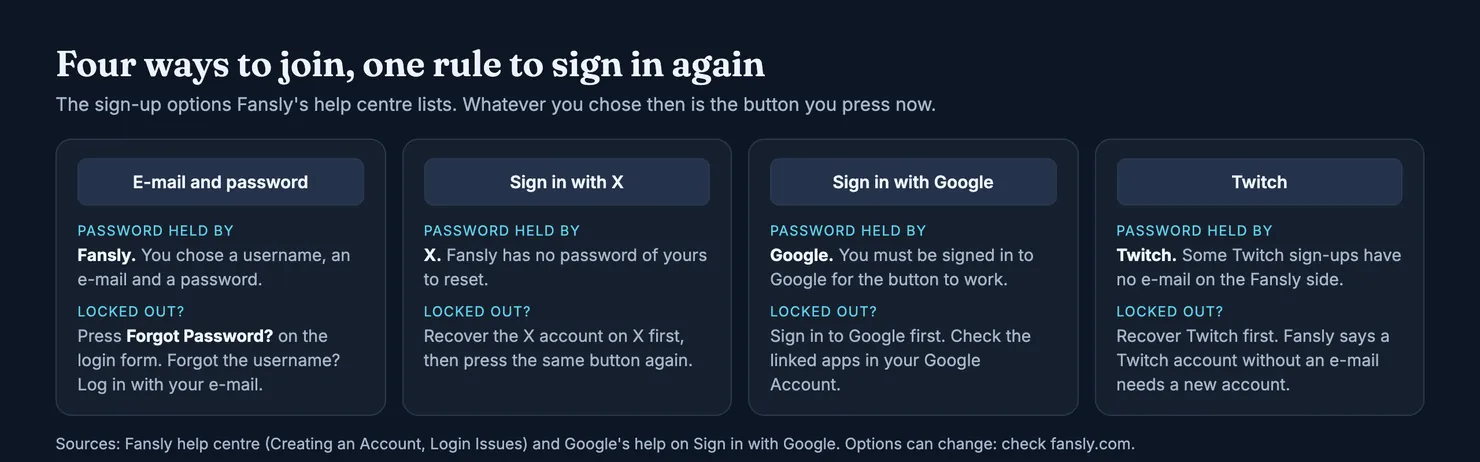
The login form sits on fansly.com. Google's listing of the page shows a "Login" link, "Sign in with X" and "Sign in with Google", with a reminder that joining means confirming you are at least 18. Fansly's help article on creating an account lists the ways in: a username, an e-mail address and a password, or a social account from X, Google or Twitch.
- Open the site yourself. Type
fansly.comin the address bar, or use a bookmark you made. Do not start from a link in an e-mail, a direct message, a video description or an advert. - Check the address before typing anything. The site name should be exactly
fansly.com. - Pick the route you used to join. E-mail and password if you chose a password on Fansly, otherwise the X, Google or Twitch button.
There is no app to download for this. Fansly's troubleshooting page says it "doesn't have an iOS or Android app" and that on any device you use it in a web browser. Anything in an app store with Fansly's name on it is someone else's, which is why our guide to the Fansly app treats those listings with suspicion. If you are new to the platform, what is Fansly? explains how it works before you sign up.
Can I log in to Fansly with Twitter (X)?
Yes, if you joined that way. "Sign in with X" is one of the options on the page, and Fansly's help centre still calls it "X (formerly Twitter)". With it, you prove who you are to X, and X vouches for you to Fansly. So it only works while you can get into that X account. If you lose access to it, the recovery happens on X, not on Fansly.
Can I sign in to Fansly with Google or Twitch?
Also yes. Google's help page explains that Sign in with Google lets you use another company's site without a separate username and password, that you have to be signed in to your Google Account for it to work, and that you can review or remove linked apps at any time. Twitch works the same way, with one catch Fansly mentions: some people signed up through Twitch "without an email address", and Fansly then cannot send them verification e-mails. Its advice in that case is to create a new account with an e-mail address.
Which password do you have?
This is the question that saves the most time. People who joined with X, Google or Twitch often press "Forgot Password?" on Fansly and get nowhere, because Fansly did not hold a password of theirs. The one that protects their Fansly account belongs to the other service.
- Joined with e-mail and password: Fansly holds the password. Recovery goes through "Forgot Password?" and the e-mail address on the account.
- Joined with X, Google or Twitch: that service holds it. Get back into the service first, then press the same button on Fansly.
- Not sure? Try the buttons one at a time. Fansly's login article says a message that your account "no longer exists" can simply mean you are "using an incorrect sign-in method".
In every case one account matters more than the rest: your e-mail. Verification links, reset links and e-mail security codes all go there, and a social login is only as safe as the inbox behind it. Changing that address on Fansly asks for your current password and a code sent to both the old and the new address, according to its help page on e-mail changes, so keep the old inbox until the switch is done.
How do I spot a fake Fansly login page?
A login form is easy to copy, and a copy that receives your password hands its owner your account, your wallet and your messages. Fansly's help page on stolen identities says the platform "operates only under" https://fansly.com and that "any other domain emulating Fansly is fraudulent". It even lists the free website builders that copies tend to be made with.
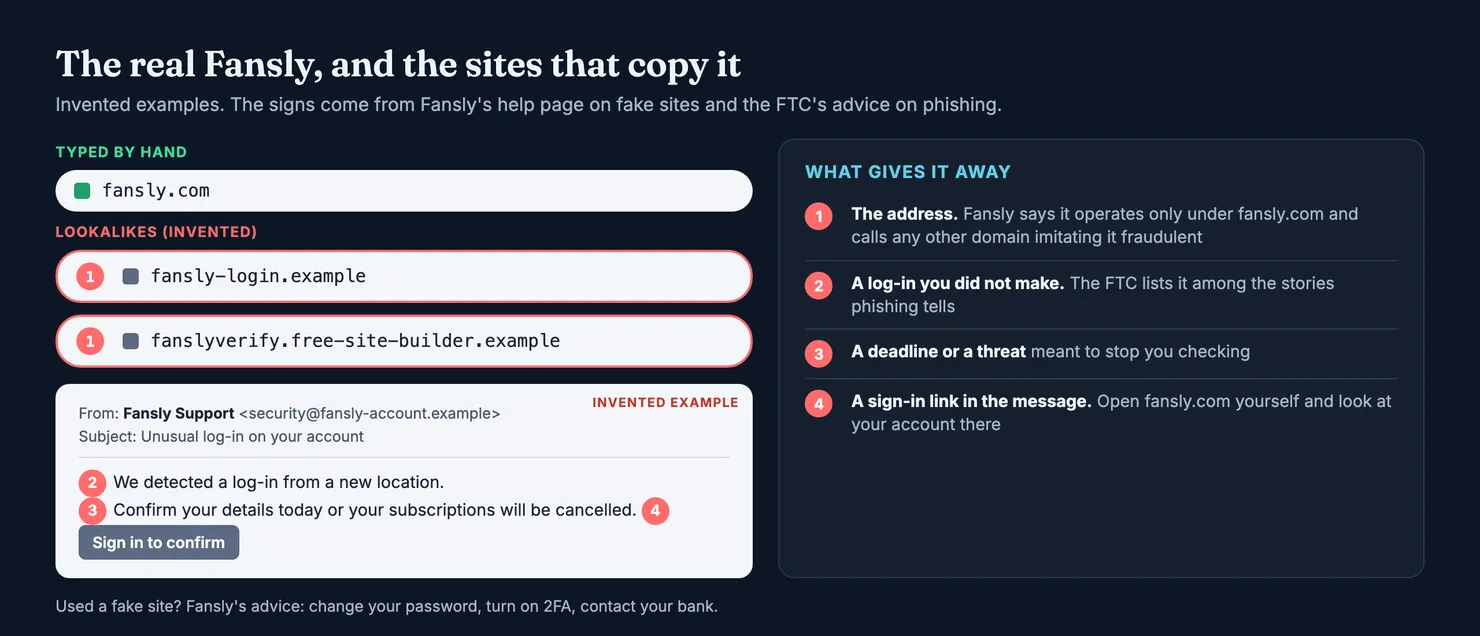
The US Federal Trade Commission's advice on phishing describes the stories that bring people to those copies: someone "noticed some suspicious activity or log-in attempts", there is "a problem with your account or your payment information", or you need to confirm some details. Its advice for a company you do use is to contact it through a website "you know is real", not the link in the message. For Fansly, that means closing the message and typing fansly.com yourself.
- The site name. Only
fansly.comcounts. "fansly" inside a longer name, or a site hosted on a free page builder, is someone else. - Search results. When we searched for "fansly login", Fansly's own page came first, but the results also held videos, tools for managing accounts and pages offering shared logins. None of those is a place to type your password.
- Messages that bring their own sign-in button. Whatever an e-mail claims about your account can be checked from inside your account. A button in the e-mail cannot be checked at all.
If you did type your details into a copy, Fansly's advice is to change your Fansly password, turn on two-factor authentication from your account settings and contact your bank. Is Fansly safe? covers the other risks around the platform, from requests to pay outside it to fake support.
Fansly not working: why can't I log in?
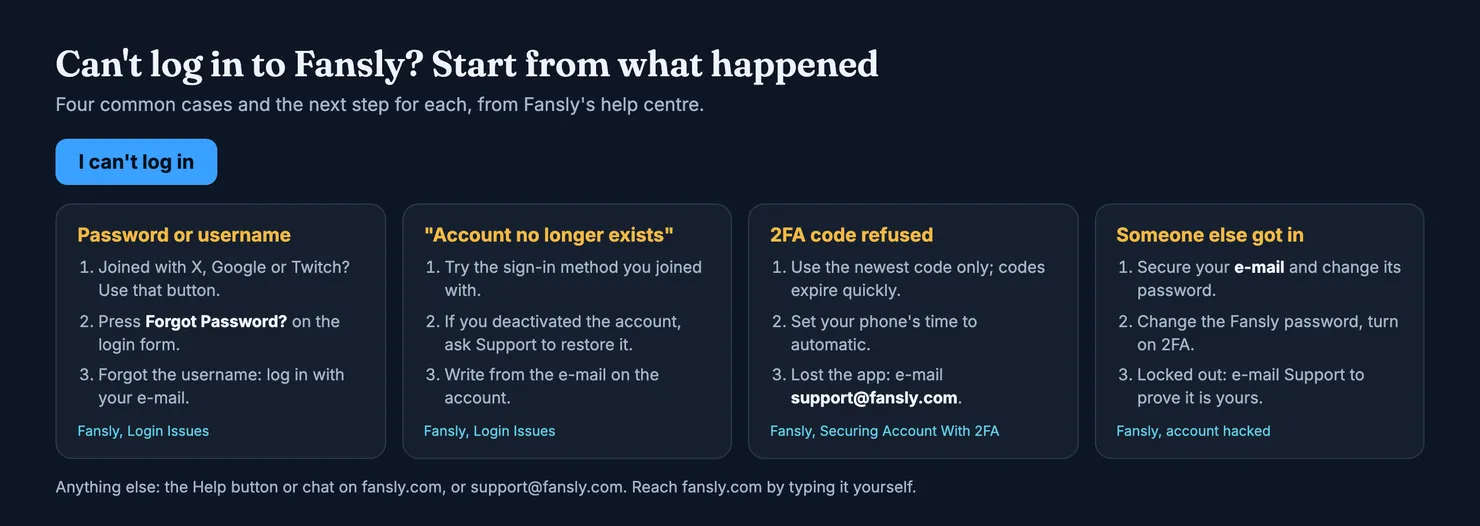
Start from what happened. A forgotten password, a two-factor code that will not go through and a hacked account each have their own fix, and Fansly's help centre covers all of them.
How do I reset my Fansly password?
First make sure you had one: if you joined with X, Google or Twitch, go back to that button. If you did set a password, Fansly's login article says to select "Forgot Password?" on the login form and follow the steps to create a new one. If no e-mail arrives, check your spam or junk folder. Fansly's sign-up article suggests adding no-reply@fansly.com to your safe senders and requesting the e-mail again. Also check that you are looking in the right inbox: people with several addresses often wait on the wrong one.
What if I forgot my Fansly username?
Then you do not need it. Fansly's help centre says to log in with your e-mail address instead; once you are in, your username appears on your Account page. The same article answers a related worry: if you sign in and your subscriptions or purchases seem to have vanished, you are probably on the wrong account. Compare the e-mail address on the account with the one your payment receipts went to.
Why does Fansly say my account no longer exists?
Fansly gives two causes. Either the account was deactivated, or you are using a different sign-in method from the one you joined with. Try your other options first, for instance Google instead of e-mail and password. If you deactivated the account yourself and want it back, the help centre says to contact support to have it restored.
Why is my Fansly 2FA code not working?
Fansly's article on securing your account with 2FA covers both kinds of code. With an authenticator app, set your phone's date and time to update automatically, because a clock that drifts produces codes the site rejects. With e-mail codes, use the code as soon as it arrives and only the newest one: "requesting a new one invalidates previous ones". If you have lost the authenticator app, e-mail support@fansly.com. Fansly says its team will verify your identity and then remove the two-factor requirement, and it strongly recommends switching 2FA back on once you are in.
What should I do if my Fansly account was hacked?
Signs include a password that suddenly fails, settings you did not change and charges you did not make. Fansly's page on hacked accounts asks you to act "immediately". Combined with the UK National Cyber Security Centre's guide to recovering a hacked account, the order is:
- Secure your e-mail. Fansly says to make sure no one else has access to the address linked to your account and to change its password too. The NCSC adds that criminals often set up a forwarding rule so they receive copies of your password reset e-mails, so check your filters and forwarding.
- Change your Fansly password to "something strong and unique", in Fansly's words, or your X, Google or Twitch password if that is how you sign in. Change it anywhere else you used the same one.
- Turn on two-factor authentication on Fansly and on your e-mail. Fansly's 2FA lives under your profile picture, then Settings, then Account.
- Check your bank statement for payments you did not make, and call your bank on the number printed on your card if you find one.
- Write to support@fansly.com if you are locked out. Fansly says it will help once it has verified that you are the rightful owner.
What if the page itself will not load?
Sometimes the account is fine and the browser is not. Fansly's troubleshooting page lists the usual steps: refresh, log out and back in, clear your cache and cookies, update your browser, try a private window, and switch off extensions, because "ad blockers, VPN extensions and privacy tools can stop pages, media or payments from loading". If it works in another browser or device, the problem is on your side; if it fails everywhere, write to support.
How do I keep my Fansly login safe?
Once you are back in, a few habits do most of the work.
- Turn on 2FA. Fansly offers it through an authenticator app such as Google Authenticator or Authy, or through e-mail codes, and asks for a code when you log in and for some sensitive actions. Do not share the QR code shown during set-up: Fansly warns that it "may give others access to your account".
- Use a password found nowhere else, on Fansly and on any account you sign in with. The NCSC points out that once a password is stolen, criminals try it on your other accounts.
- Protect the inbox. Put two-step verification on your e-mail too. It receives every reset link and every e-mail code.
- Keep your login to yourself. Shared or "free" Fansly logins put your wallet, your subscriptions and your messages in a stranger's hands, and pages that offer them are the opposite of safe.
The same logic applies on the other big platform: our OnlyFans login guide covers its sign-in options and recovery steps, and Fansly vs OnlyFans compares the two for subscribers.
Contacting Fansly support about a login problem
Fansly's page on contacting support lists two routes: the Help button at the top of the platform, or an e-mail to support@fansly.com. If you cannot sign in, e-mail is the route that still works. Write from the address registered on the account, say which sign-in method you use, describe what happens, and attach a screenshot of any error message, as Fansly's troubleshooting page suggests. Leave your password out of the message. We found no phone line in Fansly's help centre, so a phone number offered elsewhere as "Fansly support" deserves suspicion.
Logged in: check an account before you pay
Once you are in, the next question is what you are paying for: whether the account is really the person it claims to be, and whether the person answering your messages is her or someone paid to type for her. Before you subscribe or tip, look the account up on Legit. Each profile shows two separate scores, account authenticity and chatter probability, with the number of contributions behind them.
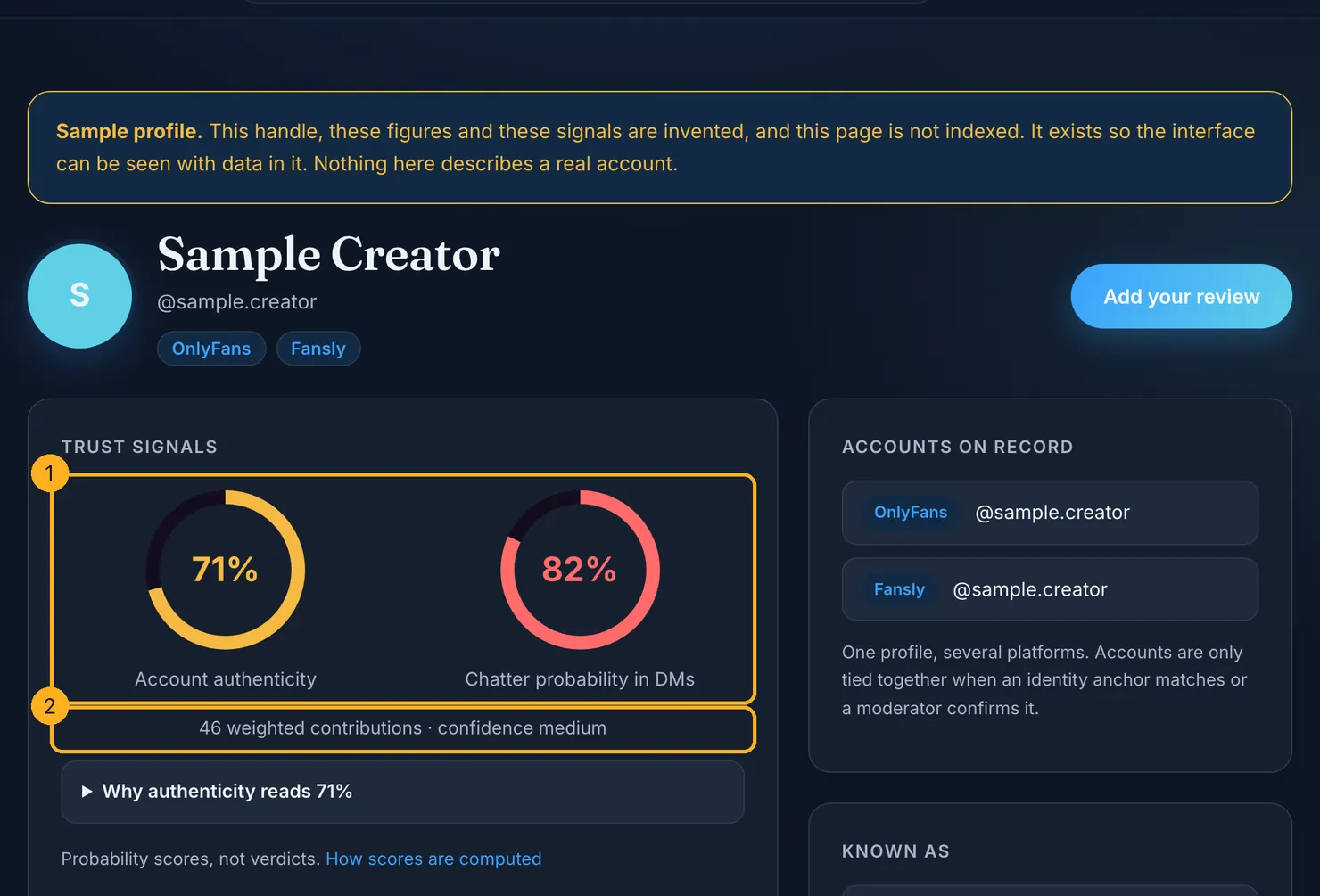
Our methodology explains how those scores are built and why they are probabilities, not verdicts. For Fansly accounts, authenticity also draws on facts Fansly shows publicly on the profile. If you already subscribe to an account, add what you saw: it is what makes the next fan's check worth something.
Questions people ask
What is the official fansly.com login page?
The login form is on fansly.com itself. Fansly's help centre says it operates only under that address and that any other domain imitating it is fraudulent. Type fansly.com into your browser or use a bookmark you made, and check the site name in the address bar before you enter a password. A longer name that merely contains the word fansly is another site.
Can I log in to Fansly with Twitter or Google?
Yes, if you joined that way. Fansly lets fans sign up with X, Google or Twitch, and its help centre says to use the same social option when you sign in again. The password then belongs to X, Google or Twitch, so you need to get into that account first. If you lose it, recover it through that service's own help pages.
How do I reset my Fansly password?
Select Forgot Password? on the login form at fansly.com and follow the steps sent to the e-mail address on your account. If nothing arrives, check your spam folder and add no-reply@fansly.com to your safe senders. If you originally joined with X, Google or Twitch, there is no Fansly password to reset, so go back to that button instead.
Why does Fansly say my account no longer exists?
Fansly's help centre gives two reasons: the account was deactivated, or you are using a different sign-in method from the one you joined with. Try the other buttons first, for example Google instead of e-mail. If you deactivated the account yourself and want it back, contact Fansly support from the e-mail address registered on it and ask for it to be restored.
What do I do if I lost access to my Fansly 2FA app?
Fansly's help centre says to e-mail support@fansly.com. The support team checks that you are the owner, then removes the two-factor requirement so you can log in again. Fansly recommends turning 2FA back on as soon as you are in. If you use e-mail codes instead, only the most recent code works and codes expire quickly.
How do I contact Fansly support about a login problem?
Fansly lists two routes: the Help button or chat on fansly.com, and the e-mail address support@fansly.com. If you cannot sign in, e-mail is the one that still works. Write from the address on the account, say which sign-in method you use and what error you see, add a screenshot if you have one, and leave your password out.