Fansly vs OnlyFans, for subscribers
Both platforms sell monthly subscriptions that renew on their own. What differs for you is the free follow, the tiers, how renewals and refunds work, and how much you can check before paying.
For a subscriber, Fansly and OnlyFans work in much the same way: you pay a creator a monthly price, the subscription renews on its own until you stop it, and refunds are the exception on both. The differences that matter when you pay are smaller and more practical. Fansly lets you follow an account at no cost before you subscribe, offers several price tiers per creator, and pays approved refunds back to your Fansly balance. OnlyFans stops a renewal on its own if the price goes up, and shows almost nothing to anyone who is not logged in. And because a Fansly profile can be read from outside, it is often the easiest way to check whether an account on either platform is really who it says it is.
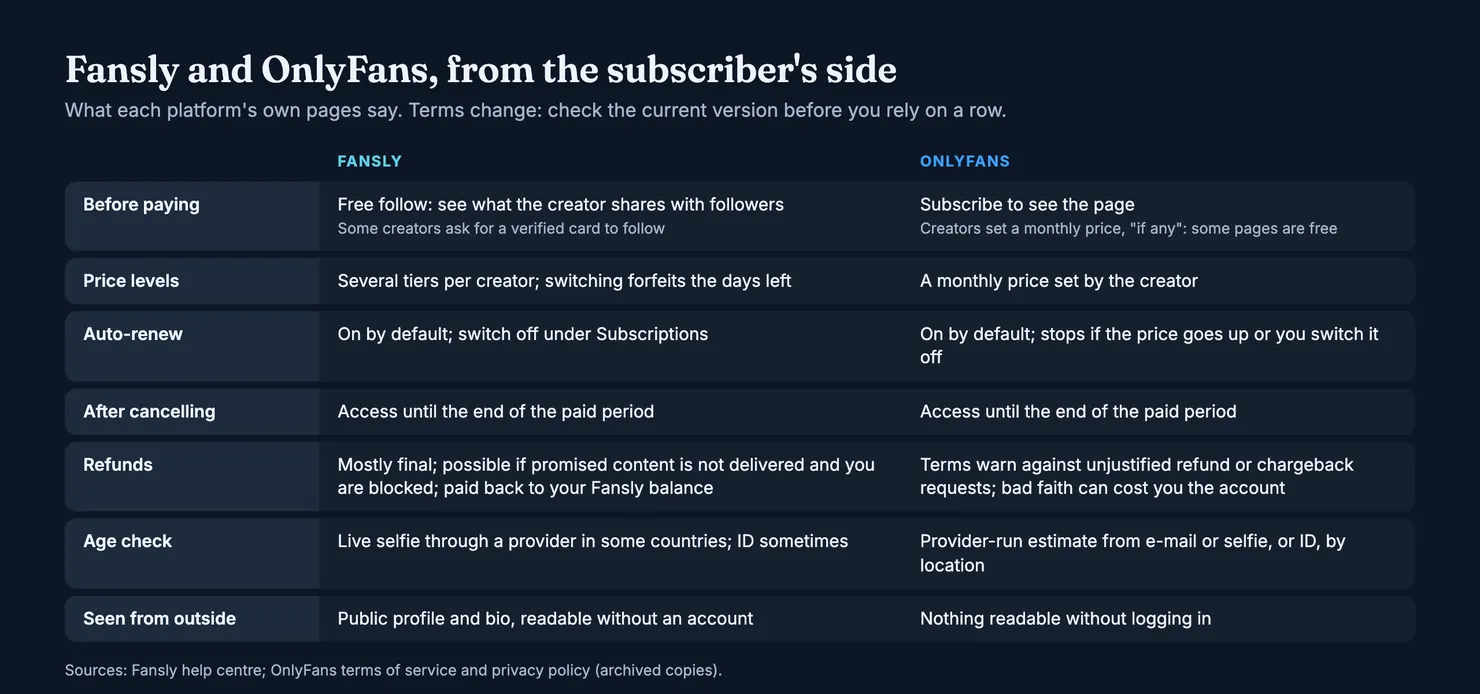
This guide is written for people who pay, not for creators. The pages that rank for this question mostly compare payouts and fees, which tell a subscriber nothing. Here we stick to what each platform's own pages say about following, subscribing, renewals, refunds, age checks and your login, and to what you can check before you spend money. We do not say which one is better: a creator is not more or less trustworthy because of where she posts, and the account you pay matters more than the platform it sits on.
A note on sources. Fansly's rules for fans are set out in its help centre and its terms. OnlyFans' are in its Terms of Service and privacy policy. Our browsers cannot open onlyfans.com, so for OnlyFans we read the copies kept by the Internet Archive and link to them next to each point. Both platforms change their terms from time to time; read the current version before you rely on a detail.
OnlyFans vs Fansly: what is Fansly, and how does it differ?
Both are subscription platforms. A creator opens a page, sets a price, and posts photos, videos and messages that subscribers pay to see. Both take payment by card inside the platform, both let you tip and buy extra content, and both require creators to prove who they are before they can earn.
The creator checks are similar in spirit. OnlyFans' terms ask anyone opening a creator account to upload a valid ID and two photos of themselves. Fansly's creator application runs an identity and age check through an outside provider, then asks for both sides of a government ID, a photo holding it with a handwritten sign, and a short video. Each platform reviews the application before the account can sell anything.
That tells you a verified adult opened the account. It does not tell you who answers the messages today, and it does not stop a verified account from borrowing the name or the look of a better-known creator. Those are separate questions, and they are the ones Legit tries to answer.
What do people use Fansly for?
Mostly the same thing as OnlyFans: following creators and paying for their content. The main practical difference is how you find and try an account. Fansly's own navigation guide describes a "For You" page of personalised recommendations, a search box that takes hashtags, keywords and creator names, and a Discovery area with trending tags and suggested creators. If you are looking for a particular account there, how to search on Fansly goes through it step by step. We could not read OnlyFans' own pages on finding creators, so we leave that side to its help centre.
What is the difference between OnlyFans and Fansly for subscribers?
Four things change what you pay and what you can check: the free follow on Fansly, its price tiers, the way renewals and refunds are handled, and how much of a profile is visible from outside. The table above sums them up. The sections below take them one at a time, with the source next to each point.
Is Fansly free?
Creating an account and following creators costs nothing. Fansly separates the two steps. Following is free and carries no commitment: you see the posts and previews a creator chooses to share with followers, you get her updates, and you can unfollow at any time. Subscribing is the paid tier, usually monthly, and it unlocks what she keeps for subscribers. A subscriber is automatically a follower too.
For a careful subscriber, that free step is the most useful difference of all. You can watch how an account behaves for a few weeks, how often it posts and how it talks to followers, before any money changes hands.
OnlyFans has no separate follow step in its terms: you subscribe to see a page. But the terms let a creator set a monthly price "if any", so some OnlyFans pages cost nothing to subscribe to. On those, the money usually comes from paid messages and extra content rather than the subscription itself.
Do you need a card to follow on Fansly?
Not in every case. Fansly says some creators only accept followers who have added a verified payment method, and that adding one does not oblige you to buy anything. If a card is needed, it is asked for inside Fansly's own payment settings. Nobody should ask you for card details in a message, on either platform.
How do subscriptions and renewals work on each?
On both platforms a subscription renews automatically. The details of when it renews, at what price, and what you lose when you change your mind are where they differ.
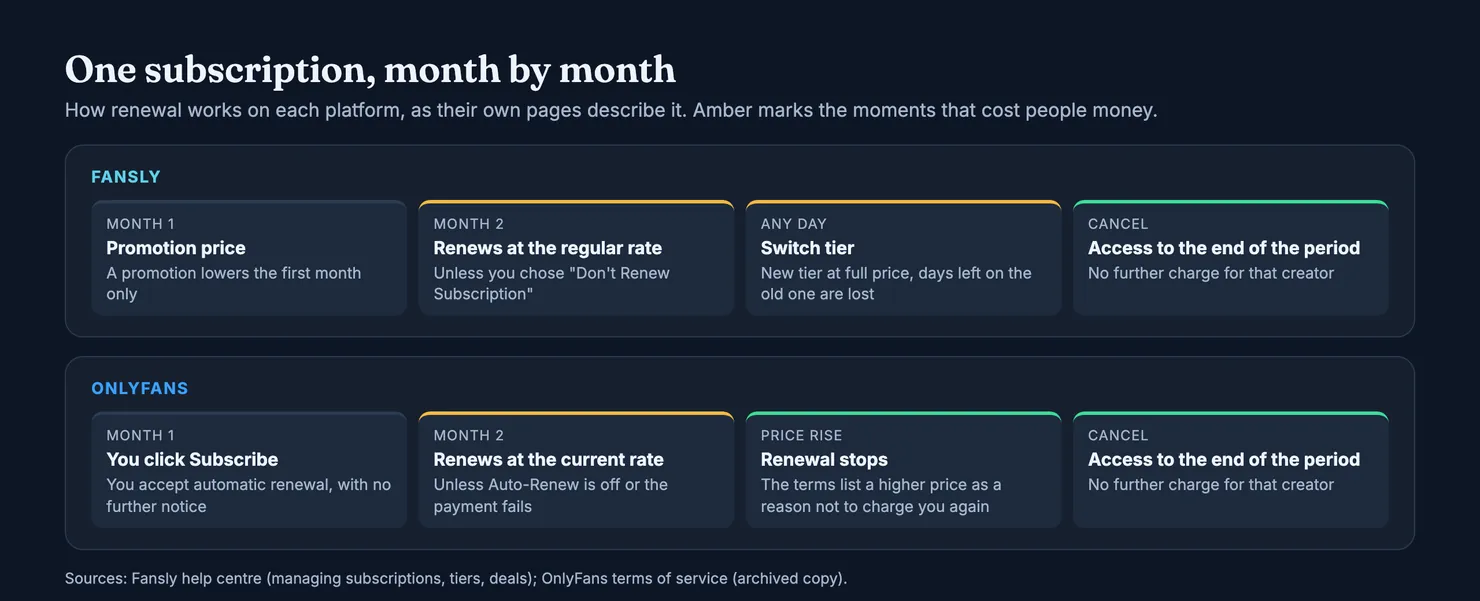
On Fansly, subscriptions renew each month until you stop them. Your Subscriptions tab lists every active and expired one with its price, billing cycle and end date. Some creators offer several months paid upfront at a lower price, shown under "Additional Plans" on their profile.
Read promotions closely. Fansly's page on subscription deals says a promotion lowers the price of the first month, and the subscription then renews at the regular rate. Discount codes, which creators hand out themselves, work the same way: when the discounted period ends, you move to the regular plan. Budget for the regular price from the start.
On OnlyFans, the terms say that by clicking Subscribe you agree to automatic renewal at the current rate, and that you will not receive further notice before each renewal. They also list the cases in which you will not be charged again: your payment is declined and you have not given another, you switched off Auto-Renew, you closed your account, or the subscription price has increased.
How do Fansly subscription tiers work?
Many Fansly creators offer more than one tier, each with its own perks and price. You can move between them whenever you like, but read the small print first. According to Fansly's page on changing tiers, the switch takes effect immediately, the new tier starts at its full price, and the time left on your old tier is forfeited and not refunded. Fansly's own advice is to switch at the end of a billing cycle. If you upgrade three days after renewing, you have paid twice for the same month.
OnlyFans' terms describe a monthly subscription price set by each creator, with tips and other purchases on top. We could not read OnlyFans' help pages, so we do not describe bundles or other offers second-hand.
What happens when an OnlyFans creator raises her price?
According to the terms, a price increase is one of the reasons OnlyFans will not charge you again automatically. In practice, that means a higher price should not be taken from your card without you choosing to subscribe again. On Fansly, the help pages we read do not describe a price change, so check your Subscriptions tab if a creator announces one.
How do you cancel a subscription on Fansly or OnlyFans?
On Fansly, open your Subscriptions page, click the cog next to the creator's name and choose "Don't Renew Subscription". You keep access until the end of the period you paid for, and you can switch renewal back on before then. On OnlyFans, the terms say you can switch off the "Auto-Renew" feature on the creator's page, and that after cancelling you can still see her content until the end of the period you paid for, with no further payments taken for that page.
The habit that saves money is the same on both: if you only want one month, turn renewal off the day you subscribe. You lose nothing by doing it early.
Refunds and wallets
Neither platform treats refunds as routine, and both warn about disputes. The difference is in what each spells out.
OnlyFans' terms ask fans not to make unjustified refund requests, or unjustified chargebacks with their card provider, and say that a request made in bad faith can lead to the account being suspended or deleted. Prepaid Wallet Credits are not refundable. Our guide can you get a refund on OnlyFans goes through what that leaves you and how to ask.
Can I get a refund on Fansly?
Sometimes, but rarely. Fansly's page on requesting a refund says most purchases are final and that digital content generally cannot be refunded once you have had access to it. A subscription may be refunded if a creator fails to deliver content she promised and blocks you. Approved refunds go to your Fansly balance, not back to your card. Tips are not refundable under the terms, though a creator can choose to refund one through support, and anything agreed outside Fansly is treated as non-refundable because Fansly cannot verify it.
To ask, Fansly says to contact support with the date, the amount and the order number of the payment, which you will find in your wallet's transaction history. Keep the confirmation e-mails too. They are your record, and they are what lets you prove a subscription on Legit.
Both platforms also offer a prepaid wallet. Fansly's wallet takes preset top-ups of up to $500 each and is used automatically for tips and small purchases. Top-ups are final; if part of a balance is unused, only that remainder may go back to your card. On OnlyFans, unused Wallet Credits are not refundable at all. On either platform, top up only what you are about to spend.
Age checks, the safety of your data and your login
Both platforms may ask you to prove your age, depending on where you live, and both use outside providers to do it.
Fansly says it asks fans in the United Kingdom, Australia, Brazil and Germany to verify their age with a live selfie through a provider called Ondato, with an ID sometimes requested as well. It says Ondato does not keep the selfie or the ID, and that Fansly only receives confirmation that you passed.
OnlyFans' privacy policy describes a similar arrangement with more steps: depending on where you are, an estimate of your age from your e-mail address, an estimate from a short selfie, or a full check matching a selfie to an ID. The policy says OnlyFans itself does not receive the face data and keeps only the result. The UK regulator Ofcom has looked closely at this check: it fined the company behind OnlyFans £1.05 million for giving it inaccurate information about the age threshold its selfie tool used.
On card payments, the OnlyFans policy says a payment provider processes the card and OnlyFans keeps a token, the card type, the expiry date and the first six and last four digits, not the full number or the security code. Is OnlyFans safe? covers the rest of that ground, including the fake "verify your account" messages that copy these checks.
Your login is your job on both. Fansly offers two-factor authentication by authenticator app or e-mail code, under Settings, then Account. Turn it on, use a password you use nowhere else, and verify your age only inside the app or website you opened yourself. Nobody in your messages needs your ID.
Is Fansly better than OnlyFans?
For a subscriber, neither is better across the board. Each gives you something the other does not, and none of it tells you whether a particular account is honest.
Fansly gives you more room to try before you pay: a free follow, tiers you can step up through, and a public profile you can read before signing up. Its rules on artificial content are also written out in plain terms. Its page on AI-generated content says photorealistic AI content is not allowed, that virtual personas must be run by an ID-verified person, and that AI talking to users without human oversight is against its terms. If who writes the messages matters to you, our guide to chatters on OnlyFans explains why it is worth asking on any platform.
OnlyFans gives you a simpler model, a monthly price set by each creator, and a renewal rule that stops the charge when the price rises. Its pages stay closed to visitors, which keeps a creator's content behind the paywall but also means you see very little before you pay. If the account you want is only there, the checks below matter more.
Why do some subscribers choose Fansly instead of OnlyFans?
Usually for the free follow and the chance to look around before paying, or because a creator they like posts there. Some prefer to see a profile from outside before creating an account at all. None of these are reasons to trust an account more. A free follow makes a better trial. It says nothing about who runs the account.
How to check an account on either platform
This is where the two differ most for a careful subscriber, and where being on both platforms helps. A Fansly profile is public: its bio and linked accounts can be read without logging in. OnlyFans profiles cannot be read from outside, and we do not work around that.
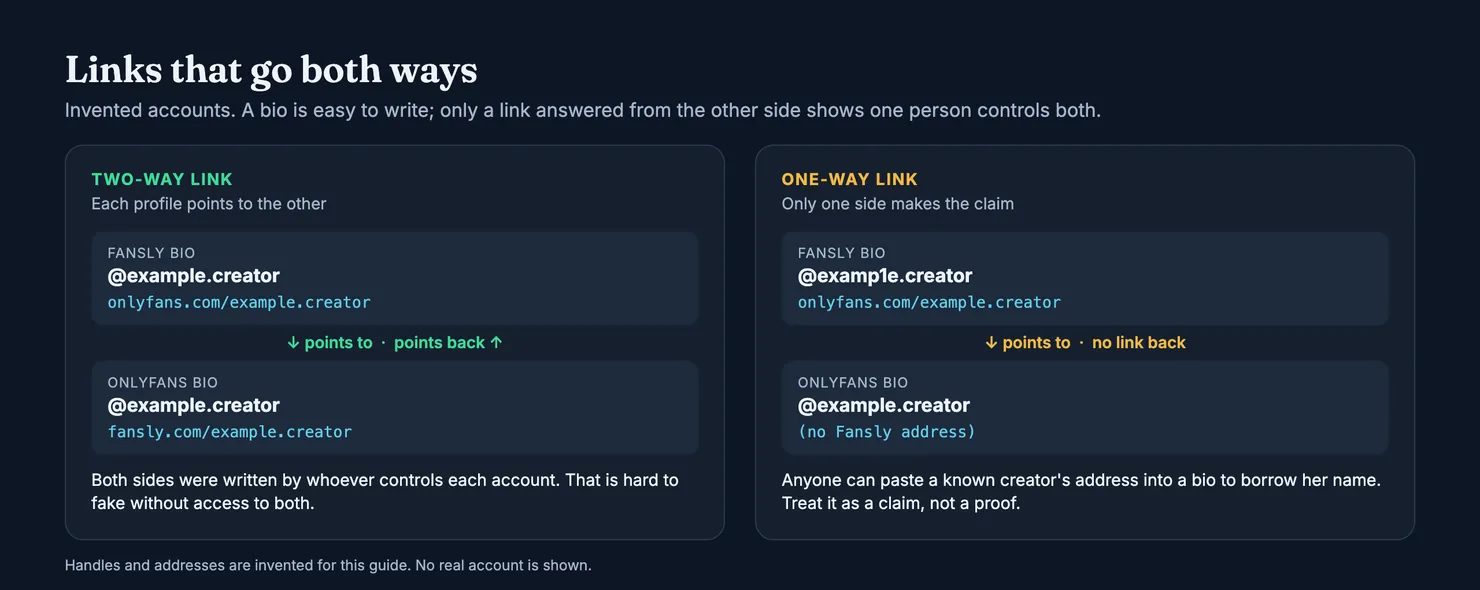
So when a creator is on both, her Fansly bio is often the quickest way to confirm that an OnlyFans account is really hers. Look for links that go both ways: her Fansly bio points to the OnlyFans address, and her OnlyFans bio points back. A link in one direction only proves nothing, because anyone can paste a known creator's address into a bio. Be wary of near-identical handles too: a digit in place of a letter, an extra dot, an underscore. How to spot a fake OnlyFans account lists the other signs.
How can you tell if the same creator runs both accounts?
Legit does this check for you where it can. When someone adds a Fansly account, we read its public bio. If it points to a MYM address and that MYM bio points back, the two accounts are joined on one profile automatically. An OnlyFans address, or any link that goes one way only, is looked at by a moderator before anything is joined: we cannot read the OnlyFans side, and a wrong merge would lend one account another's reputation. The methodology sets out what each platform lets us see: Fansly publishes a profile we can read, while an OnlyFans account carries no public fact at all, and its profile says so plainly and relies on what subscribers report.
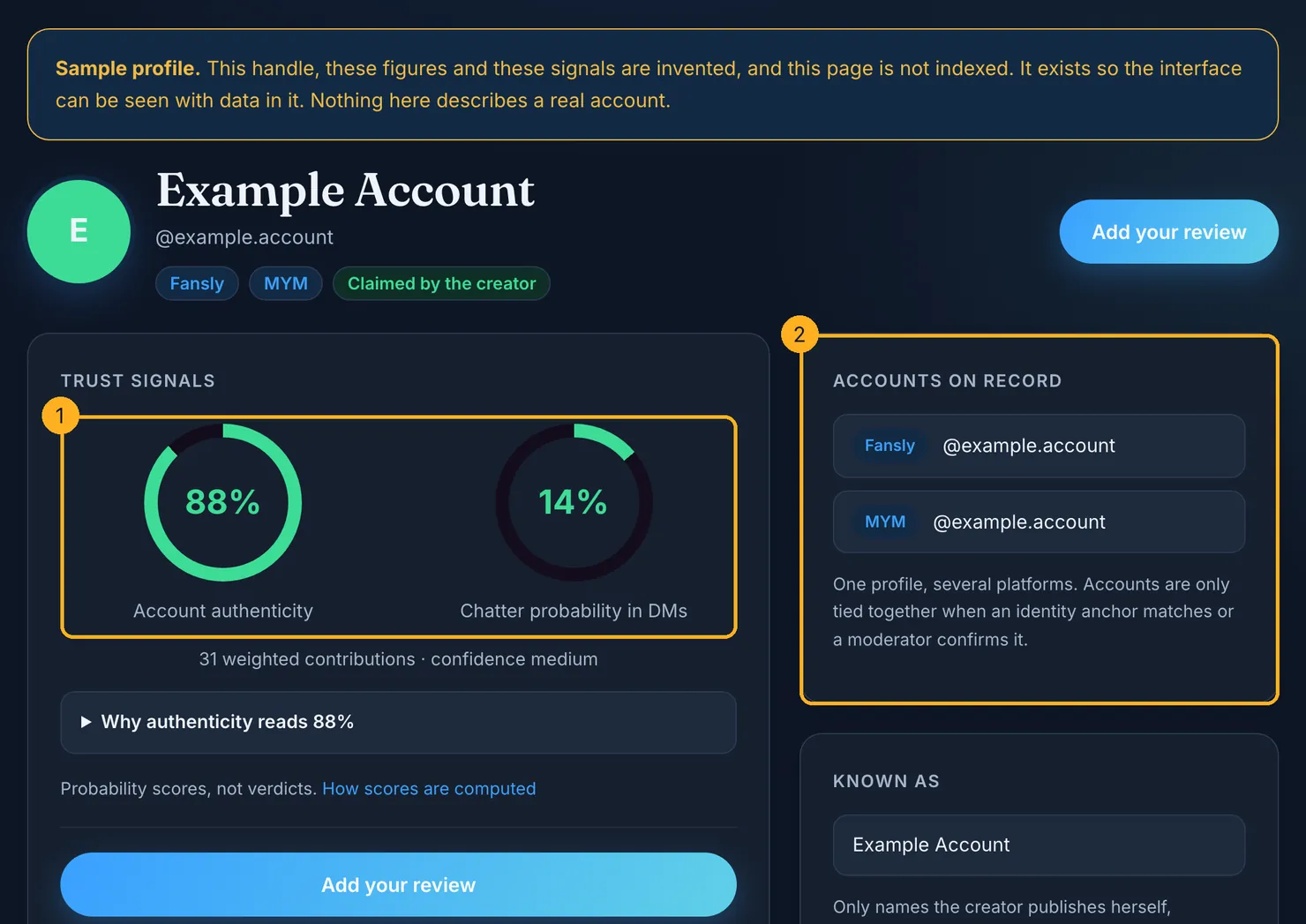
The profile then shows two separate scores: how likely the account is to be who it claims, and how likely it is that someone other than the creator answers the messages. A score with too little behind it stays empty rather than showing a made-up number.
Before you pay, on either platform
- Check the account first. Search it in the Legit finder: linked accounts, what its public pages show, and what subscribers have reported about who answers.
- Follow before you subscribe on Fansly, and watch the account for a while.
- Turn renewal off on day one if you only want a month, and read what a promotion renews at.
- Switch Fansly tiers at the end of a cycle, not in the middle.
- Top up a wallet only by what you will spend; unused credit is hard to get back.
- Keep the receipt e-mails and keep every payment on the platform.
- Turn on two-factor authentication and verify your age only in the official flow.
Already subscribed on one of them? Add what you saw. It takes a minute, and a verified receipt is what gives your report its weight.
Questions people ask
Is Fansly better than OnlyFans for subscribers?
Neither is better across the board. Fansly gives you more room to try before paying: a free follow, several tiers and a public profile you can read. OnlyFans has a simpler price model and its terms stop a renewal when the price rises. Neither platform tells you whether a particular account is honest, so check the account itself before you pay on either.
Is Fansly free to use?
Creating an account and following creators on Fansly costs nothing. Following shows you what a creator shares with followers and her updates. Some creators only accept followers who have added a verified payment method, which does not commit you to buy anything. Seeing what she keeps for subscribers needs a paid subscription, usually monthly, which renews automatically until you switch renewal off.
What is the difference between OnlyFans and Fansly?
Both sell monthly subscriptions to creators' pages and both renew automatically. Fansly adds a free follow step, lets creators offer several price tiers, and pays approved refunds back to your Fansly balance. OnlyFans stops automatic renewal if the price goes up. A Fansly profile can be read without an account, while an OnlyFans profile shows nothing until you log in.
Can I get a refund on Fansly?
Rarely. Fansly says most purchases are final and that content you could access is generally not refunded. A refund may be considered if a creator fails to deliver promised content and blocks you, and approved refunds go to your Fansly balance rather than your card. Contact support with the date, amount and order number, and keep every agreement and payment inside Fansly.
Does turning off auto-renew end my access straight away?
No, on either platform. On Fansly, choosing not to renew keeps your access until the end of the period you already paid for. OnlyFans' terms say the same: after cancelling you can still see the creator's content until the end of that period, and no further payment is taken for her page. That is why it is safe to switch renewal off on the day you subscribe.
Is the same creator on Fansly and OnlyFans really the same person?
Not necessarily. Check that the links go both ways: her Fansly bio points to the OnlyFans address and her OnlyFans bio points back. A link in one direction proves nothing, since anyone can paste a known creator's address, and near-identical handles are a common trick. Legit joins accounts only when an identity anchor matches or a moderator confirms the link.