Can you get a refund on OnlyFans?
Refunds on OnlyFans are the exception, and going straight to your bank can backfire. What the terms say, which problems have a real route, and how to stop the next charge.
Sometimes, but rarely. OnlyFans' terms treat most purchases as final: fans agree not to make unjustified refund requests or unjustified chargebacks, prepaid wallet credits are non-refundable, and a request OnlyFans judges to be in bad faith can get your account suspended or deleted. A request is still worth making in three situations: a billing error, a charge you did not make, or something you paid for that never arrived. For a subscription you used and did not enjoy, there is no real route back.
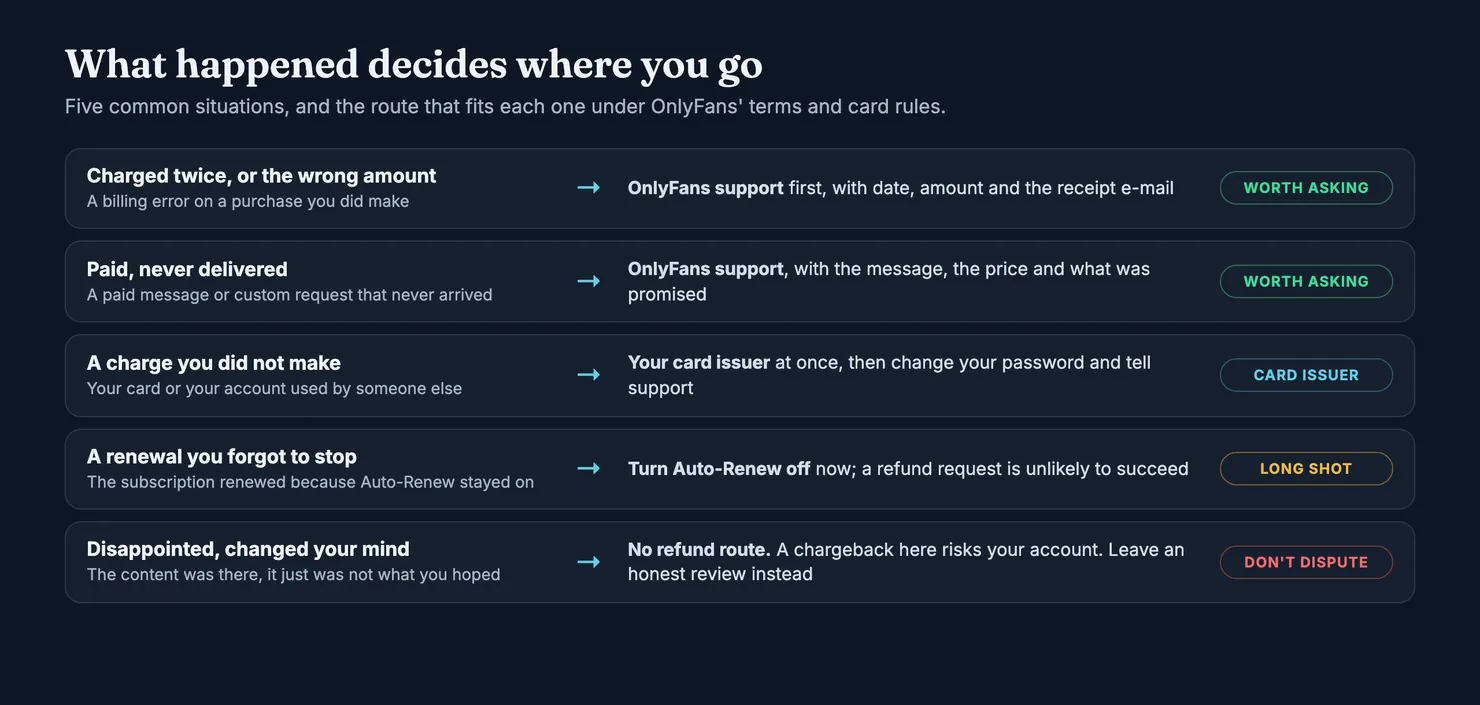
What follows is what the terms actually say, which route fits which problem, what a chargeback costs you, the legal backstops if you are in the US or the UK, and how to avoid ending up here again. Terms change, so check the current version of OnlyFans' Terms of Service before you act. Our browsers cannot open onlyfans.com, so we read the copy kept by the Internet Archive.
What OnlyFans' terms say about refunds
OnlyFans is run by Fenix International Limited, a company registered in England and Wales. Its Terms of Service contain no refund policy in the sense a shop would have one: no window in which you can change your mind, no list of refundable items. Instead, the refund question is scattered across a few clauses, and every one of them leans the same way.
- Refund and chargeback requests. You agree not to make unjustified refund requests, or unjustified chargeback requests to your card provider, for anything you buy from a creator or any tip. If OnlyFans decides a request was made in bad faith, it may suspend or delete your account.
- Wallet credits. Money you prepay into your OnlyFans wallet is non-refundable, which the terms spell out as meaning you are not entitled to get unused credits back.
- Account closed for a breach. If OnlyFans terminates your fan account for breaking its rules, payments already made, prepaid subscriptions included, are not refunded.
- Your local rights. The terms also say that consumers may rely on mandatory provisions of the law where they live, and that nothing in the terms takes those away.
One more clause matters, because it explains why disputes over "personal" content happen at all. Creators promise OnlyFans that what they sell is of satisfactory quality, taking account of how it was described and the price. A paid video that is nothing like its description is therefore a breach of the creator's own commitment, not just a matter of taste. That is your argument if you ask support for help, and it only works if you can show the description.
Can I get a refund for an OnlyFans subscription?
Usually not. A subscription buys access to a creator's page for a period. If the page was there and you could see it, you had what the subscription sells, even if the content disappointed you, and the terms give no right to change your mind. Fansly, the closest competitor, says the same thing more bluntly in its help article on refunds: subscriptions are generally non-refundable if the content was accessible during the subscription period. The exceptions on both platforms look alike: a billing mistake, a charge you did not make, or paid content that was promised and never delivered.
Can I get a refund on OnlyFans wallet top-ups?
Not under the terms. Wallet credits are described as non-refundable, so money sitting unused in your wallet stays there, and you have no claim on it if OnlyFans closes your account for a breach. That is one more reason not to top up more than you plan to spend soon. The only clear exception is a top-up you did not make yourself, and that is a fraud question for your card issuer, covered below.
When a refund request is worth making
Three situations give you a real case. In each one, the problem is something you can prove, not a feeling about the content.
- A billing error. You were charged twice for the same subscription, charged a different amount from the price shown, or charged after the subscription had ended. Compare your bank statement with the receipt e-mails OnlyFans sends for each payment.
- A charge you did not make. Someone else used your card, or got into your OnlyFans account and spent from it. The terms put lost or compromised accounts and the payments that follow outside OnlyFans' responsibility, so your card issuer is the place that can actually help.
- Paid, never delivered. You paid for a locked message or a custom request and nothing arrived, or what arrived was plainly not what was described. Keep the message with its price and the creator's description; a screenshot of the conversation is your evidence.
Can you get a refund for content not delivered or not as described?
This is the grey zone. A clip that is shorter than you hoped is a disappointment; a clip that is not the one advertised, or a custom request answered with recycled content, is closer to "not delivered". The satisfactory quality clause in the terms is on your side here, but only if the description was specific. Vague promises ("something special just for you") are hard to hold anyone to, which is also why custom content and paid chat produce most of the arguments. If you suspect the person promising things in the DMs is not the creator at all, our guide on who is really answering your messages explains how that works.
How to get a refund from OnlyFans, step by step
The terms point complaints to support@onlyfans.com and to OnlyFans' complaints policy. Whatever channel you use, the request that has a chance is short and factual.
- Collect the evidence first. The receipt e-mail for each payment, the line on your bank or card statement, and for an undelivered purchase, a screenshot of the message showing the price and the description.
- Write to support from the e-mail address on your account. Give the date, the amount, what you paid for, and what went wrong, in that order. One problem per request.
- Say what you are asking for. A refund of a duplicate charge, a refund of a message that never unlocked. Not "compensation".
- Keep it calm and keep a copy. If you later need your card issuer or an ombudsman, they will want to see that you tried the business first.
Be wary of anyone offering to "handle" an OnlyFans refund for you, and of support phone numbers found in forum posts or search snippets. We could not verify any phone line for OnlyFans support. Fake support numbers are a common way to collect card details from people who are already annoyed and in a hurry, a pattern described in our guide to staying safe on OnlyFans.
How long does an OnlyFans refund take?
OnlyFans does not publish a timeline we could read, so we will not guess one. What you can control is the clock on your side: card disputes have deadlines, which are counted from the statement or the transaction, not from the day support finally replies. If support has not answered and a deadline is getting close, do not wait for it to pass.
How do I refund an accidental subscription?
Start by switching off Auto-Renew on that creator's page, so the mistake does not repeat next period. Then write to support straight away, saying you subscribed by accident and have not used the page. There is no promise of a refund in the terms for this case. A quick, honest request is more likely to be read kindly than one sent weeks later, after the content was opened.
Chargebacks: when your bank is the right place
A chargeback is a request to your card issuer to reverse a payment, bypassing the seller. For a charge you never made, it is exactly the right tool, and you should contact your issuer as soon as you spot it. For a subscription you regret, it is the wrong one, and the terms say why: an unjustified chargeback can cost you the account, with every subscription on it and whatever is left in your wallet. If a chargeback succeeds, the terms also let OnlyFans take the creator's share of the refunded amount back from her earnings, so the creator pays for it too.
The terms speak of what OnlyFans "may" do. We have no figures on how often accounts are closed after a chargeback, and nobody outside the company does either.
How do you chargeback on OnlyFans in the US?
In the US, the Federal Trade Commission's guide to disputing credit card charges explains the rules under the Fair Credit Billing Act. They cover billing errors on credit cards: charges you did not authorise, wrong amounts, and things you did not accept or that were not delivered as agreed. Your letter must reach the issuer's billing-inquiries address within 60 days of the first bill showing the error. The issuer must acknowledge it within 30 days and resolve it within 90, and you can hold back the disputed amount while it does.
For fraud, speed matters even more on a debit card. The FTC's page on lost or stolen credit and debit cards says your liability for unauthorised credit card charges is capped at $50. On a debit card, it can be up to $50 if you report within two business days of noticing, up to $500 within 60 days of the statement, and potentially everything in the account after that.
And in the UK?
The Financial Ombudsman Service describes chargeback as a way to claw back a debit or credit card payment in certain circumstances, usually within about 120 days, and stresses that your bank does not have to raise one. Section 75 of the Consumer Credit Act is a separate protection for credit card purchases priced over £100 and up to £30,000, so it rarely fits a subscription. If your bank turns you down and you disagree, complain to the bank first; you can take it to the ombudsman if you get no final response within eight weeks or are unhappy with it.
Elsewhere, ask your bank about its own chargeback rules. The principle is the same almost everywhere: contact the business first, keep proof that you did, and keep the dispute for real errors.
Stop the next charge: Auto-Renew and cancelling
Many "I want a refund" stories are really a renewal nobody stopped. Under the terms, a subscription renews automatically at the current price, and you will not get a separate reminder before it does. It stops renewing only if your payment fails, the price goes up, you switch off Auto-Renew on the creator's page, or you close your account before the new period starts.
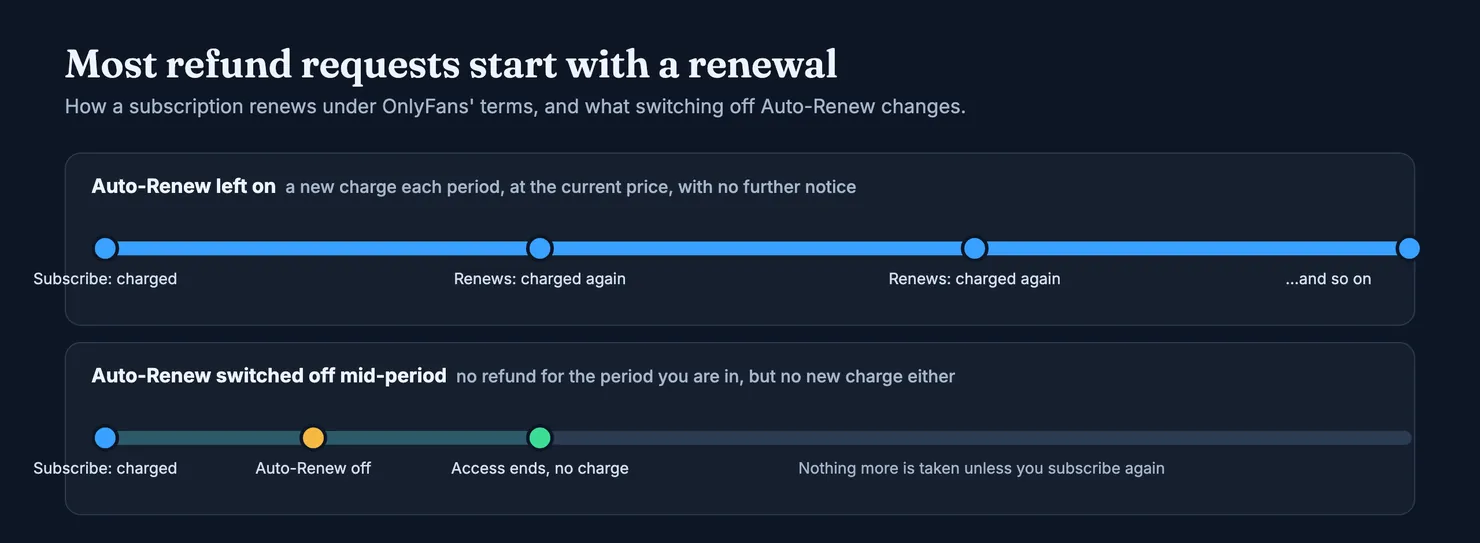
Switching off Auto-Renew does not refund the period you are in. You keep access until it ends, and then no further payment is taken unless you subscribe again. That makes the habit simple: if you only want one month of a page, turn Auto-Renew off the day you subscribe. You lose nothing by doing it early.
Closing your account works too, but it is heavier: all subscriptions are deleted, you lose access to everything you paid for, and wallet credits are non-refundable.
How to avoid needing a refund at all
Since money rarely comes back, the useful work happens before you pay. Three checks cover most of what goes wrong.
- Check the account is hers. Copies of popular pages reuse a creator's photos and sit one character away from her real handle. Our guide on spotting a fake OnlyFans account walks through the signs.
- Check who is likely to answer. If you are paying for messages, it helps to know how likely it is that a team, or software, is writing them. See how to recognise AI chatters.
- Keep big purchases inside the platform. Paying a creator outside OnlyFans leaves you with no support to write to and no clause to point at.
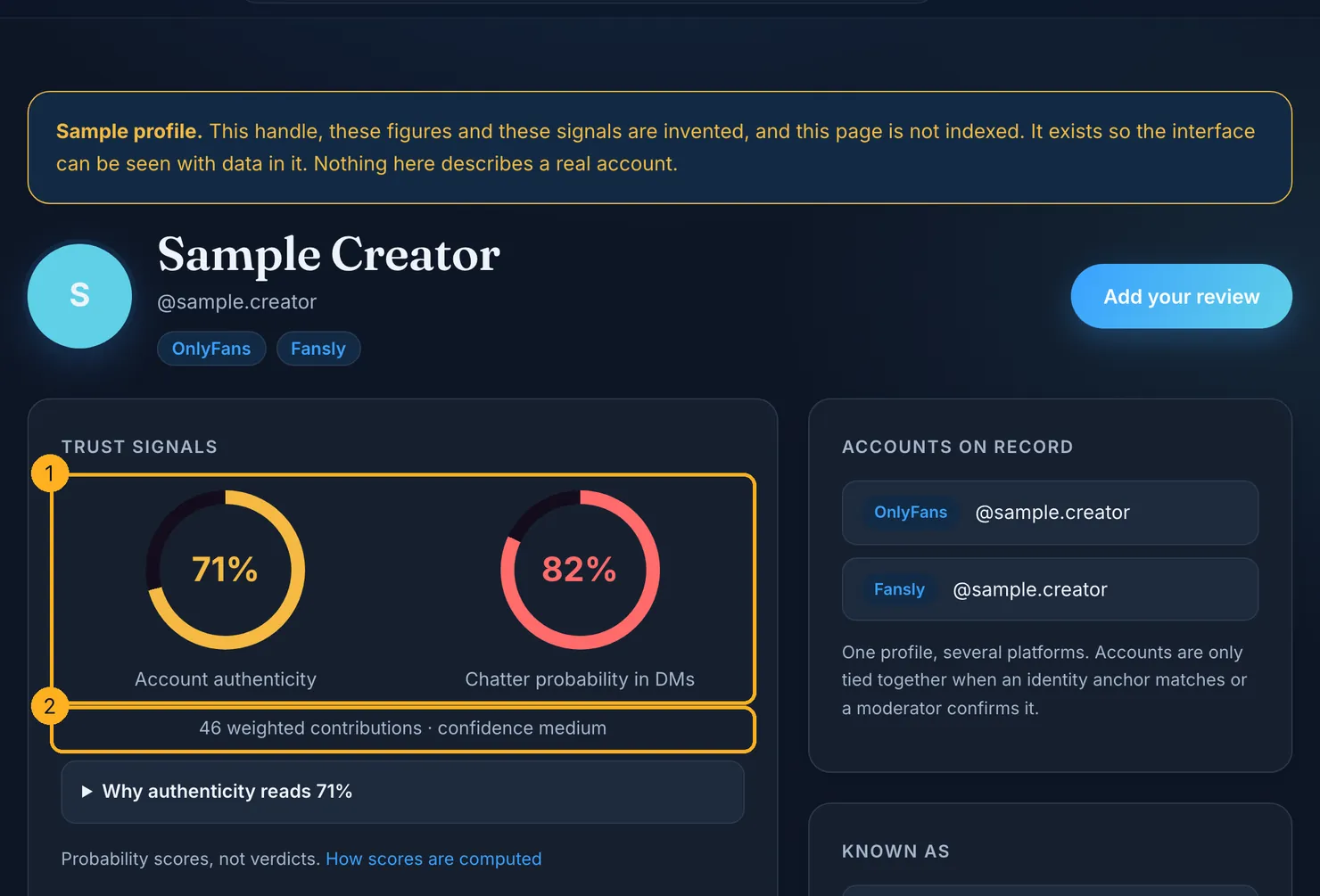
A Legit profile puts the first two checks in one place: an authenticity score and a chatter probability, each with the number of contributions behind it and how confident we are. A missing score means missing data, not a bad account.
If you cannot get your money back, make it count
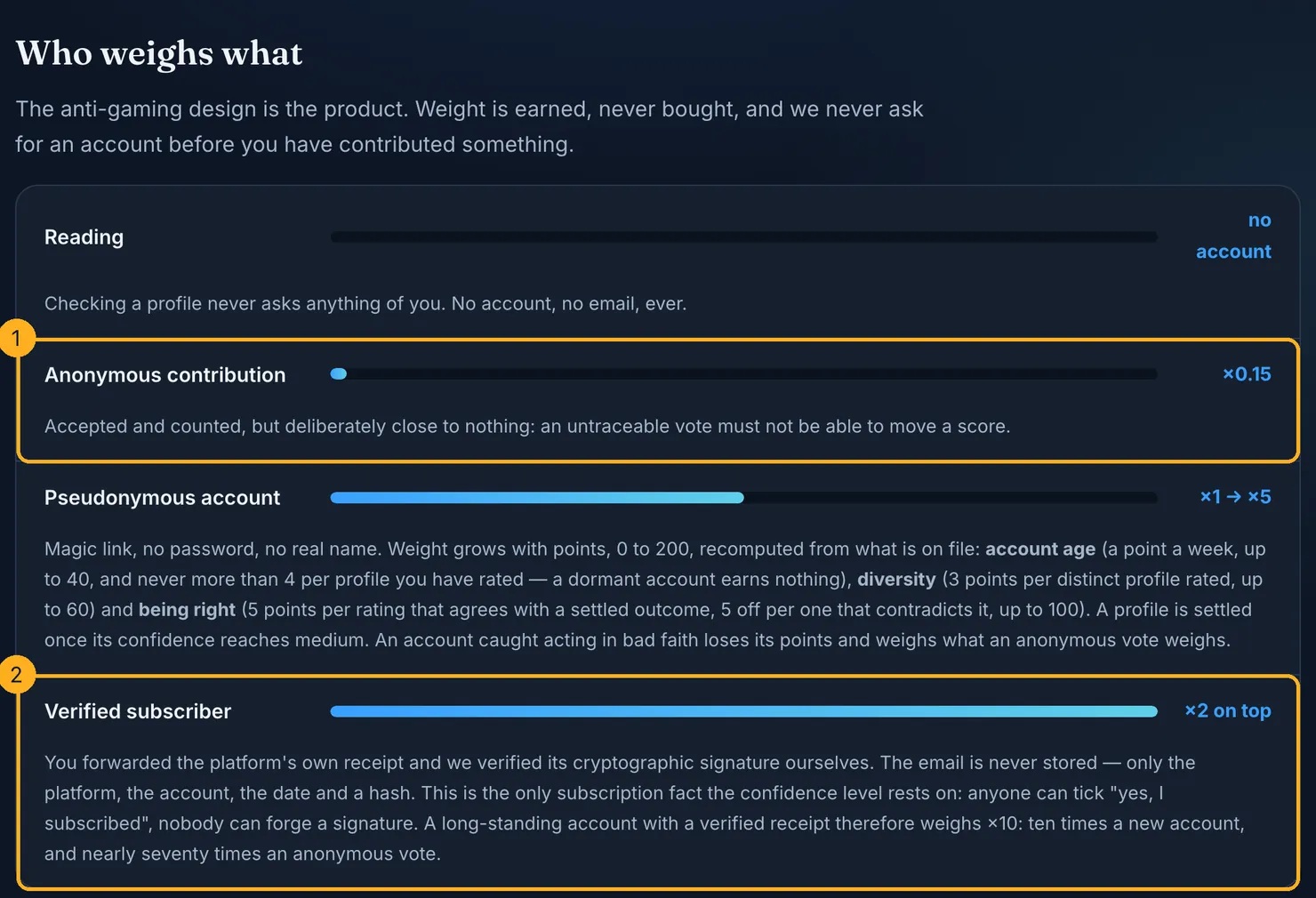
When a purchase goes wrong and no refund comes, the one thing still in your hands is warning the next person. You can rate the account on Legit in under a minute, anonymously if you prefer. The receipt e-mails you collected for your refund request are useful here too: forward the platform's own receipt and we check its cryptographic signature, which doubles the weight of your report. We do not keep the e-mail itself, only the platform, the account, the date and a hash, as our methodology explains.
If you are weighing up platforms rather than a single page, our comparison of Fansly and OnlyFans sets their rules side by side. And before the next subscription, it takes a few seconds to check the account first.
Questions people ask
Can I get a refund for an OnlyFans subscription?
Usually not. A subscription buys access to a creator's page for a period, and if you could see the page, you had what it sells; the terms give no right to change your mind. A request has a chance when there is something you can prove: a double charge, a wrong amount, a charge you did not make, or a paid message that never unlocked. Disappointment with the content is not one of them.
How do I get a refund from OnlyFans?
Write to OnlyFans support from the e-mail address on your account. Give the date, the amount, what you paid for and what went wrong, attach the receipt e-mail and, for an undelivered purchase, a screenshot of the message with its price and description. Ask for one specific thing, keep the tone factual, and keep a copy in case you need your card issuer later.
How long does an OnlyFans refund take?
OnlyFans does not publish a timeline that we could read, so nobody outside the company can promise one. What you can watch is your own deadline: card disputes are counted from the statement or the payment date, not from the day support replies. If a deadline is close and support is silent, contact your card issuer before it passes.
Can I get my OnlyFans wallet balance back?
Not under OnlyFans' terms, which describe wallet credits as non-refundable: unused credits are not paid back. You also have no claim on them if OnlyFans closes your account for breaking its rules. The one clear exception is a top-up you did not make yourself, which is a fraud question for your card issuer rather than for OnlyFans.
Will a chargeback get my OnlyFans account banned?
It can. Under the terms, fans agree not to make unjustified chargeback requests, and if OnlyFans decides one was made in bad faith it may suspend or delete the account, with its subscriptions and wallet credits. For a charge you genuinely did not make, a chargeback is the right tool. For a subscription you regret, it puts the account at risk for little chance of success.
How do I stop OnlyFans charging me?
Switch off Auto-Renew on each creator's page you subscribe to. Under the terms, a subscription otherwise renews automatically at the current price with no further notice. You keep access until the end of the period you paid for, and nothing more is taken unless you subscribe again. Closing your account also stops renewals, but deletes every subscription.