Is OnlyFans safe?
For most subscribers the risk is not the site itself but what happens around it: copycat accounts, requests to pay elsewhere, fake account warnings and what you share. What OnlyFans' own documents say, and what to check.
For a subscriber, mostly yes: OnlyFans is a real company, regulated in the UK, and the two parts people worry about most are handled by specialists. Card payments go through a payment provider, so OnlyFans keeps a token rather than your full card number, and age checks are run by a third-party provider, so OnlyFans says it does not receive your face data. Where subscribers get hurt is around the platform: copycat accounts, requests to pay some other way, fake "verify your account" messages, a reused password, and what they choose to share in private messages. Each of those has a check that takes a minute.
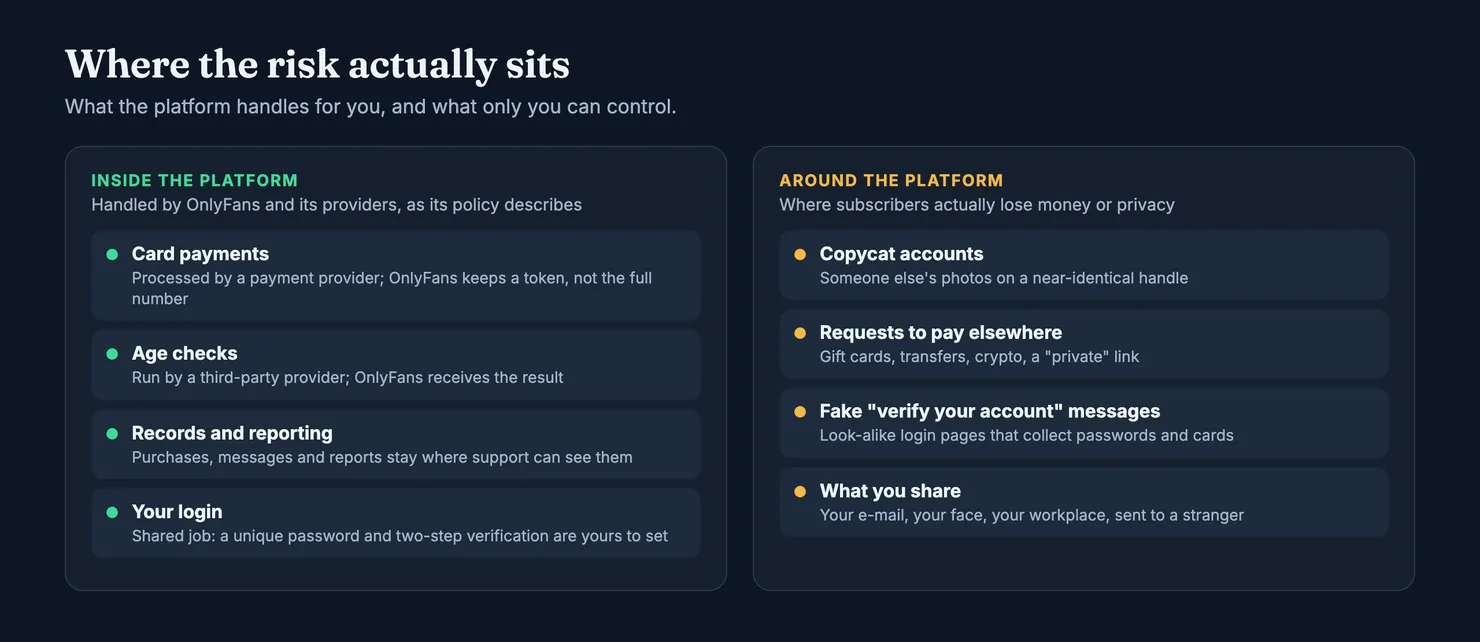
This guide is for people who pay, not for creators. It goes through what OnlyFans' own documents say about your data, what the age check involves, how safe your card is, how private you really are, and what to do if something goes wrong. It is not a verdict on the company's security, which nobody outside it can audit. OnlyFans' privacy policy and Terms of Service change from time to time, so read the current versions before you rely on a detail. Our browsers cannot open onlyfans.com, so we read the copies kept by the Internet Archive and link to them below.
Is OnlyFans legit?
Yes, in the sense people usually mean: it is a real business that takes real payments and delivers what a subscription sells, which is access to a creator's page. OnlyFans is run by Fenix International Limited, a company based in London, and its Terms of Service set out who can join: fans must be at least 18, and register with an e-mail address, a username and a password.
It is also watched by a regulator. In the UK, Ofcom oversees how adult platforms keep children out, and it has used those powers on OnlyFans: it fined the provider of OnlyFans £1.05 million for giving it inaccurate information about its age checks. We come back to what that case says below.
"Legit" does not mean everything on it is what it claims to be. The terms say plainly that OnlyFans does not guarantee the legitimacy or accuracy of what users post. The company checks who opens a creator account; it does not promise that every page, every message and every offer inside is honest. That gap is where the useful checks sit.
What are the cons of OnlyFans for a subscriber?
Three, mostly. Payments are hard to undo: the terms leave little room for refunds, and a dispute made in bad faith can cost you the account (see can you get a refund on OnlyFans). Subscriptions renew automatically at the current price unless you switch Auto-Renew off on each creator's page. And on many large accounts the person answering your messages is not the creator but a paid chat team, which is legal, common and rarely disclosed: who is really answering your DMs explains how that works.
Is OnlyFans ID verification safe?
This is the question most people arrive with, usually because a selfie request has just appeared on screen. The short answer: the check is real, it is run by a specialist provider rather than by OnlyFans itself, and OnlyFans' privacy policy says the company does not receive your face data. What you are trusting is the provider, so do it only in the official flow, and refuse anyone who asks for the same documents anywhere else.
What happens when OnlyFans asks for a selfie?
OnlyFans' privacy policy describes the process for fans in some detail. Every fan must be over 18; some must also verify their identity, depending on where they live or on whether OnlyFans detects suspicious activity on the account. The check you get depends on your location and the law there:
- E-mail address age estimation. A third party estimates whether you are over or under 18 from the sites and apps where your e-mail address has been used before. Nothing is uploaded.
- Facial age estimation. If the e-mail check fails, or is not allowed where you live, you may be asked for a short selfie clip. The provider estimates your age from it. The policy says this process is not used to recognise you.
- Age and identity verification. In some places, or if age estimation fails, you send the provider a short selfie clip and a photo of a government identity document, and it matches the two.
Ofcom's decision gives a glimpse of how the facial estimate is tuned. The tool estimates your age from a live selfie; if the estimate is above a set "challenge age", you go through; if not, you have to prove you are over 18 another way. Setting it above 18 leaves a margin for error, so that a teenager who looks older is still stopped. If you are an adult and the estimate says otherwise, it is the system working as designed, not a judgement on you.
Does OnlyFans keep your ID or your face?
According to its privacy policy, no. It states that it does not collect, receive, possess or have access to the face recognition data that its providers process. From an age estimate, it receives the result: pass or fail, and the reason for a fail. From an identity check, it receives what the policy calls onboarding data, a record that the check took place, where the law allows it.
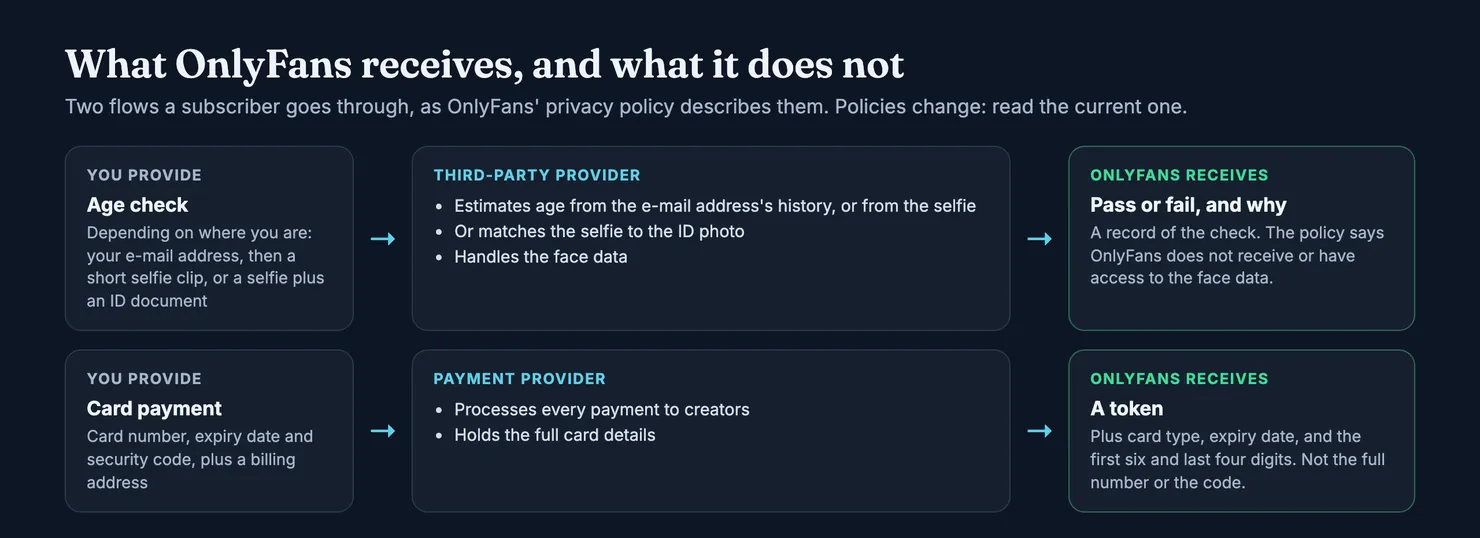
The policy does not name the providers, and it does not say how long they keep the selfie or the document. That part sits with them. If it matters to you, the age estimation route keeps less: no document leaves your hands. You may not get to choose, though, since the route depends on where you are.
As for the Ofcom case, it was about the information OnlyFans gave the regulator: the company had said its challenge age was 23, then discovered its provider had it set at 20. Ofcom found that Fenix failed to give accurate and complete answers. It was not a data breach and says nothing about your selfie being exposed. It does show that the check depends on how a provider configures it, and that the regulator follows it closely.
How do you know the verification request is real?
A real request appears inside the app or the website you opened yourself, when you try to subscribe or when the platform flags your account. A fake one arrives by e-mail, by text, or from another user in your messages. In practice:
- Start from the official site or app. If an e-mail says you must verify, do not use its link. Open OnlyFans the way you normally do and see whether the request is there.
- Send documents only in the platform's own flow. A creator, a "manager", a "support agent" in your messages, or a stranger who promises faster access has no business with your ID or your face.
- Treat any request for an ID by private message as a red flag. The policy describes the provider collecting your selfie and document. It does not describe anyone asking for them in a chat.
Is OnlyFans safe for credit cards?
Paying on the platform is the safe part. OnlyFans' privacy policy says that payments to creators are processed by third-party payment providers, and that OnlyFans does not receive your full card number, its expiry date or its security code. What it gets back is a token that stands for your card, the card type, the expiry date, and the first six and last four digits of the number. If OnlyFans itself were ever breached, the full number would not be in its database to take.
Where money does go missing, it is usually one of these.
- Paying outside the platform. The US Federal Trade Commission lists the methods fraudsters ask for: wire transfers, gift cards with their codes, money transfer apps and cryptocurrency. A creator account that asks you to pay one of those ways, for "exclusive" content, a meeting or an emergency, is a reason to stop. Inside the platform there is at least a record of what you paid and to whom.
- Someone else in your account. The terms say OnlyFans is not responsible for lost, stolen or compromised accounts, passwords or e-mail accounts, or the unauthorised payments that follow. A saved card on an account with a reused password is the weak point. The next section covers how to close it.
- Renewals you forgot. A subscription renews at the current price unless you switch Auto-Renew off, and the terms say you will not be warned again. If you only want one month, switch it off the day you subscribe; you keep access until the period ends.
If you would rather not put your main card on file, a card you can freeze or cap from your banking app limits what a stolen account can spend. Many banks offer one. And keep the receipt e-mails: they are your record if a charge looks wrong, and on Legit they let you prove you subscribed, which doubles the weight of what you report.
Is OnlyFans private?
Private enough for most people, provided you set it up with some care. You subscribe under a username, not under your identity. But the company holds your e-mail, your card token and billing address, your purchases and your messages, and its privacy policy lists who it shares data with: payment processors, customer support, moderation, and age and identity verification providers, among others. The terms add that OnlyFans may disclose records to third parties in line with that policy and cooperate with law enforcement.
Is OnlyFans anonymous for subscribers?
Not anonymous, but pseudonymous. OnlyFans knows who pays, because a card is attached to a person and an age check may have been run. What a creator, and anyone who helps run her account, can see is what you show them: your username, your display name and profile picture, and every message, photo and tip you send.
Practical steps that cost nothing:
- Use an e-mail address you keep for this, not your work or family address. It is also what the e-mail age estimate is run on.
- Pick a username that says nothing about you. No first name, no birth year, no handle you use elsewhere.
- Leave the profile picture blank, or use something that is not your face.
- Share what you would share with a stranger. No workplace, no home town, no photos you would not want forwarded. Assume anything you send can be saved and shown to someone else.
Can you be tracked on OnlyFans?
By the company, yes, the way any website that takes payments keeps records of your account, your purchases and the devices you use; the privacy policy lists the categories. By creators and other fans, only through what you give away. The realistic ways people are identified are ordinary: a username reused on another site, a photo with a face or a uniform in it, a detail mentioned in a chat. Keep those out and there is little to follow.
How to keep your OnlyFans account secure
Since the terms put a compromised account on you, account security is the one part of platform safety you control fully. The UK National Cyber Security Centre's top tips fit here almost word for word.
- Secure the e-mail address first. Whoever controls it can reset your OnlyFans password. Give it a strong password used nowhere else.
- Use a unique password for OnlyFans. Three random words, or a password manager that makes one up and remembers it.
- Turn on two-step verification on the e-mail account, and on OnlyFans if your account settings offer it. The NCSC's point is simple: 2-step verification keeps people out even when they have your password, and passwords get stolen from other sites through breaches and phishing.
- Keep the app and the phone updated. Updates carry security fixes.
What does a fake OnlyFans message look like?
Most account takeovers start with a message that sends you to a look-alike login page. The FTC's guide to recognising phishing lists the usual hooks: a claim of suspicious log-in attempts, a problem with your account or payment details, a link to update them. It also makes the point that settles most cases: real companies do not e-mail or text you a link to update your payment information.
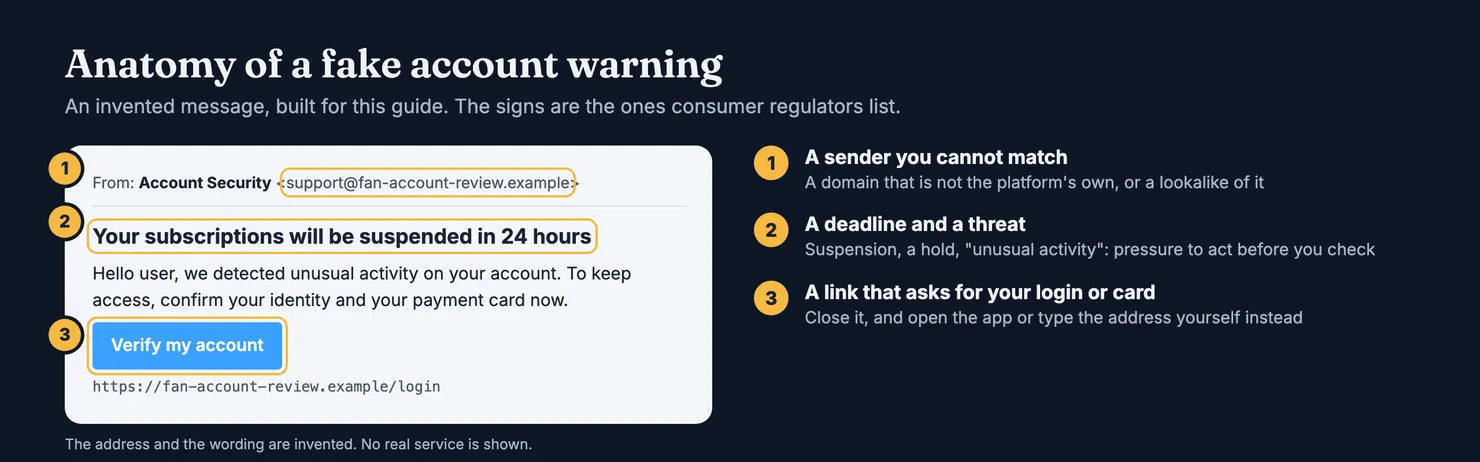
When a message like that arrives, close it, open the app or type the address yourself, and look for the same warning there. If you already typed your password into the page, change it on the real site at once, then change it anywhere else you used it. If you gave card details, call your bank. In the UK you can forward suspicious e-mails to report@phishing.gov.uk, the address the NCSC gives on its reporting page.
Fake accounts and pressure in private messages
Inside the platform, the two things that cost subscribers most are accounts that are not who they claim to be, and conversations that turn into requests for money.
How do you spot a fake OnlyFans account?
Copied photos on a new account are a familiar way to sell someone else's face. The FTC's advice for dating profiles works here too: run a reverse image search on the pictures, and be wary if they turn up under another name or with details that do not match. Then look at the handle. An extra underscore, a ".vip" or "official" suffix, or one swapped letter is how a copycat sits next to the real account in search results. A brand-new account with a handful of posts that claims to be someone well known deserves a second look.
The strongest signal is a link that goes both ways: the creator's long-standing social profile points to the account, and the account points back. How to spot a fake OnlyFans account goes through the signs one by one, and how to find someone on OnlyFans explains how to reach the real page from her own links rather than from an advert.
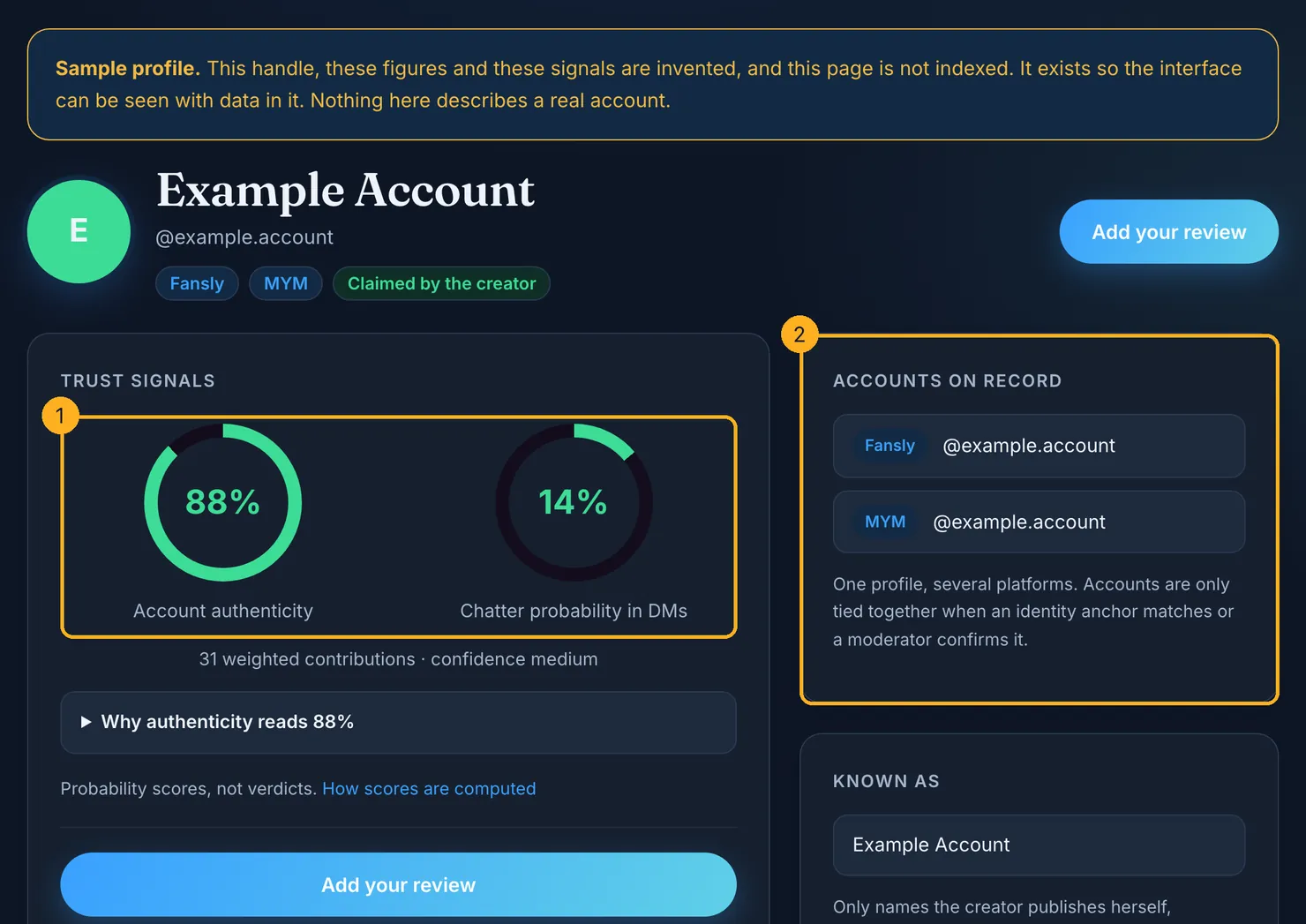
Before you pay, you can also look the account up in the Legit finder. Each profile carries two separate scores: how likely it is that the account really belongs to the person it presents, and how likely it is that someone else answers the messages. Each comes with the number of contributions behind it and a confidence level. Accounts on different platforms are tied together only when an identity anchor matches, such as a link that goes both ways, or when a moderator confirms it. A score with nothing behind it is shown as missing, not as zero.
Is the creator really the one messaging you?
Often not, on large accounts. Paid chat teams are common, and some accounts use software to write replies. That is not fraud in itself, but it changes what a "personal" message is worth before you pay for one. AI chatbots on OnlyFans covers what is known about automated replies.
The warning signs the FTC lists for romance fraud describe the worst inboxes well: someone who builds trust very fast, writes several times a day, asks to move the conversation to another app, and then needs money urgently. A request to continue on WhatsApp, Telegram or a private e-mail takes you away from the platform's records and its reporting tools. Stay where you started, and pay only for what the platform sells.
What to do if something goes wrong
Stop replying, and keep what you have: screenshots of the conversation, the account's address, the receipt e-mails, the date and amount of every payment. Then work through the list that fits.
- A charge you did not make. Call your card issuer straight away, then change your OnlyFans and e-mail passwords and tell OnlyFans support. The FTC's advice for anyone who has paid a fraudster, by card, gift card, transfer or crypto, is to contact the company or the bank at once and ask for the money back.
- An account that is not who it claims to be, or that pushed you to pay elsewhere. Report it through the platform's own reporting tools, with your screenshots.
- Money lost to fraud. In the US, report it at ReportFraud.ftc.gov. In England, Wales and Northern Ireland, the NCSC points to Report Fraud at reportfraud.police.uk or 0300 123 2040; in Scotland, Police Scotland on 101.
- A purchase that never arrived, or a billing error. That is a refund question, with its own routes and risks: our refund guide sets them out.
Then help the next person. If you subscribed to an account and something was off, the creator was not the one writing or the account was not hers, add what you saw on Legit. Three questions, thirty seconds. Forward the platform's receipt and your report carries twice the weight; the e-mail itself is not stored. It is what moves an account's scores, and it is how the next subscriber gets an answer before paying rather than after.
Questions people ask
Is OnlyFans ID verification safe?
The check is run by a third-party provider, not by OnlyFans itself, and OnlyFans' privacy policy says the company does not receive or have access to the face data involved; it keeps a record of the result. The main risk is a fake request. Verify only inside the official app or website you opened yourself, and send your ID to nobody who asks for it by message or e-mail.
Is OnlyFans safe for credit cards?
Paying inside the platform is the safer part. According to its privacy policy, a payment provider processes the card and OnlyFans keeps a token, the card type, the expiry date and the first six and last four digits, not the full number or the security code. The bigger risks are a stolen account with a saved card and requests to pay outside the platform.
Can creators see who you are on OnlyFans?
They do not get your card details or the result of your age check. What a creator, and anyone helping run her account, can see is what you show: your username, display name, profile picture and everything you send in messages. Use a username and picture that say nothing about you, and share only what you would share with a stranger.
Can you be tracked on OnlyFans?
OnlyFans keeps records of your account, purchases and devices, like any site that takes payments, and its privacy policy lists what it collects and who it shares it with. Creators and other fans can only follow what you give away: a username reused elsewhere, a face in a photo, a detail mentioned in a chat. Keep those out and there is little to trace.
Is OnlyFans legit or a scam?
OnlyFans itself is a legitimate company, run from London and regulated in the UK, and a subscription delivers what it sells: access to a creator's page. Its terms do not guarantee that everything users post is genuine, though. Copycat accounts and people who push you to pay elsewhere exist on it, which is why the checks before paying matter.
What should I do if someone asks me to pay outside OnlyFans?
Stop and do not pay. Wire transfers, gift cards with their codes, money transfer apps and cryptocurrency are the methods the FTC lists as the ones fraudsters ask for, and paying that way leaves you with no record on the platform. Keep screenshots, report the account through OnlyFans' own tools, and if you already paid, contact your bank at once.