How to find someone on OnlyFans
OnlyFans has no directory to browse, so the address is the search. Where a reliable link comes from, what to do without a username, and how to check the page is hers.
To find someone on OnlyFans, start from a link the creator posts herself, on a social account she has run for a long time, or type onlyfans.com/ followed by the exact username she uses elsewhere. OnlyFans has no public directory to browse, so the address is the search. The harder part is the second step: making sure the page you reach is hers and not a copy wearing her photos.
This guide is for people looking for a creator who promotes her page in public. If you are trying to work out whether a private person you know has an account, skip to the section on that: the short answer is that you should not, and nobody honest can help you do it.
Why OnlyFans is hard to search
Every OnlyFans profile lives at one address, onlyfans.com/username. To open an account at all, OnlyFans asks for an e-mail address, a password and a username, and creators must also upload an ID and two photos of themselves before they can publish, according to its Terms of Use. What the platform does not offer is a public catalogue of those creators, sorted by name, country or anything else.
The same terms say OnlyFans may use recommender systems, for example to show creator accounts on your home page that people with similar subscriptions follow. That is discovery chosen by the platform, not a search you control. They also bar creators from promoting their account through Google Ads or similar search advertising, which is one reason creators send traffic from their own social accounts instead. Terms change, so check the current version on OnlyFans' own page.
Is there a search bar on OnlyFans?
Signed-in users see a search option inside the site and the app. It is not a directory, though, and it does not reliably return a given creator from a partial name: results depend on what the platform chooses to show, and the interface changes from time to time. When you know the exact username, typing the full address is faster and leaves no doubt about which page you opened.
Why can't I search people on OnlyFans?
Because OnlyFans is built around subscriptions to accounts you already know about, not around browsing. Many creators also prefer it that way. A creator who posts under a stage name has good reasons not to be findable from her everyday identity, her town or her face, and OnlyFans' terms say outright that it is not responsible for whether her content is seen by people who recognise her. The narrow search is partly a privacy feature.
Can you look someone up on OnlyFans without an account?
Usually you can open a creator's profile page by its address without signing in and see her display name, bio and price. To subscribe, message or see anything behind the paywall you need an account with a payment method, as the terms describe. The in-site search, where it appears, is for signed-in users.
Five ways to find a creator's real page
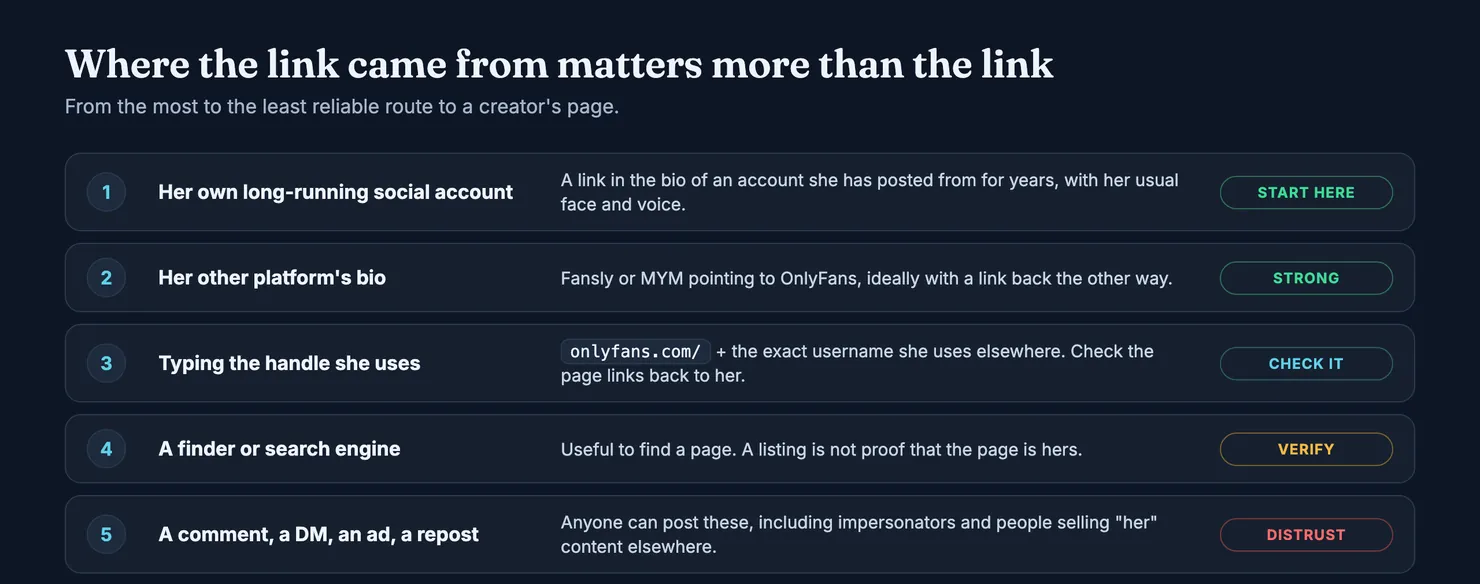
The routes below are ordered from the most to the least reliable. The rule behind the order is simple: a link is only as trustworthy as the person who could have put it there.
- Her own long-running social account. Creators usually link their page from the bio of an Instagram, X, TikTok or Reddit account, or from a link-in-bio page. An account she has posted from for years, with her usual face and voice and a steady history, is the best place to start. Click the link from there rather than copying the handle by hand.
- Her page on another platform. Creators often run Fansly or MYM alongside OnlyFans, and their bios frequently point to each other. If her Fansly bio links to an OnlyFans address and that OnlyFans page points back, you have found something better than a link: a pair. Our guide to finding someone on Fansly covers that side.
- The handle she uses everywhere. Plenty of creators keep one username across platforms. Type
onlyfans.com/plus that exact handle. If a page opens, look for a link back to the social accounts you know before you trust it. - A finder or a search engine. Searching the name she publishes, plus the word OnlyFans, often surfaces her socials, which takes you back to route 1. A finder can help too, including ours. A listing is still not proof that the page belongs to her.
- A link in a comment, a DM, an ad or a repost. Anyone can post these, including impersonators and people reselling content that is not theirs. Treat them as a lead to check, never as the destination.
How to find someone on OnlyFans without a username
This is the most searched variant of the question, and the honest answer depends on what you do have.
If you have the name she uses in public, the stage name on her posts and banners, search for it on the platforms where creators promote themselves. Her social bios will usually give you the handle in one click. If you know her from Fansly or MYM, those platforms let signed-in members search, and her bio there may carry her OnlyFans address.
If you have a profile link from any of the three platforms, or only a fragment of the handle, you can paste it into Legit's finder. It searches usernames, former usernames and the public names creators publish themselves, across OnlyFans, Fansly and MYM. When the account is on Legit you get its profile; when it is not, the finder says so plainly.
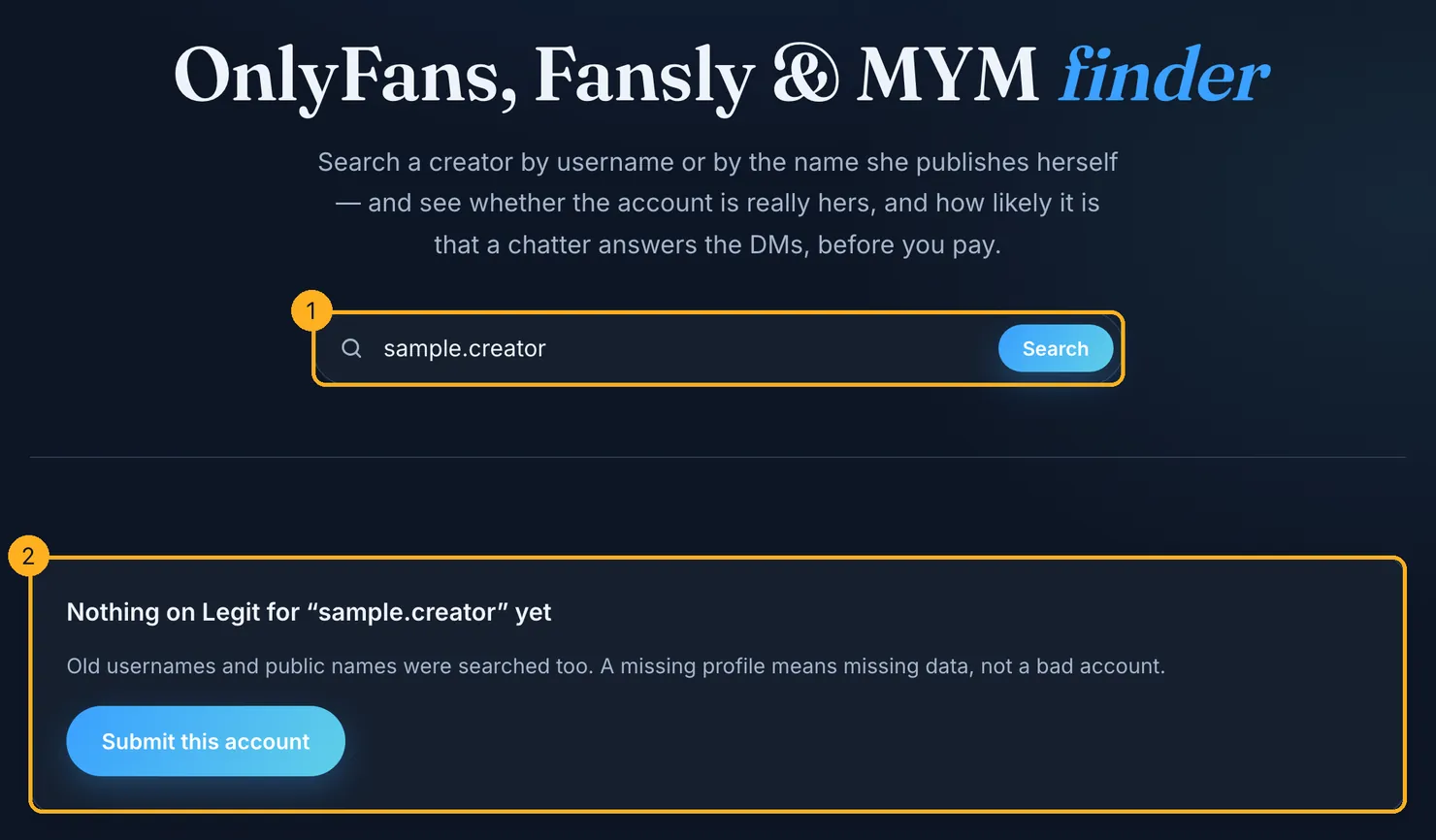
A missing profile tells you nothing about the account itself. It means nobody has added it yet. If you know the address, you can submit the account and it gets a profile once its public page has been read.
What you cannot honestly do is go from someone's full name, a phone number, an e-mail address or a photo of a private person to an account they did not link to that identity. Tools that promise this are selling unmasking, and we come back to why below.
How to find someone on OnlyFans by username?
Type onlyfans.com/ followed by the username, with no @ and no spaces. Every character counts: an underscore instead of a dot is a different account. Our short guide on searching OnlyFans by username covers the details, including what happens after a creator renames her account.
Make sure it is really her before you pay
Finding a page that uses her name and photos is easy. Finding the one she runs is the actual job, because copied photos on a fresh account are a common way to sell someone else's face. Scams that start on social media are not a niche problem: the US Federal Trade Commission reported that people lost $2.1 billion in a single year to scams that began there, and that nearly 60% of people who lost money to a romance scam said it started on social media.
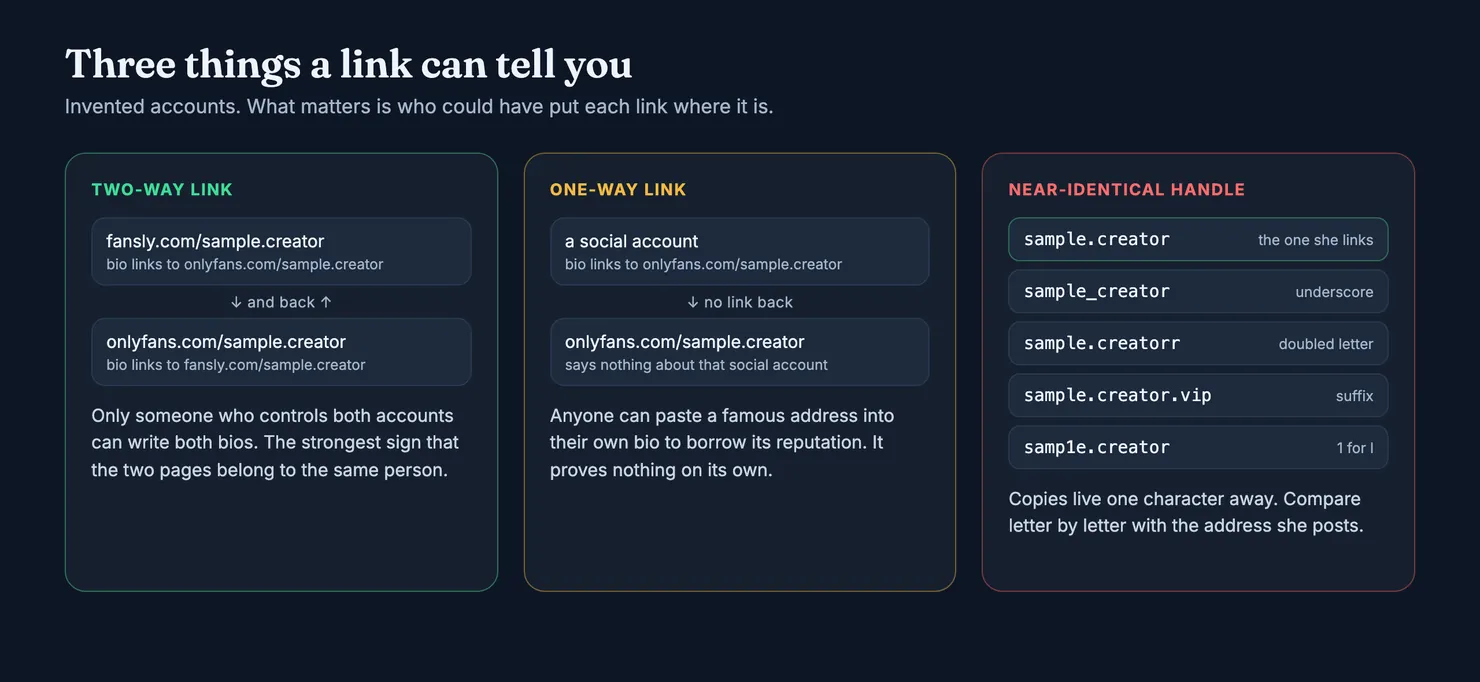
Four checks catch most copies.
- Look for a two-way link. When her Fansly or MYM bio links to the OnlyFans page and the OnlyFans page links back, the same person controls both bios. That is the strongest public sign you can get. A link in one direction only proves nothing, because anyone can paste a known creator's address into their own bio to borrow her reputation.
- Compare the handle letter by letter. Copies live one character away: an underscore for a dot, a doubled letter, a suffix such as ".vip" or "official", a 1 in place of an l. Compare with the address she posts herself, not with what you remember.
- Check where the photos come from. Google lets you search with an image and shows websites that use the same or a similar picture. If the profile photo of a brand-new account turns up on an older account under another name, the new one is probably the copy. Use this to test a profile, never to identify a person.
- Read the account's history. A recent account with few posts, claiming to be someone with a large following elsewhere and none of her links, deserves suspicion.
What if two accounts claim to be her?
Trust the one her long-running socials link to, and the one that links back. If neither does, wait. A creator who opens a new account after losing an old one usually announces it where her audience already follows her. Our guide on spotting a fake OnlyFans account goes through the other signs.
What if the account asks you to pay somewhere else?
Stop. A page or a DM that moves you to another app, or asks for a gift card, a transfer or crypto, follows the pattern the FTC describes for romance scams: a fake profile, a quick move off the platform, then a request for money by a method that is hard to reverse. The FTC's rule is blunt: never send money to someone you have not met in person. Payments made inside OnlyFans at least go through its own billing; our guide on whether OnlyFans is safe explains the rest.
How Legit ties a creator's accounts together
Legit does part of this checking for you, as far as public pages allow. A Legit profile tracks a creator rather than a handle, so her OnlyFans, Fansly and MYM accounts can sit on one page with one reputation.
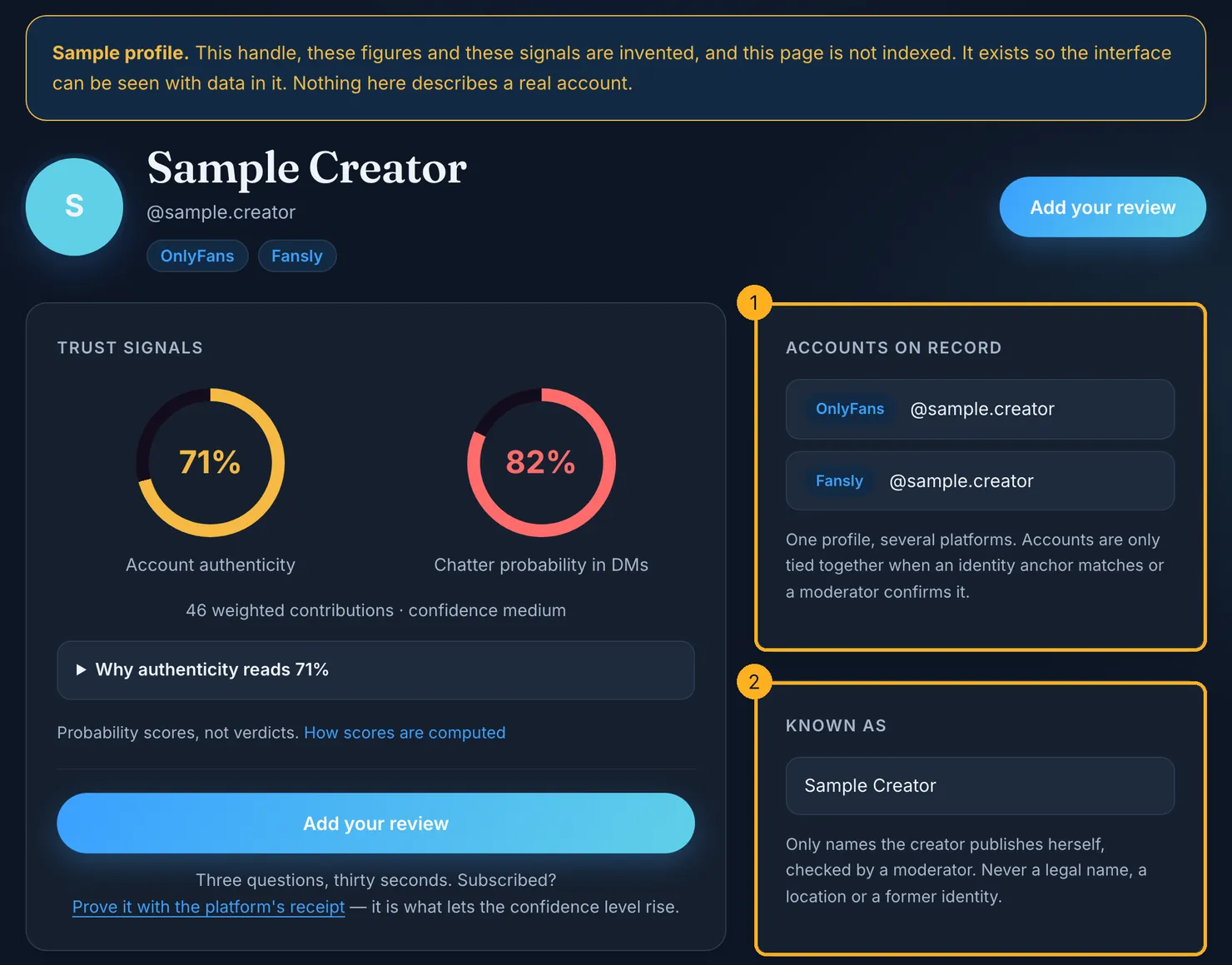
Accounts join a profile in two ways only. When a Fansly account is submitted, we read the OnlyFans and MYM addresses in its bio. If the link is mutual, for example her MYM bio points back to her Fansly, the accounts are tied together automatically. If it runs one way only, which is the case for every OnlyFans address because we do not read OnlyFans pages, the link goes to a moderator as a suggestion. Contributors can suggest a link too, but nobody's say-so merges two reputations. The methodology page explains how identity is handled.
The name shown as "Known as" follows the same caution. Only names a creator publishes herself, on an account she controls, are accepted, and a moderator checks them. Names from official documents, places, employers and former identities are removed on sight, as the rules for public names set out.
Finding someone you know: where we draw the line
A large share of searches around this topic are not about creators at all. They ask how to find out whether a colleague, a former partner or a neighbour has an OnlyFans, starting from their full name, phone number, e-mail address or home town.
Can you find out if someone you know is on OnlyFans?
Only if they have chosen to say so publicly, for instance by linking the page from an account that carries their name. Otherwise, no honest method exists, and the services that claim one work by matching faces, contacts and stolen data against people who did not consent to be matched.
Trying anyway can cross a legal line. In England and Wales, the Crown Prosecution Service's guidance on stalking and harassment lists using the internet to locate personal information about someone and monitoring their use of the internet among the behaviours it treats as stalking, and publishing material about a person among the statutory examples. Other countries have their own versions of these rules. OnlyFans' terms, for their part, list the disclosure of a creator's identity or personal information by other people, without her consent, among the things the platform takes no responsibility for. The risk is real enough to be written into the contract.
So Legit offers no search by place, no map of creators, no names a creator has not published herself and no pirated content. Where a creator lives is her safety, not a filter, and whether someone you know earns money this way is their business.
Before you subscribe
Once you have the address, paste it into the finder and see whether its profile shows linked accounts, public signals and how likely it is that someone other than the creator answers the DMs. If you have subscribed already, add what you saw: a few short questions, and your answers help the next person tell the real page from the copy.
Questions people ask
How do I find someone on OnlyFans?
Start from a link the creator posts herself, ideally in the bio of a social account she has run for a long time, or type onlyfans.com/ followed by the exact username she uses elsewhere. OnlyFans has no public directory, so the address is the search. Then check that the page links back to accounts you know are hers before you pay.
How do I find someone on OnlyFans without their username?
Search for the name she uses in public on the platforms where creators promote themselves: her social bios usually give the handle in one click. Her Fansly or MYM page may also link to her OnlyFans. A finder can help when you have a fragment of a handle or a profile link. Nothing honest gets you from someone's full name or phone number to an account.
Is there a search bar on OnlyFans?
Signed-in users see a search option, but it is not a directory and does not reliably find a given creator from a partial name. Results depend on what the platform chooses to show, and the interface changes. When you know the exact username, typing the full address is quicker and leaves no doubt about which page you opened.
Can you look someone up on OnlyFans without an account?
You can usually open a creator's profile page by its address without signing in and see her display name, bio and price. Subscribing, sending messages and seeing anything behind the paywall need an account with a payment method. Search inside the site, where it appears, is meant for signed-in users.
How can I tell if an OnlyFans account is fake?
Check that her long-running social accounts link to it and that it links back, compare the handle letter by letter with the one she posts, and look for her photos on older accounts under other names. A new account with few posts and none of her links deserves suspicion, and a request to pay outside OnlyFans is a classic sign of a scam.
Can I find out if someone I know is on OnlyFans?
Only if they have chosen to say so publicly. Services that claim to match full names, phone numbers or photos to accounts are selling unmasking, and trying it can amount to harassment: guidance from England's prosecutors counts using the internet to locate someone's personal information as cyber stalking. Whether someone earns money this way is their business.