OnlyFans search by name: the username is what counts
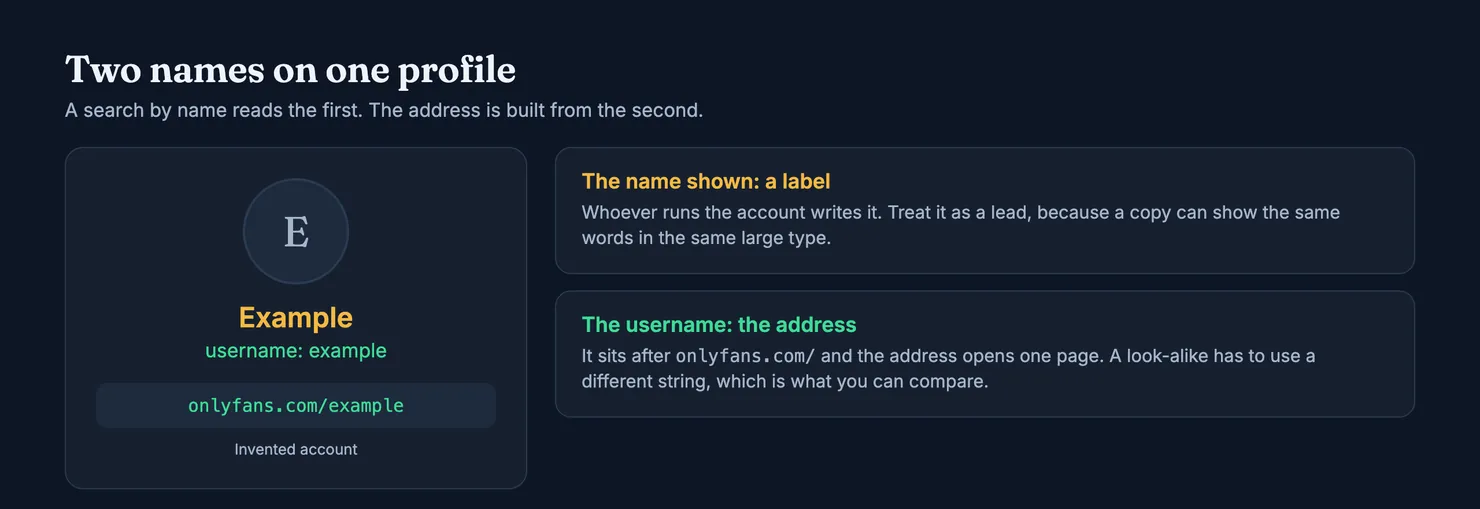
A name is a label, and several accounts can carry the same one. The username is the address, and it opens one page. Search with the name if that is all you have, then confirm with the username.
You can type a name into a search box, but on OnlyFans a name won't reliably get you to one account. Every profile lives at onlyfans.com/ followed by its username, and that address opens one page. The name shown on the profile is a label written by whoever runs the account, so a search by name gives you candidates at best. Get the username from a place she controls, open that address, and check it before you pay.
One limit up front. Our browsers can't open onlyfans.com, and we have found no OnlyFans page explaining how its own search matches names, so we won't guess. Where we rely on the OnlyFans terms, we read an archived copy and say so. Everything below works whatever the search box does on the day you try it. Every account in this guide is invented.
Name or username: what each one tells you
Can you search OnlyFans by name?
You can try, and sometimes it works. Our guide to finding someone on OnlyFans covers what signed-in users see in the app. What matters here is what a match means, and a match on a name means very little: the words on the page agree with the words you typed. It doesn't tell you who holds the account.
What is the difference between a name and a username?
OnlyFans asks for a username when anyone registers, along with an email address and a password (OnlyFans terms, archived copy). That username is what follows the slash in the address.
The clearest description of the two kinds of name comes from Fansly rather than OnlyFans. Fansly calls the username a unique identifier that appears in the profile address, and says the display name "doesn't need to be unique" and can be changed at any time, with the change showing straight away (Fansly help: managing my Fansly name). We have no equivalent OnlyFans page to quote, so treat the parallel as a working assumption. It is a safe one for your purposes, since it only asks you to trust the name less.
Why can't you search names on OnlyFans with any confidence?
Because you are looking for a person, and a search box compares text. OnlyFans doesn't vouch for that text either: its terms say it doesn't endorse or vouch for the legitimacy or accuracy of what users post. They also say it may use recommender systems to put creator accounts on your home page. That is the platform choosing what to show you, and a recommendation tells you no more about who runs an account than a search result does.
Why a name proves so little
Say you are looking for a creator who goes by Example. Nothing we have read stops someone from opening an account, typing Example at the top of it and using her photos. Now there are two pages that look the same in a list of results, and the one you open first may be the copy.
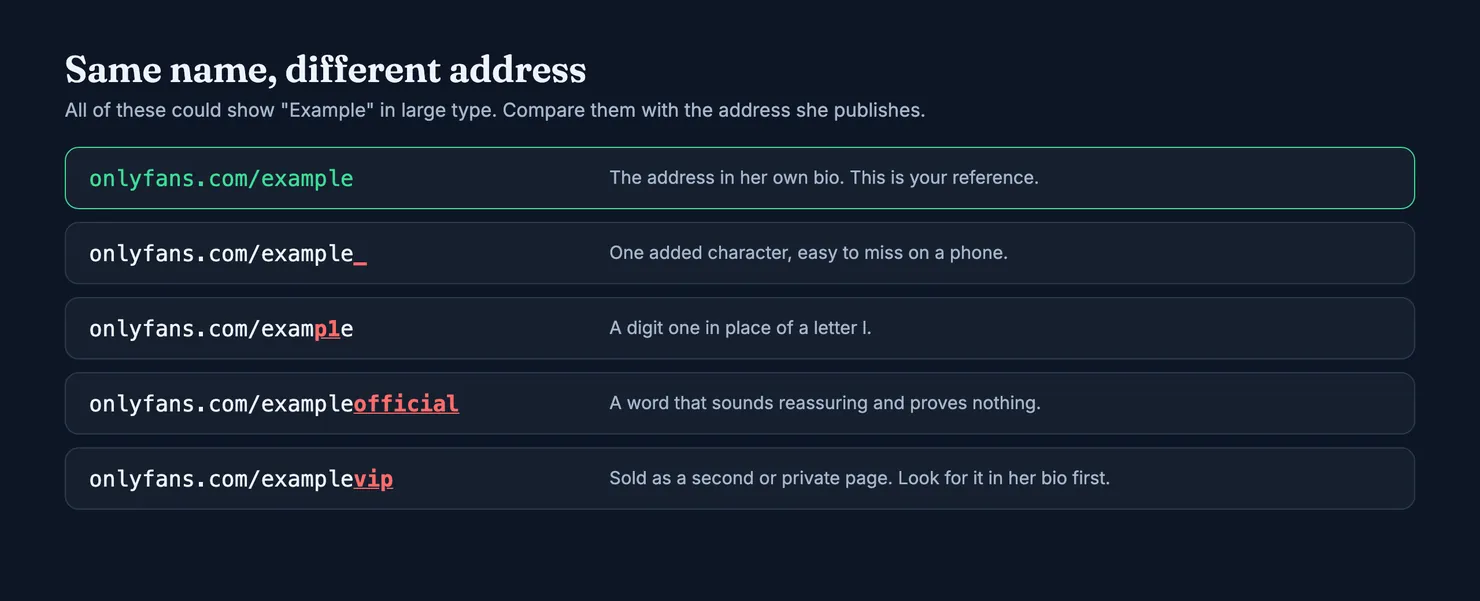
The username is harder to imitate because the one she holds is taken. A copy has to settle for something close, such as example_ or exampleofficial. That gives you something you can compare, provided you know the original. Which is why the rest of this guide is about getting hold of the real username, and why a search result on its own isn't enough.
Popularity doesn't settle it either. Likes and followers can be real and still sit on a page that isn't hers, and a thin page can be a genuine new account. Our guide to spotting a fake OnlyFans account goes through those signals in more detail.
How to search OnlyFans by name and end up on one account
Work through these in order. Most of the time the first one ends the search.
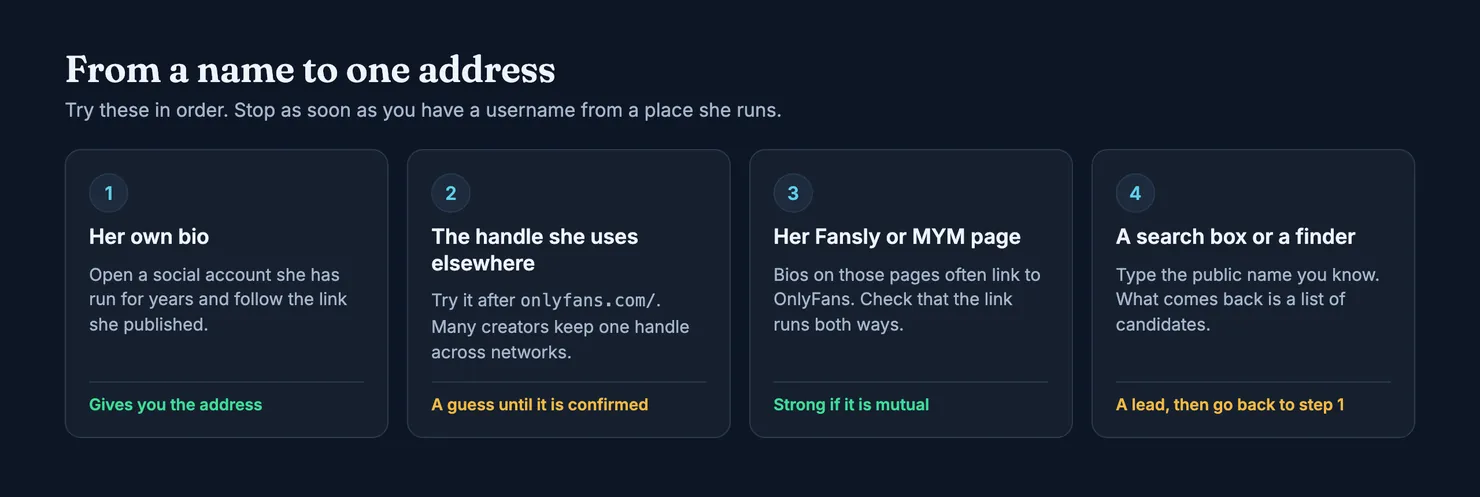
- Go to a bio she runs. Pick a social account she has had for years and follow the link she posted. A link she published herself is worth more than any search result, because it is her saying which address is hers.
- Try the handle she uses elsewhere. Many creators keep one handle across networks. If her handle on another site is
example, tryonlyfans.com/example. Treat what opens as a guess until something else confirms it, because a copy can register a handle she hasn't claimed on OnlyFans. - Look at her Fansly or MYM page. Creators who run several pages often link them in their bios. Fansly's search covers hashtags, keywords and creator names, with results personalised to you (Fansly help: navigating Fansly), and our Fansly search guide explains how to use it. The link has to come from her side and point at the exact address you are checking.
- Use a search box or a finder last. Type the public name you know. Whatever comes back is a list of candidates. Pick the likely one, then go back to step 1 and look for her link to that exact address.
How do I search for an OnlyFans account with a search engine?
Put the name she publishes in quotes, followed by the word OnlyFans. Google treats quotes as a request for that exact phrase, and site: in front of a domain limits results to that site, with no space after the colon (Google Search Help: refine searches). So "Example" OnlyFans is a broad search, and site:onlyfans.com example is a narrow one.
The broad one is usually more useful, because it tends to surface her social accounts and takes you back to step 1. The narrow one only knows what the search engine has indexed, so an empty result proves nothing about whether she has a page.
Be careful with paid results. The OnlyFans terms tell creators not to promote their accounts through Google Ads or similar search advertising. They also say links to OnlyFans must not be deceptive. Rules can be broken, and we can't tell you who bought what, but we wouldn't take a sponsored result as her own link.
Which finder should I use?
Sites offering to find an OnlyFans account by name are all over the results for this query, and we don't review them here. Three questions tell you most of what you need about any finder, ours included. Does it say where its names come from? Does it admit what it doesn't cover? Does it stop at finding an account, or does it offer to tell you who the person is? We would walk away from that last kind, for reasons we come to below.
OnlyFans search by username: how to do it properly
If you have the username, you don't need a search box at all. Type onlyfans.com/ and the username into your browser's address bar. Copy it from her bio rather than typing it from memory, since a single wrong character can take you to a different page.
What if the address doesn't open anything?
OnlyFans doesn't publish a list of reasons we can read, so here is Fansly's, which is a fair guide to what can go wrong on any platform: a new account that hasn't shown up yet, a mistyped username, a profile that is restricted, private or temporarily unavailable, and an account that was deleted, deactivated or not created in the first place. Fansly's closing advice is to ask the creator for her direct link (Fansly help: unable to find a user).
Start with the typo, because it is the only one of those you can fix yourself. Underscores, full stops and doubled letters are the usual culprits.
What if the username has changed?
Usernames do move. Fansly says a profile link updates when the username changes, so an old link can stop matching what you remember (Fansly help). We have no OnlyFans page describing what happens to an old address there. Either way, go back to her current bio for the current address. A stranger telling you she "moved" to a new page is exactly how a copy gets its first customers.
Before you subscribe: check the username, not the name
A few minutes here do more for you than any amount of searching.
Is the address exactly the one she publishes?
Read it one character at a time against the address in her bio. Look for an added underscore, a digit standing in for a letter, or a suffix such as "official", "vip" or "backup". If you have only ever seen the handle in passing, your memory will happily accept a near match, so compare the two side by side.
Does the link run both ways?
This is the check that holds up best. Open a profile you already know is hers and see whether it points at this exact OnlyFans address. A copy can paste her links into its own bio, but it can't add its address to hers. A link in the direction from the suspect page to her accounts proves almost nothing.
Do the photos turn up under another name?
Run a reverse image search on the profile picture. The US Federal Trade Commission suggests this for fake profiles generally, and treats a picture tied to another name or to details that don't match as a warning sign (FTC on romance fraud). In Chrome you can right-click an image and choose Search with Google Lens, and results can include websites with the same or a similar image (Google Search Help: search with an image). Use this to check whether a profile's photos were copied. It isn't a way to trace the person in them.
Is anyone asking you to pay somewhere else?
The same FTC page lists wanting to move off the platform soon after contact, and asking for wire transfers, gift cards, transfer apps or cryptocurrency, among the marks of romance fraud. The pattern carries over. If you are paying for a subscription, pay on the platform, where you at least have a record and a route to complain. If you have already paid and something is wrong, our guide to OnlyFans refunds covers what you can try.
Where a search by name should stop
Everything above is about the name a creator uses for her work: her stage name, the handle she promotes. Some people searching this topic want something else, namely to get from someone's everyday identity to an account, or from an account back to the person. This guide doesn't help with that, and we think you should leave it alone.
A stage name is a boundary she chose, often for good reasons. If you are trying to find out whether someone you know has a page, the honest route is to ask them. Going further can stop being merely rude: the UK's Crown Prosecution Service lists using the internet to locate personal information about a victim, and as a means of surveillance, among the ways stalking and harassment happen online (CPS guidance). The law where you live may differ, but we wouldn't test it.
Legit holds the same line. Public names on a profile are ones a creator has published herself on an account she controls. Anything pointing to a private identity, a location or an employer is removed on sight, and it costs the contributor all of their weight. The methodology page sets out the rule.
What Legit's finder does with a name
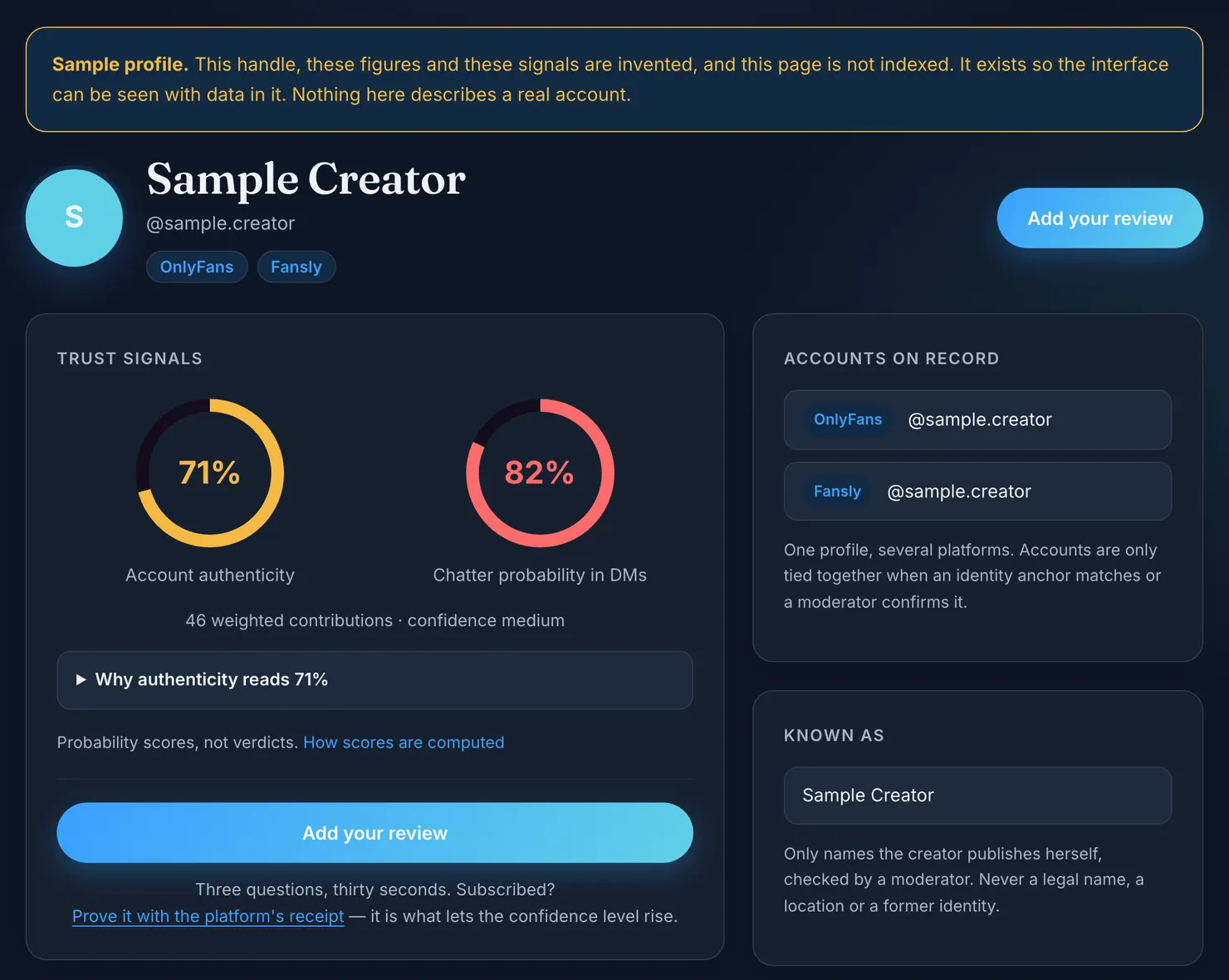
Legit's finder takes a username, a public name or a pasted profile link. It looks for what you typed inside usernames, display names, moderator-published public names and former usernames, so it can still find an account after its handle has changed. Results are ordered by how many contributions a profile has, then alphabetically. Position says nothing about whether an account is genuine, and nobody can pay to move it.
You should know its limits before you lean on it:
- It only knows accounts that have been submitted. We don't crawl OnlyFans, so a missing account tells you nothing about the account. You can submit it yourself.
- We can't read OnlyFans pages. OnlyFans shows a visitor nothing outside its app that we can read, so an OnlyFans account on its own carries no public fact. A profile with an empty gauge isn't under suspicion. We simply have no figure to show.
- Links from elsewhere get a human check. When a Fansly bio points to an OnlyFans address, we can't confirm the link from the OnlyFans side, so a moderator looks at it before the two are tied together. That is deliberate: anyone can paste a known creator's address into a bio.
- The figures are probabilities. The authenticity estimate rests on facts we read ourselves and takes no votes. It stays between 10% and 90%, and its confidence stops at medium. You can read each rule on our methodology page.
Found the account? Check it, then say what you saw
Paste the username into the finder to see the accounts tied to it and how likely it is that someone other than the creator answers the messages. If you subscribe, adding what you saw helps the next person who types the same name.
Platform rules can change without notice, and the archived copy we read may not be the latest. The current version is on OnlyFans' own terms page, so check there before relying on a detail.
Questions people ask
Can you search OnlyFans by name?
You can try, but a match on a name only tells you that the words on a page agree with the words you typed. Several accounts can show the same name, and whoever runs an account writes it. Treat any result as a candidate, then look for the exact address in a bio she runs.
How do I do an OnlyFans search by username?
Type onlyfans.com/ and the username into your browser's address bar. No search box is involved, and the address opens one page. Copy the username from a bio she runs rather than typing it from memory, because one wrong character can take you to a different account or to nothing at all.
Should I run an OnlyFans search by name or username?
Use the username whenever you have it. Start with the name only when it is all you know, and use it to work out the username, usually by finding a social account she runs and following the link in its bio. The name helps you begin. The username is what you check before paying.
Can I search for users by name on OnlyFans if they are fans?
We have found no OnlyFans page describing a way to look up subscribers, and we wouldn't go looking for one. On Fansly, the help pages say the search bar is designed to display creators, and anyone who isn't a creator won't appear. If you need to reach another fan, ask them for their username.
Why does a search for a name bring up several similar accounts?
Because the name on a profile is only text. Copies often take a creator's stage name and photos, then register a close variation of her username, with an underscore or a word like official added. They look identical in a list. Compare each address, character by character, with the one she publishes.
How can I tell if the OnlyFans account I found is really hers?
Open a profile you already know is hers and see whether it links to that exact address. A copy can paste her links into its own bio, but it can't add its link to hers. Compare the username closely, run a reverse image search on the profile picture, and stop if anyone asks you to pay elsewhere.