How to spot a fake OnlyFans account
Yes, fake accounts exist. Most are copies: someone takes a real creator's photos, opens an account under a name close to hers and sells to people who think they are paying her. A few checks catch most of them.
Yes, fake OnlyFans accounts exist, and most of them are copies. Someone saves a real creator's public photos, opens an account under a name one or two characters away from hers, and sells to people who think they are paying her. You can catch most of them before paying with a few checks: where the link came from, whether the address matches the one she publishes herself, whether her other accounts link back to it, how old and how full the account looks, and whether anyone is pushing you to pay outside the platform. None of these signs proves anything alone. Three or four together are a reason to stop.
This guide is for the person about to subscribe, or already subscribed and starting to wonder. It covers how the copies work, the signs you can check yourself, what the platforms' own pages say, what Legit checks for you, and what to do once you have found one. We don't name creators or accounts here: every example is invented, starting with an account we simply call example.
A note on sources. Fansly's rules come from its help centre. Our browsers cannot open onlyfans.com, so for OnlyFans we read the copy of its Terms of Service kept by the Internet Archive. The advice on scams comes from the US Federal Trade Commission. Platform terms change, so check the current version before you rely on a detail: OnlyFans publishes its own at onlyfans.com/terms and Fansly at fansly.com/tos, even if our tools can only read the first through an archive.
Are there fake OnlyFans accounts?
There are, on OnlyFans and on every other platform that sells subscriptions. The common kind is an impersonation: an account that shows a real creator's face and body but is run by somebody else, usually to collect subscription fees and paid messages before it is reported and closed. Copies of this kind cost almost nothing to make. The photos are already public on her social media and her free posts, and a new account takes minutes to open.
A copy has one problem it cannot solve. The real creator has been building her presence for months or years. She links her accounts from her own profiles, her audience knows where to find her, and her paid page has a back catalogue. A copy has to borrow all of that, and it usually can't. Most of the checks below come down to that gap.
Can OnlyFans accounts be fake if creators have to verify their ID?
The archived OnlyFans terms say that to open a creator account you must upload a valid form of ID and two photos of yourself, and add a bank account or payment method for payouts. That is a real barrier. It does not tell you, as a subscriber, that the person in the posts is the person who passed the check. The terms do not describe how OnlyFans compares the two, and nobody outside the company can see that comparison happen.
The same terms also say plainly that OnlyFans does not vouch for the legitimacy, accuracy or reliability of the content users post. So treat the ID check as one hurdle a copy has to clear, not as a promise that every account is who it says it is. Fansly's help pages, for their part, have a whole article for creators who find a fake profile impersonating them, which tells you the platform expects it to happen.
What is a fake OnlyFans scam?
The phrase covers two different things. The first is a copy account on the platform itself, which takes subscription money and sells recycled photos. The second doesn't touch the platform at all. Malwarebytes, summarising reporting by USA Today, describes impersonators who open accounts on TikTok with content stolen from real creators, sometimes with an AI-generated voice, move fans to a private messaging app, ask for payment through a peer-to-peer transfer app for "exclusive" content, and then block them (Malwarebytes). The creator's name is used, but OnlyFans is only the bait.
The second kind is the more dangerous one, because nothing about the payment is recorded anywhere you can dispute it. A subscription charged through the platform at least shows up on a statement with a merchant name. A transfer to a stranger's app account is gone once it is sent.
How to spot a fake OnlyFans account
Work through these before you pay. They take a couple of minutes, and you need nothing but a browser.
Where did you find the link?
Start with how the account reached you. A comment under one of her posts, a direct message from an account you don't follow, a "my backup page" or "my new page" link sent out of the blue: these are how copies get traffic, because a copy has no audience of its own. The real creator posts her link on her own profiles, usually in the bio of the social accounts she has run for a long time.
So begin from her, not from the link you were handed. Open the social account you already know is hers, find the address she publishes there, and follow that. Our guide on finding someone on OnlyFans explains how to get from a creator's public profiles to her real page without guessing.
Is the handle exactly right?
A copy wants an address that looks right at a glance. It adds an underscore, doubles a letter, swaps an l for a 1, or tacks a word onto the end. Words like "official", "real", "backup" or "VIP" in a handle are a reason to look harder. They are not a badge: anyone can type them when they open an account.
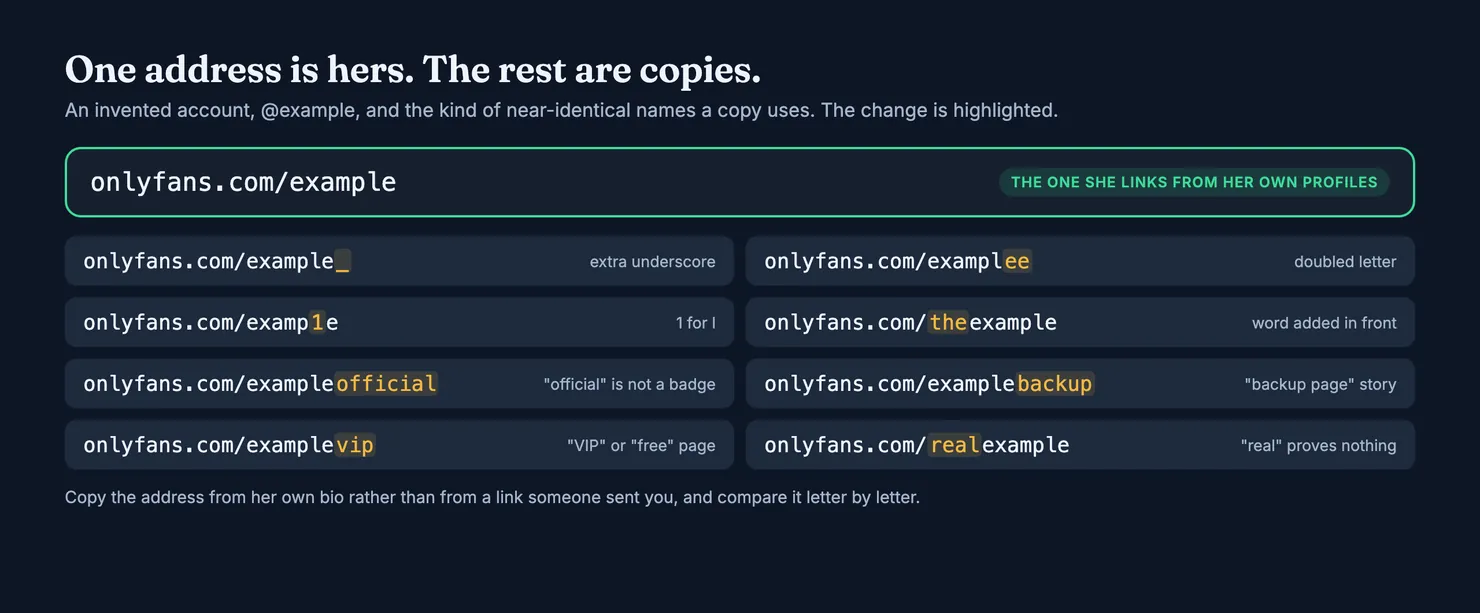
Compare the address in your browser with the one in her bio, letter by letter. On a phone, copy the address and paste it into a note, where the characters are larger than in the address bar. If you were sent the link, don't trust the text of the link either: what you tap and where it goes can differ, so check the address once the page has opened.
Do her other accounts link back?
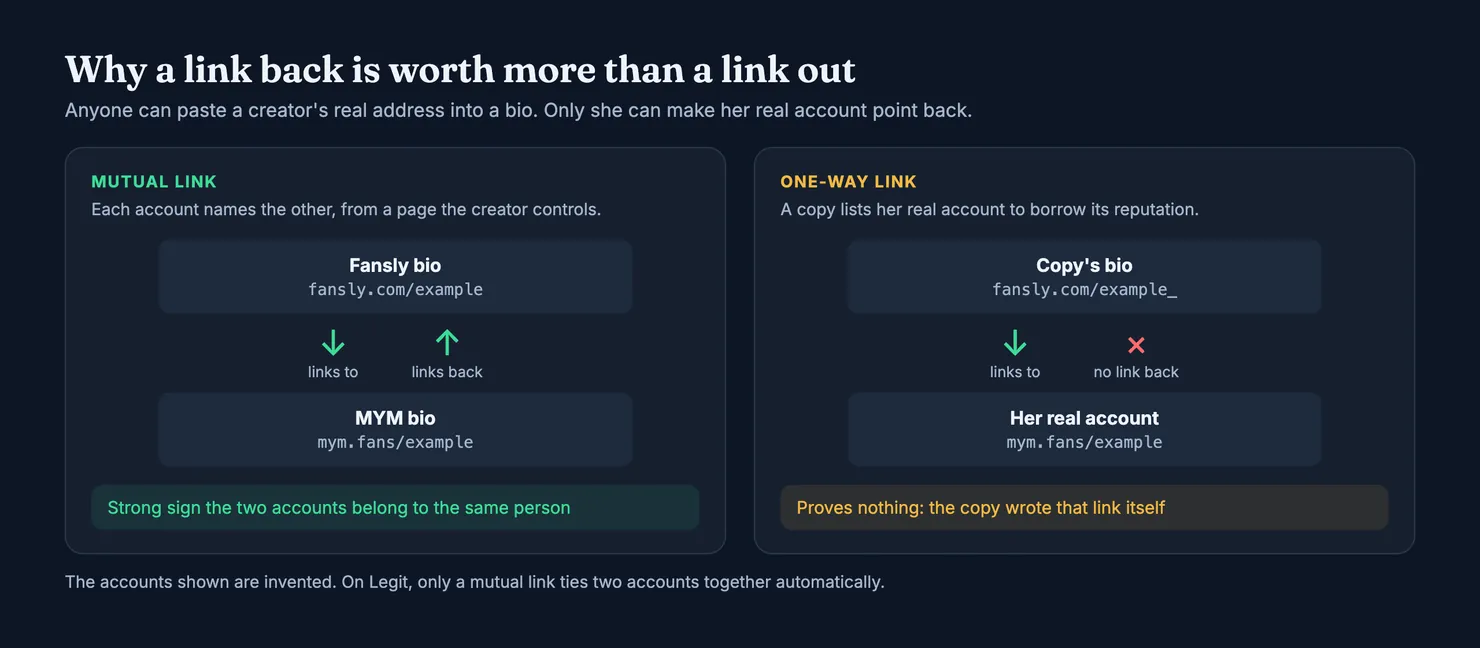
This is the strongest check you can do yourself. If the creator has a Fansly, an MYM page or social accounts, open them and look at where they point. Does one of them link to this exact OnlyFans address? If it does, that link was written by whoever controls her real account, which is very hard for a copy to arrange.
Be careful about the other direction. A copy can paste her real Instagram or her real Fansly into its own bio, and often does, because it borrows her reputation for free. A link from the account you are checking to her other accounts proves nothing. Only a link from her known accounts to this one counts.
Does the account look new or thin?
Someone who has been creating for a long time has a long feed: hundreds of posts, videos as well as photos, comments from subscribers going back months. A copy usually has a handful of posts, all of them pictures you have already seen on her free social accounts, and rarely video, because video is harder to steal in quantity and easier to recognise. Look at the number of posts and media the page shows before you subscribe, and at how far back the visible posts go.
A small account is not proof of a fake. New creators start somewhere, and some keep their feed short on purpose. What should worry you is the combination: a famous face, a tiny library, and an account that seems to have appeared last week.
Do the photos appear under another name?
The FTC suggests a reverse image search of a profile picture when you suspect a fake profile, and says a photo associated with another name, or with details that don't match, is a sign of a scam (FTC: romance scams). On a creator account the result usually points somewhere useful: the same picture on her long-running social account, under her usual handle. If that handle is not the one you are about to pay, you have your answer.
Use a general search engine's image search for this. Don't upload her photos to services that promise to find a person's other accounts or real identity from a face. That is not something a subscriber needs, and it is exactly how creators end up harassed off the internet.
Does it want you to pay somewhere else?
This is the clearest sign of all. A request to pay by gift card, bank transfer, a money transfer app or crypto, or to carry on the conversation on another app, matches the pattern the FTC describes for people running fake profiles: they want to message you off the platform and to be paid in ways that are hard to reverse (FTC). On gift cards the FTC is blunter still: no real business or government agency will ever tell you to buy one to pay them (FTC: gift card scams).
Hurry is worth noticing too. "Only today", "last spot", "pay now or I delete this": pressure to decide quickly works best on people who haven't had time to check, which is the point of it. A creator who is really selling to you will still be there tomorrow.
Fake websites that look like the platform
Some fakes are not accounts at all. They are websites built to look like a creator platform, with a login form or a payment page, reached from a link-in-bio page or a message. Fansly's help centre says it operates only under fansly.com and that any other domain imitating it is fraudulent (Fansly help). The archived OnlyFans terms allow a domain name that contains the OnlyFans trademark only with written permission, and only if it redirects to the creator's own OnlyFans account.
The practical rule follows from that. Before you type a card number or a password, read the address bar. If the page says OnlyFans or Fansly but the domain is something else, close it. A genuine link-in-bio page sends you on to the platform; it has no reason to ask for your card itself. Our guide on whether OnlyFans is safe covers phishing and payment safety in more detail.
What Legit checks for you
Every profile on Legit carries an authenticity estimate: how likely the account is to belong to the person it shows. It is built only from facts we read on public pages and on our own site, not from votes, because a crowd's opinion about a stranger is easy to manipulate. A claim by the creator moves nothing either. The whole rubric, with every rule and its weight, is published on our methodology page and loaded straight from the code that computes it.
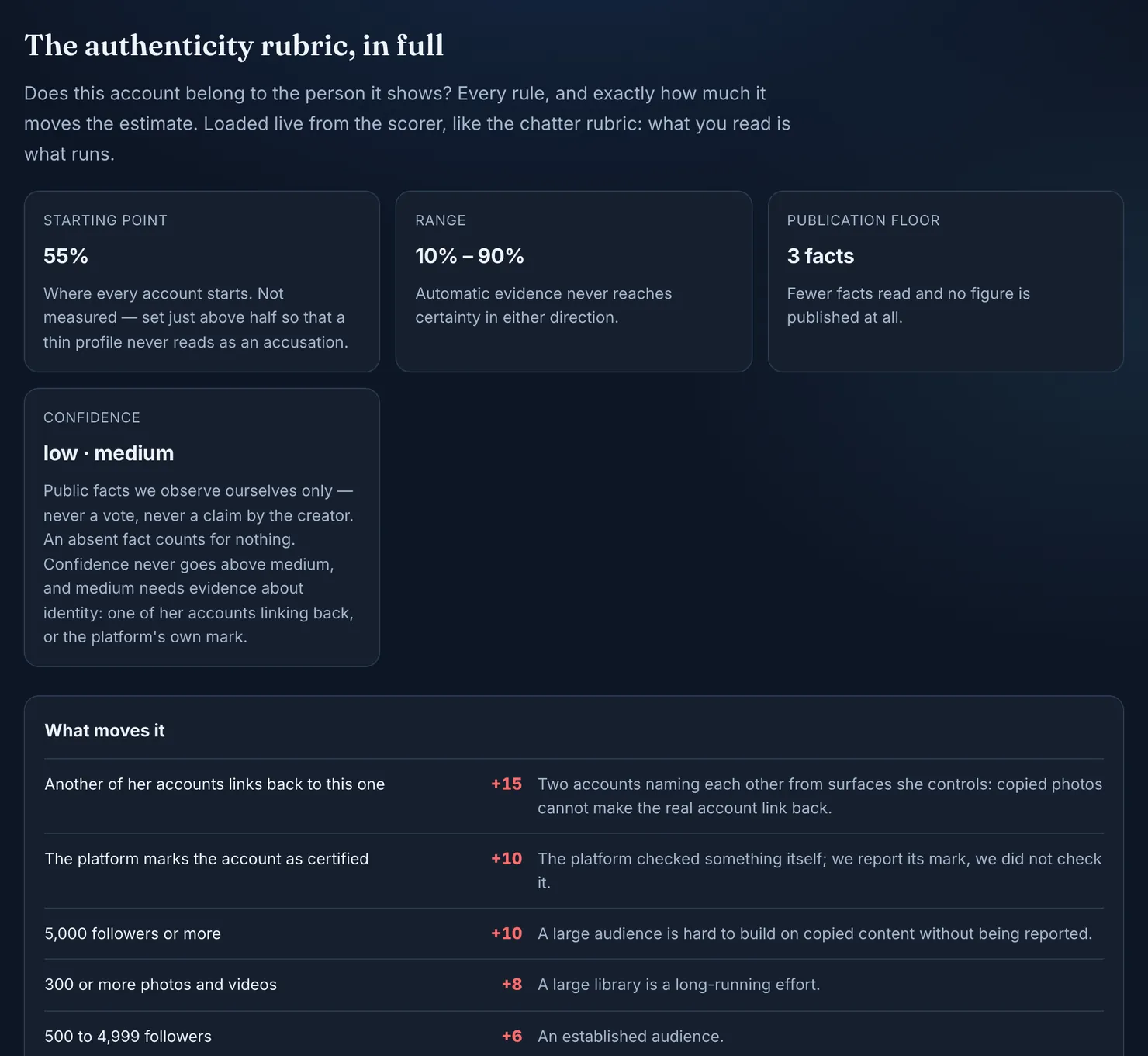
The largest single step is the check described above: another of her accounts linking back to this one. On the methodology page it moves the estimate up by 15 points. A link in one direction only moves it by 3, for the reason a copy exploits: anyone can paste a known creator's address into a bio. When a Fansly bio and an MYM bio link to each other, we tie the two accounts together on one profile automatically. A link that goes only one way, which includes every link to OnlyFans, goes to a moderator instead, and so does any account that already sits on another profile.
The other rules look at whether the account looks like a long-running business or a fresh copy: the size of its audience, the size of its library, a platform's own certification mark, an empty bio, a missing profile picture. Each step is small, and the methodology page says exactly how small.
The estimate has limits, and we say so on every profile. It starts at 55%, never goes below 10% or above 90%, and its confidence never rises above "medium". With fewer than three facts read, no figure is shown at all, only a dash. OnlyFans pages cannot be read by our tools, so an account that exists only on OnlyFans has less to go on than one with a Fansly or MYM page as well.
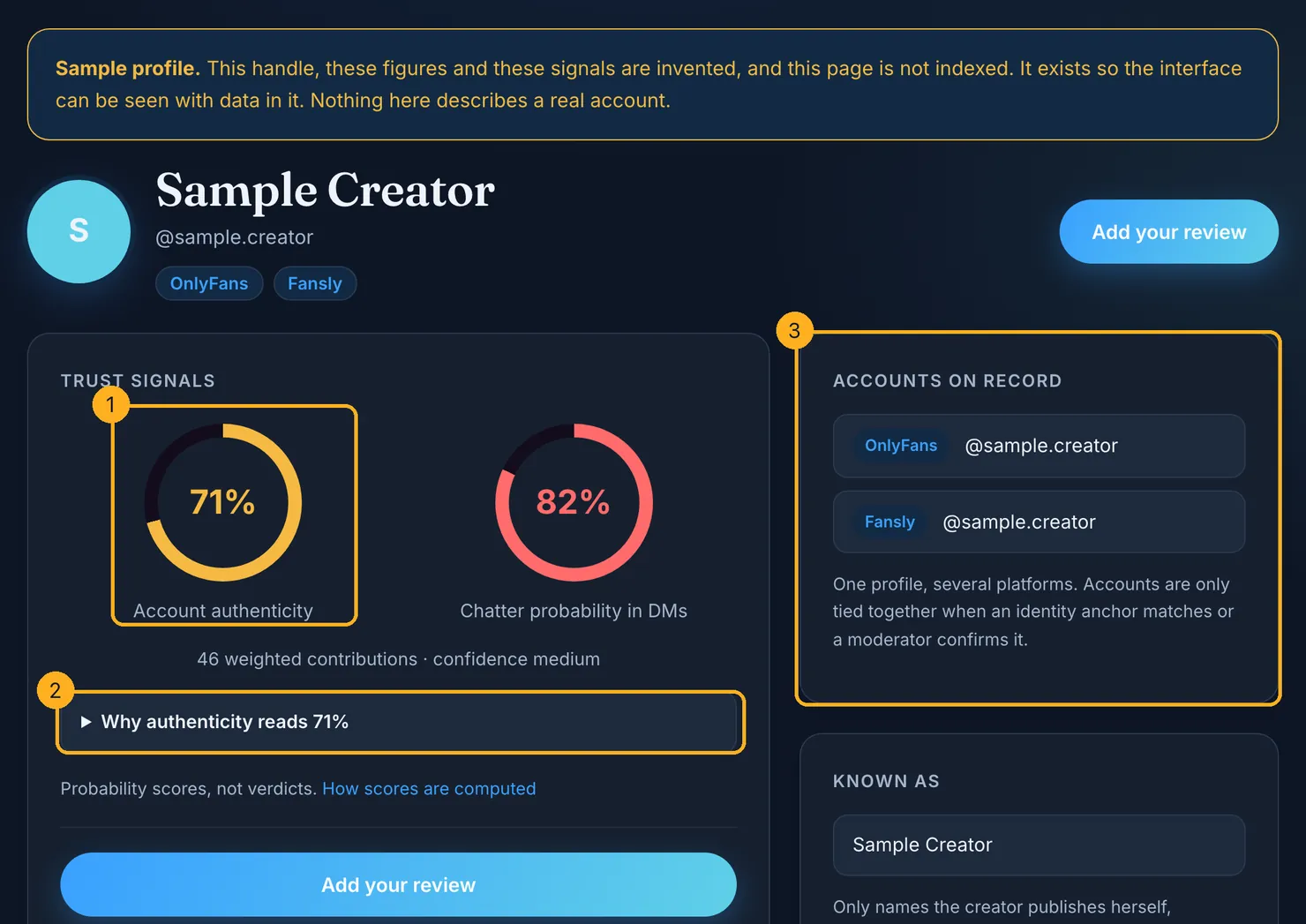
Reviews from other subscribers sit on the same profile, separately from this estimate, along with a chatter probability that says how likely it is that someone other than the creator answers the messages. If you are paying mainly for conversation, our guide on OnlyFans chatters explains what that figure measures, and the one on OnlyFans agencies covers who else may be running a real creator's account.
You can look up an account on Legit before you subscribe. If it isn't there yet, adding it records the public facts we can read, and the next person who checks will find them.
How to report a fake OnlyFans account
Reporting a copy is worth the minute it takes. It is the only route by which the account comes down, and the platform cannot act on what nobody tells it about.
On Fansly, open the profile, click the three dots at the top right, choose Report, pick a reason, add details and confirm. Fansly says it responds to all complaints within five business days, that reports are anonymous, and that it cannot give you updates on its investigations (Fansly help: how to report content). Fake websites imitating Fansly are reported to the company hosting them, and Fansly lists several hosts' abuse forms on its impersonation page.
On OnlyFans, use the report option on the profile itself, or contact support. The archived terms point to a Complaints Policy for reporting content and give support@onlyfans.com as the contact address. We could not read OnlyFans' help pages ourselves, so check the current wording there before you rely on a particular step.
Can you report someone on OnlyFans for scamming?
You can report the account, and you should. What happens next is the platform's decision, and you are unlikely to hear about it. Reporting does not get your money back by itself either; that is a separate conversation with the platform's support or with your bank, covered below.
Should you tell the real creator?
If she takes messages from fans, yes. She is the one who can ask the platform to remove a copy using her identity, and the one who loses most from it: Fansly, for example, offers creators a free takedown service for impersonation (Fansly help). Keep the message short: the address of the copy, where you saw it, and nothing more. Don't go looking for any other information about her to make your point.
What to do if you already paid a fake account
- Stop paying. Turn off auto-renew on the subscription and send nothing more, on the platform or off it. Don't answer messages that promise to make things right in exchange for one more payment.
- If you paid through the platform, contact its support with the account's address and what you were sold. Our guide to OnlyFans refunds explains what the terms say and why an unjustified chargeback can put your account at risk.
- If you paid off the platform, by gift card, transfer app, wire or crypto, contact the company you paid through or your bank straight away. The FTC says to report a gift card scam to the card's issuer right away, however long ago it happened, and to keep the card and the receipt (FTC).
- Report the fraud. In the US, the FTC takes reports at ReportFraud.ftc.gov and also suggests telling the site or app where you met the scammer (FTC). Elsewhere, your bank can tell you who takes fraud reports where you live.
- Write down what you saw. A short note helps the next person more than anything else. You can rate the account on Legit and say what made you doubt it.
Being taken in by a good copy says nothing about you. It happens to careful people, and the creators whose faces are used are as much its targets as you are. They are made to look right at the moment you are least inclined to check. If you are weighing up where to subscribe in the first place, our comparison of Fansly and OnlyFans sets out what each platform's own pages say, and a quick search on Legit shows what other subscribers found before you.
Questions people ask
Are there fake OnlyFans accounts?
Yes. The common kind is an impersonation: an account that reuses a real creator's public photos under a name close to hers and sells to people who think they are paying her. Others are not on OnlyFans at all, but on social apps, where someone uses her name and asks for payment through a transfer app before blocking you.
Can OnlyFans accounts be fake if creators verify their ID?
They can. OnlyFans' terms ask creators for a valid ID and two photos before an account opens, which is a real barrier. But the terms do not explain how the posts are compared with that check, and they say OnlyFans does not guarantee the legitimacy of what users post. Treat the ID check as one hurdle, not as a guarantee.
How do you spot a fake OnlyFans account?
Check where the link came from, compare the handle letter by letter with the one in her own bio, and see whether her other accounts link back to it. Then look at the size and age of the library, run a reverse image search on the profile picture, and walk away from anyone who asks to be paid off the platform.
How do you report a fake OnlyFans account?
Use the report option on the profile itself, or contact the platform's support with the account's address and what made you doubt it. On Fansly, the three dots at the top right of a profile open a Report option; Fansly says reports are anonymous and answered within five business days, without updates on the outcome.
What should I do if I paid a fake account?
Stop paying and turn off auto-renew. If you paid through the platform, contact its support. If you paid by gift card, transfer app, wire or crypto, contact that company or your bank straight away, keep any receipts, and report the fraud; in the US the FTC takes reports at ReportFraud.ftc.gov.
Does a handle with 'official' or 'real' in it mean the account is genuine?
No. Anyone can type those words when they open an account, and copies use them precisely because they sound reassuring. The only address that counts is the one the creator publishes on her own long-running profiles. Compare it character by character with the page you are about to pay.