Fansly search: finding the right creator
Fansly's search bar finds creators by username, name, keyword or hashtag, and Discovery lets you browse by tag. The quickest route is still her own link. Finding an account is one step; making sure it belongs to her is another.
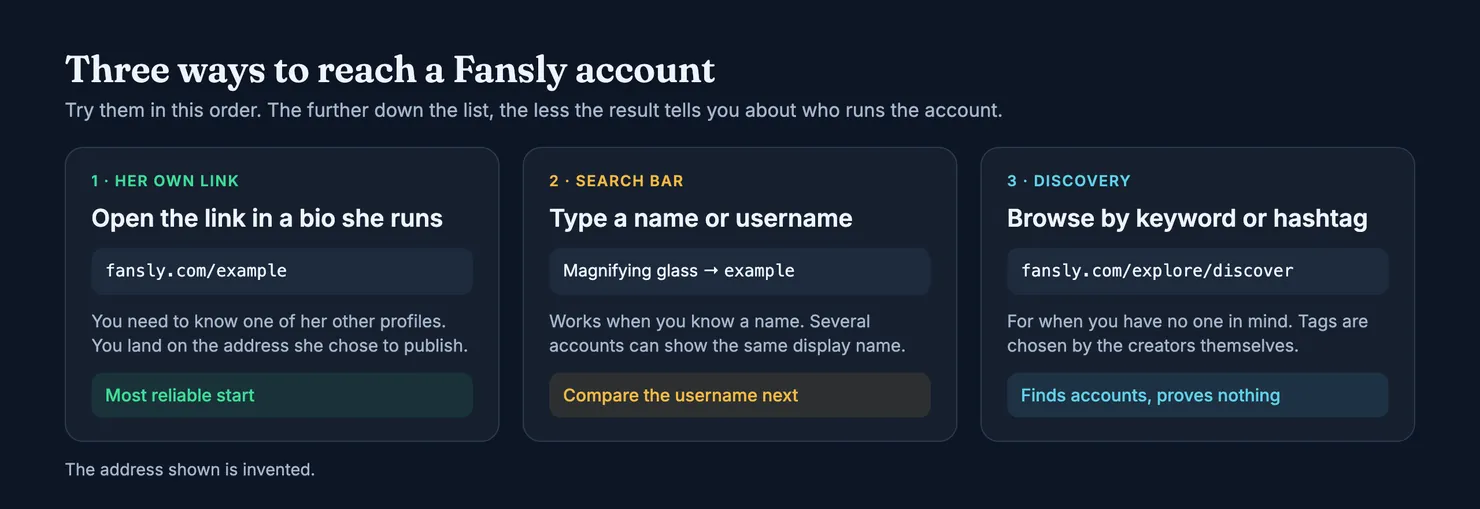
Fansly has its own search. Click the magnifying glass and type a creator's username, her display name, a keyword or a hashtag. If you know the username you can skip all that and open fansly.com/username directly, and if she posts her link in a bio she runs elsewhere, that is better again, because it lands you on the address she chose to publish. Search finds accounts. It can't tell you who runs them, and that second question deserves a couple of minutes before you pay anyone.
What follows about Fansly comes from its own help centre, read page by page and linked next to each claim. Help pages get rewritten, so if something here no longer matches your screen, believe your screen and check the current Fansly help centre. Every account in this guide is invented, starting with one we simply call example.
How to search on Fansly
Where is the search bar?
It sits behind the magnifying glass. Fansly's navigation page says you can search there by hashtag, keyword or creator name, and that you will also see trending tags and suggested creators (Fansly help: navigating Fansly). So one box does two jobs: looking up a person you have in mind, and browsing for someone you don't.
None of the pages we read explains how results are ordered. Don't take the first result to be the right one just because it came first.
How do I find someone on Fansly if I only know her name?
Type the name, then look at the username on each result rather than the big text above it. Fansly gives every account three identifiers, and they behave very differently (Fansly help: managing my Fansly name):
- Display name. It doesn't have to be unique, it can contain symbols and spaces, and it can be changed instantly from the account settings.
- Username. It is unique, it appears in the profile address, and it is limited to letters, numbers and approved special characters. Fansly asks creators who want to change theirs to contact Support, so it moves less easily than a display name.
- Profile link. The direct address of the profile, built on the username.
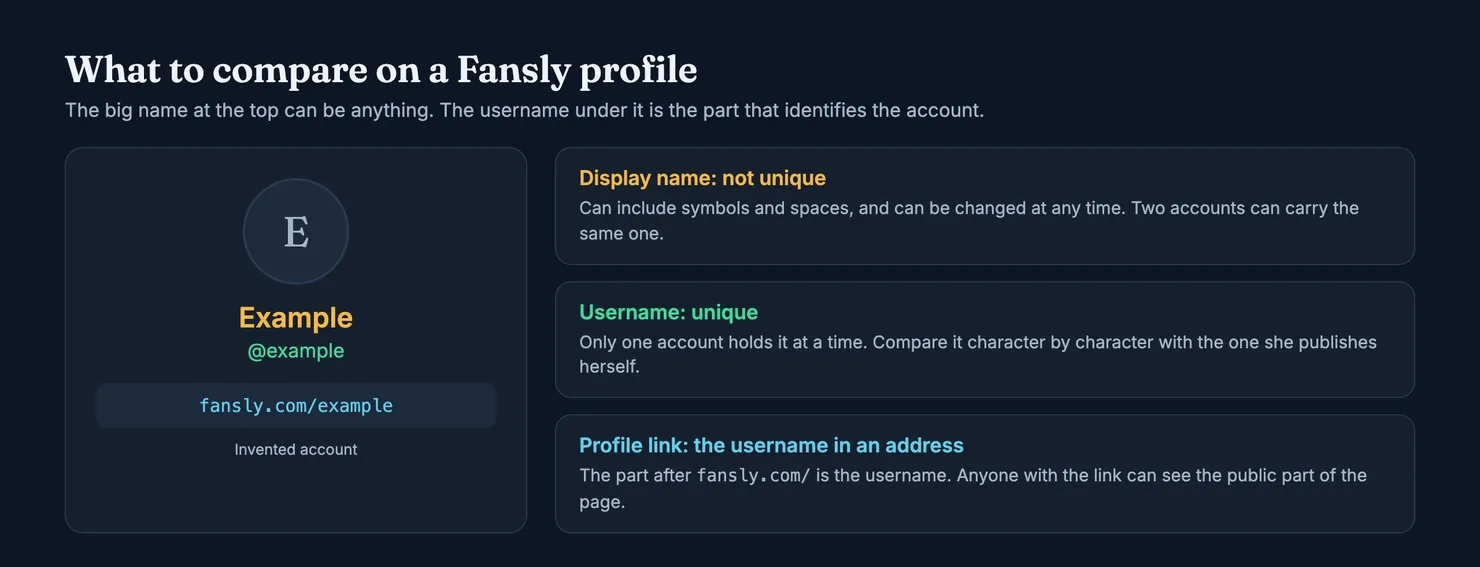
That is why a name search can mislead you. Say you are looking for a creator called Example. You might get example, example_ and exampleofficial, all three showing "Example" in large type. At most one of them is hers, and the display name gives you no way to tell which. Get the username from a place she controls and compare it character by character. We go through the same problem on OnlyFans in our guide to searching by name or username.
Is there a Fansly user search for fans?
No. Fansly says its search bar is designed to display creators, and that someone who isn't a creator won't appear in the results (Fansly help: unable to find a user). If you are looking for another subscriber, search won't help you, and that seems fair enough to us. Fans didn't sign up to be listed.
Go straight to the profile link
Search is often the slow way round. A Fansly profile lives at fansly.com/username, anyone with that link can see the public part of the page, and a creator can copy it from the three dots on her profile (Fansly help). Fansly's own advice when search comes up empty is to ask the creator for her direct link.
You rarely need to ask, because most creators who want subscribers already publish it. Start from a social account you know is hers, open the bio and follow the link from there. It takes less time than comparing search results, and you skip the lookalikes altogether.
The link has to come from her, though. A "my new page" link sent to you in a direct message, or dropped in a comment under her post, is a stranger's claim about her. Copies get their traffic that way, as our guide to spotting a fake account explains.
Check the domain too. Fansly states that it operates only under fansly.com and that any other domain presenting itself as Fansly is fraudulent (Fansly help: stolen identity). The US Federal Trade Commission gives the general version of that advice: if a message claims there is a problem with your account or your payment, go to the company through a website you know is real, not through the details in the message (FTC on phishing).
Browsing by tag on the Discovery page
If you have no one in mind, the magnifying glass also leads to Discovery, at fansly.com/explore/discover. You can search a keyword such as "cosplayer" or "fitness", click a hashtag in a post's caption to see related posts, and try variations of a term. A filter icon above the For You Page or a hashtag search lets you pick up to five hashtags, and those filters reset when you leave the page (Fansly help: finding new content).
What you see here depends on a few things, and only the first is in your hands:
- Your own behaviour. Fansly says suggestions draw on what you browse and engage with, so two people can get different pages.
- The creator's labels. Tags are private labels she sets on her profile to help Fansly match her with people. Hashtags are public and sit in post captions (Fansly help: discoverability).
- Her opt-ins. The For You Page only carries posts she ticked for it, while the Suggestions tab includes all creators automatically, according to the same page.
The practical point is that absence from the For You Page says nothing about an account, and neither does a tag. A tag tells you how someone wants to be found. It doesn't check anything.
Why a creator doesn't show up in Fansly search
Why can't I find someone on Fansly?
Fansly lists four usual reasons (Fansly help), and the table below adds a fifth from its privacy page.
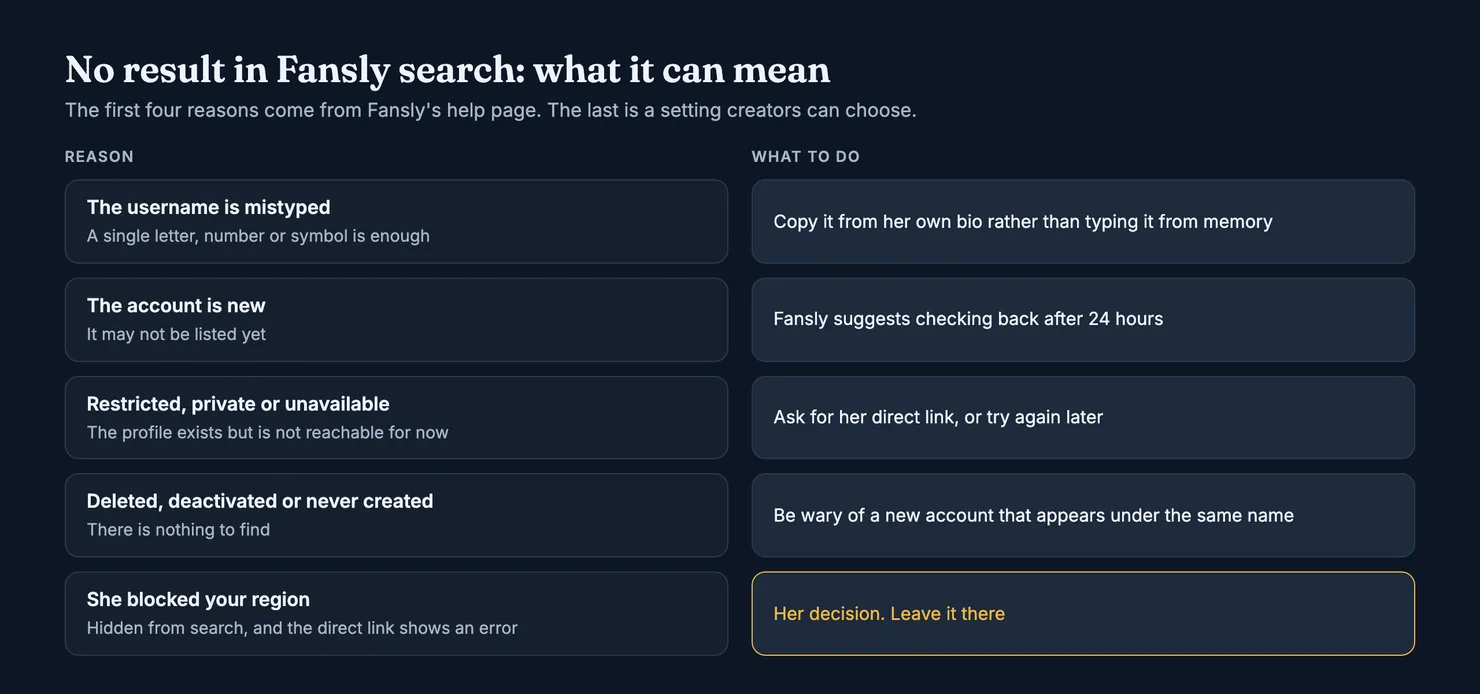
- The username is mistyped. Check the spelling, including numbers and special characters. Copying it from her bio beats typing it from memory.
- The account is new. Fansly suggests checking back in 24 hours.
- The profile isn't accessible. It may be restricted, private or temporarily unavailable.
- The account doesn't exist. It may have been deleted or deactivated, or it was not created in the first place.
Be a little careful with that last one. If an account you knew has gone and a new one turns up under the same display name, it isn't necessarily her coming back. Look for the new address in a bio she has run for a long time before you trust it.
What if she has blocked my region?
Creators can block locations from their privacy settings. Fansly says people in a blocked location won't see the profile in search results or on the For You Page, and get an error if they open it directly (Fansly help: privacy settings). From where you sit, that looks exactly like an account that doesn't exist.
That is her decision about who sees her work. Plenty of creators have good reasons for it, and we don't offer a way round it. If it is why you can't find her, leave it there.
The profile opens but the posts are hidden. Is that the same thing?
No, search has done its job in that case. The same privacy page describes timeline permissions, which let a creator control who can see her timeline, for example by requiring a follow. A hidden timeline tells you about her settings and says nothing either way about whether the account is hers.
What about a Fansly finder or a Fansly search engine?
Search for either phrase and you get sites that have nothing to do with the company. Fansly's help pages don't mention any of them, and by its own statement Fansly works only under fansly.com, so whatever they are, they aren't Fansly. We don't name or rate them here. A few points apply to any of them, ours included:
- Coverage is unknown. An outside list holds whatever its owner managed to gather. A missing account doesn't mean it isn't on Fansly, and a listed one may have gone.
- A listing is not a check. Finding an address in a directory tells you as little about who runs it as finding it in Fansly's own search bar.
- Your login stays on Fansly. No outside site needs your Fansly password. If you did enter it on a site pretending to be Fansly, the platform advises changing your password, turning on two-factor authentication and warning your bank (Fansly help).
Some of these sites promise more than finding a shop: tracing the person behind it, through her face or her whereabouts. This guide doesn't help with that. A stage name is a boundary, and a paid subscription doesn't buy you the right to cross it.
Found the account. Is it really hers?
Anyone can open an account and pick a display name that matches a known creator. Fansly has a whole help article for creators who find a fake profile impersonating them, so it clearly expects this to happen (Fansly help). Before you subscribe, three checks do most of the work.
Do her other accounts link back to this one?
This is the test that holds up best. Open a profile you already know is hers and see whether its bio points to this exact Fansly address. Looking the other way round proves much less: a copy can paste her links into its own bio, but it can't put its link into hers.
Does the username match, character by character?
An underscore, a doubled letter or an added "official" is the usual difference between a copy and the account it copies. Compare the address against the one she publishes, not against your memory of it.
Is anyone asking you to pay somewhere else?
Subscriptions, tips and content purchases on Fansly go through its wallet (Fansly help). A request to move the conversation elsewhere and pay by gift card, wire transfer, transfer app or cryptocurrency is a different thing altogether. The FTC lists both the move off the platform and those payment methods among the marks of romance fraud (FTC on romance fraud), and the pattern carries over. Stop there.
If you find a copy, you can report it from the three white dots at the top right of the profile: Report, a reason, your details, Confirm. Fansly says it answers every complaint within 5 business days, that reports are anonymous, and that it can't give you updates on an investigation (Fansly help: reporting content).
How Legit's finder checks a Fansly account
Legit's finder takes a username, a public name or a pasted profile link. If the account is on Legit, you get its profile.
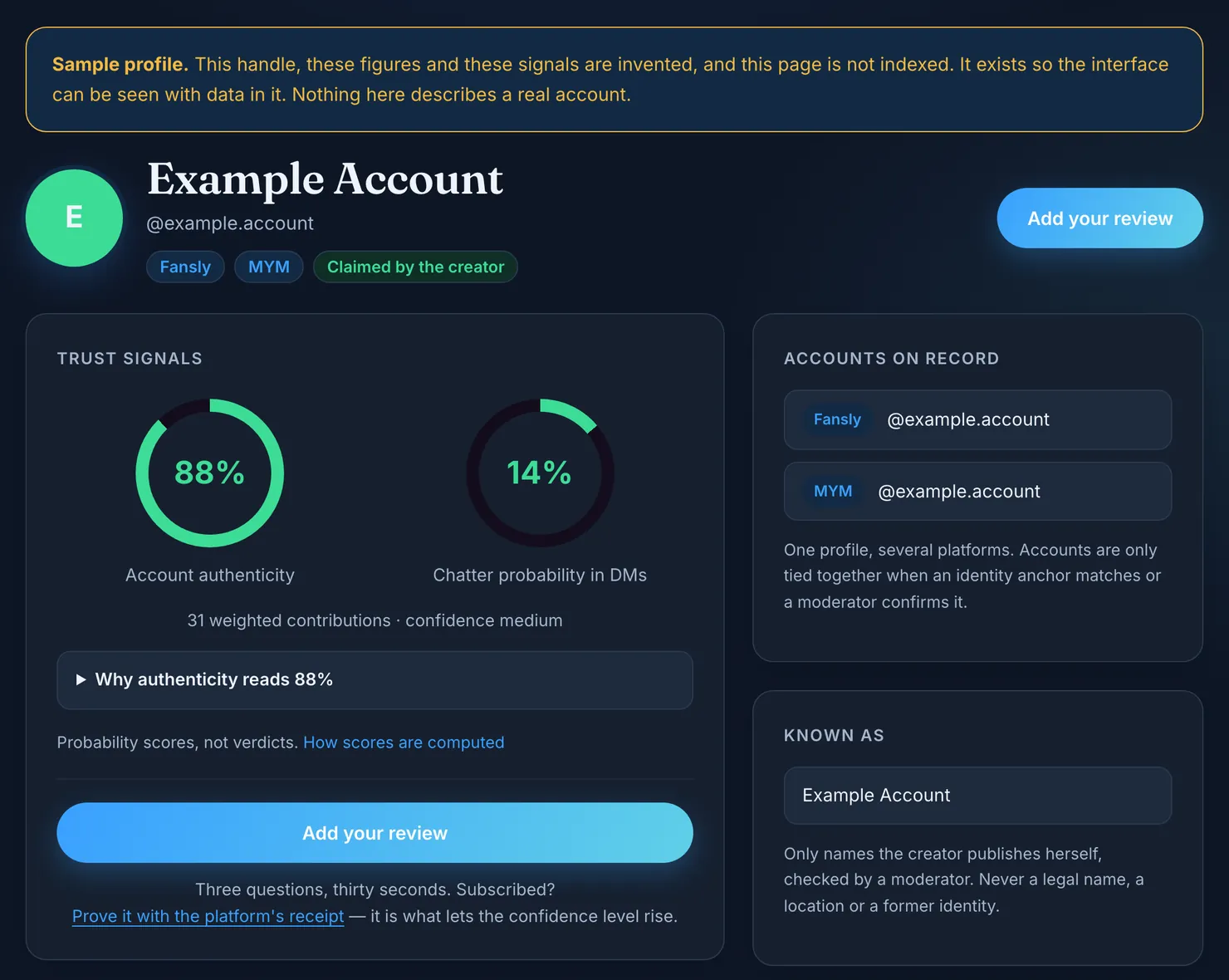
The authenticity figure on that page comes from facts we read on the public Fansly profile and from the accounts tied to it. Votes and creators' own claims don't move it. Each rule and its weight is published on our methodology page. The estimate starts at 55%, and the strongest single rule is another of her accounts linking back, worth 15 points. A link in one direction only is worth 3, because anyone can paste a known creator's address into a bio.
The same logic decides what gets tied together. When a Fansly bio links to an account whose own bio links back, we join the two automatically. A one-way link goes to a moderator instead.
It has limits, and you should know them before you lean on it:
- The estimate stays between 10% and 90%, its confidence stops at medium, and below three facts we publish no figure at all. It is a probability, not a verdict.
- The finder only knows accounts that have been submitted. We read one public page at a time and don't crawl Fansly, so a missing account means nothing about the account.
- A genuine creator with no linked accounts can read low. That only means we have little evidence either way.
- The second figure, the likelihood that a chatter answers messages, comes from what contributors report rather than from Fansly's page.
If the account isn't listed, you can submit it and we read its public page once. If you have already subscribed, a short review helps the next person: rate the account and say what you saw.
Looking for the same creator elsewhere? OnlyFans works differently, and our guide to finding someone on OnlyFans covers it. For the differences that matter once you pay, see Fansly vs OnlyFans. Fansly's terms of service are the place to check its current rules, since they can change at any time and our browsers can't open them to confirm a detail for you.
Questions people ask
How do you search on Fansly?
Click the magnifying glass and type a creator name, a keyword or a hashtag. The same place shows trending tags and suggested creators. If you already know the username, you can open fansly.com followed by that username instead, which skips the results list and any lookalike accounts in it.
How do I find someone on Fansly by username?
Type the exact username in the search bar, or add it after fansly.com in your browser's address bar. It is the only one of the account's names that is unique, so copy it from a bio she runs elsewhere if you can. One wrong character can lead you to a different account or to nothing.
Why is a creator not showing up in Fansly search?
Fansly gives four usual reasons: the account is new, so check back in 24 hours; the username is mistyped; the profile is restricted, private or temporarily unavailable; or the account was deleted or deactivated. A creator can also block a location, and people there won't see her in search. That last one is her choice to make.
Can you search for fans or subscribers on Fansly?
No. Fansly says its search bar is designed to display creators, and someone who isn't a creator won't appear in the results. The pages we read describe no directory of subscribers. If you need to reach another fan, you would have to get their link or username from them directly.
Is there an official Fansly finder or search engine?
Fansly's own search is the magnifying glass on fansly.com, together with its Discovery page. Fansly says it operates only under that domain, so any finder on another address is not Fansly's. Treat an outside list as an unverified directory, and don't enter your Fansly password anywhere except on fansly.com.
How can I tell if a Fansly account is really hers?
Open a profile you already know belongs to her and see whether its bio links to that exact Fansly address. A copy can paste her links into its own bio, but it can't add its link to hers. Compare the username character by character too, and stop if anyone asks you to pay outside the platform.