What is Fansly, and how does it work for fans?
Fansly is a subscription site where creators sell photos, videos, messages and live streams to fans. Following is free; tiers renew every month; locked posts and tips cost extra.
Fansly is a subscription site where creators sell access to their photos, videos, messages and live streams, and fans pay them directly through the platform. Following a creator costs nothing; subscribing to one of her tiers is a monthly charge that renews on its own; and locked posts, paid messages and tips are paid on top. Fansly's own help centre says it hosts adult content, so creators and fans in several countries go through an age check. Everything below is read on that help centre, from the side of the person paying.
This guide is for fans, not for people thinking of selling on Fansly. It explains how access works, how a payment leaves your account, what you can and cannot get back, how to open and protect an account, and how to make sure the account you are about to pay is the one you meant. If you already know the basics and want the differences with OnlyFans, our Fansly vs OnlyFans guide sets them out row by row.
What is Fansly, in plain terms?
Fansly is a website, at fansly.com, where each creator runs a profile with a public part and a paid part. Fans can follow her for free, subscribe to see her paid posts, buy individual pieces of media, send tips, message her and watch her live streams. Fansly takes care of the payments, the age checks and the reports; the creator decides what she posts, at what price and for whom.
Two details matter before anything else. First, prices are set by each creator, not by Fansly, and every transaction is shown and processed in US dollars, whatever your card's currency (Fansly, What currency does Fansly use). Your bank converts the amount and may add its own rate and fees, which is why the figure on your statement rarely matches the round number you saw on the profile. Second, Fansly's help centre describes itself as one of the platforms "hosting adult content", which is the reason age checks exist for fans in some countries (Fansly, Global age verification requirement).
What is Fansly used for?
For a fan, it is used to follow and pay creators you already know from elsewhere, usually from a link in a social media bio, and to find new ones through Fansly's own search and recommendations. Our Fansly search guide explains how that search works and why some accounts do not show up in it. For a creator, it is a shop: subscriptions, one-off sales, tips, paid messages and live streams, all paid out through Fansly.
How does Fansly work for a fan?
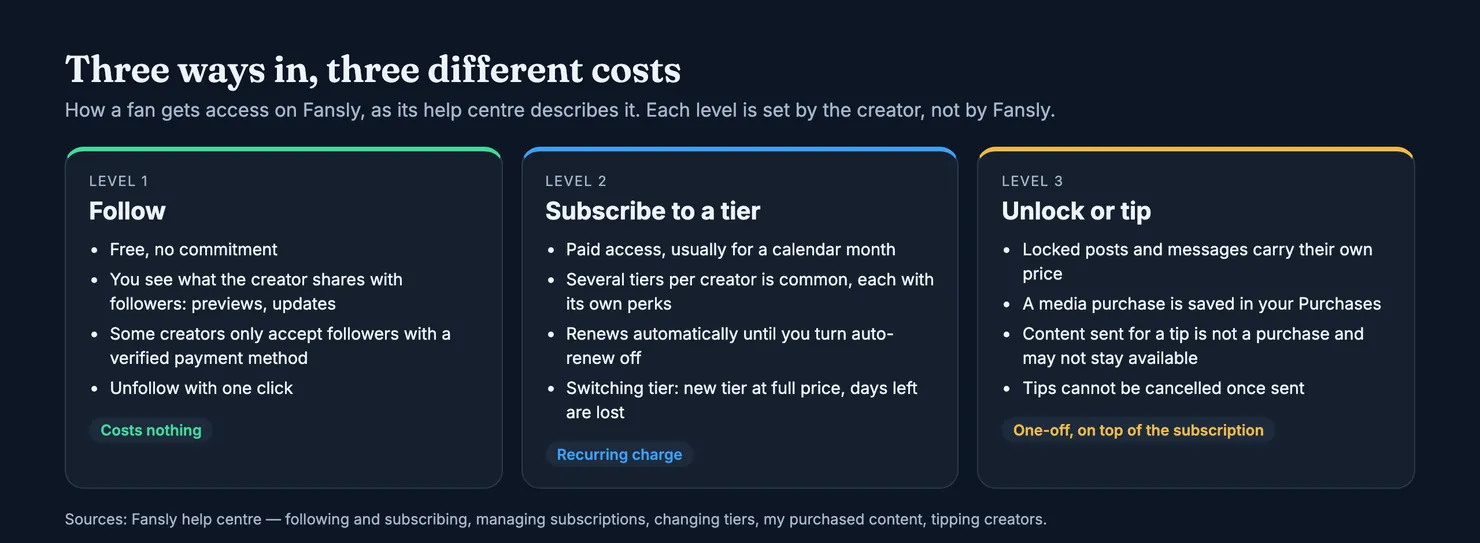
Access on Fansly comes in three layers, and most of the confusion fans run into comes from mixing them up. Each layer is set up by the creator, which means two profiles can look alike and charge for very different things.
Is Fansly free?
Opening an account and following creators is free. Fansly describes following as "staying in the loop for free": you see the posts, previews and updates a creator chooses to share with followers, you get her notifications, and you can unfollow at any time (Fansly, Difference between following and subscribing). One catch: some creators only accept followers who have a verified payment method on file. Adding a card in that case does not charge it, but it does mean your card is registered before you have paid for anything.
What a follower sees is up to each creator. Some put a lot in front of the paywall, others almost nothing. The paid layers are where the content most people come for sits.
What do Fansly subscription tiers change?
Subscribing is paid access, usually for one month, to what a creator reserves for subscribers. Many creators offer several tiers at different prices, each with its own perks, and you pick one on her profile after adding a payment method (Fansly, Managing subscriptions). Most subscriptions run for a calendar month; discount codes can change the length, and some creators sell three-month or six-month plans paid upfront (Fansly, How long does a subscription last).
Three points cost fans money if they miss them:
- Renewal is automatic. Every subscription is set to renew by default at the end of each billing cycle, until you switch auto-renew off (Fansly, What is auto-renew).
- A promotion lasts one period. A reduced first month, or a code a creator sends you, rolls into the regular price afterwards. Your Subscriptions page shows both the discounted price and the renewal price.
- Changing tier starts a new period. The new tier applies immediately at its full price, and the days left on the old one are forfeited and not refunded; Fansly shows a warning before you confirm (Fansly, Changing subscription tiers). If you want to move up, the cheapest moment is the end of your current cycle.
To stop a subscription, open your Subscriptions page, click the cogwheel next to the creator and choose "Don't Renew Subscription". You keep access until the end of the period you paid for, and the page then shows a "Sub Expire Date" instead of a "Sub Renew Date", which is the quickest way to confirm the cancellation went through.
What else costs money once you subscribe?
A subscription does not open everything. Fansly says plainly that some posts need a specific tier, and that others carry an extra price even for subscribers: you click the lock icon to see what is required (Fansly, Subscribed but can't see creator's content). Messages can be priced too: Fansly notes that some creators set a price per message, and that tips can be sent on posts, on profiles, in messages, towards a creator's goal and during live streams (Fansly, Tipping creators).
The difference between buying and tipping matters more than it looks. A media purchase, such as unlocking a post or paying for a custom video, is saved in your Purchases collection and appears as "Media Purchase" in your transaction history. Content a creator sends you in exchange for a tip is not a purchase, and Fansly warns it may not stay available if she changes her settings (Fansly, My purchased content). Tips cannot be cancelled once sent. For custom requests, Fansly gives creators 14 days to deliver. Our guide to custom content covers how those requests go wrong, and most of it applies here.
How do you pay on Fansly?
Fansly has a wallet: a prepaid balance you top up by clicking your balance at the top right of any page. When you buy something, the wallet is used first if it covers the whole price. If it does not, or if you chose another method, your saved card or payment method is charged for the entire amount. Fansly does not split a payment between the two (Fansly, General fan wallet information). Some regions have alternative payment methods, listed on the Payments page, where you can also see the full history of your wallet.
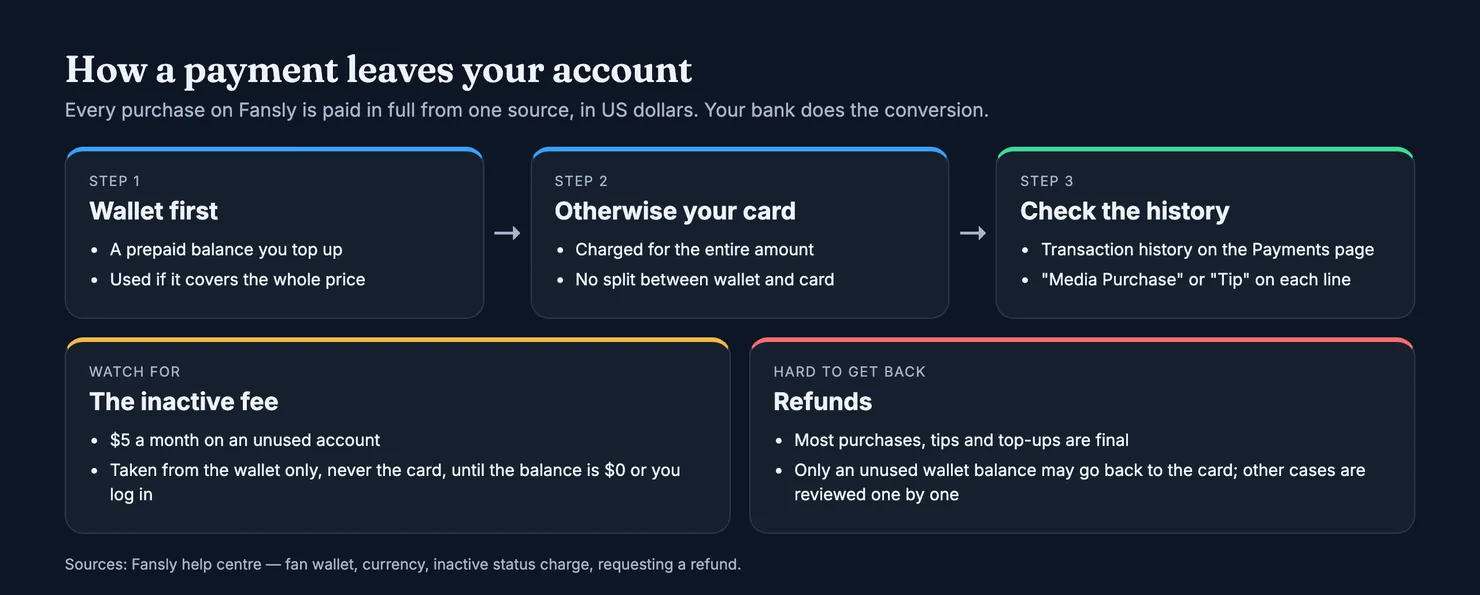
One charge surprises people who stopped using an account with money still in it. Fansly applies an inactive status charge of $5 a month to accounts left unused for an extended period. It comes out of the wallet only, not your saved card, and repeats each month until the balance reaches zero or you log back in (Fansly, What is an inactive status charge). The practical lesson: do not leave a large balance sitting in a wallet you rarely open.
Keep an eye on the transaction history. Each line says whether it was a subscription, a media purchase or a tip, with the date, the amount and the creator, which is exactly what support will ask you for if something goes wrong.
Can you get a refund on Fansly?
Rarely, and you should plan as if you will not. Fansly's refund page says most purchases and fees are final, and that content you bought and received cannot be refunded, even if you regret it (Fansly, Requesting a refund). The same page goes through each type of payment:
- Tips are non-refundable. A creator can choose to refund one by contacting support.
- Subscriptions are generally not refunded if the content was accessible during the period. Fansly may consider a refund when a creator fails to deliver promised content and blocks the fan; an approved refund goes back to your Fansly balance, not your card.
- Wallet top-ups are final. If you have used part of the balance, only what remains may be refunded to the card.
- Deals made outside Fansly, such as a payment agreed in another app, cannot be checked and are treated as non-refundable.
Fansly says it reviews requests case by case and can refund at its discretion. To ask, write to support with the transaction ID from your history, the date and amount, what went wrong and any evidence (Fansly, Disputing a transaction). These rules come from Fansly's help pages, which point back to its terms of service; terms change, so read the current version before you rely on them.
What does a Fansly account involve?
You sign up with a username, an e-mail address and a password, or with an X, Google or Twitch account, then confirm the e-mail Fansly sends you. Some regions add a third-party identity check at this stage (Fansly, Creating an account). Your username is what appears in your profile address, so pick one that says nothing about you.
Two settings are worth turning on from the first day. Two-factor authentication, with an authenticator app or e-mail codes, is under Settings, then Account (Fansly, Securing account with 2FA). And if you ever want to leave, the delete button is at the bottom of the Account settings page; it asks for a 2FA code, stops your subscriptions from renewing, but does not refund charges already taken (Fansly, How to delete my account).
Do you have to verify your age on Fansly?
It depends on where you are. Fansly's help centre lists the United Kingdom, Australia, Brazil and Germany as countries where fans are asked to verify their age, usually at login or when opening adult content. The check is run by a provider called Ondato: a live selfie, and sometimes a photo ID matched to the selfie. Fansly says Ondato does not store the selfie or the ID and that Fansly only receives confirmation that you passed (Fansly, Global age verification requirement). Its refund page adds that certain US states require the check as well.
In the UK, the requirement comes from the Online Safety Act. Ofcom, the regulator, explains that sites allowing pornography must use strong age checks and that ticking a box to say you are over 18 is no longer enough; facial age estimation and photo-ID matching are among the accepted methods (Ofcom, Age checks for online safety). Fansly also states that refunds are not given to users who refuse the check or cannot complete it, so do it before you top up a wallet, not after.
Who posts on Fansly, and what can they post?
Creators on Fansly must be at least 18 and legally adults where they live. To be accepted, they verify their age and identity with a government photo ID through a third party, then send Fansly photos and a short video of themselves holding that ID. Anyone else who appears in their content has to be verified as well, and that responsibility sits with the creator (Fansly, Getting started on Fansly).
What kind of content does Fansly allow?
Fansly allows adult content from verified adult creators, and its full content rules sit in its terms and policies on fansly.com. We could not read those pages for this guide: fansly.com blocks our browsers and the archived copies are empty app shells. So we will not list categories here. What the help centre does make clear is that a creator's ID check says who opened the account. It does not say who writes the messages: on any subscription platform, some accounts hand their inbox to staff, which our guide to chatters explains.
Is Fansly safe to use?
The risks fans run on Fansly are mostly the same as on any paid platform: losing money to a copy of the site, paying an account that is not who it claims to be, and having an account taken over. None of them depends on how well Fansly runs its own systems, and all of them can be reduced with a few habits.
How do you spot a fake Fansly site?
Fansly says it operates only at https://fansly.com, and that any other domain imitating it is fraudulent (Fansly, Someone has stolen my identity). Fansly's page lists free website builders and link-in-bio services among the hosts where it has found fake pages, so check the address bar before you log in or enter a card, and type the address yourself rather than following a link from a message. If you entered your details on a look-alike, Fansly's advice is to change your password, turn on 2FA and contact your bank. Report fake profiles on Fansly with the three dots, then Report.
Impersonation also happens inside the platform: an account with a handle one letter away from a known creator, copied photos and a lower price. Our guide on spotting a fake account is written for OnlyFans, but the signs carry over to Fansly unchanged.
Before you pay a Fansly account
The most useful check takes a minute. Look at where you found the link: the strongest sign that an account is genuine is that her other accounts point to it, and that it points back. A Fansly bio can carry links to a creator's other accounts, and when one of those accounts links back to the Fansly profile, the same person controls both.
That is also what Legit reads. When a Fansly account is added, we read its public profile and its bio, and two accounts that link to each other are attached to the same profile; a link that only goes one way is sent to moderation instead. Each profile carries two separate scores, one for authenticity and one for the chance that a third party answers the messages, explained on our methodology page.
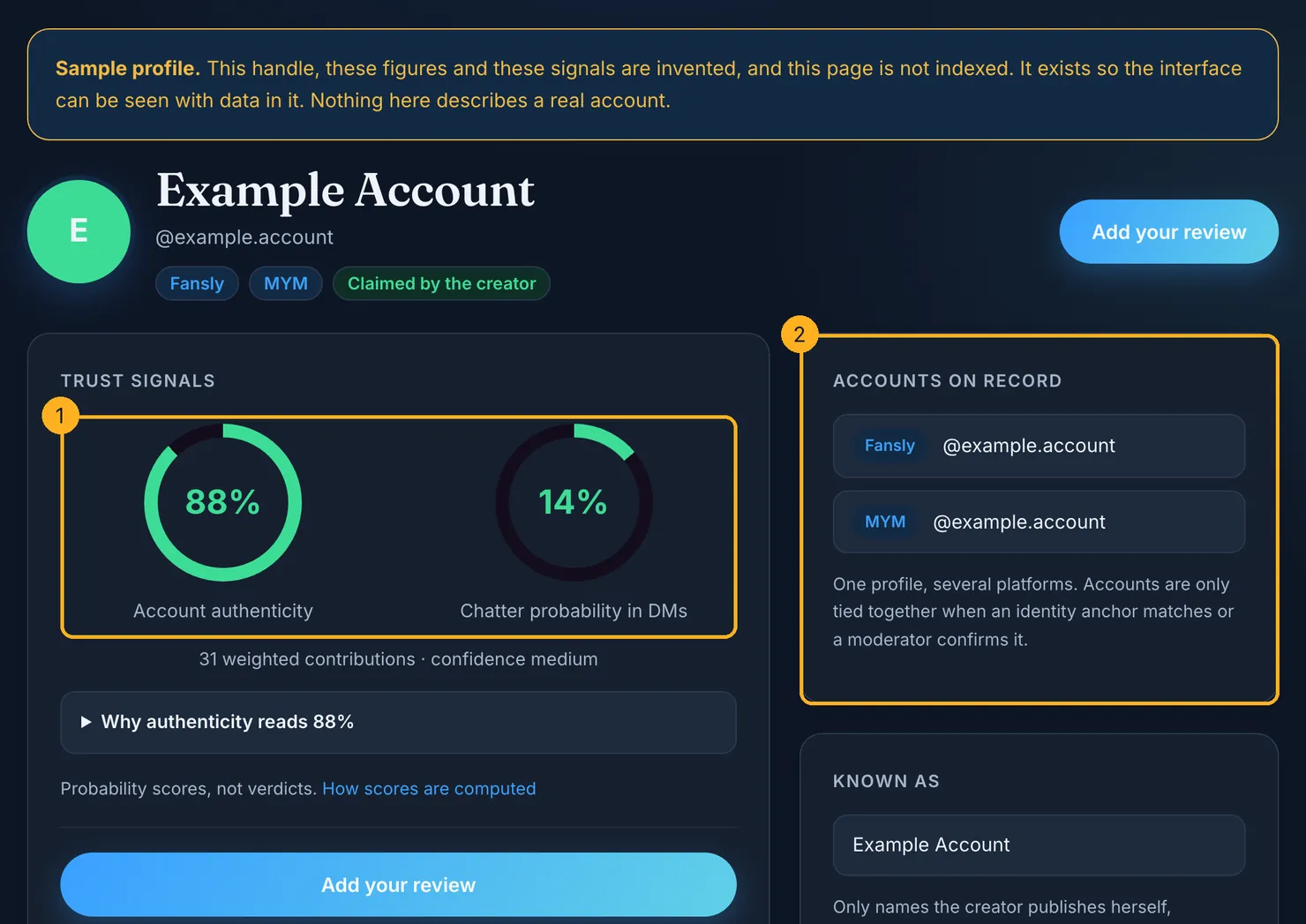
Search the account on Legit before your first payment. If it is not there, or if you have already paid and seen something worth knowing, add what you saw: a subscription that renewed at a different price, messages that did not sound like the person, a link that did not match. That is how the next fan gets an answer before paying.
Questions people ask
Is Fansly free to join?
Yes. Creating an account and following creators costs nothing, and followers see whatever a creator chooses to share with them. Some creators only accept followers who have a verified payment method on file, but adding one does not charge you. You only pay when you subscribe to a tier, unlock a locked post or message, or send a tip.
How much does a Fansly subscription cost?
Each creator sets her own prices, so there is no single figure. Many offer several tiers with different perks, some run a reduced first month, and some sell three-month or six-month plans paid upfront. All prices are charged in US dollars, and your bank converts them, sometimes with a fee. The Subscriptions page shows the current price and the renewal price.
How do I cancel a Fansly subscription?
Open your Subscriptions page, click the cogwheel next to the creator and choose Don't Renew Subscription. You keep access until the end of the period you already paid for, and nothing more is charged for that creator. The page then shows a Sub Expire Date instead of a Sub Renew Date, which confirms that the cancellation worked.
Can I get my money back on Fansly?
Usually not. Fansly treats most purchases, tips and wallet top-ups as final, and does not refund content you bought and received. It may consider a subscription refund when a creator fails to deliver promised content and blocks the fan, credited to your Fansly balance. Requests go to support with the transaction ID, date, amount and evidence, and are reviewed case by case.
Why does Fansly ask me to verify my age?
Because laws in some places require it for sites hosting adult content. Fansly lists the United Kingdom, Australia, Brazil and Germany, plus some US states. The check is a live selfie through a provider called Ondato, sometimes with a photo ID. Fansly says the selfie and ID are not stored and that it only receives confirmation that you passed.
What is the Fansly inactive fee?
Fansly charges $5 a month on accounts left unused for an extended period. The fee is taken only from the money in your Fansly wallet, not from your saved card, and repeats each month until the balance reaches zero or you log back in. Logging in from time to time, or keeping an active subscription, avoids it.