What OnlyFans shows on your bank statement
An OnlyFans payment appears on your statement under the platform's name, converted from US dollars with tax on top. Here is how to read the line, match it to a purchase, and what to do if it is not yours.
An OnlyFans payment shows on your bank or card statement as a line from the platform itself. Press reports describe it as "OnlyFans" or "OnlyFans.com", so anyone who reads the statement can tell where the money went. The amount is rarely the price you saw on the profile: OnlyFans charges in US dollars, adds tax on top, and your bank converts the total. Each subscription renewal, tip, paid message and wallet top-up can be a separate line.
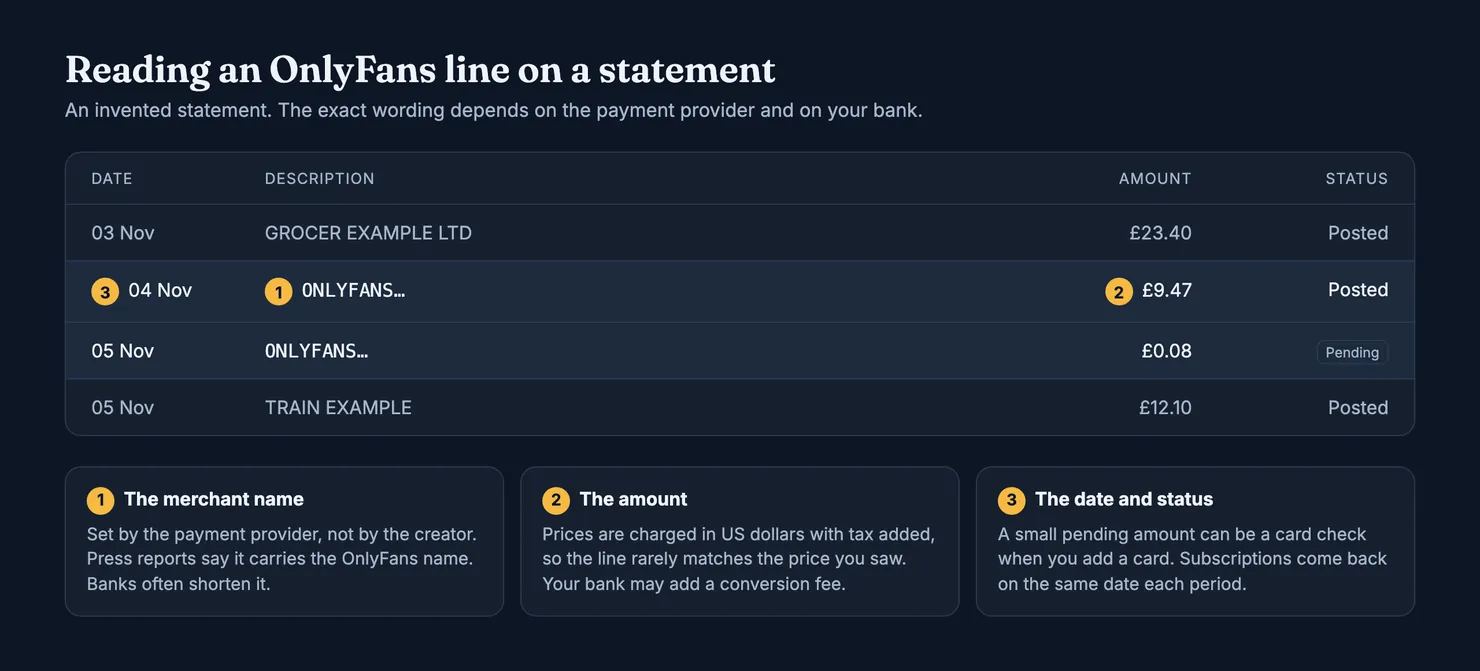
This guide explains what OnlyFans' own terms say about how fans are charged, why the line can look different from one bank to the next, how to work out which purchase a line belongs to, and what to do if you did not make it. We read OnlyFans' pages in archived copies, because onlyfans.com is blocked for our browsers. OnlyFans does not publish the exact text of its statement line in any page we read, so we do not print one either.
What does OnlyFans show up as on a bank statement?
The line carries the platform's name, not a disguised one. A Lifehacker guide to OnlyFans payments put it bluntly: charges appear as "OnlyFans" or "OnlyFans.com", and every transaction shows up on the card or bank statement (Lifehacker). The name is the stable part. The wording around it varies.
The reason sits in OnlyFans' terms. You do not pay OnlyFans directly. When you add a card, you authorise OnlyFans to pass your payment details to "a third-party payment provider", and that provider takes the money (OnlyFans Terms of Service). The provider and your bank decide between them what the line says. Banks cut long names to fit a column, add a reference code, or show a city. The same terms also say OnlyFans may change which payment providers process fan payments, so the line on an old statement and the line on a new one do not have to match.
The company behind the site is Fenix International Limited, registered in London, according to the same terms. If you see that name on a receipt or in a dispute letter, it is the operator of OnlyFans, not an unknown company.
Does OnlyFans show up on a bank statement?
Yes. Every payment you make leaves a line, on a credit card, a debit card or a bank account. Nothing in the terms offers a discreet billing name, and the platform does not let you choose how the charge is labelled. If someone else sees your statements, through a shared account, a card in their name or an online banking app on a family tablet, they can see the payments.
Why is the OnlyFans charge different from the price on the profile?
Two clauses explain most of the gap. First, "all prices appear, and are charged, in USD", and payment providers may charge currency conversion fees. If your card is in pounds or euros, your bank converts the dollar amount at its own rate on the day it processes the charge, and may add a foreign transaction fee. Second, fan payments are exclusive of tax: the terms say indirect sales tax is added at the current rate where it applies (OnlyFans Terms of Service). A subscription advertised at a round price can arrive as an odd number of pounds and pence.
If the gap is large, look for a second purchase on the same day before you assume an error. Two lines with close timestamps are usually two separate payments.
Why there can be several OnlyFans lines
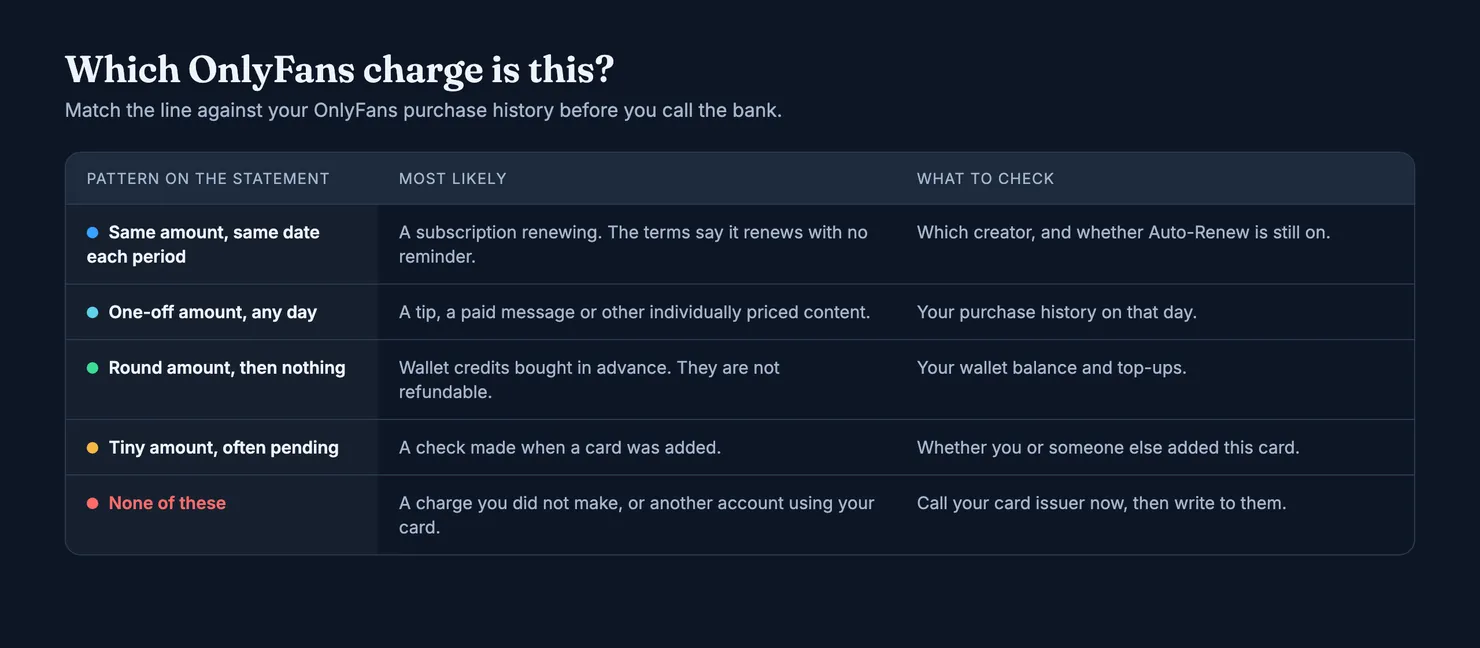
OnlyFans splits payments into two kinds. The terms say the payment provider takes "periodic payments" for subscriptions and "immediate payments" for everything else (OnlyFans Terms of Service). In practice that gives you a handful of patterns:
- Subscription renewals. A subscription renews automatically at the creator's current rate, plus tax, for another period of the same length. The terms add that you will not receive further notice before a renewal. Each creator you subscribe to renews on its own date.
- Tips, paid messages and other individually priced content. These are charged when you buy them. A subscription does not cover them, which is why a busy month of messages can produce many small lines. Our guide to custom content on OnlyFans explains where those purchases come from.
- Wallet credits. You can prepay an amount into a wallet and spend it later. The top-up is one line on your statement; what you then spend from the wallet does not appear there at all. The terms say wallet credits are non-refundable, and that a purchase costing more than your remaining credits is charged in full to your card.
- A second card. If you saved more than one payment method and the first one fails, the terms say OnlyFans uses the other one. A charge can therefore land on a card you had forgotten was on the account.
- A card check. Lifehacker reported that adding a card can trigger a very small charge used to check it, and that it shows on the statement too (Lifehacker). It often appears as pending and may disappear.
Why did I get a random OnlyFans charge?
Most "random" charges are one of the patterns above, seen at a moment you were not expecting. A renewal you forgot about is the most common, because the terms promise no reminder. A tip or paid message bought late at night is the second. A wallet top-up is easy to miss because the spending that follows does not reach your bank.
Then there are the cases where you did not make the payment yourself. Someone in your household may have used a saved card. Someone may have signed in to your OnlyFans account with a reused password. Or your card number may have been stolen and used on OnlyFans like any other site. The next two sections deal with telling these apart.
How to match a statement line to a purchase
Before you call anyone, give yourself ten minutes with three things side by side: the statement, your e-mail inbox and the OnlyFans account that pays.
- Note the date and the amount of each line, and whether it is pending or posted. Pending lines can still change or vanish.
- Search your e-mail for messages from OnlyFans around that date. Subscription confirmations and receipts are a far better record than a bank line, because they say what was bought.
- Open the account's purchase and subscription history and look for a payment on the same day. Work out the dollar price plus tax and compare it with the converted amount; a small difference is the exchange rate, not fraud.
- Check the subscriptions that are still set to renew. If a renewal surprised you, switch off Auto-Renew for that creator. Our guide on cancelling an OnlyFans subscription walks through what that stops and what it does not.
- Check the cards saved on the account. Remove any you do not want charged. Look for one you did not add.
If every line matches something in the account, the charges are real purchases. Disputing them with your bank in that case is a different matter from reporting fraud: OnlyFans' terms ask you not to make unjustified refund or chargeback requests and say a bad-faith one can get your account suspended or deleted. If you think a purchase was not delivered as promised, our OnlyFans refund guide covers what the terms allow.
What to do if you did not make the charge
If a line matches nothing in your account, or you have no OnlyFans account at all, treat it as an unauthorised payment and move quickly. Deadlines run from the date of the statement, not from the day you notice.
Should I contact OnlyFans or my bank first?
Your bank or card issuer, first, when you did not make the payment. Call the number on the back of the card or use its app, ask for the card to be blocked if the number may be compromised, and follow up in writing. The US Federal Trade Commission advises exactly that order: report at once, then confirm in a letter with the dates (FTC, lost or stolen cards). Contact OnlyFans afterwards, at the support address given in its terms, if the charge came from your own account being used by someone else.
In the United States, the protection depends on the card:
- Credit cards. The Fair Credit Billing Act lets you dispute billing errors, including unauthorised charges. Your liability for unauthorised charges is limited to $50. Write to the issuer's billing-inquiries address so the letter arrives within 60 days of the first bill showing the error; the issuer must acknowledge it within 30 days and resolve it within 90 (FTC, disputing charges).
- Debit cards and bank transfers. If your card number was used but the card was not lost, you are not responsible for unauthorised transactions you report within 60 calendar days of the statement being sent. Wait longer and you can lose more (FTC). Once you report it, the bank generally has ten business days to investigate and three more to tell you what it found (CFPB).
In the United Kingdom, contact your bank straight away and report the fraud to Report Fraud. If the bank's answer does not satisfy you, complain to it in writing: it has 15 days to respond and 35 days to give a final answer. After that you can take the case to the Financial Ombudsman Service for free. If you did not make the payment and did not act with gross negligence, the ombudsman can tell the bank to refund what you lost (Financial Ombudsman Service).
If the charge came from your own OnlyFans account, change its password, and the password of the e-mail address behind it, then remove the cards you do not recognise. OnlyFans' terms say it is not responsible for compromised accounts or the unauthorised payments that follow, so the account's security is on you. Our guide on whether OnlyFans is safe covers phishing messages that imitate the platform's billing e-mails.
Can you hide OnlyFans on a bank statement?
Not through OnlyFans. The terms offer no discreet billing name and no option to change the label, and the payment provider, not you, sets it. Articles that promise to "hide" the line are usually selling something: a virtual card service, a gift card, or a route through someone else's account. We do not recommend any of them. Some break OnlyFans' terms or your bank's, a card in another person's name puts the charge on their statement instead of yours, and Lifehacker warned that sites offering anonymous third-party payments to OnlyFans are after your personal data (Lifehacker).
If privacy at home is the worry, the honest options are boring ones: a card and an online banking login that only you use, paperless statements, and switching off renewals you no longer want so fewer lines appear in the first place.
What OnlyFans keeps about your card
The privacy policy is more reassuring than the statement line. It says payments to view creators' content are processed by third-party payment providers, and that OnlyFans does not receive your full card number or its security code. The provider gives OnlyFans a token that stands for your card, along with details such as the card type and the first six and last four digits of the number (OnlyFans Privacy Policy). OnlyFans also keeps a record of the payments made from your fan account, including failed ones.
Two practical points follow. A message that claims to come from OnlyFans and asks you to type your full card number or security code into a form is not how the platform says it handles cards. And the record of what you bought sits in your OnlyFans account and your e-mail receipts, not on the bank line, so keep those receipts until you have checked your statement.
Before you pay the same account again
A surprising line is often the moment people stop and ask whether an account was worth the money: a renewal that came round faster than expected, or a stack of paid messages after a conversation that felt scripted. That is where Legit is meant to help. Search the account on Legit before you subscribe again or buy another message.
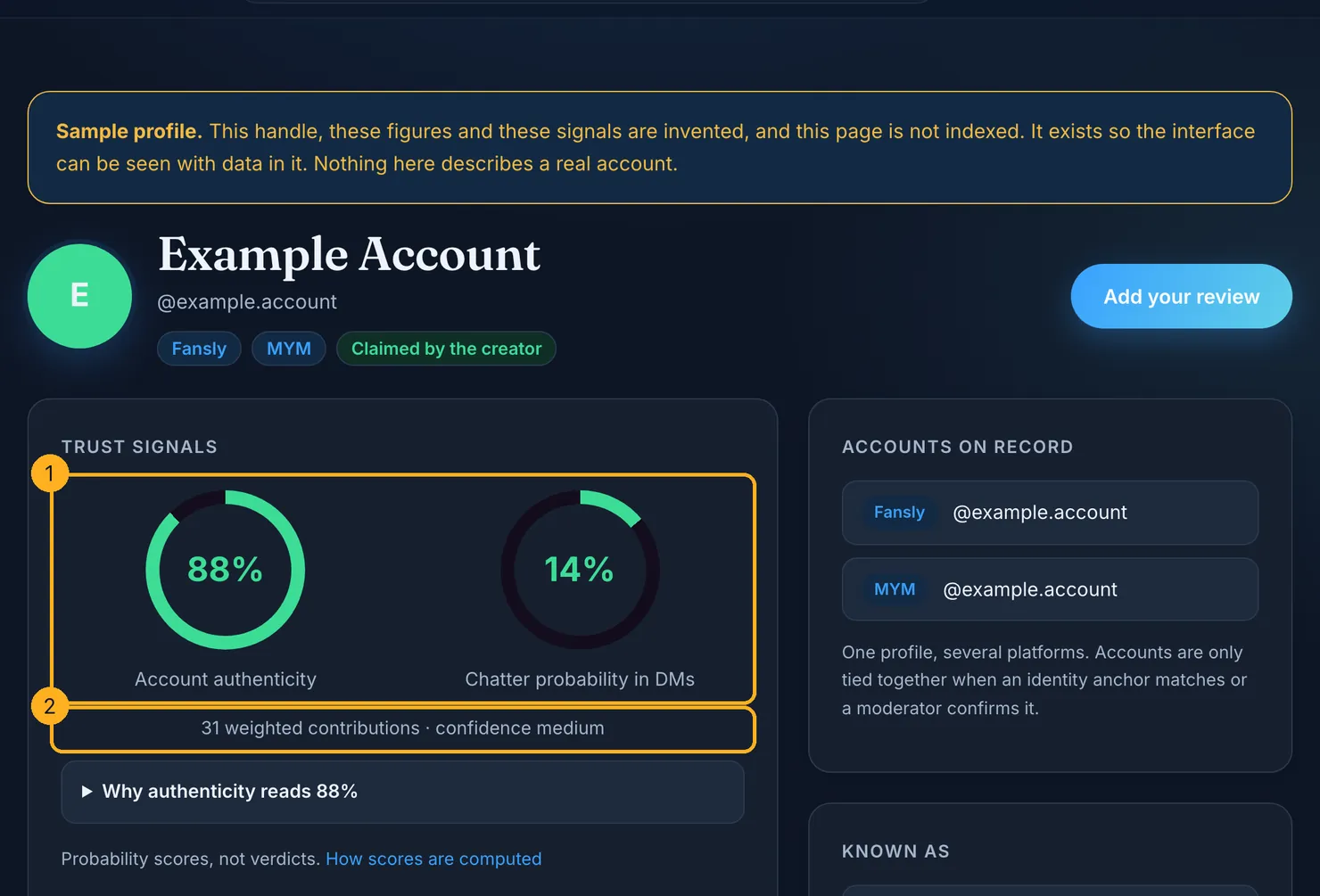
Each profile carries two separate scores: how likely the account is to be run by the person it claims to be, and how likely it is that someone else answers the messages. The number of weighted contributions behind them is shown underneath, and our methodology explains how the scores are computed and what they cannot tell you. Neither score says anything about billing.
If you were a subscriber, you can add what you saw on the review page. The OnlyFans receipt e-mail you found while matching your statement is useful here too: forward it and we check the platform's cryptographic signature ourselves. We keep the platform, the account, the date and a hash of the e-mail, not the e-mail itself, and a review backed by a verified receipt counts for more than an unproven one.
OnlyFans' terms change, and so do payment providers and the way banks print their lines. Check the current terms before you rely on any clause quoted here.
Questions people ask
What name does OnlyFans use on a bank statement?
Press reports say the line reads "OnlyFans" or "OnlyFans.com". OnlyFans does not publish the exact wording in the pages we read: a third-party payment provider takes the money, the terms say that provider can change, and banks shorten names in their own way. Expect the platform's name, possibly with a reference code or a city next to it.
Does OnlyFans show up on a credit card statement?
Yes. Credit cards, debit cards and bank accounts all show OnlyFans payments, one line per payment. Subscription renewals are charged on their renewal date, while tips, paid messages and wallet top-ups are charged when you buy them. The terms offer no option to change how the charge is labelled, so anyone who sees the statement can see the payments.
Why is my OnlyFans charge more than the subscription price?
OnlyFans' terms say prices are shown and charged in US dollars and that tax is added at the current rate where it applies. If your card is in another currency, your bank converts the total at its own rate and may add a foreign transaction fee. A second purchase on the same day, such as a tip or a paid message, can also explain a larger total.
Can I hide OnlyFans charges from my bank statement?
Not through OnlyFans: its terms offer no discreet billing name, and the payment provider sets the label. We do not recommend workarounds such as someone else's card or gift card schemes, which can break the platform's terms or your bank's and expose your card details. Using a card and banking login that only you can see is the straightforward option.
What should I do about an OnlyFans charge I did not make?
Call your card issuer straight away, ask for the card to be blocked if the number may be compromised, and confirm in writing with the dates. In the US, report credit card errors within 60 days of the bill and debit card ones within 60 days of the statement. In the UK, contact your bank, report to Report Fraud, and escalate to the Financial Ombudsman if needed.
Does OnlyFans store my full card number?
According to its privacy policy, no. Payments are processed by third-party payment providers, and OnlyFans receives a token that stands for the card, with details such as the card type and the first six and last four digits of the number, but not the full number or the security code. It does keep a record of the payments made from your fan account, including failed ones.