How to cancel an OnlyFans subscription before it renews
Cancelling on OnlyFans means switching off Auto-Renew, one creator at a time. You keep what you paid for until the period ends, and the terms promise no reminder before the next charge.
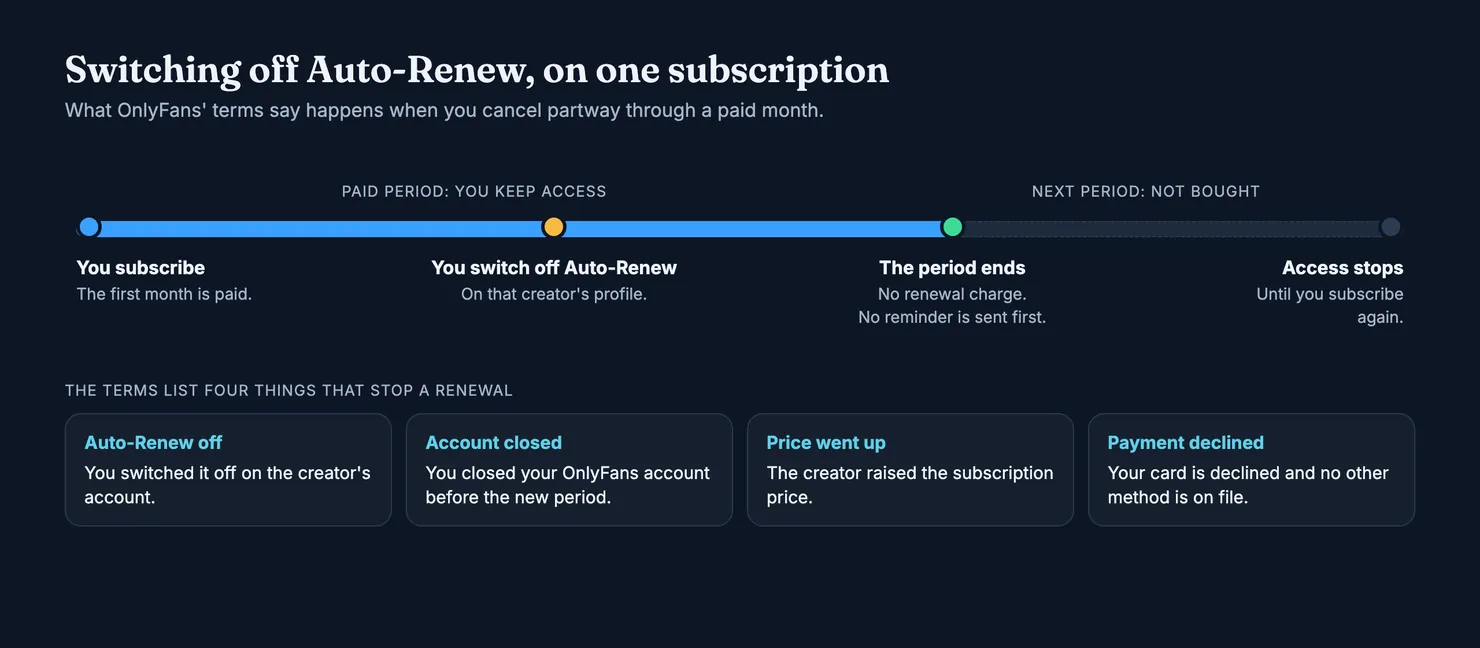
To cancel an OnlyFans subscription, you switch off Auto-Renew for that creator. Nothing else stops the charge: unfollowing, muting her or deleting the app leaves the renewal in place. OnlyFans' terms say you keep access until the end of the period you have paid for, and that no further subscription payments go to that creator after it. There is no refund for the days left, and no reminder before a renewal, so the safe time to do it is as soon as you know you will not stay.
This guide covers what "cancelling" means on OnlyFans, what its terms say happens next, what cancelling does not cover, the two other ways to stop paying when the first does not work, and how to check that the money has actually stopped leaving your account. We read OnlyFans' pages in archived copies because onlyfans.com is blocked for our browsers, so this guide does not walk you through its screens button by button: the buttons move, and the terms are what count.
How do you cancel an OnlyFans subscription?
An OnlyFans subscription is tied to one creator. Each one you follow has its own period, its own price and its own renewal. Cancelling, on OnlyFans, means telling the platform not to renew that particular subscription when its current period runs out.
The terms put it in one sentence. A subscription renews automatically for a period of the same length unless you cancel, and it does not renew if you have switched off "Auto-Renew" on the creator's account (OnlyFans Terms of Service). The separate contract between fan and creator, which governs every purchase you make on the site, uses the same words (OnlyFans contract between fan and creator).
How do you turn off auto-renew on OnlyFans?
In practice it takes three steps:
- Open the creator's page while signed in to the account that pays, on the website or in the app.
- Find the subscription and its Auto-Renew setting, and switch it off. If you are asked to confirm, confirm.
- Check the result: look at the subscription again and make sure it no longer says it will renew. Note the date your paid period ends.
Repeat this for every creator you want to stop paying. There is no single switch in the terms that cancels them all, short of closing the account, which we come to below.
How do you unsubscribe from OnlyFans on mobile?
The same way. The setting belongs to the subscription, not to the device, so it does not matter whether you switch it off in a phone browser, on a computer or in the app. Make sure you are signed in to the account that holds the card being charged. If you have more than one OnlyFans account, the subscription may sit on the other one, which explains many "I cancelled and was still charged" stories.
Is unfollowing or deleting the app the same as cancelling?
No. Deleting the app removes it from your phone and leaves your account, your saved card and your subscriptions exactly as they were. The renewal clause in the terms lists what stops a charge, and none of these is on it: switching off Auto-Renew, closing your OnlyFans account, a price rise, or a payment that is declined with no other method on file (OnlyFans Terms of Service).
What happens after you switch off Auto-Renew
Nothing changes straight away. The terms say that once you have cancelled, you can still view the creator's content until the end of the subscription period you paid for, and after that no further subscription payments are taken for her (OnlyFans Terms of Service). The licence to see her content then ends with the active period (OnlyFans contract between fan and creator).
So you are not cutting off something you have already bought. Cancel a monthly subscription on day three and you still have the remaining days. Cancelling early costs you nothing, while cancelling late can cost you a month.
Can you cancel an OnlyFans subscription straight away?
You can switch Auto-Renew off at any moment, and the cancellation counts from then. What you cannot do, under the terms we read, is end the period you have paid for and get the rest of it back. Access runs to the end date, then stops.
Does OnlyFans warn you before a subscription renews?
Do not count on it. The terms say you will not get further notice before a renewal, and that the renewal is charged at the creator's current rate unless one of the exceptions applies (OnlyFans Terms of Service). If you want a reminder, set one yourself, a day or two before the end date.
One exception catches people out. If the creator raises her subscription price, the terms say your subscription does not renew at the new price. You would have to subscribe again to keep access. That protects you from a silent price rise, but it can also end a subscription you meant to keep.
What cancelling does not cover
Switching off Auto-Renew stops one thing: the next subscription payment to that creator. Everything else you pay for on OnlyFans sits outside it.
- Paid messages, tips and other purchases. The fan–creator contract says a subscription does not include content that a creator prices individually (OnlyFans contract between fan and creator). Those are one-off payments and nothing renews them, but cancelling does not undo them either. If a paid extra is your problem, our guide to custom content on OnlyFans covers what the terms promise about delivery.
- Money in your wallet. The terms say wallet credits are non-refundable (OnlyFans Terms of Service). Cancelling every subscription leaves that balance where it is.
- The period already charged. The terms ask fans not to make unjustified refund or chargeback requests, and say that requests made in bad faith can lead to the account being suspended or deleted. Your statutory rights are not affected, the contract adds, but there is no general right to money back for a month you have started. Our OnlyFans refund guide covers the cases where asking makes sense.
Can you get a refund after cancelling an OnlyFans subscription?
Not for the part of the period you have not used, going by the terms. If you were charged for something you did not authorise, or charged again after a cancellation you can prove, that is a different matter, and the record you keep (see below) is what makes the difference.
Free trials and discounted first months
Some creators offer a free trial or a reduced first month. The renewal clause makes no distinction for them in the terms we read: the subscription renews for the same length unless you cancel, at the rate that applies when it renews. We found no separate clause on trials.
The US Federal Trade Commission's general advice fits here. A free trial usually turns into a paid subscription if you do not cancel in time, so note the date it ends. And check that the renewal costs what you expected, because a promotional rate can end after the first period (FTC: free trials, auto-renewals and subscriptions).
How do you cancel an OnlyFans free trial?
Exactly as for a paid one: switch off Auto-Renew for that creator. If you only wanted the trial, do it the day you start it. You keep the trial period either way, and you do not have to remember the date.
Cancel, close the account, or stop the card: which one?
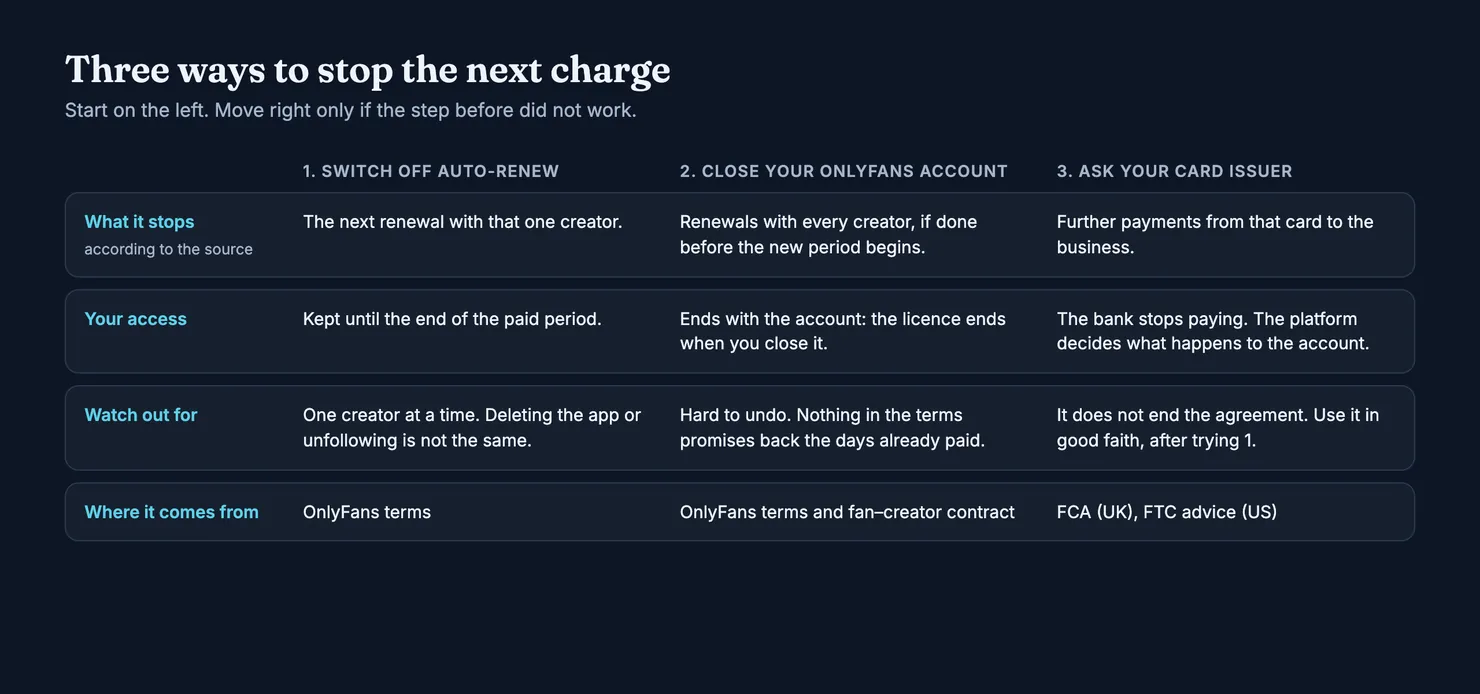
Switching off Auto-Renew is the normal route and the one to try first. Two other exits exist, and each has a cost.
Does deleting an OnlyFans account cancel a subscription?
Closing your OnlyFans account is one of the cases in which the terms say a subscription does not renew, as long as you close it before the new period begins (OnlyFans Terms of Service). It stops every subscription at once. It also ends your licence to view content you have paid for, because the contract ties that licence to your account (OnlyFans contract between fan and creator). Nothing in the terms we read promises back the days already paid, and wallet credits are non-refundable. If you only want to stop paying, switching off Auto-Renew on each subscription gets you there with less loss.
Can your bank stop OnlyFans payments?
In the UK, yes, and it is a right. A subscription paid by card is what the Financial Conduct Authority calls a recurring card payment, or continuous payment authority. You can cancel it by asking the business or by asking your card issuer, and once you ask the issuer it must stop the payments, even if you have not contacted the business. Ask by the end of the business day before the next payment. Any payment taken after that is unauthorised and must be refunded (FCA: recurring card payments).
Two cautions come from the same page. Stopping the payment does not necessarily end the contract, so anything you genuinely owe is still owed. And getting a new card does not reliably stop recurring payments, because some are passed on to the new card.
In the US, the FTC's advice is to follow the company's cancellation steps first, keep a copy of your request, and dispute with your card company in writing if charges continue (FTC: free trials, auto-renewals and subscriptions). That order matters on OnlyFans too: its terms allow chargebacks in good faith, and treat bad-faith ones as grounds to suspend or delete an account.
Why can't I cancel my OnlyFans subscription?
When the setting will not stay off, or a charge arrives after you thought you had cancelled, it is usually one of these:
- The wrong account. The card is attached to a second OnlyFans account, or to an e-mail address you rarely use. Look at which address the payment receipts go to.
- A charge that is not a subscription. A tip, a paid message or a wallet top-up shows up on a statement like any other payment. Cancelling does not touch them, and nothing renews them either.
- A renewal that happened before you cancelled. If you switched Auto-Renew off on the renewal date, the new period may already have been charged. You then keep access to that new period.
- A charge that is not from OnlyFans at all. If the descriptor on your statement looks unfamiliar, check it against your OnlyFans receipts before you assume anything. Our guide on whether OnlyFans is safe covers phishing and payment fraud around the platform.
If none of these explains it, contact OnlyFans support with the dates and amounts, and keep the reply. In the UK, the Financial Ombudsman Service lists trouble cancelling a recurring payment, and charges after a free trial people did not realise was recurring, among its common complaints. It asks you to complain to the business first, which then has up to 35 days to give a final answer, before you take it to the ombudsman free of charge (Financial Ombudsman Service: regular payments).
How to check that the charges have stopped
Switching the setting off is half the job. The FTC's advice after any cancellation is to watch your statements for the next few billing cycles (FTC: free trials, auto-renewals and subscriptions). For OnlyFans, that means:
- Keep a record. A screenshot of the subscription once Auto-Renew is off, and the date you did it. Keep it for your own files; do not post it anywhere.
- Note the end date of each cancelled subscription in your calendar.
- Look at the statement after that date. No new subscription charge for that creator should appear. One-off purchases can still appear if you made them.
- If a charge appears anyway, contact OnlyFans with your record first, then your card issuer if it is not resolved.
How MYM and Fansly compare
MYM, the French platform, describes cancellation plainly in its terms of sale. A subscription is monthly by default, open-ended and charged on its anniversary date. You can end it at any time from the subscriptions tab of your account; a month that has started is owed in full, with no pro rata refund, and you keep the benefits until the end of the period. A fixed "X months" offer is paid upfront, gives no refund if you stop early, and becomes an ordinary monthly subscription when it runs out (MYM terms of sale). Our guide to MYM, in French, covers the rest of what to check there.
We could not read Fansly's help pages on cancellation for this guide, so we say nothing about its rules here. Our comparison of Fansly and OnlyFans covers what we did read on both platforms.
Before you subscribe again
Many people who search for how to cancel have just paid for something that was not what they expected: a page that posts little, or messages that read as if someone else were writing them. Cancelling deals with the bill. It does not tell you anything about the next account you are tempted by.
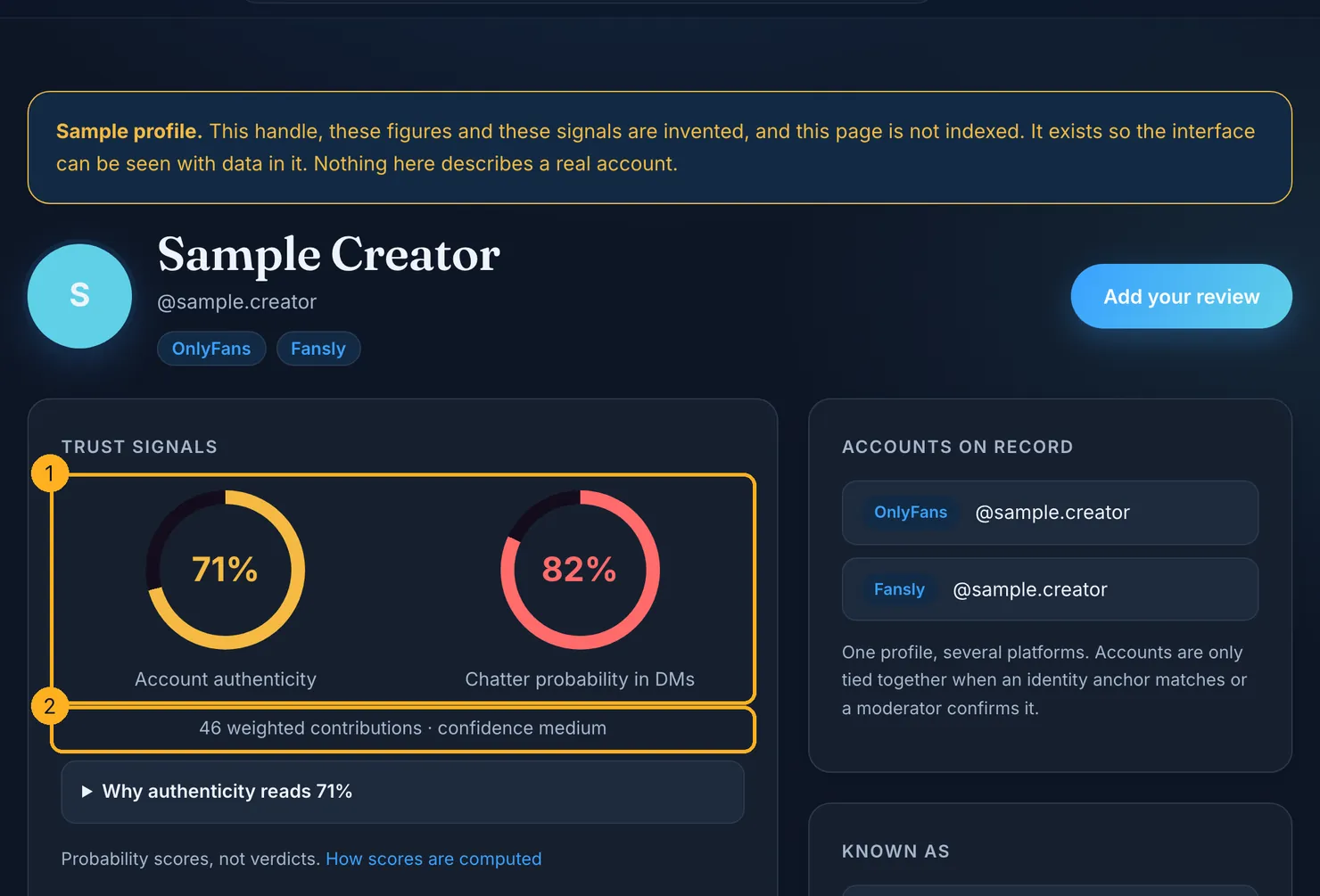
That is what Legit is for. Each profile carries two separate figures: how likely it is that the account is really the creator it claims to be, and how likely it is that someone other than her answers the messages. The first rests on public facts about the account, the second on what subscribers report, as described on our methodology page. Where there is not enough to go on, the figure stays blank rather than guessed. You can check an account on Legit before you pay, and if you have just cancelled one, add what you saw, so the next person has more to go on than you did.
Questions people ask
How do I stop paying for an OnlyFans subscription?
Switch off Auto-Renew on the subscription to that creator, while signed in to the account that pays. OnlyFans' terms say a subscription renews automatically unless you do this, close your account, the price goes up, or your payment is declined with no other method on file. Each creator is a separate subscription, so repeat it for every one you want to stop.
Does deleting an OnlyFans account cancel a subscription?
Closing your OnlyFans account before a new period begins is one of the cases in which the terms say a subscription does not renew, and it stops every subscription at once. It also ends your licence to view content you paid for, and wallet credits are non-refundable. Deleting the app from your phone is different: it closes nothing and cancels nothing.
Can you cancel an OnlyFans subscription straight away?
You can switch off Auto-Renew at any moment, but the period you have paid for is not cut short. OnlyFans' terms say you can keep viewing the creator's content until the end of that period, and that no further subscription payments are taken for her afterwards. The days left are not refunded, so cancelling early costs you nothing extra.
Does OnlyFans send a reminder before a subscription renews?
Its terms say you will not receive further notice before a renewal, and that the subscription renews at the creator's current rate unless one of the listed exceptions applies. If you want a reminder, set one yourself a day or two before the end date. A price rise by the creator is one of the exceptions: the subscription then does not renew.
How do you cancel an OnlyFans free trial?
The same way as a paid subscription: switch off Auto-Renew for that creator. We found no separate clause on trials in OnlyFans' terms, so the general renewal rule applies. If you only want the trial, switch it off the day you start it. You keep the trial period, and you do not have to remember when it ends.
Why am I still charged after cancelling OnlyFans?
The usual reasons are a subscription held on another OnlyFans account, a renewal charged before you switched Auto-Renew off, or a payment that was not a subscription at all, such as a tip, a paid message or a wallet top-up. Compare the statement with your OnlyFans receipts, then contact OnlyFans support with the dates and amounts if the charge is still unexplained.