Does OnlyFans have an app?
No. OnlyFans says it works in your web browser, on phones and computers alike. How to make it open like an app, what OFTV is, and what the 'OnlyFans apps' on download sites really are.
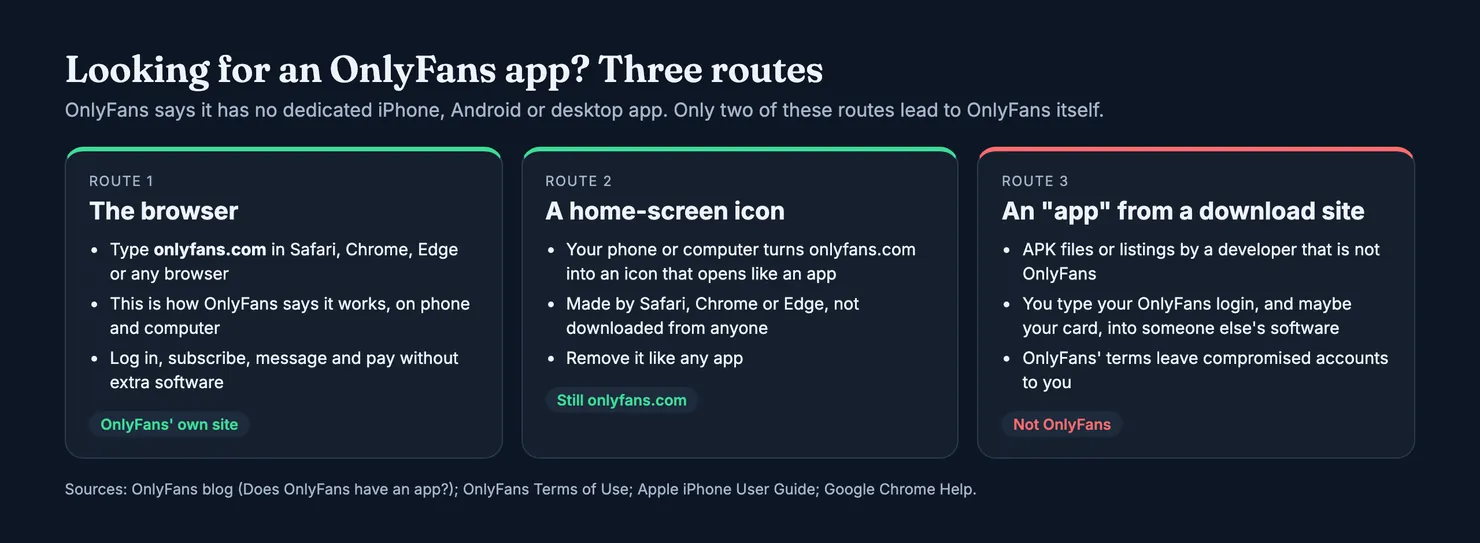
No, OnlyFans does not have an app. Its own blog post on the question, Does OnlyFans have an app?, says there is no dedicated iPhone, Android or desktop app, and that the site works directly in your web browser on phones and computers. You can put onlyfans.com on your home screen so it opens like an app, and that is as close to an OnlyFans app as it gets. Anything called "OnlyFans" on a download site or offered as an APK file was made by someone else, and it wants the thing that matters most on your account: your login.
Does OnlyFans have an app?
Not one you can download. The answer comes from OnlyFans itself rather than from forum guesswork. Its post says you can log in, subscribe, message creators, stream content and manage your account in the browser "without downloading additional software". The same post then explains how to add the site to a home screen or a computer's dock, which is the company's own suggestion for anyone who wants an icon.
So on a phone you lose nothing by using the browser. Subscriptions, tips, pay-per-view messages and your payment settings all live on the site. If you are new to how those fit together, our guide How does OnlyFans work covers subscriptions, messages and payments from the subscriber's side.
Is OnlyFans an actual app?
People say "the OnlyFans app" and mean one of three things. Some mean the website, opened on a phone. Some mean an icon on their home screen that opens the site, which their phone made for them. Others mean an app they found on a download site, usually an Android package listed under a developer name that has nothing to do with OnlyFans. The first two are OnlyFans. The third is not, whatever its icon looks like.
Is there an OnlyFans app for iPhone?
Not from OnlyFans. On an iPhone, use Safari (or another browser) at onlyfans.com, and add it to your home screen if you want an icon. The steps are further down, and they come from OnlyFans and Apple, not from us.
Is there an OnlyFans app for Android?
Not from OnlyFans either. This matters more on Android, because Android lets you install apps from outside Google Play, and that is where the copies live. Whatever turns up under the OnlyFans name on a download site, with whatever icon, is not the platform, because OnlyFans says it has no Android app.
Is OnlyFans no longer on the App Store?
What you will find in the App Store today is OFTV, not OnlyFans. OnlyFans' post says OFTV is a free app on iOS, Android, Apple TV, Roku, Fire TV and several smart TVs. Its App Store listing names the seller as OF Media LLC and describes "a free video platform featuring original content by OF creators", free to watch, with no ads and no login. It does not open your OnlyFans subscriptions, messages or wallet, so it does not replace the website. If someone tells you OnlyFans was pulled from the stores and offers you "the old app" instead, that is a pitch, not news.
Why there is no OnlyFans app in the App Store or Google Play
OnlyFans' post does not say why. The stores' own rules make the situation easy to understand, though, and they are worth knowing because they tell you where a real app could and could not be.
Apple's App Review Guidelines list overtly sexual or pornographic material as content that is not allowed (guideline 1.1.4), including apps that may include pornography. Google's Play policy on sexual content says it does not allow apps that contain or promote sexual content, including pornography and services intended to be sexually gratifying. Both stores revise these rules, so read them as they stand, not as we summarise them.
Much of what creators sell on OnlyFans is adult content, so an app built around that would not get into either store. That is context, not OnlyFans' stated reason. The practical upshot is simple. If an app in a store is called "OnlyFans" and promises your subscriptions, it is either something else wearing the name or it will not stay there long. If it is an APK outside the store, nobody has reviewed it at all.
Why is there no app for OnlyFans, then?
Because the company has chosen the browser, and says so, without spelling out its reasons. What we can see is the split it has made. The subscription site, with its adult and non-adult creators behind one login, stays on the web. OFTV, which its App Store listing describes as videos from fitness coaches, home cooks, musicians and comedians, is the part that sits in the stores. Reddit and Quora threads asking "why" offer theories; the rules quoted above are the only part anyone can check.
How to use OnlyFans on your phone: the web app
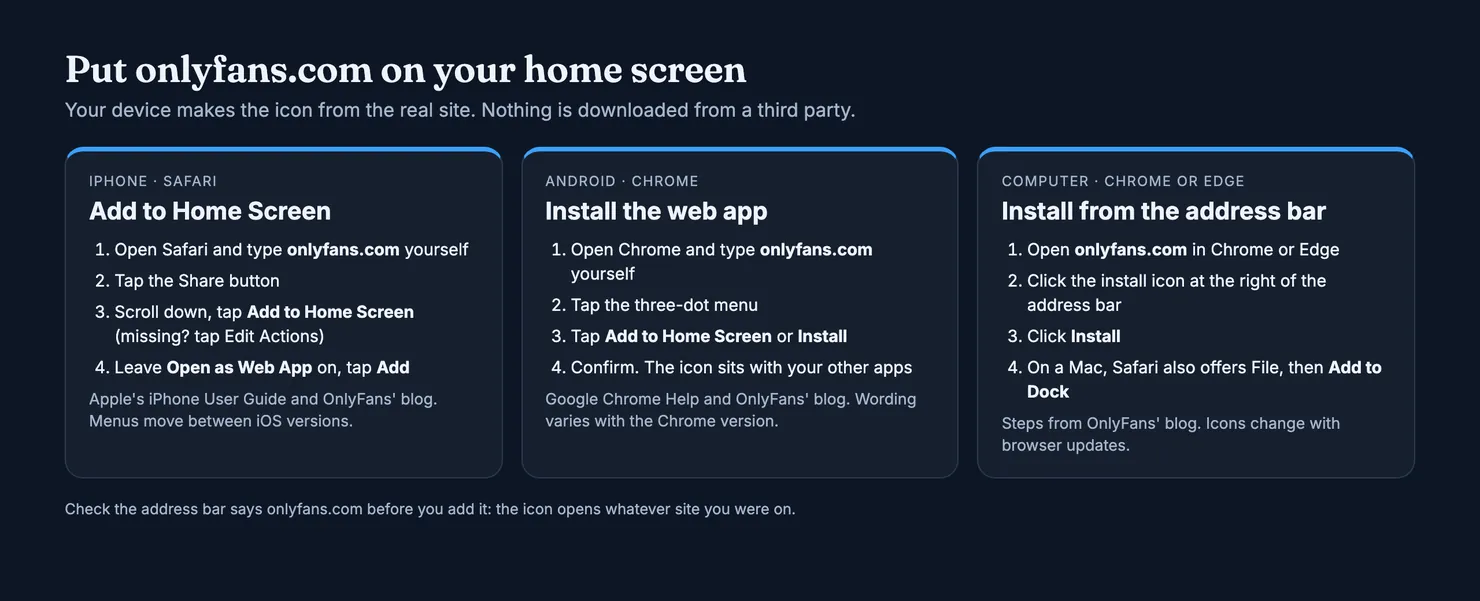
A web app is a website your phone treats like an app: an icon on the home screen, its own window, no address bar in the way. You make it yourself from the real site, so nothing is downloaded from a stranger. OnlyFans' post gives the steps for each browser, and they match the phone makers' own help pages.
How do I get the OnlyFans app on my iPhone?
- Open Safari and type
onlyfans.comin the address bar yourself. Do not follow a link from a message or an advert. - Tap the Share button.
- Scroll down the list and tap Add to Home Screen. If it is missing, Apple says to scroll to the bottom, tap Edit Actions and add it.
- Leave Open as Web App switched on and tap Add.
Apple's iPhone User Guide calls this turning a website into an app. When you tap the icon, the site opens like an app. OnlyFans' post also gives a version for Chrome on an iPhone, where Add to Home Screen sits under the Share button and View More.
How do I put OnlyFans on my Android home screen?
- Open Chrome and type
onlyfans.comyourself. - Tap the three-dot menu.
- Tap Add to Home Screen, or Install if Chrome offers it.
- Confirm. The icon appears with your other apps.
Google Chrome Help describes web apps the same way: a website that works as an app from the home screen. You remove it from Settings, then Apps, like anything else. Google adds a warning worth keeping in mind. If a web app later asks to change its name to look like a different app, that may be a malicious change, and you should uninstall it.
Can I install OnlyFans on a computer?
Yes, in the same sense. OnlyFans' post says Chrome on a Mac or Windows PC shows an install icon at the right of the address bar when you are on onlyfans.com, and Edge on Windows shows one too. Click it, then Install, and OnlyFans gets its own window and a desktop or taskbar shortcut. In Safari on a Mac, the post says File, then Add to Dock, puts it in your Dock and Applications folder. These are the browsers' features, so the icons move as the browsers update.
Whichever device you use, check the address bar before you add anything. The icon opens whatever page you were on, so an icon made from a lookalike address keeps sending you back to the lookalike.
What are the "OnlyFans apps" on download sites?
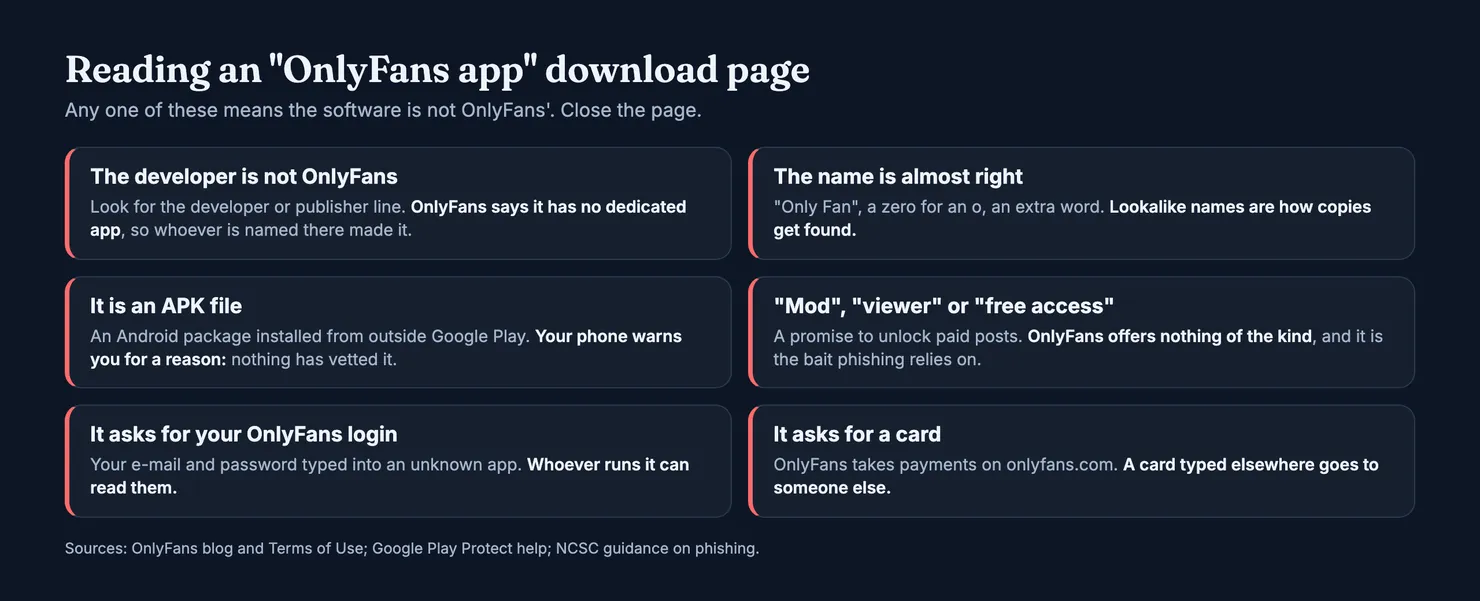
They are software by other people, listed under the OnlyFans name or something close to it. We did not download or test any, so we cannot tell you what a particular one does. We can tell you what each of them asks of you, because they all work the same way. To show you anything from your account, an app that is not OnlyFans needs your OnlyFans e-mail and password, typed into its screen instead of into onlyfans.com. Whoever runs it can read them.
That is the risk the UK's National Cyber Security Centre describes in its guidance on phishing scams: the aim is often to get you onto a site or into software that can install a virus or steal bank details and other personal information. An app promising OnlyFans on your phone is an easy wrapper for exactly that.
How do I tell a real app from a copy?
For OnlyFans the test is short, because there is no real one to find. The developer line on the listing will name someone else. The name may be slightly off ("Only Fan", an extra word, a zero for an o). It is often an APK, a file you install from outside Google Play, which Google Play has not checked. If any of that is on the page, close it. You are not missing a feature: the site does everything the listing promises, apart from the things it should not.
What about "mod", "viewer" and "free" versions?
Some listings promise to unlock paid posts or show profiles without a subscription. OnlyFans offers no such thing, and an app that claims to is either lying or built on someone else's stolen content. Either way it is bait. Treat those words on a download page as the clearest warning sign there is, and do not type anything into the app.
Does it matter if I already logged in?
Yes, and the terms say why. OnlyFans' Terms of Use list what the company is not responsible for, and that list includes issues in your own hardware or software and any lost, stolen or compromised accounts, passwords or e-mail accounts, along with unauthorised payments that follow. In plain terms, if you hand your login to someone else's app, the consequences fall on you first. Terms change, so read the current version on the site.
Installed a fake OnlyFans app? What to do
Act in this order. The NCSC's page on what to do if you have shared sensitive information covers the general case, and most of it applies here.
- Uninstall the app. On Android, open the Play Store, go to Play Protect and run a scan. Google Play Protect checks apps from other sources too and can warn you about or remove harmful ones.
- Change your OnlyFans password from a browser, at
onlyfans.com, typed yourself. Then change it on every other account that used the same password, which the NCSC singles out. Start with your e-mail, since it can reset everything else. - Turn on two-step verification wherever you can, starting with that e-mail account. The NCSC's top tips for staying secure online put a strong, separate e-mail password and 2-step verification near the top.
- Check your payments. Look through your bank or card statement for charges you did not make. If you typed a card into the app, call your bank now, not after you spot something.
- Report it. If you lost money, the NCSC says to tell your bank and report it to Report Fraud (England, Wales and Northern Ireland) or Police Scotland. If you cannot get back into your OnlyFans account, our guide on contacting OnlyFans customer service explains the support routes.
Running an antivirus scan, if your phone or computer has one, is also on the NCSC's list when you have installed software from a scam. For the wider picture of keeping an account safe, see Is OnlyFans safe?
Before you pay anyone from your phone
A real site is half the question. The other half is the account you are about to pay. On a phone, most people reach an OnlyFans profile from a link in a social media bio, and that link can point to a copy using someone else's photos. Our guide on how to spot a fake OnlyFans account goes through the checks, from the exact handle to whether her other accounts link back.
Legit runs in the same phone browser. You can look up the account on Legit before subscribing and see two separate scores: how likely it is that the account belongs to the person it shows, and how likely it is that someone else answers the messages. How each score is worked out, and what it cannot tell, is in our methodology. The same question about Fansly, which has no app either, is covered in Is there a Fansly app?
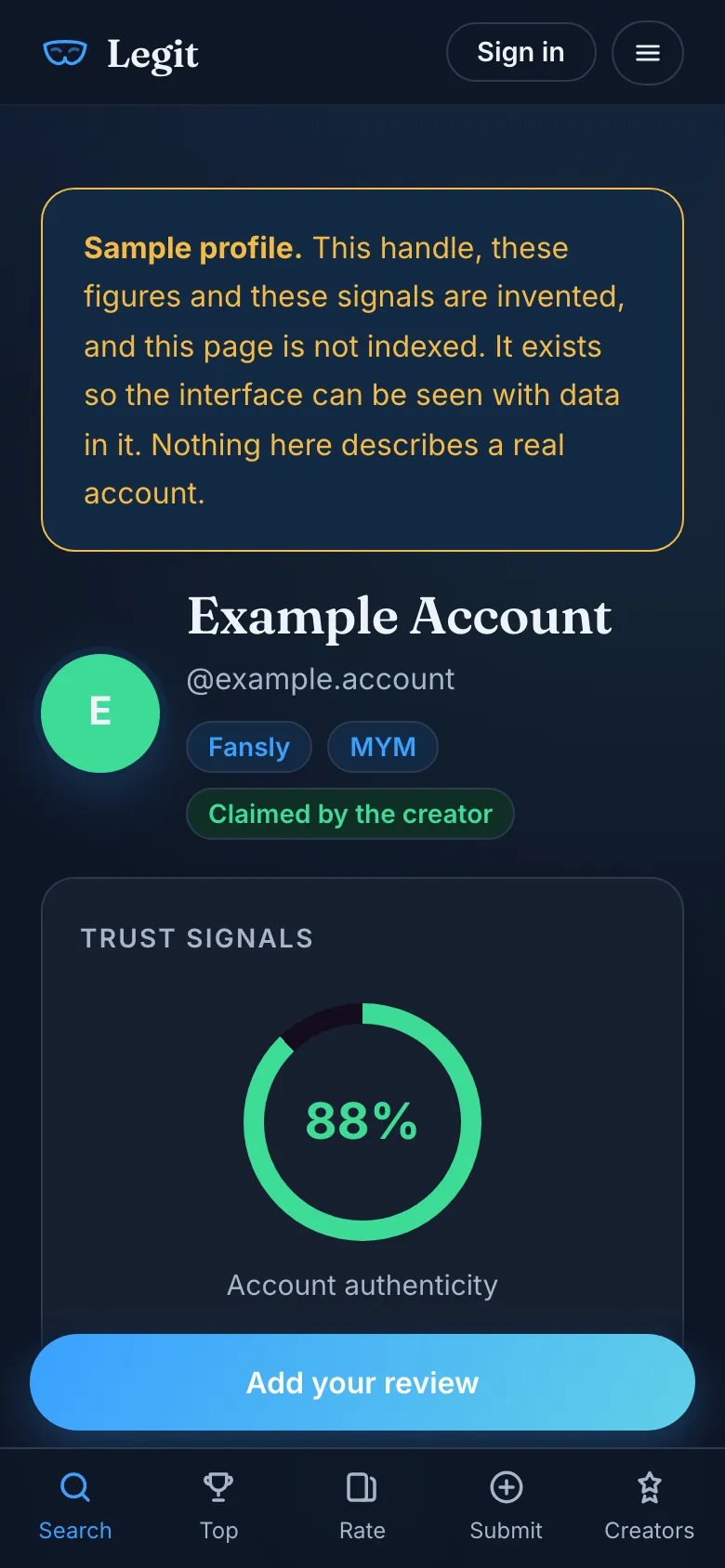
If you have already subscribed, what you saw helps the next person. You can rate the account from your phone in a couple of minutes, and if the subscription receipt from OnlyFans is in your inbox, it can back up your review.
Questions people ask
Does OnlyFans have an official app?
No. OnlyFans' own blog says it does not have a dedicated iPhone, Android or desktop app, and that the site works directly in your web browser on mobile and desktop. You can log in, subscribe, message creators, stream and manage your account there without downloading anything.
How do I get OnlyFans on my iPhone?
Open Safari, type onlyfans.com yourself, tap the Share button, then Add to Home Screen, leave Open as Web App switched on and tap Add. OnlyFans gives these steps on its blog and Apple's iPhone User Guide describes the same thing as turning a website into an app. The icon opens the real site, and nothing comes from a third party.
Is there an OnlyFans app for Android?
Not from OnlyFans. Android packages offered on download sites under the OnlyFans name are made by other developers. The safe equivalent is Chrome: open onlyfans.com, tap the three-dot menu, then Add to Home Screen or Install. The icon opens onlyfans.com and can be removed like any other app.
Is an OnlyFans APK safe to download?
Treat it as unsafe. OnlyFans says it has no Android app, so any APK carrying its name was made by someone else and has not been through Google Play. It will ask for your OnlyFans login, and the UK's National Cyber Security Centre warns that scam links and downloads are a common way to steal passwords and bank details.
Why is OnlyFans not on the App Store?
OnlyFans' post does not give a reason. Apple's review guidelines exclude overtly sexual or pornographic material, and Google Play does not allow apps that contain or promote sexual content. A platform where much of what creators sell is adult content has little room in either store, so the browser is the way in.
Is OFTV the OnlyFans app?
No. OFTV is a separate free video service from the same group, listed on the App Store under OF Media LLC. Its listing says it is free to watch, has no ads and needs no login. It does not open your OnlyFans subscriptions or messages, so it is not a way to use your OnlyFans account on a phone.