How to contact OnlyFans customer service
OnlyFans support works by e-mail, contact form and tickets from your account, as its own terms and privacy policy say. Here is which route fits which problem, how to write a message that gets answered, and how to spot the fake support that fills the gap.
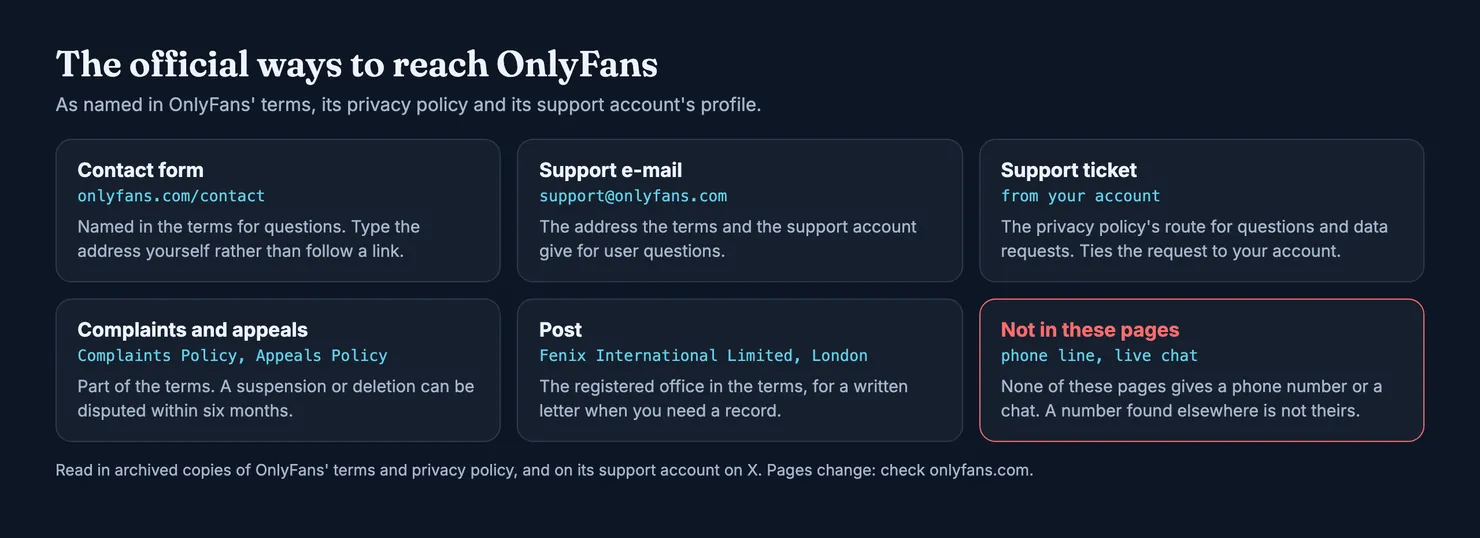
To contact OnlyFans customer service, e-mail support@onlyfans.com or use the contact form at onlyfans.com/contact; both are named in OnlyFans' terms of service. Its privacy policy adds a third route: a support ticket sent from your own account. For a written record, the terms also give a postal address in London. What none of OnlyFans' own pages gives is a phone number or a live chat, which is worth knowing before you search for one, because the numbers that turn up in search results are where many support scams begin.
We read OnlyFans' terms and privacy policy in copies kept by the Internet Archive, because onlyfans.com does not let our browsers in; the links go to the live pages. Its help centre and contact form were closed to us for the same reason, so this guide says only what we could read. Policies change: check the current text before relying on a detail.
How do I contact OnlyFans customer service?
Pick the route that matches what you need, and start from a page you reached yourself rather than from a link someone sent you.
- The contact form. The terms say that to contact OnlyFans with questions you can "email support@onlyfans.com or use our Contact Form". Type
onlyfans.com/contactinto your browser rather than following a link from a message. - The support e-mail. The same address,
support@onlyfans.com, appears again at the end of the terms for anything about the site or its rules, and in the profile of OnlyFans' support account on X, which lists it for "User Questions" (OnlyFans Support on X). - A ticket from your account. The privacy policy tells people with questions or privacy requests to "submit a ticket through your account". This ties your message to the account concerned, which saves a round of proving who you are.
- Post. The terms name the company behind the site, Fenix International Limited, and its registered office at 9th Floor, 107 Cheapside, London EC2V 6DN. A letter is slow, but it leaves a dated record.
What is the OnlyFans support email address?
support@onlyfans.com. It is the only general support address in the terms, and the one the support account on X gives. Write from the e-mail address registered on your OnlyFans account if you can: it is the simplest proof that the account is yours. Be wary of any other address presented as "OnlyFans support", especially one on a different domain.
How do I open an OnlyFans support ticket?
From inside your account, while signed in. The privacy policy refers to submitting a ticket "through your account" without describing the menus, and the help pages that would show them are closed to our browsers, so we will not guess at the clicks. If you cannot sign in at all, the e-mail address and the contact form remain open to you.
Does OnlyFans have a customer service number?
Not one that OnlyFans publishes in any page we read. The terms list e-mail, the contact form and post. The privacy policy lists a ticket and e-mail. The support account's profile lists the help centre and e-mail addresses. None of them gives a phone number for fans to call.
Search results tell a different story. Forum threads and contact directories post phone numbers presented as OnlyFans' support line. We could not trace any of them to an OnlyFans page, so we do not repeat them here, even as a warning. Calling an unverified number puts you on the phone with whoever paid to be found, and a caller posing as support can ask for your password, your card or a "verification payment" in a way an e-mail cannot. If you want to speak to a person about money, call your bank, using the number on your card.
One detail in the terms can mislead people: they say OnlyFans may send you notice by account message, e-mail, letter, text, or by calling a phone number you provided. That is about OnlyFans contacting you, not a line you can ring. If someone calls claiming to be OnlyFans, hang up and check your account and inbox yourself.
Does OnlyFans have live chat?
Not in any of the pages we read. There is no chat in the terms, the privacy policy or the support account's profile. The support account on X showed no posts when we looked, which suggests it is a pointer to e-mail and the help centre rather than a help desk you can message. Any "live chat with OnlyFans support" offered in a direct message, a messaging app or a pop-up on another site is not an official channel.
Which route for which problem
Support is not always the first call. For some problems the fastest fix is in your own settings, and for others it is your bank.
- A charge you do not recognise. Check your account's purchases and subscriptions first: most surprises are a renewal, a tip or a paid message. If the payment is not yours at all, call your bank before anyone else. Our guide on OnlyFans charges on a bank statement walks through matching a line to a purchase.
- A renewal you did not want. You can stop it yourself: the terms say a subscription does not renew if you switch off Auto-Renew on the creator's account. Our guide to cancelling an OnlyFans subscription shows how.
- Content that was not delivered. Write to support with the details. The terms say OnlyFans is not a party to the contract between fan and creator, and they warn against unjustified refund or chargeback requests. Our OnlyFans refund guide covers what the terms allow.
- A suspended or deleted account. The terms point to the Appeals Policy and say you must dispute the decision within six months of being notified, or lose the right to.
- Illegal content or an account impersonating someone. The terms say suspected illegal content is reported through the Complaints Policy.
- A question about your personal data. Use the privacy route: a ticket from your account, or the contact details in the privacy policy, which says OnlyFans has a Data Protection Officer to answer these.
- Closing your account. The terms say fans can delete their account in the "User Account" section themselves. Our guide on deleting an OnlyFans account explains what happens next.
How to write to OnlyFans support so you get an answer
A support team that works by e-mail answers the messages it can act on. Give it everything in the first message.
- Write from the right address. Use the e-mail address registered on the account, or open a ticket from inside it.
- Name the account. Your username, and the creator account concerned if the problem involves one.
- Give dates and amounts. For a payment: the date, the amount in dollars as shown on OnlyFans, the amount on your statement and the last four digits of the card.
- Attach screenshots. The purchase history, the message or the error. Crop out anything you do not need to share.
- Say what you want. A refund, an unlock, an explanation, a deletion. One clear request is easier to handle than a story.
- Never send your password or full card number. No real support team needs them. The privacy policy says OnlyFans may ask for extra information to confirm a request comes from you; that is different from asking for your password.
Keep a copy of what you sent and when. If you later complain to your bank, a regulator or a court, a dated trail of messages is the best evidence you will have.
Fake OnlyFans support: how to spot it
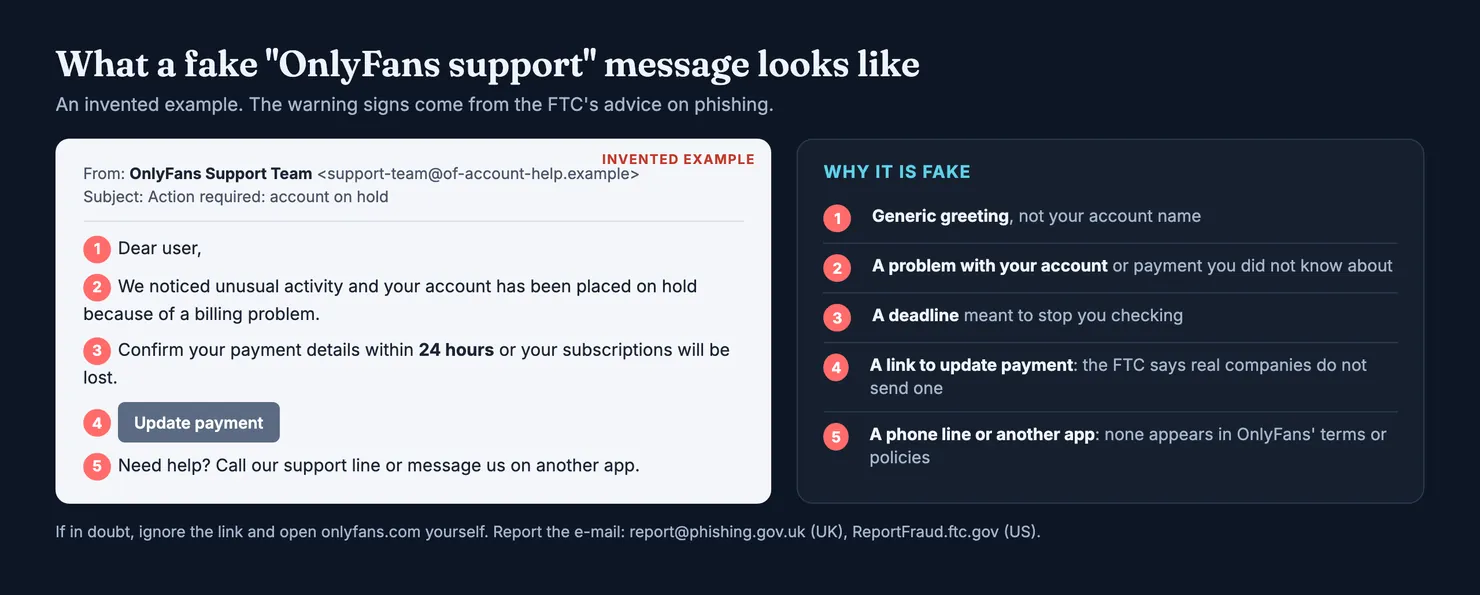
Because OnlyFans works by e-mail and form, scammers imitate it the same way. The US Federal Trade Commission's advice on phishing lists the usual story: a message that looks like it comes from a company you use, says there is suspicious activity or a problem with your account or payment, and asks you to confirm details or click a link. It adds a rule worth remembering: legitimate companies won't e-mail or text you a link to update your payment information (FTC, phishing).
What to do with a suspicious "support" message
Do not click, reply or call. The FTC's advice is to contact the company through a website or number you know is real, not the one in the message. For OnlyFans, that means opening the site yourself and checking your account and notifications. If there is no problem there, there is no problem.
Then report it. In the UK, forward a suspicious e-mail to report@phishing.gov.uk; the National Cyber Security Centre can take down scam addresses and sites. If you lost money or someone got into your account, report it to Report Fraud in England, Wales and Northern Ireland, or to Police Scotland on 101 (NCSC, report a scam e-mail). In the US, the FTC takes reports at ReportFraud.ftc.gov. If you gave away your card details, call your bank at once. Our guide on whether OnlyFans is safe covers the other scams that start in messages.
What OnlyFans support cannot do for you
Knowing the limits saves a lot of waiting. The terms set several of them.
OnlyFans says it is not a party to the contract between fan and creator. It provides the platform and may moderate content, but a dispute about what a creator promised is, on paper, between you and her. Support can look at it; it is not bound to settle it in your favour.
Refunds are narrow. The terms ask fans not to make unjustified refund or chargeback requests and say a request made in bad faith can get the account suspended or deleted. Wallet credits are non-refundable. If OnlyFans closes a fan account for breaking the rules, payments already made are not refunded.
Account security is on you. The terms say OnlyFans is not responsible for lost, stolen or compromised accounts, passwords or e-mail accounts, or for the unauthorised payments that follow. Support may help you get back in; the money is a matter for your bank.
None of this removes your rights as a consumer. The terms themselves say consumers can rely on the mandatory rules of the country where they live.
What if OnlyFans support does not reply?
Send one follow-up in the same thread rather than ten new messages, then use the formal routes. A complaint goes through the Complaints Policy, a suspension through the Appeals Policy, and the terms say consumers must notify OnlyFans and, if asked, try mediation before bringing a claim. A letter to the registered office in London gives you a dated record. For a request about your personal data, UK law gives you a right of access: the Information Commissioner's Office says organisations usually have one month to answer, and that you can complain to the ICO if they do not (ICO, getting copies of your information). Our guide on what OnlyFans knows about you lists what such a request can cover.
Fewer problems to report: check the account before you pay
Plenty of support tickets start with a subscription that was never worth buying: a copy of a real creator's profile, an account that is not run by the person in the pictures, or messages answered by a team rather than by her. OnlyFans' terms leave most of that between you and the creator.
Legit scores accounts on OnlyFans, Fansly and MYM on those two questions, separately, and shows how many contributions each score rests on. You can look up an account before paying for it, without signing in. Our methodology explains how the scores are built and why a thin record gives no score at all.
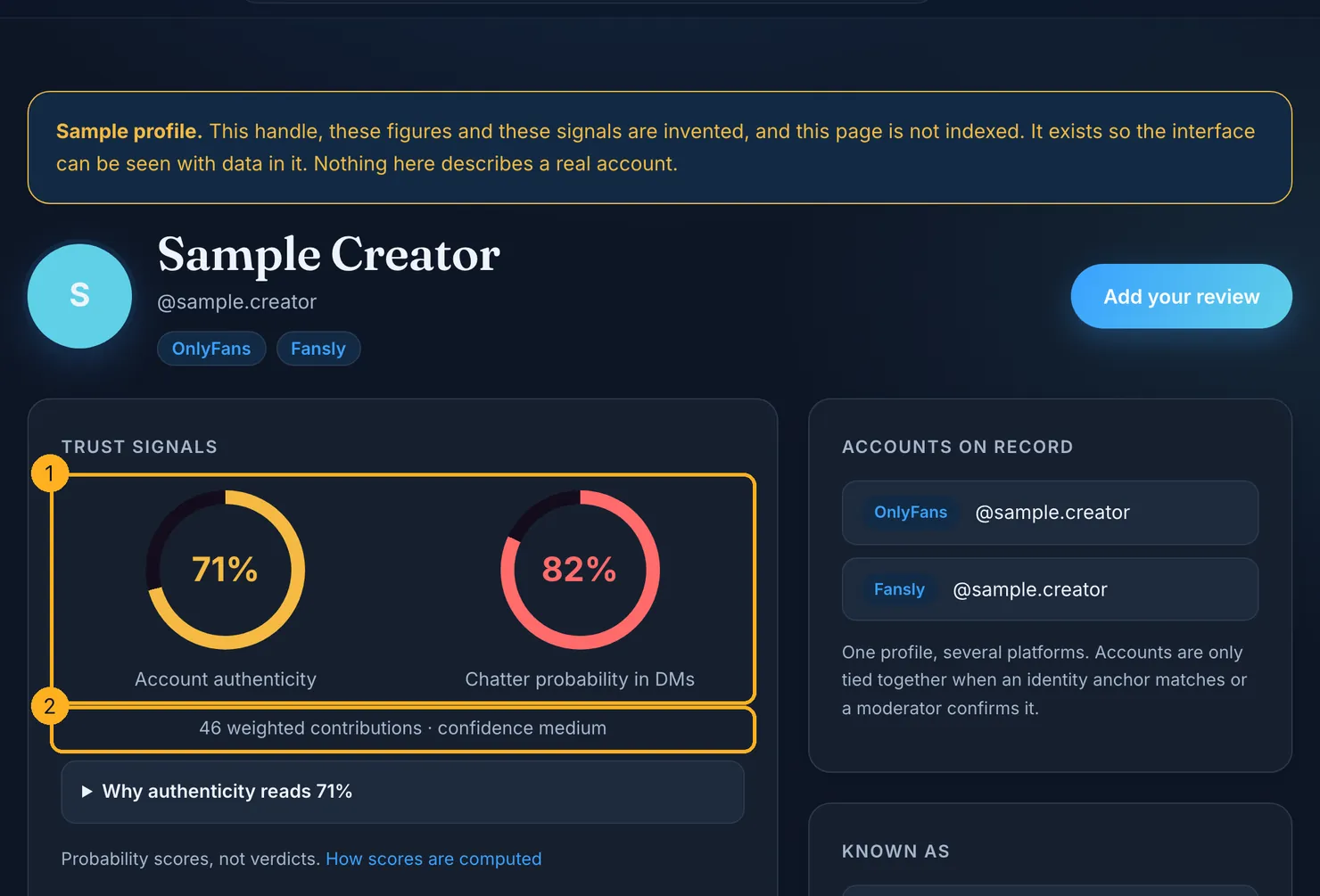
If you have already paid and something was wrong, add what you saw to the account's profile. A support ticket fixes your own problem at best; a rating warns the next person before they pay.
Questions people ask
What is the OnlyFans customer service email?
The address in OnlyFans' terms of service is support@onlyfans.com, and the platform's support account on X gives the same one for user questions. Write from the e-mail address registered on your OnlyFans account, give your username, dates and amounts, and never include your password or full card number in the message.
Does OnlyFans have a customer service phone number?
Not one that appears in OnlyFans' terms, privacy policy or support account profile, which list e-mail, a contact form, a ticket from your account and a postal address. Phone numbers posted on forums and directories could not be traced to OnlyFans, so do not call them; for a payment problem, call your bank on the number printed on your card.
Can I chat live with OnlyFans support?
No live chat appears in any OnlyFans page we could read. Support works through e-mail, the contact form and tickets sent from your account. A chat offered in a direct message, a messaging app or a pop-up on another website is not an official channel, and it is a common way for scammers to ask for passwords or card details.
How do I get a refund from OnlyFans support?
Write to support with the purchase date, amount and what went wrong. OnlyFans' terms say it is not a party to the contract between fan and creator, wallet credits are non-refundable, and a refund or chargeback request made in bad faith can get your account suspended. If a payment was not made by you at all, contact your bank first.
How do I appeal an OnlyFans account suspension?
OnlyFans' terms send account suspensions and deletions to its Appeals Policy and say you must dispute the decision within six months of being notified, or you give up the right to. Write to support from the e-mail address on the account, quote the notice you received and keep a copy of everything you send.
What should I do with an email from OnlyFans support I was not expecting?
Do not click its links, reply to it or call any number in it. Open onlyfans.com yourself and check your account and notifications. If the message claims a billing problem or asks you to confirm payment details, treat it as phishing and report it: to report@phishing.gov.uk in the UK, or to the FTC at ReportFraud.ftc.gov in the US.