Is OnlyFans anonymous? What creators and OnlyFans see
For a subscriber, OnlyFans is pseudonymous, not anonymous. Here is what the creator, OnlyFans and your bank can each see, read in OnlyFans' own privacy policy and terms, and the small choices that give people away.
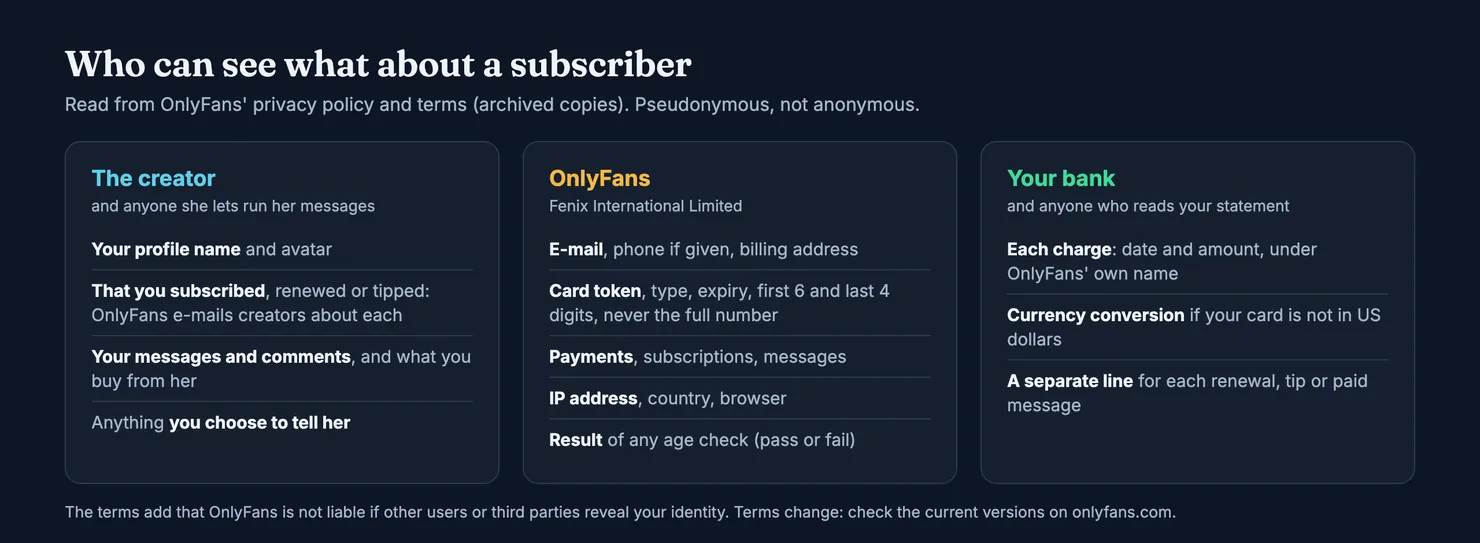
Not completely. For a subscriber, OnlyFans is pseudonymous rather than anonymous: the creators you follow see an account, not a person, but OnlyFans itself holds your e-mail address, part of your card details, your payments and your connection data, and your bank sees every charge. How private you stay depends mostly on what you put in your profile and your messages. This guide goes through who can see what, read in OnlyFans' own privacy policy and terms of service, and where anonymity tends to break.
About those links. onlyfans.com does not let our browsers in, so we read both documents in copies kept by the Internet Archive; the links go to the live pages. Policies change, and the creator's side of the app is not described in either document, so where they are silent we say so rather than guess.
Is OnlyFans anonymous for subscribers?
It is anonymous towards the people you pay, up to a point, and not at all towards the company. Those are two different questions, and most of the confusion comes from mixing them up.
Can I remain anonymous on OnlyFans?
Towards creators and other fans, largely yes, if you set it up that way. The terms ask a fan for a valid e-mail address, a username and a password, or a sign-in through an approved third party (Terms of Service). Nothing in them requires your own name on your profile. Your profile name and avatar are what creators deal with, and you choose both.
Towards OnlyFans, no. To open and use a fan account you hand over contact details, a card, a billing address and, sometimes, proof of your age. The privacy policy lists all of it, and we go through it below.
Can people find out who I am on OnlyFans?
Not from anything OnlyFans publishes about fans. Neither document describes any public list of the accounts a fan follows, and the privacy policy says OnlyFans does not use cross-site tracking or sell personal data (Privacy Policy).
People find out in other ways: a profile name you also use elsewhere, a photo of yourself as an avatar, something you say in a message, an e-mail address that gives your name away, or a phone left unlocked. The terms are blunt about the consequences. OnlyFans says it is not liable if other users or third parties disclose your identity or publish your personal information without your consent (Terms of Service). Keeping yourself private is, in practice, your job.
What OnlyFans creators see when you subscribe
This is the question most people are really asking, and it is also the one OnlyFans documents least. Neither the terms nor the privacy policy describes the creator's screens. What the privacy policy does list is what sits in each type of account.
For a fan, account data means your profile name, your password, your avatar and header images, your subscriptions, your comments on posts, your chat messages with other users and your support requests. For a creator, it includes her subscribers (Privacy Policy). The same policy says OnlyFans sends creators e-mail notifications when they have a new subscriber, a new tip or a renewal.
So you should assume a creator knows that your account subscribed, renewed or tipped, sees your profile name and avatar, reads everything you send her and knows what you bought from her. That is the account she deals with. Whether it points to you depends on what you put in it.
Can OnlyFans creators see your name or email?
Nothing in OnlyFans' terms or privacy policy says that a fan's e-mail address, phone number or name is shown to creators. The policy files your e-mail and phone number under "user data", held by OnlyFans, separately from the account data creators interact with. We cannot see the creator's side of the app, so we will not promise more than that.
The common exceptions are of your own making. If your profile name is your own name, she sees it. If you sign in through a third-party account, check what that account shows. If you tell her your name, or give her your e-mail to move the conversation elsewhere, she has it.
Can creators see the name on your card?
The privacy policy says card payments are handled by third-party payment providers, and that OnlyFans itself does not receive your full card number or the security code. What it gets from the provider is a token standing for your card, the card type, the expiry date and the first six and last four digits (Privacy Policy). Nothing in the documents says any card detail or the name on the card is passed to creators.
The policy does list "the name registered with your payment card" among the sensitive data it, or its service providers, may hold. That is a reason to treat OnlyFans as knowing who you are, not a sign that creators do. Our guide to OnlyFans payment methods covers which cards work.
Who else reads your messages?
More people than you might think. Some creators let staff or agencies answer their messages, so the person replying may not be the creator at all; our guide to OnlyFans chatters explains how that works and how to spot it. Whoever runs the inbox sees what you write.
OnlyFans reads them too, in a sense. The privacy policy lists the moderation and filtering of content sent in chat messages, and of text in direct messages, to investigate breaches of its terms (Privacy Policy). Write every message as if a stranger could read it, because one might.
What OnlyFans itself knows about you
Here the answer is simple: OnlyFans knows enough to identify you. The privacy policy groups what it holds about fans into a few categories (Privacy Policy):
- User data: your e-mail address and telephone number.
- Account data: profile name, password, avatar and header, subscriptions, comments, chat messages and support requests.
- Financial data: the card details passed on by the payment provider, your billing address and any money added to your wallet.
- Transaction data: every payment from your account to creators, and failed payments.
- Technical data: your IP address with its country code, and your browser's user agent.
- Age check results: pass or fail and the reason, when you have been checked.
Before a fan account is opened, the policy says OnlyFans also checks your country of residence, to make sure access is lawful where you are.
Can you be tracked through OnlyFans?
Not in the advertising sense. The policy says OnlyFans does not use cross-site tracking technologies, does not sell personal data and does not share it for targeted advertising. Non-essential cookies are used, with consent, only for its referral programme for creators (Privacy Policy).
It does record where you connect from. Your IP address and country code are part of the technical data it holds, and the terms say a fan must be legally allowed to view content where they are (Terms of Service). We will not go further than that, and we will not suggest ways round location checks: they exist because the rules differ from one country to the next.
Who does OnlyFans share your data with?
The policy names the categories of recipient. Service providers (IT, payments, customer support, moderation, tax, background screening, age checks), professional advisers such as lawyers and auditors, companies in its own group, and, depending on the case, a buyer in a sale or merger (Privacy Policy).
It also shares data with authorities: law enforcement, tax authorities, regulators and certain non-profit organisations such as the National Center for Missing & Exploited Children, to report illegal content, answer requests and meet reporting duties. The terms add that OnlyFans may disclose information about your use of the site to third parties in line with that policy (Terms of Service).
And it keeps things for a while. Retention is decided case by case, but the policy mentions identity, financial and tax record keeping that in some cases runs up to 7 years, plus anything kept for legal claims or under a preservation order. Deleting your account, which our guide on how to delete an OnlyFans account explains step by step, does not wipe all of it at once.
Age checks: the least anonymous part
Every fan must be 18 or over, and the privacy policy says some fans are asked to prove it, depending on where they live or on circumstances such as suspicious activity on the account (Privacy Policy). OnlyFans does not run the check itself. A third-party provider does, in up to three steps.
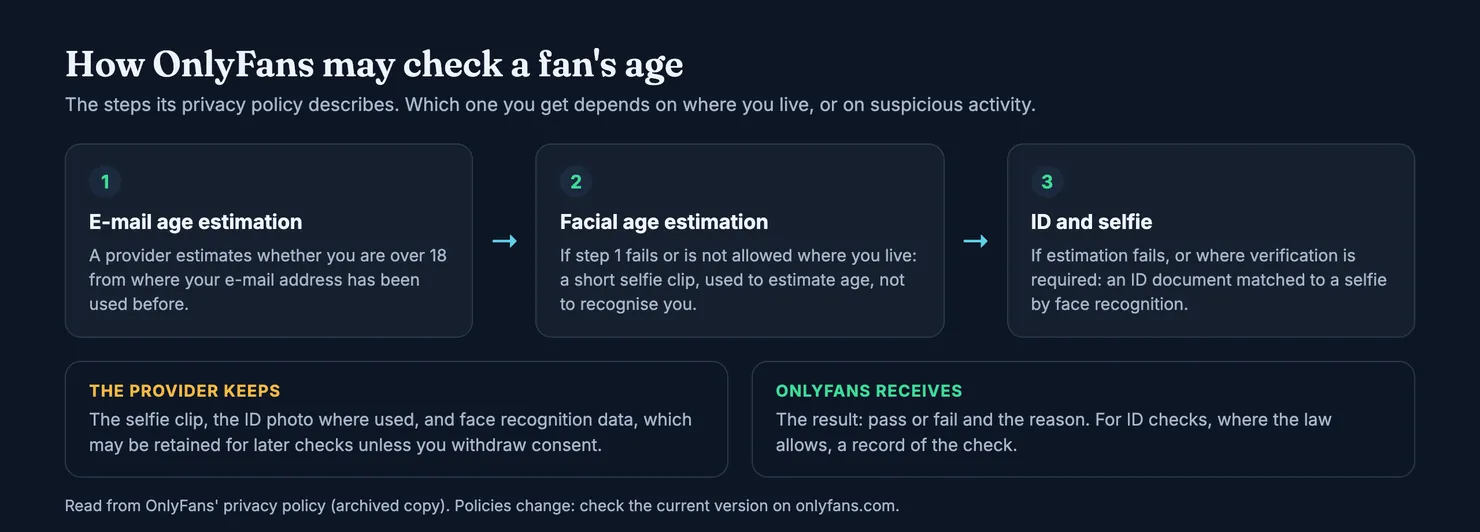
First, e-mail address age estimation: the provider estimates whether you are over 18 by looking at websites and apps where your address has been used before. If that fails, or is not allowed where you live, facial age estimation: you record a short selfie clip, which the policy says is used to estimate your age, not to recognise you. If that fails too, or where full verification is required, you photograph an ID document and take a selfie, and the provider matches the two with face recognition.
The policy says OnlyFans never receives the face recognition data, which stays with the provider; it receives the result, pass or fail with the reason, and, for ID checks where the law allows, a record of the check. The provider may keep face recognition data so you can confirm your identity later without showing your ID again. You can withdraw that consent by writing to the privacy address given in the policy.
In the UK, the checks are not optional. Under the Online Safety Act, sites that allow pornography must have strong age checks for UK users, done by the site or by another company, and Ofcom lists facial age estimation among the accepted methods (Ofcom).
Is it safe to verify your age on OnlyFans?
Ofcom's view is that strong age checks can be done safely and in a way that protects your privacy, while still telling users to be careful when they hand over personal information. Data protection itself is enforced by the Information Commissioner's Office, to which Ofcom says it may refer a provider (Ofcom).
The practical rule is to do the check only from inside OnlyFans, after signing in yourself. A message or a link that asks for your ID or a selfie "to keep your account" should be treated as a scam until proven otherwise. Our guide is OnlyFans safe? covers the age checks and account security in more detail.
What your bank and the people around you can see
OnlyFans charges in US dollars and, from what we found, offers no discreet billing label. Each renewal, tip or paid message can show up as its own line on your statement, under the platform's name. Our guide to what OnlyFans shows on a bank statement goes through the lines one by one, with what to do if one is not yours.
That matters more than it sounds. Your bank is not the only one reading your statements: a partner with a joint account, a parent who pays the card, a business that checks expenses, an accountant. The same goes for the e-mail receipts and notifications sent to the address on your account, and for a phone that shows message previews on the lock screen. None of this is OnlyFans revealing anything. It is how payments and e-mail work.
Where anonymity on OnlyFans usually breaks
Most of the ways a subscriber gets identified have nothing to do with OnlyFans' systems. They come from small choices, usually made in the first five minutes and then forgotten.
- Your profile name. A handle you also use on social media, a gaming site or at work links the two accounts in seconds.
- Your avatar. A photo of your face, your car or your street is an identity card. Leave it blank or use something generic.
- Your messages. Your town, your job, your first name: each detail looks harmless on its own, and together they narrow things down quickly.
- Your e-mail address. If it contains your name, any receipt you forward or any address you give out carries it.
- Moving the conversation elsewhere. A request to continue on another app or by phone often comes with a request for money too. Our guide on fake OnlyFans accounts explains the pattern.
- Phishing. The FTC describes messages that look like they come from a company you know and claim suspicious log-ins, a problem with your account or your payment details, asking you to confirm personal information or click a link to pay (FTC). An "OnlyFans" message like that gives a scammer your login, and with it your subscriptions and messages.
What if someone threatens to reveal your subscription?
Treat it as extortion, not as a deal. Do not pay and do not send anything more. Keep the messages and the account names, report the account to OnlyFans and to the platform where the threat arrived, change your password, and contact the police if the threat is serious. Paying rarely ends it, because whoever made the threat now knows you will pay.
How to see what OnlyFans holds on you
You do not have to guess. Under UK data protection law you have the right to ask an organisation whether it uses or stores your personal information, and for a copy of it: a subject access request. You do not need a lawyer, and organisations usually have one month to answer. The Information Commissioner's Office suggests writing "subject access request" in the subject line, adding the date, details that identify your account, and exactly what you want (ICO).
OnlyFans' privacy policy says you can exercise your rights through a support ticket from your account or by e-mail to the privacy address it gives, and that it may ask for more information to confirm who you are. It also lists the right to ask for correction or deletion, with limits, and the right to complain to your data protection regulator, which in the UK is the ICO (Privacy Policy). In the US, the policy's state disclosures describe similar rights and appeals for residents of certain states.
Can you be anonymous on OnlyFans if you delete your account?
Deleting stops new data being collected and removes your profile, but the policy keeps some records for legal, tax and safety reasons, in some cases for years. If anonymity matters to you, the decisions that count are the ones you make before you subscribe: the e-mail address, the profile name, the avatar and what you say.
Staying private when you check or rate an account on Legit
If you are wondering whether an account is really run by the creator, or whether someone else answers the messages, you can look it up on Legit before paying: search for the account. Searching does not need an account and does not tell the creator anything.
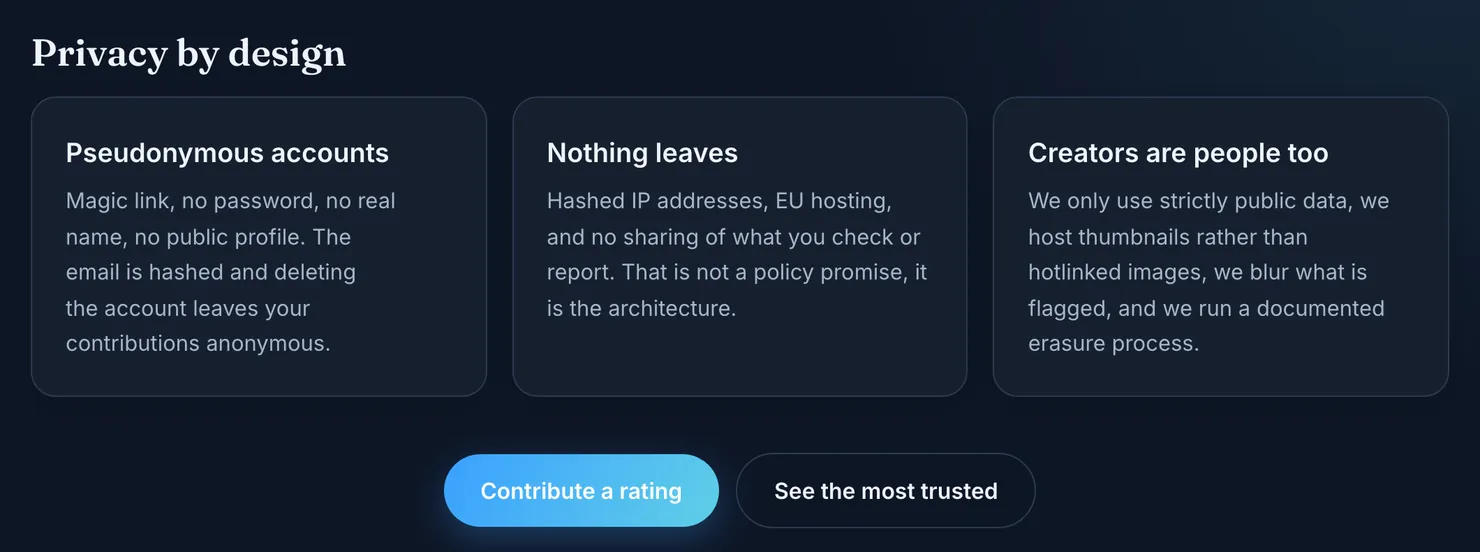
If you want to add what you saw, rating an account works on the same principle as this guide recommends. As our methodology sets out, a Legit account is pseudonymous: a magic link instead of a password, no name to give and no public profile. The e-mail address is hashed, IP addresses are hashed, and deleting your account leaves your contributions in place without an author. If you forward a receipt to prove a subscription, we check the platform's signature and store the platform, the account, the date and a hash, never the e-mail itself.
That gives you a way to warn other fans without telling anyone, the creator included, who you are. For the bigger picture of what an OnlyFans subscription involves, our guide on how OnlyFans works is the place to start.
Questions people ask
Is OnlyFans anonymous for subscribers?
Partly. Creators see your account rather than your identity: the profile name and avatar you chose, your messages and what you pay them. OnlyFans itself is not anonymous: its privacy policy says it holds your e-mail address, billing address, payment records, IP address and part of your card number. Your bank also sees every charge.
Can OnlyFans creators see my name or email?
Nothing in OnlyFans' terms or privacy policy says a fan's name, e-mail address or card details are shown to creators. They see the profile name and avatar you chose, your messages and your purchases. Your name reaches a creator when you use it as your profile name, put it in a message or share an e-mail address that contains it.
Do OnlyFans creators know when I subscribe?
Yes. OnlyFans' privacy policy lists subscribers among the data held in a creator's account and says creators are notified by e-mail when they get a new subscriber, a new tip or a renewal. Assume the creator knows that your account subscribed and what it paid her, even if she never writes to you.
Does OnlyFans need my ID to subscribe?
Not always. The privacy policy says some fans must prove their age depending on where they live or on suspicious activity. The check is run by a third-party provider and may start with an e-mail based estimate, then a selfie clip, and only then an ID document matched to a selfie. OnlyFans says it receives the result, not the face data.
Can I see what data OnlyFans has about me?
Yes. Under UK data protection law you can make a subject access request asking for a copy of the personal information an organisation holds, and it usually has one month to answer. OnlyFans' privacy policy says requests go through a support ticket from your account or by e-mail to its privacy address, and that it may ask for details to confirm who you are.
Does deleting my OnlyFans account make me anonymous again?
Not entirely. Deleting removes your profile and stops new data being collected, but OnlyFans' privacy policy says it keeps some records for legal, tax and safety reasons, in some cases for several years. What protects you most is decided earlier: the e-mail address, profile name and avatar you use, and what you write in messages.