OnlyFans payment methods, read from the terms
Fans pay on OnlyFans with a payment card saved on their account, either directly or through wallet credits bought with that card. Here is what the terms say about each step, and the requests you should turn down.
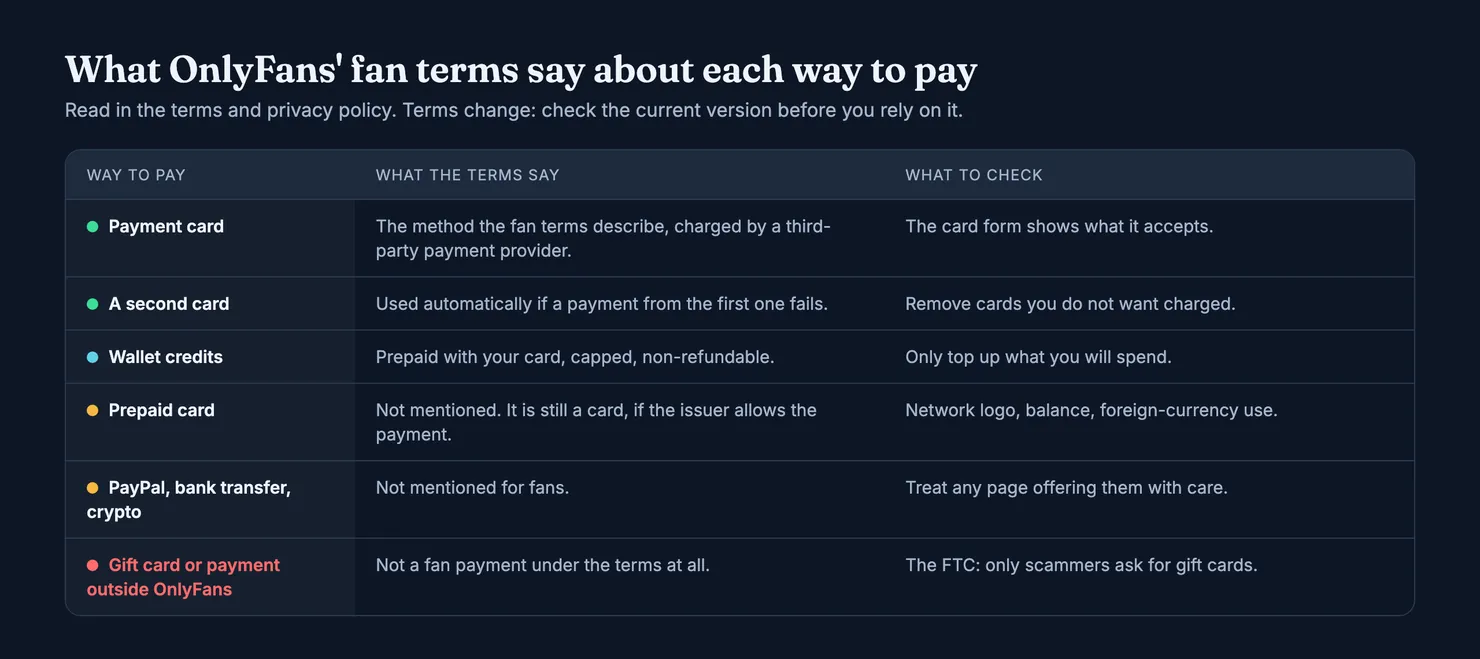
On OnlyFans, fans pay with a payment card saved on their account. OnlyFans' terms describe that card as the way subscriptions, tips and paid messages are charged, through a third-party payment provider, and they let you prepay "wallet credits" with the same card to spend later. That is the whole list in the terms we read. They mention no PayPal, no bank transfer, no crypto and no gift cards for fans, so a page or a person offering one of those is not describing OnlyFans' own checkout.
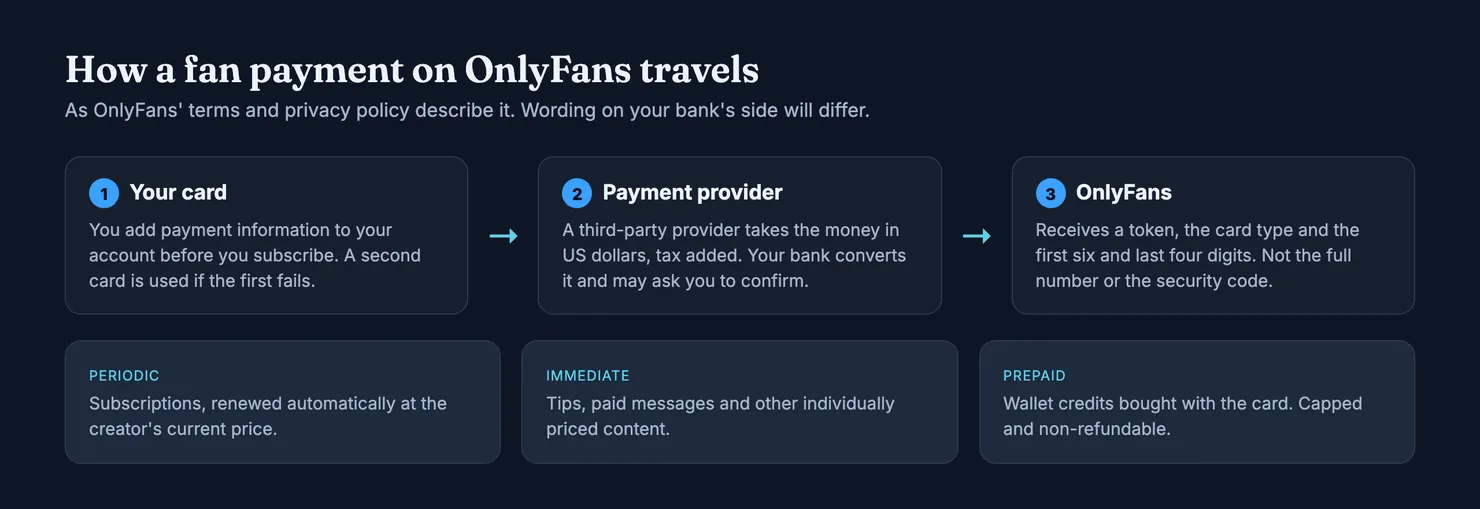
This guide goes through what the terms and the privacy policy say about each step: adding a card, what happens to the card number, how you are charged afterwards, why a payment gets refused and what a creator can see. It ends with the requests to turn down and what to check before you pay an account at all. We read OnlyFans' pages in archived copies on the Internet Archive, because onlyfans.com and its help centre are blocked for our browsers, and the help centre has no archived copy we could open. Where the terms are silent, we say so rather than guess.
How do you pay on OnlyFans?
The OnlyFans Terms of Service set out the order. Before you subscribe to a creator or buy anything from one, you add payment information to your account. Then you click Subscribe, or buy the message or the tip. You authorise OnlyFans to pass your payment details to "a third-party payment provider", and that provider takes the money.
Two other clauses shape every payment you make. Creators set their own prices. And all prices appear, and are charged, in US dollars, with indirect sales tax added at the current rate where it applies. If your card is in pounds, euros or anything else, your bank converts the total, and the terms warn that payment providers may charge currency conversion fees on top.
The company you are dealing with is Fenix International Limited, registered in London, according to the same terms. That is the name you may see on receipts and in any correspondence about a payment.
What payment methods does OnlyFans accept?
Read strictly, the fan sections of the terms describe a payment card and "payment information", nothing more. They talk about your "payment card provider" when they mention chargebacks, and about your "payment card" being charged when a purchase costs more than your wallet credits. They do not name card brands or networks. The card form on the site is the only place that shows which cards it takes on a given day, and we could not open it.
Wallet credits are the second route, and they still start with a card. You prepay an amount and spend it later on subscriptions, tips and messages. We come back to how the wallet works further down, because its rules are stricter than many people expect.
Can you use PayPal on OnlyFans?
Not according to the terms we read. The sections on fan payments mention no PayPal account, no bank transfer, no direct debit, no crypto wallet and no gift card. The only nearby mention of an e-wallet sits in a general clause saying your "bank or e-wallet company" may charge conversion fees, which applies to creators' payouts as much as to fans and does not add a way to pay.
So when a search result promises a PayPal route, or crypto, it is usually selling a product of its own: a virtual card, a top-up service or a middleman that pays on your behalf. That product has its own conditions, its own fees and its own access to your money. We do not recommend any of them, and we do not name them. If you use one anyway, read whose name ends up on the card and what happens to your data.
Can you pay OnlyFans without a credit card?
A debit card is a payment card too, so nothing in the terms rules it out. The difference is in your protections when something goes wrong: in the US, the Federal Trade Commission explains that federal law limits what you owe for unauthorised credit card charges to $50, and debit cards follow other rules (FTC, using credit cards and disputing charges). Our guide on what OnlyFans shows on a bank statement covers those rules in more detail.
Can you use a prepaid card on OnlyFans?
Prepaid cards are not mentioned in OnlyFans' terms at all, so nothing is promised either way. The US Consumer Financial Protection Bureau draws a useful line. An open-loop prepaid card carries a network logo and can be used wherever that kind of card is accepted. A closed-loop card only works at certain shops or services, most have no network logo, and many gift cards are closed-loop (CFPB, prepaid card key terms). A store gift card is in the second group and cannot pay a card form at all. A prepaid card with a network logo is a card, and whether it goes through depends on the payment provider and the card's issuer, which may refuse foreign-currency payments or certain kinds of merchant. We cannot test that for you, so treat any page that promises a particular card "works on OnlyFans" with caution.
What happens when you add a card
Adding a card is where most first payments stall, and the reasons are rarely on OnlyFans' side. Three things can happen between typing the number and seeing a subscription go through.
- An age check, in some places. The terms say you must be at least 18 and must submit further age or identity verification when asked. The OnlyFans Privacy Policy adds that, in certain locations, a third-party provider estimates your age, first from your e-mail address and, if that fails or is not allowed where you live, from a short selfie. The policy says the selfie is used to estimate age, not to recognise you. We do not explain how to get round these checks.
- Your bank confirming that it is you. In the UK, the Financial Conduct Authority's rules on Strong Customer Authentication mean banks check that the person making an online payment is you or someone you have authorised (FCA, confirming your identity). In practice that is a prompt in your banking app or a code by text message. Card payments in other countries can work the same way.
- The payment provider taking the card. From then on, the provider holds the card details and charges them when you buy something.
Does OnlyFans charge your card when you add it?
The terms do not describe a charge for adding a card. Payments start when you subscribe or buy something. That said, press reports describe a very small verification charge on some cards, which often shows as pending and then disappears; our bank statement guide covers that line and the others you may see. If a small charge stays on your statement and you did not add the card, treat it as a charge you did not make and call your card issuer.
How do OnlyFans payments work after you subscribe?
The terms split fan payments into two kinds. The payment provider takes "periodic payments" for subscriptions and "immediate payments" for everything else (OnlyFans Terms of Service). That one sentence explains most of what people find confusing on their statements.
- Subscriptions renew automatically at the creator's current price, plus tax, for another period of the same length, and the terms say you will not receive further notice before a renewal. Each creator you subscribe to renews on its own date. Our guide to cancelling an OnlyFans subscription explains how to switch renewals off.
- Tips, paid messages and other individually priced content are charged the moment you buy them. A subscription does not include them. Our guide on custom content explains where those purchases come from and where disputes start.
- A second card steps in if the first fails. The terms say that if you gave more than one payment method and a payment from the first one fails, OnlyFans uses the other. A card you added once and forgot about can therefore be charged months later.
Prices in dollars and tax added on top mean the amount on your statement rarely matches the round figure on the profile. A subscription priced at a neat number can arrive as an odd number of pounds and pence after tax and conversion. That gap is normal; a second purchase on the same day is the usual explanation for a bigger one.
How does the OnlyFans wallet work?
Wallet credits are money you prepay into your OnlyFans account and spend later. The terms attach four rules to them, and each one matters before you top up:
- They are non-refundable. You are not entitled to a refund of credits you have not used.
- They are capped. The terms say wallet credits are subject to a maximum amount, shown on the site.
- They earn no interest. Money sitting in the wallet does not grow.
- Purchases cannot be split. If something costs more than your remaining credits, the full price goes on your card, not the difference.
The wallet suits someone who wants a fixed budget: the top-up is one line on the bank statement, and spending inside the wallet does not reach the bank. The catch is the first rule. Top up only what you are sure to spend, because the terms give you no way to take the rest back out.
Why was my card declined on OnlyFans?
OnlyFans does not publish a list of decline reasons in any page we could read, and the decision usually belongs to your bank or card issuer rather than to the platform. These are the causes worth checking first, roughly in order of how often they come up:
- An online payment you did not confirm. If your bank sent a prompt to your phone and it timed out, the payment fails. Try again with the banking app open.
- Not enough money on the card. Remember the total is the price plus tax, converted. On a prepaid card, the CFPB notes that some issuers even charge a fee when you try to spend more than the balance.
- A card that refuses foreign currency. OnlyFans charges in US dollars. Some cards, especially prepaid ones, cannot pay in a foreign currency or charge a percentage fee when they do; the CFPB calls this a foreign transaction or currency conversion fee.
- A card that cannot pay this kind of merchant. Closed-loop cards only work in certain places. Some issuers block categories of payment on purpose.
- An age check left unfinished. In places where OnlyFans asks for age estimation, you may not be able to pay until it is done.
If none of these fits, call the number on the back of the card. The issuer can see why it refused the payment, which OnlyFans' support cannot. Retrying with card after card rarely helps, and each attempt can leave a line on a statement.
Can OnlyFans creators see your card name?
People ask this more than almost anything else about paying, and the honest answer has two halves. The privacy policy explains what OnlyFans receives. It does not explain what a creator sees.
On the first half, the OnlyFans Privacy Policy says payments to view creators' content are processed by third-party payment providers. OnlyFans does not receive your full card number, its expiry date or its security code. Instead, the provider gives OnlyFans a token that stands for your card, plus the expiry date, the card type and the first six and last four digits. Elsewhere, the policy lists the partial card number and the name registered with your card among the sensitive data that OnlyFans or its service providers collect.
On the second half, the policy describes no sharing of card details with creators, and we have no way to check what a creator's dashboard shows. We will not tell you more than the policy says. What follows from it is practical: a message from a creator, or from someone claiming to be OnlyFans support, that asks for your full card number, its security code or a photo of the card is not part of how the platform says it handles payments. Our guide is OnlyFans safe covers the wider picture of account and payment security.
The payment request you should refuse
Everything above assumes you pay inside OnlyFans. The risk grows the moment someone suggests another route: "send it directly, it's cheaper", "buy me a gift card and send the code", "pay through this link and I'll unlock everything". The terms describe fan payments as payments made through the platform and its provider; a payment made somewhere else is simply outside them.
That matters for two reasons. First, the refund and complaint routes in OnlyFans' terms, limited as they are, only concern payments made on OnlyFans. Our OnlyFans refund guide explains what those routes allow. Second, gift cards are a payment method that only works in one direction. The US Federal Trade Commission says that no real business will tell you to buy a gift card to pay it, that the number and PIN on the back let whoever holds them take the money even if you still have the card, and that people met online often use gift card requests to take money (FTC, gift card fraud). If it has already happened, the FTC's advice is to contact the gift card company straight away with your receipt, ask for the money back and report it.
What are some ways to pay for OnlyFans discreetly?
Within the terms, there are not many, and we are not going to invent any. OnlyFans charges under its own name, the terms offer no discreet billing label, and a card in someone else's name puts the payment on their statement, which raises its own problems. What you can control is simpler: use a card and a banking app that only you can see, keep your receipts in an inbox only you read, and use the wallet if you want one top-up line instead of many. Pages that promise invisibility usually do it by putting a company of their own between you and OnlyFans, with access to your money and your data.
How to change or remove a payment method from OnlyFans
OnlyFans' help centre describes the exact screens, but we could not read it, so we will not pretend to give click-by-click steps. The cards saved on an account are managed from the account's own settings; look for the section listing your cards. Three habits are worth keeping whatever the screen looks like:
- Keep one card on the account if you can. The terms say a second card is used when the first fails, which is convenient until it is a card you meant to stop using.
- Switch off renewals before removing a card, not after. Removing a card does not, by itself, tell you which subscriptions were still set to renew; the auto-renew guide covers this.
- Look for a card you did not add. If there is one, remove it, change your password and call that card's issuer. The terms say OnlyFans is not responsible for unauthorised payments that follow from a compromised account, so moving fast is on you.
If a charge has already gone through that you did not make, the card issuer comes first. In the US, the FTC says a billing dispute letter must reach the issuer within 60 days after the first bill with the error was sent (FTC). For purchases you did make, the terms warn that unjustified refund or chargeback requests can cost you the account, so a dispute is for errors and fraud, not for a message you regret buying.
Before you pay an account
Knowing how to pay is the easy part. Knowing whether an account deserves the money is harder, and that is the part Legit is built for. Search the account on Legit before you subscribe or buy your first paid message.
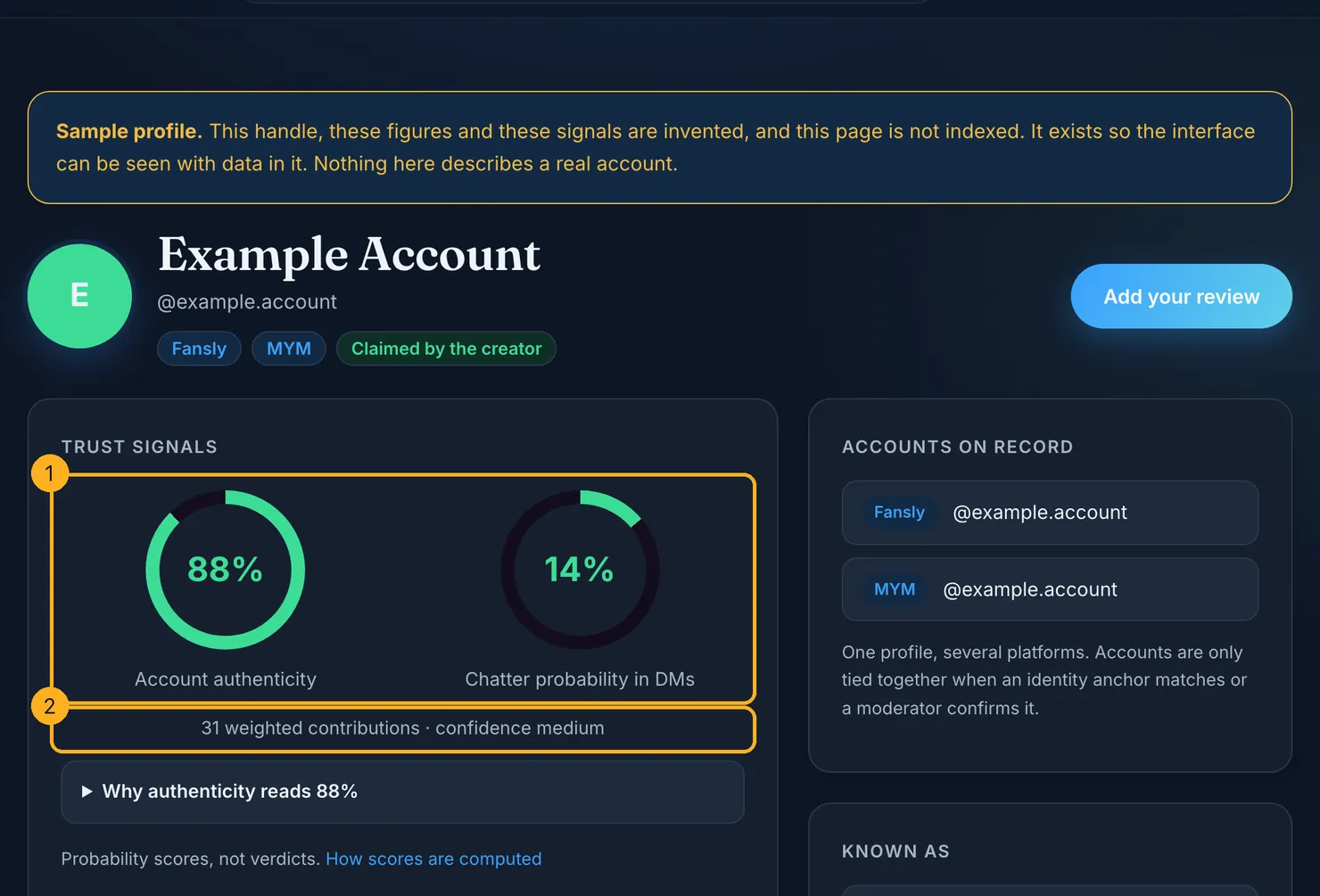
Each profile carries two separate scores: how likely the account is to be run by the person it claims to be, and how likely it is that someone else answers the messages. The number of weighted contributions behind them is shown underneath, and our methodology explains how the scores are computed and what they cannot tell you. Neither score says anything about payments or billing.
If you have already subscribed, you can add what you saw on the review page. The receipt e-mail OnlyFans sends you is useful there: forward it and we check the platform's cryptographic signature ourselves. We keep the platform, the account, the date and a hash of the e-mail, not the e-mail itself, and a review backed by a verified receipt counts for more than an unproven one.
OnlyFans' terms change, and so do its payment providers and the checks banks run. Check the current terms before you rely on any clause quoted here.
Questions people ask
What payment methods does OnlyFans accept?
OnlyFans' terms describe one route for fans: you add payment information, in practice a payment card, to your account before you subscribe, and a third-party payment provider charges it. You can also prepay wallet credits with that card and spend them later. The terms do not list card brands, so the card form itself is the place to see what is accepted.
Can you use PayPal on OnlyFans?
Not according to the terms we read. The sections on fan payments talk about a payment card and payment information charged by a third-party provider, and they mention no PayPal account, bank transfer, crypto wallet or gift card. A page that promises a PayPal route to OnlyFans is describing a product of its own, not the platform's checkout, so read its conditions carefully.
Can I pay for OnlyFans without a credit card?
A debit card is still a payment card, so the terms do not rule it out. Prepaid cards are not mentioned at all. The US Consumer Financial Protection Bureau explains that prepaid cards with a network logo work wherever that network is accepted, while closed-loop cards, including many gift cards, do not. Whether a given card goes through is up to the payment provider and the card issuer.
Why does OnlyFans keep declining my card?
Usually because the bank or card issuer refused the payment. Common reasons are an online payment you did not confirm in your banking app, a balance lower than the price plus tax, a card that blocks foreign-currency payments, or a prepaid card that cannot be used for this kind of purchase. An unfinished age check can also stop you. Your card issuer can tell you why it refused.
Can OnlyFans creators see my card details?
OnlyFans' privacy policy says payments are handled by third-party payment providers and that OnlyFans itself receives a token, the card type and the first six and last four digits, not the full number or the security code. It also lists the name registered with the card among the data it or its providers collect. It does not describe passing card details to creators.
Is it safe to pay a creator outside OnlyFans?
It is a risk the platform's terms do not cover. A payment outside OnlyFans is not a fan payment under its terms, so the refund and complaint routes they describe do not apply. Requests for gift cards are the clearest warning sign: the US Federal Trade Commission says no genuine business asks to be paid by gift card, and the card numbers let whoever has them take the money.