How to delete your OnlyFans account, and what it ends
You close an OnlyFans account from its own settings, but the order matters: closing ends your renewals and your access to everything you bought at once. Here is what the terms say it ends, what OnlyFans keeps, and how to ask for the rest to be erased.
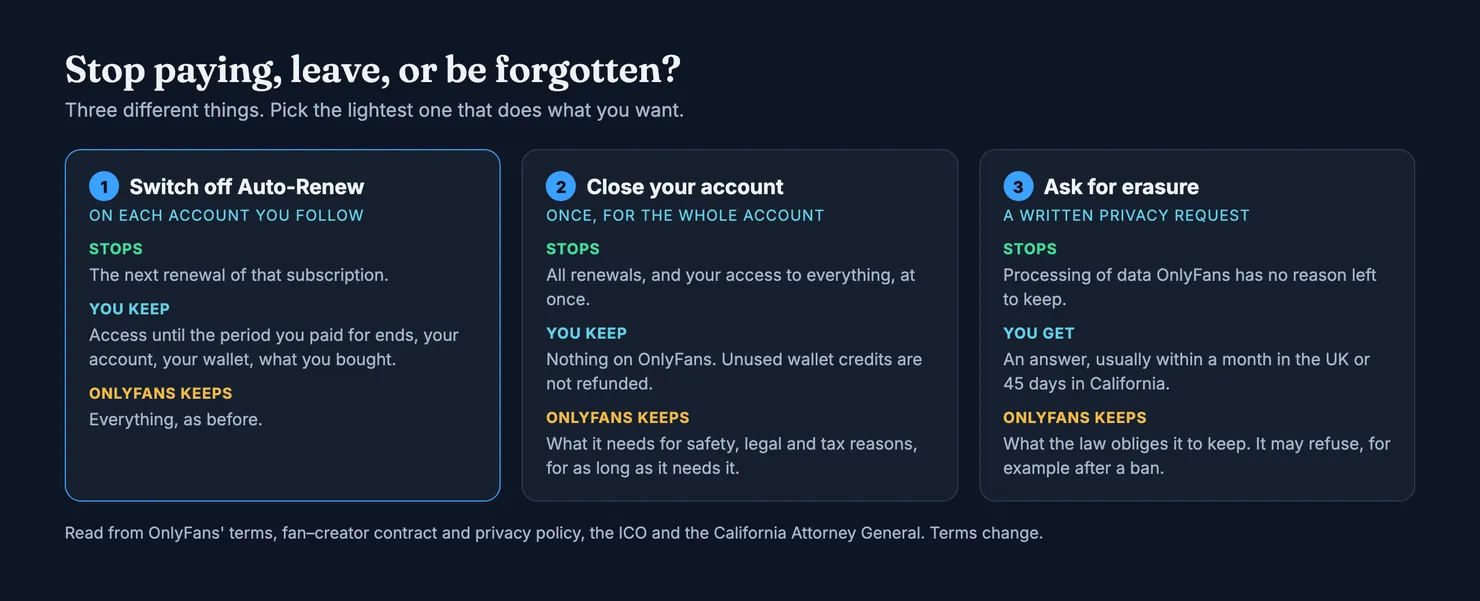
To delete an OnlyFans account, you close it from the account itself, signed in, on any device; deleting the app from your phone closes nothing. Before you do, check whether closing is what you want. If the goal is to stop paying, switching off Auto-Renew on each account you follow does that and keeps your access until the period ends. Closing the account stops every renewal at once, but it also ends your access to everything you paid for, and unused wallet credits are not refunded, according to OnlyFans' own Terms of Service.
We could not show OnlyFans' screens here. Its site and help centre are closed to our tools, so what follows comes from the terms, the contract between fan and creator and the privacy policy, read in archived copies, and from the regulators who say what you can ask for. Menu names differ between devices and the terms change, so read the clauses below as our reading of the version we saw.
Delete, deactivate or cancel: which one do you need?
People search for all three words, and they lead to different places. Cancelling a subscription is something you do on one creator's account. Closing, deleting or deactivating your account is something you do once, for everything. Asking OnlyFans to erase your data is a separate request, made in writing, which you can add after closing.
Do I need to delete my account to stop paying?
No. OnlyFans' terms list four cases in which a subscription stops renewing: your payment is declined and no other card works, the price has gone up, you switched off Auto-Renew on that creator's account, or you close your OnlyFans account before the next period starts (Terms of Service). Switching off Auto-Renew is the gentle one: you keep what you paid for until the period ends. Our guide on cancelling an OnlyFans subscription walks through it, including what to keep as proof.
Is deactivating an OnlyFans account the same as deleting it?
For a subscriber, people use the two words for the same thing: you closing your own account. The terms only use "deactivate" and "delete" when OnlyFans acts against an account. It may suspend or delete an account with 30 days' notice for any reason, or at once while it reviews a suspected breach, and a fan account terminated for a breach gets no refund of prepaid subscriptions (Terms of Service). If that happened to you and you think it was wrong, the terms point to an appeals policy, not to a new account.
How to delete your OnlyFans account, step by step
The order matters more than the button. Done in this order, you lose as little as possible.
- List what you pay for. Open your subscriptions and note each account, its price and its renewal date. If one renews tomorrow, deal with it today.
- Decide about the current period. Nothing in the terms we read promises a refund of the days left when you close the account, and the contract says your licence to the content ends when you close it (fan–creator contract). If you would rather use what you paid for, switch off Auto-Renew everywhere now and close the account after the last period runs out.
- Spend or write off your wallet. Wallet credits are prepaid, carry no interest and are non-refundable, says the Terms of Service. Whatever is left when you close is gone.
- Keep what you may need later. Your receipt e-mails sit in your mailbox, not on OnlyFans, and they are what proves a charge if you ever need to dispute one. Save them before you clean out your inbox.
- Close the account from its settings. Sign in, open your account settings and look for the option to delete the account. We cannot show you the screen, and its wording may change. Expect to confirm, and possibly to sign in again.
- Check your next statement. A charge after the date you closed should not happen. If one does, the section on your card below says what to do.
How do I close my OnlyFans account on my iPhone?
The same way as on a computer: sign in on the website from your phone's browser and close the account from its settings. Removing an icon or a bookmark from your phone leaves the account, the card and the renewals exactly as they were. The account lives on OnlyFans' servers, not on the device.
Can I delete my OnlyFans account without verification?
We cannot tell you what the settings ask for on the day you try. What the privacy policy does say is that, for a privacy request, OnlyFans may ask for more information to confirm who you are, and may decline a request it cannot verify (privacy policy). Answer such a request only inside your account or from an address you typed yourself. Nobody legitimate needs you to send an identity document to a stranger who wrote to you first.
Can a creator delete their account the same way?
A creator account carries earnings, payouts and tax duties that a fan account does not, and the terms treat them separately. This guide is written for subscribers. If you are a creator, read the earnings and withdrawal parts of the Terms of Service before you close anything.
What happens to your subscriptions, purchases and wallet
Here the terms are clear, and less generous than people expect.
- Renewals stop. Closing the account before the next period begins is one of the four cases in which a subscription stops renewing (Terms of Service).
- Access ends. The contract lists the moments your licence to a creator's content ends, and one of them is "if the Fan closes their account" (fan–creator contract). That covers subscription posts and the pay-per-view items and messages you unlocked. Paying gave you a licence to view, not ownership.
- Wallet credits are lost. The terms say you are not entitled to a refund of unused credits.
- No refund is promised for the rest of the period. The terms we read do not offer one for a fan who leaves of their own accord. Our guide to OnlyFans refunds covers the cases where asking makes sense, and the warning in the terms about refund and chargeback requests made in bad faith.
Does deleting your OnlyFans account delete everything?
No, and OnlyFans says so. Its privacy policy explains that it keeps personal data case by case: for the lifetime of the account to run the service, then for as long as needed for trust and safety investigations, for legal and regulatory duties such as identity record keeping and financial or tax reporting, "which in some cases is up to 7 years", for valid legal requests such as a preservation order, and for the limitation periods of possible legal claims (privacy policy).
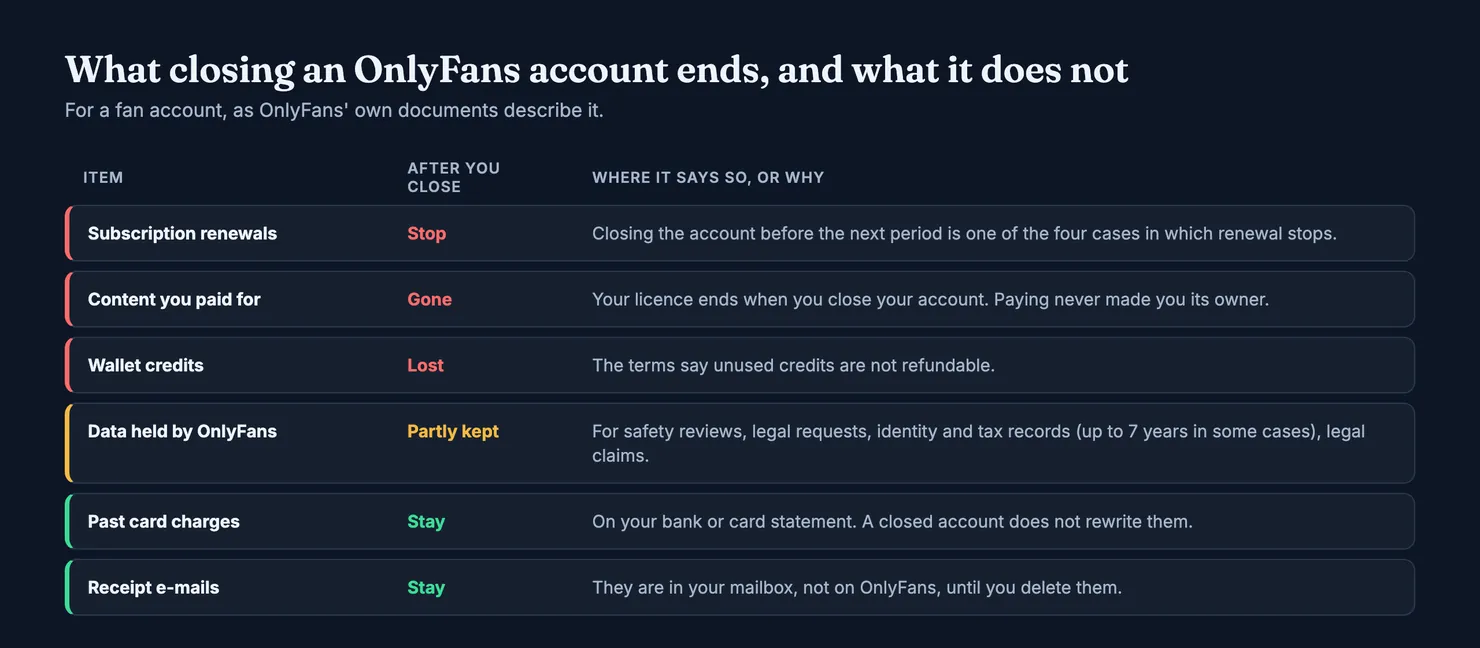
Two things also live outside OnlyFans and are untouched by closing the account: the charges already on your bank or card statement, and the receipt e-mails in your mailbox. If you are wondering what those charges look like to someone reading your statement, our guide on what OnlyFans shows on a bank statement sticks to what OnlyFans itself states.
What about the selfie from the age check?
If you went through an age or identity check, the privacy policy says that, where the law allows, OnlyFans' third-party provider may keep face recognition data so you do not have to send a document again. You can withdraw consent to that retention, and have the data deleted, by writing to privacy@onlyfans.com (privacy policy). Closing the account does not obviously do it for you, so it is worth a separate line in your request.
How to ask OnlyFans to erase your data
Closing the account and asking for erasure are two steps. The privacy policy gives you a right to ask for deletion of personal data where there is no legitimate reason left to keep it, through a ticket from your account or by e-mail to privacy@onlyfans.com, and warns that it may not be able to comply in some cases, for example when an account was deactivated for breaching the terms (privacy policy). The policy also names a Data Protection Officer and a representative in the EU.
Ask before you close, while you can still open a ticket from inside the account. Say which account it is, ask for erasure of the data they no longer need, name the age-check data if it applies, and ask which data they will keep and why. Keep a copy.
How long does OnlyFans have to answer?
That depends on where you live, not on OnlyFans. In the UK, the Information Commissioner's Office says an organisation has one calendar month to respond, which it can extend by up to two months if it tells you why within the first month; the clock starts once it has what it reasonably needs to confirm your identity, and it usually cannot charge a fee (ICO). In California, the Attorney General says businesses must respond within 45 calendar days, extendable to 90 if they tell you (California Attorney General). Other places have their own rules.
Can OnlyFans refuse to delete my data?
Yes, within limits. The ICO lists cases where an organisation may refuse, among them when it is legally obliged to keep the data, for example under financial regulation, and the California Attorney General warns that the right to delete comes with many exceptions. Both describe the same path if you are unhappy: complain to the company first, then, in the UK, to the ICO.
Your card after you close the account
Closing the account should end the renewals. If a charge still arrives, or you want a belt as well as braces, the UK's Financial Conduct Authority explains that you can cancel a recurring card payment with the business or with your card issuer, and that payments taken after you cancel are unauthorised (FCA). It adds a point people miss: stopping the payment does not by itself end the contract, so do both, close the account and tell your card issuer. Outside the UK, ask your bank what it offers.
Fake support pages that promise to delete your account
When we searched for this question, one of the first results was a forum page advertising a "support" phone number for deleting OnlyFans accounts. We found no phone number in OnlyFans' own documents; the privacy policy points to a ticket from your account and an e-mail address. A number that appears in a forum post or a sponsored page is a way to get your card details or your password.
The FTC's advice fits: if a message or page claims to help with your account, contact the company through a website or number you know is real, not the one in the message (FTC). Nobody needs your password or a photo of your card to close an account you can close yourself. Our guide on whether OnlyFans is safe covers the other common traps.
Before you go: leave what you saw
Leaving is often the moment you know most about an account: whether the messages felt like one person, whether the paid extras matched what was promised. That is exactly what other subscribers need before they pay. You can look up the account on Legit and add what you saw; it takes about thirty seconds and does not need an OnlyFans login.
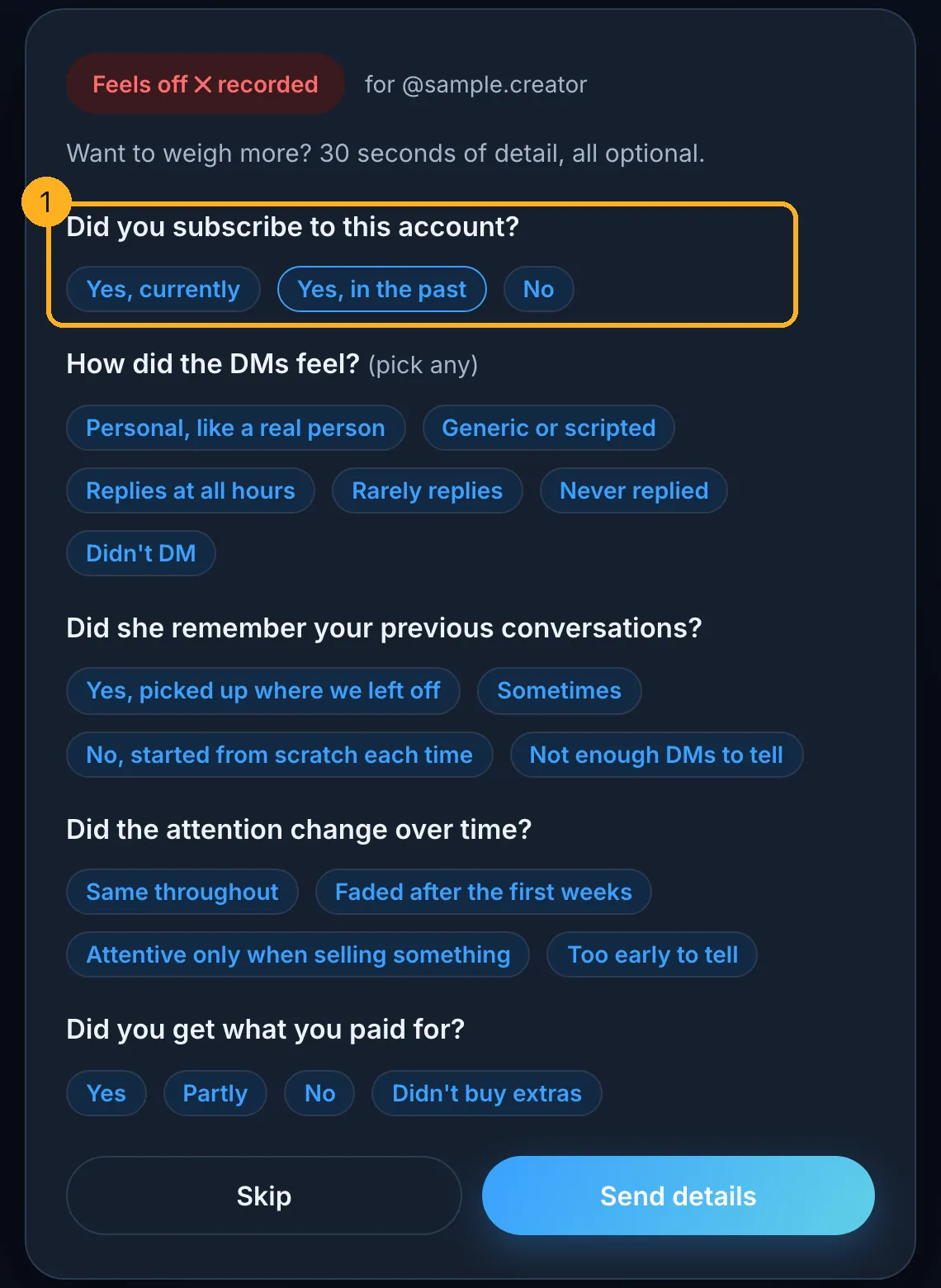
Your OnlyFans receipts still work after you close the account. Signed in to a free Legit account, forward one and your rating counts as a verified subscriber's, because we check the platform's own e-mail signature ourselves; we accept receipts up to about a year and a half old. The methodology explains how much more that weighs. Your Legit account is separate from OnlyFans: if you also want to leave Legit, you can delete your account from your reviews page, and your ratings stay on the profiles without your name.
And if you are leaving because you subscribed in a hurry, our guide on subscribing to OnlyFans sets out what the Subscribe button commits you to, for next time.
Questions people ask
Can you delete an OnlyFans account?
Yes. A fan can close their own account from its settings, signed in on the website from any device. The terms name closing the account as one of the four ways a subscription stops renewing. Closing is permanent from your side: access to subscriptions and anything you unlocked ends, and leftover wallet credits are not refunded.
Does deleting my OnlyFans account cancel my subscriptions?
Yes. OnlyFans' terms say a subscription stops renewing if you close your account before the next period begins. You lose access straight away, though, rather than at the end of the period you paid for. If you want to use what you paid for, switch off Auto-Renew on each account first and close the account once the last period has run out.
Will I get a refund when I delete my OnlyFans account?
Do not count on one. The terms we read promise no refund of the days left in a period when a fan closes their own account, and they say unused wallet credits are non-refundable. A fan account that OnlyFans terminates for breaking the rules gets no refund of prepaid subscriptions either. Spend or write off your wallet balance before you close.
Does deleting your OnlyFans account delete all your data?
No. OnlyFans' privacy policy says it keeps data case by case: for safety investigations, legal requests, identity record keeping and financial or tax reporting, in some cases for up to seven years, and for possible legal claims. Charges already on your bank statement and receipt e-mails in your mailbox are outside OnlyFans and stay where they are.
How do I delete my OnlyFans account on my phone?
Open the OnlyFans website in your phone's browser, sign in, and close the account from its settings, the same way as on a computer. Removing an icon, a bookmark or an app from the phone does not touch the account, the saved card or the renewals, because all of that is held on OnlyFans' side, not on your device.
How do I ask OnlyFans to erase my personal data?
The privacy policy says to submit a ticket through your account or e-mail privacy@onlyfans.com. Do it before closing the account, while you can still open a ticket. Say which account it is, ask for erasure of data they no longer need, mention any age-check data, and ask what they will keep and why. They may ask you to confirm your identity.
Is there a phone number to delete an OnlyFans account?
We found none in OnlyFans' own documents, which point to a ticket from your account and an e-mail address. Phone numbers advertised on forums or sponsored pages for deleting an account are a way to get your password or card details. Close the account yourself from its settings, and contact OnlyFans only through addresses you typed yourself.