How to subscribe to OnlyFans, and what you agree to
Subscribing takes four steps: a fan account, an age check where the law requires one, a payment card, and the Subscribe button. Here is each step as OnlyFans' terms describe it, and what that button commits you to.
To subscribe to an OnlyFans account, you open a free fan account, pass an age check if your country requires one, add a payment card, then click Subscribe on the creator's page. That is the order OnlyFans' own Terms of Service describe. The steps take a few minutes. What deserves more of your attention is what the Subscribe button commits you to: a charge in US dollars that renews by itself, at the creator's current price, with no reminder.
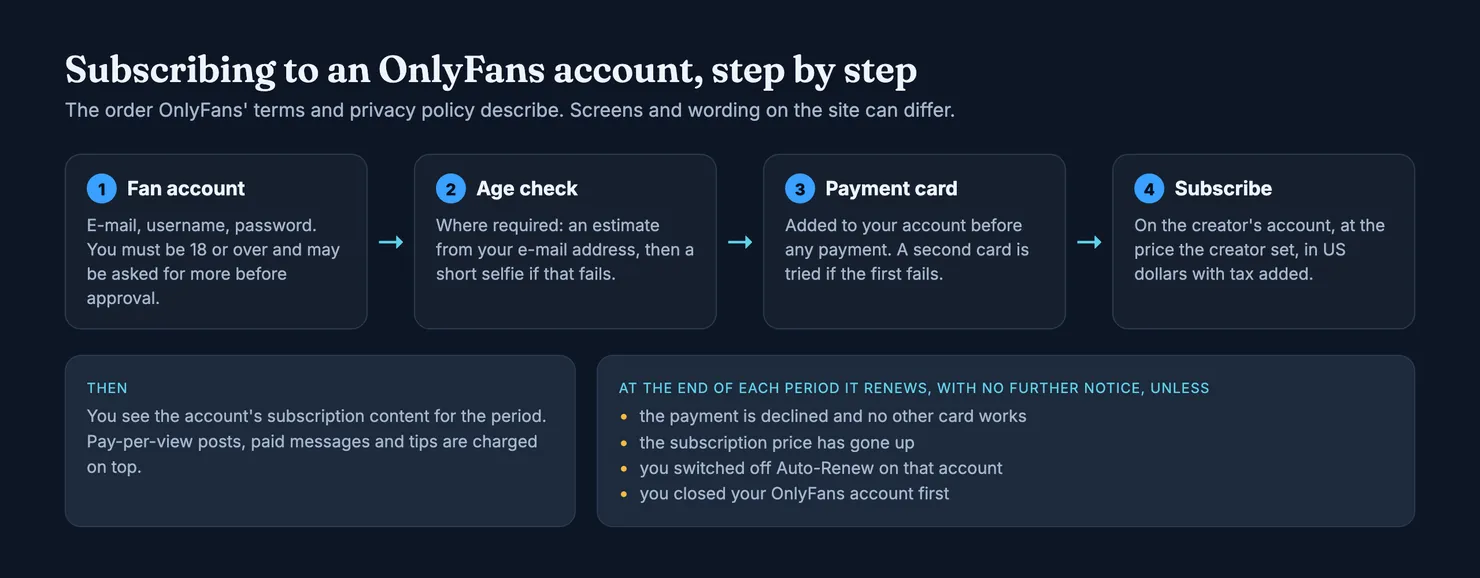
We could not show OnlyFans' own screens here. Its site is closed to our tools, so everything below comes from the terms, the contract between fan and creator and the privacy policy, read in archived copies, plus guidance from consumer regulators. Button labels and layout can differ from one device to another, and the terms change, so treat the clauses quoted here as a reading of the version we saw.
How to subscribe to OnlyFans, step by step
Do you need an account to subscribe on OnlyFans?
Yes. A subscription is attached to a fan account, and the terms set four conditions for opening one: you must be at least 18, able to enter a binding contract, legally allowed to view the content where you live, and you agree to pay for what you buy (Terms of Service). Opening the account costs nothing. You register with an e-mail address, a username and a password.
The terms add that OnlyFans may ask for more information before it approves an account. In practice this is where some people stall: the account exists, but the Subscribe step does not go through until the extra check is done.
Use an e-mail address you control and a password you use nowhere else. The same account will hold your card, your purchase history and every receipt OnlyFans sends you, so it is worth protecting like a bank login. If the account settings offer two-step sign-in, turn it on.
Why does OnlyFans ask me to verify my age?
Because the law in more and more places now requires it. In the UK, the Online Safety Act requires services that publish pornographic content to introduce robust age checks that meet Ofcom's guidance (GOV.UK explainer). Other countries and US states have their own rules.
OnlyFans' privacy policy explains how it does this for fans. The process depends on where you are, or on other circumstances such as suspicious activity on the account. It starts with an estimate made by an outside provider from your e-mail address, by checking where that address has been used before. If that fails, or is not allowed where you live, you may be asked for a short selfie, which the provider uses to estimate your age. The policy says OnlyFans receives the result, pass or fail, rather than the check itself.
If you are an adult and the check keeps failing, contact OnlyFans through its own site. Do not look for a way round it: some of the routes advertised online break the terms, and some break the law.
How do you subscribe to someone on OnlyFans?
The terms put it in two moves: add payment information to your account, then click Subscribe on the creator's account (Terms of Service). Concretely:
- Find the right account. Type the address yourself, in the form
onlyfans.com/username, or follow a link the creator publishes on a profile you already trust. Look-alike usernames are common; our guide to spotting a fake OnlyFans account shows what to compare. - Add a card. You can save more than one. The terms say that if a payment from the first method fails, OnlyFans uses the other one. Our guide to OnlyFans payment methods covers what the terms say about cards and wallet credits.
- Read the price, then click Subscribe. The creator chose that price. The charge is taken by a third-party payment provider, in US dollars, with tax added.
Once the payment goes through, the account's subscription content opens to you. The contract between fan and creator says the fan gets access to the relevant content within 14 days of the payment (Contract between Fan and Creator).
What clicking Subscribe means
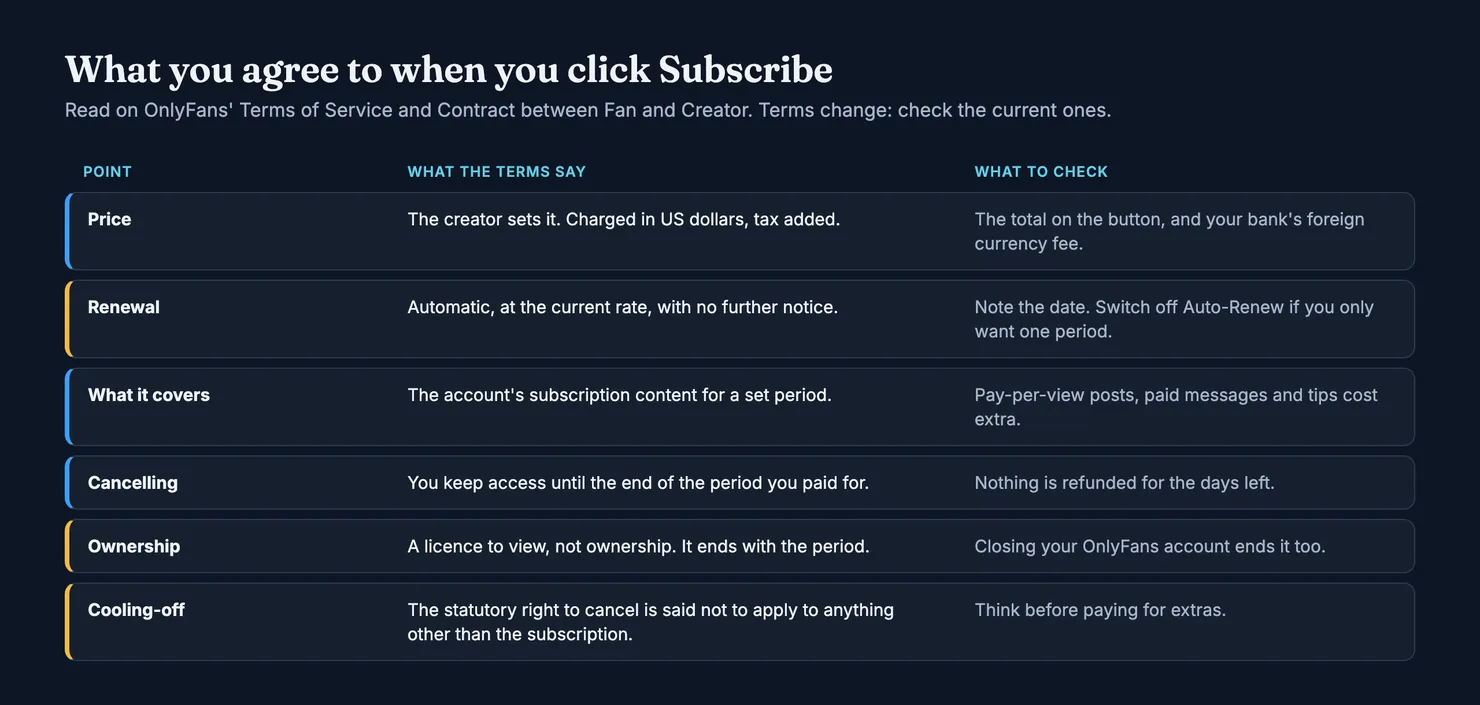
The button is short. The commitment behind it runs to several clauses, split between the Terms of Service and the contract between fan and creator. The picture puts them side by side.
How do OnlyFans subscriptions work?
The terms define a subscription as a binding agreement to access, for a specific period, all the content a creator makes available to fans, in exchange for automatic renewal payments. Two words matter there. "Binding" means it is a contract, not a follow button. "All the content a creator makes available to fans" is narrower than it sounds, because the same definition goes on to exclude individually priced content.
OnlyFans says it is not a party to that contract: the agreement is between you and the creator, and OnlyFans provides the platform and handles the payment. It also says creators alone set their prices. The platform takes a fee of 20% of each fan payment, according to the creator section of the same terms, which is worth knowing when you wonder who you are paying.
What you get is a licence to view, not ownership. The contract lists when that licence ends: when the subscription period ends, if your payment is charged back or reversed, if the creator deletes the content or the account, if your account is suspended, or if you close it yourself (Contract between Fan and Creator).
Do OnlyFans subscriptions auto renew?
Yes, by default. The terms say that a subscription renews automatically at the current rate, plus tax, and that you authorise a new charge after each period unless one of four things happens:
- your payment is declined and you have not provided another one;
- the subscription price has increased;
- you switched off the "Auto-Renew" feature on that creator's account;
- you closed your OnlyFans account before the new period starts.
The same clause adds that by selecting Subscribe you accept that you will not receive further notice before the renewal. Nothing in the terms promises a reminder e-mail. If you only want one period, switching off Auto-Renew straight after subscribing is the simplest way to be sure; the terms say you keep access until the end of the period you paid for. Our guide to OnlyFans auto-renew goes through cancelling in detail.
The US Federal Trade Commission gives advice that fits this case well: before giving a card for a subscription, check whether the business will keep charging you unless you act, and assume it will if that is unclear; and when a first period came at a promotional rate, check what the renewal will cost, because it can be more (FTC).
What does an OnlyFans subscription not include?
The terms list three kinds of "creator interaction": a subscription, a payment for pay-per-view content, and any other interaction or payment with a creator's account, including direct messages. Only the first is covered by the subscription price. Locked posts, paid messages and tips are charged separately, immediately, on the same card.
That is how a monthly subscription becomes a much larger monthly bill. Our guide to pay-per-view messages explains how those are charged. One more clause is worth reading before you buy extras: the contract says the statutory right to cancel under UK and EU consumer law does not apply to creator interactions other than a subscription. Your statutory rights to a refund are not affected, but you cannot simply change your mind about a paid message.
How much an OnlyFans subscription costs
There is no single price. The terms say creators set a monthly subscription price, "if any", and that creators alone decide the price of everything they sell. So the price is whatever the account shows, and it can change: a price rise is one of the four cases in which the terms say a subscription does not renew automatically.
Three things are added to the figure you see:
- Tax. The terms say fan payments exclude indirect sales tax, which is added at the rate that applies to you.
- Currency. Prices appear and are charged in US dollars. If your card is in pounds or euros, your bank converts the amount, and the terms warn that payment providers may charge conversion fees.
- Extras. Everything priced individually, as described above.
Can an OnlyFans subscription be free?
The words "if any" in the terms leave room for an account with no subscription price at all. A free account is still a creator interaction, though: you still need a fan account and, depending on where you live, an age check, and paid posts and messages on that account are charged as usual. The terms we read do not describe free trials or discounted first months, so if an account offers one, read what the renewal will cost before you accept.
Why you can't subscribe on OnlyFans
When the Subscribe step fails, the cause is usually one of four things. Work through them in this order.
- The account is not approved yet. The terms allow OnlyFans to ask for more information before approving a fan account. Check your e-mail, including the spam folder, for a request.
- The age check is unfinished. Where a check is required, the payment will not go through until it is passed. The privacy policy says a failed e-mail estimate can lead to a selfie check.
- The bank refused the payment. The charge is in US dollars and often comes from abroad. Some cards refuse foreign or online payments, and your bank may ask you to confirm the payment in its app before it goes through. Your bank's app or helpline is the place to find out; OnlyFans does not see why your bank said no.
- There is no card on the account. The terms require payment information before any creator interaction, even a free one.
If none of these explains it, contact OnlyFans through the help pages on its own site. Do not hand your card details to anyone who offers to "unlock" a subscription for you.
Keeping control after you subscribe
A subscription on OnlyFans is a recurring card payment. In the UK, the Financial Conduct Authority explains that you can cancel one either with the business or with your card issuer, which must then stop the payments, as long as you ask by the end of the business day before the next one is due. It also points out that cancelling the payment does not necessarily end the contract, and that later payments taken after you cancelled are unauthorised and must be refunded (FCA). Cancelling inside OnlyFans first is cleaner; the bank route is there if that fails.
A few habits save most of the trouble:
- Write down the date you subscribed. The next charge comes one period later.
- Decide on the day whether you want it to renew, and switch off Auto-Renew if not.
- Keep the receipt e-mail OnlyFans sends after each payment.
- Read your statement after the first charge, to see the amount in your own currency and the line it appears under.
Can I subscribe to OnlyFans discreetly?
You can know what shows. You cannot make it disappear. The charge appears on your card statement like any other online payment, and the receipt goes to the e-mail address on your account. Our guide to what OnlyFans shows on a bank statement covers what OnlyFans says about the statement line. The privacy policy says OnlyFans receives a token from the payment provider rather than your full card number. We do not give tips for getting round the age check or paying with someone else's card: both can cost you the account, and the second is fraud.
Fake sign-up pages and payment requests
Wherever there is a paywall, there are copies of it. Three patterns turn up often.
- Messages with a link to "renew" or "fix" your payment. The FTC's advice is plain: legitimate companies won't e-mail or text you a link to update your payment information, and a message claiming a problem with your account or payment is a classic phishing opening (FTC). Type
onlyfans.comyourself instead. - Fake renewal notices. If you already agreed to auto-renew, a genuine renewal reminder has no reason to ask for your card again, the FTC notes. One that does is a reason to stop.
- Requests to pay a creator elsewhere. Anything paid outside OnlyFans, by bank transfer, gift card or a payment app, sits outside the terms and the contract you just read. There is nobody to ask for help afterwards.
Our guide on whether OnlyFans is safe covers account security and phishing at more length. If a payment has already gone wrong, the guide to OnlyFans refunds explains what the terms allow and what your card issuer can do. The terms warn that unjustified refund or chargeback requests can cost you your account, so keep disputes for real errors and fraud.
Before you pay an account
Subscribing is the easy part. Whether an account deserves the money is the question nobody answers at the checkout, and it is the one Legit exists for. Search the account on Legit before your first payment.
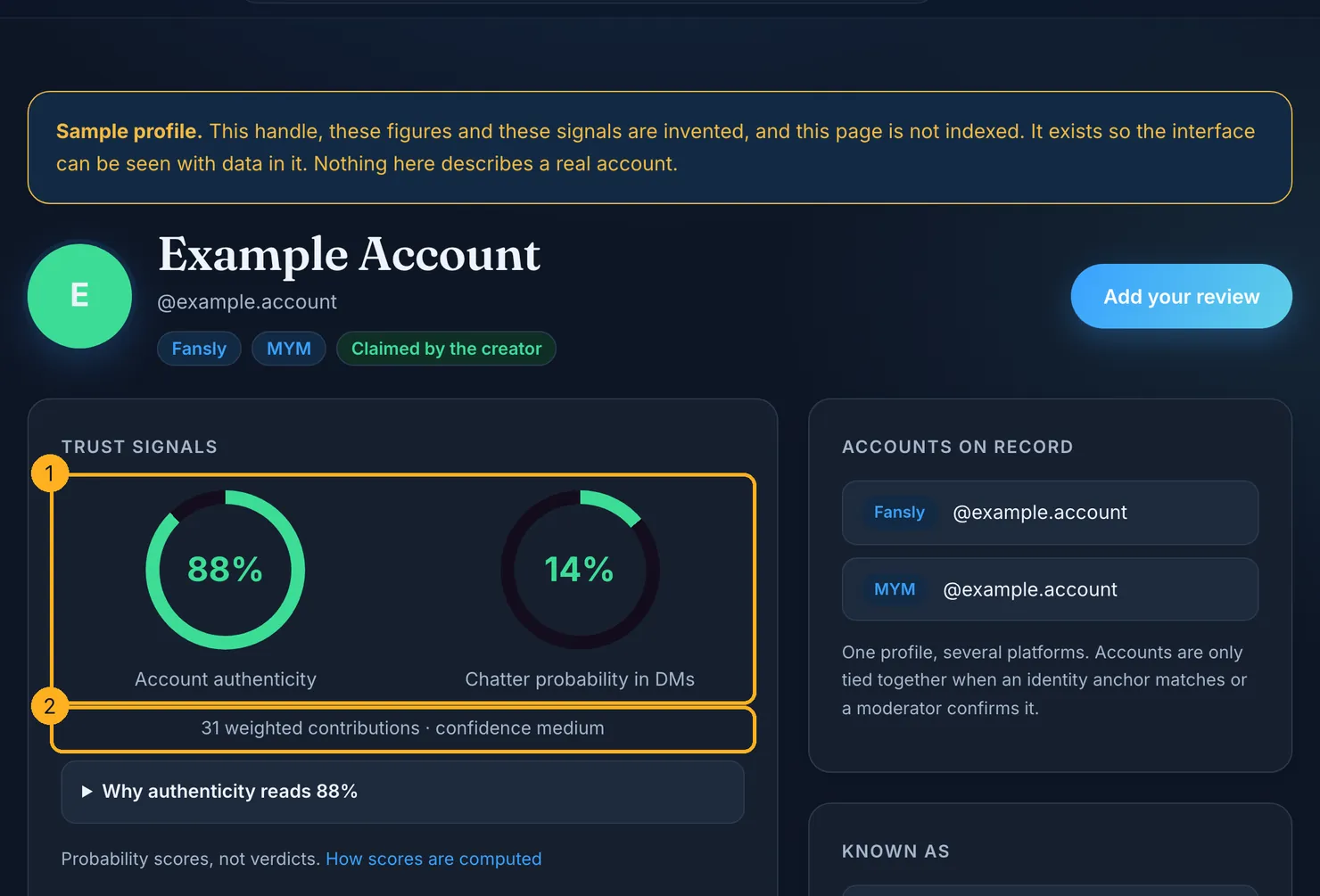
Each profile carries two separate scores: how likely the account is to be run by the person it shows, and how likely it is that someone else answers the messages. The number of weighted contributions behind them is shown underneath, with a confidence level, and our methodology explains how both are computed and what they cannot tell you. We cannot read OnlyFans pages ourselves, so an OnlyFans profile on Legit rests on what contributors report and on the links we can check elsewhere, and it says so.
If you have already subscribed, add what you saw on the review page. The receipt e-mail OnlyFans sends you is useful there: forward it and we check the platform's cryptographic signature ourselves. We keep the platform, the account, the date and a hash of the e-mail, not the e-mail itself, and a review backed by a verified receipt counts for more than an unproven one.
OnlyFans' terms change, and so do the age checks the law requires. Check the current terms before you rely on any clause quoted here.
Questions people ask
How do I subscribe to someone on OnlyFans?
Open a fan account with an e-mail address, a username and a password, and pass the age check if OnlyFans asks for one where you live. Add a payment card to the account, then go to the creator's page and click Subscribe. The terms describe exactly that order: payment information first, then the Subscribe button on the creator's account.
Is it free to make an OnlyFans account?
Yes. Opening a fan account costs nothing; you pay only when you subscribe to an account or buy something from a creator. You must be at least 18, and OnlyFans may ask for more information or an age check before it approves the account. The terms also require payment information on the account before any interaction with a creator.
How does OnlyFans work for subscribers?
You pay a creator, through OnlyFans, for access to their account for a set period, usually a month, at a price the creator sets in US dollars. OnlyFans runs the platform and takes the payment but says it is not a party to the agreement between you and the creator. Anything priced individually, such as paid messages or locked posts, is bought separately on top.
Do OnlyFans subscriptions renew automatically?
Yes. According to OnlyFans' terms, a subscription renews at the current rate, plus tax, at the end of each period. It stops only if your payment is declined with no other card available, the price has gone up, you switched off Auto-Renew on that account, or you closed your OnlyFans account first. The terms say you get no further notice before a renewal.
Why can't I subscribe on OnlyFans?
The usual causes are an account still waiting for approval, an unfinished age check, a card refused by your bank, or no card saved on the account. The charge is in US dollars, so some cards refuse it as a foreign payment, and some banks ask you to confirm it in their app. Your bank, not OnlyFans, can tell you why it declined a payment.
Does an OnlyFans subscription include everything on the account?
No. The terms define a subscription as access to the content a creator makes available to subscribers for a set period, and they exclude individually priced content. Pay-per-view posts, paid direct messages and tips are charged separately, immediately, on the card saved on your account, on top of the monthly subscription price.
Can I get a refund if I change my mind after subscribing?
Not as a matter of course. If you cancel, the terms say you keep access until the end of the period you paid for, and no further renewal is charged. The contract says the statutory right to cancel does not apply to purchases other than the subscription. The terms also warn that unjustified refund or chargeback requests can lead to your account being suspended.