PPV on OnlyFans: what you pay for when you unlock
PPV, pay-per-view, is content a creator locks behind a one-off price on top of your subscription: a blurred post on her feed or a message with an unlock button. Here is how it is charged, and what OnlyFans' own terms say when it goes wrong.
PPV on OnlyFans means pay-per-view: a post or a message that stays locked until you pay a one-off price for it, on top of your subscription. You see it as a blurred post on a creator's feed or as a message in your inbox with a price and an unlock button. Paying unlocks that one item, and nothing else. OnlyFans' own terms treat each of these unlocks as a separate purchase, charged straight away, and they give you fewer ways to change your mind than you might expect.
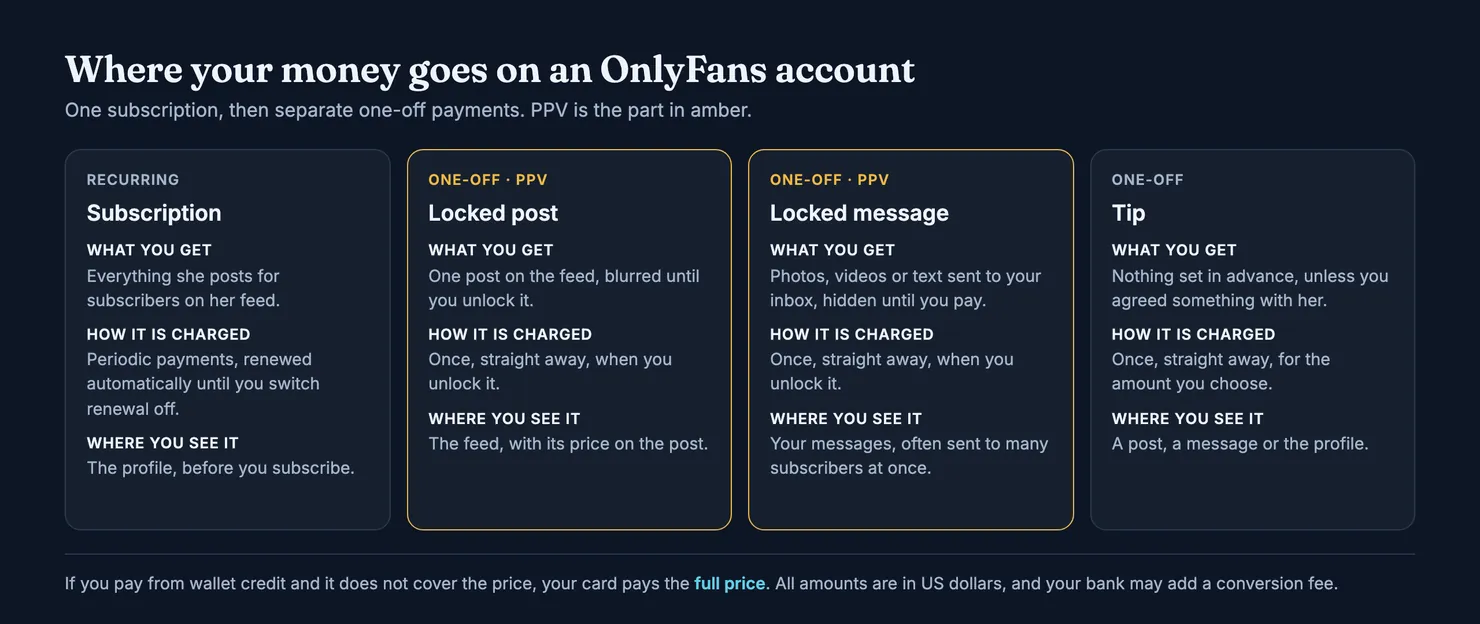
This guide is for the subscriber's side of PPV: what you are buying, how it is charged, what a "no PPV" page claims, what OnlyFans' terms say about refunds, and what to do when an unlocked message turns out to be something other than what it described. We read OnlyFans' Terms of Service and its Contract between Fan and Creator in archived copies on the Internet Archive, because onlyfans.com is blocked for our browsers. Terms change, so the links below go to OnlyFans' current pages, and you should read those before relying on any detail here.
What does PPV mean on OnlyFans?
Pay-per-view is an old television term: you pay for one fight or one film, not the channel. On OnlyFans it works the same way. A creator can put a price on a single post or a single message, and you pay that price to see it. The OnlyFans Terms of Service list "a payment for pay-per-view Content" as one kind of what they call a Creator Interaction, next to a subscription and next to "any other interaction or payment" with a creator's account, direct messages included.
There are two places you will meet it:
- A locked post on the feed. The post sits among the creator's other posts, blurred or hidden, with its price shown. You unlock it from the feed.
- A locked message in your inbox. A message arrives with a short text, sometimes a blurred preview, and a price. The content inside stays hidden until you pay.
Either way, the price is set by the creator, not by OnlyFans. OnlyFans takes its fee from what you pay: the terms put it at 20% of each fan payment, which tells you who earns what but changes nothing in the price you see.
Is PPV charged on top of the subscription?
Yes. This is the point people most often get wrong. The Contract between Fan and Creator defines a subscription as access, for a set period, to all the content a creator makes available to fans in exchange for automatic renewal payments, and then adds that this "excludes individually priced Content". So a subscription gives you the feed as the creator offers it to subscribers. Anything she prices individually, on the feed or in messages, is a separate purchase.
That has a practical consequence. A cheap or free subscription can still be an expensive account to follow, because the money is in the messages. The subscription price on a profile tells you the cost of entry, not the cost of what you came for. Our guide to how you pay on OnlyFans covers the card and wallet side of this.
What is the difference between PPV, a tip and a custom?
All three are one-off payments, but you buy different things. With PPV, the creator decides what is inside and what it costs, and you decide whether to unlock it. With a tip, you choose the amount and nothing is promised in return unless the two of you agreed something first. With a custom, you ask for something made for you, agree the details and the price, and then pay. Disputes are easiest to settle with PPV, because the message text is a written description, and hardest with a tip sent in the hope of something unstated.
How do OnlyFans PPV messages work?
A PPV message is a direct message with a price attached. The creator, or whoever runs her inbox, writes a line of text, attaches photos, a video or more text, and sets a price. You receive it like any other message. Until you pay, you see only what she chose to leave visible: the text, and sometimes a blurred thumbnail or the number of items inside.
When you pay, the content opens in the conversation. Nothing in the terms we read says the unlocked content becomes yours to keep: the fan-creator contract talks about access, and it says creators may remove content, pay-per-view content included, at any time. Think of an unlock as paying for access to that message for as long as it stays up.
Why do you get so many locked messages?
Because one message can be sent to many subscribers at once. A locked message that looks personal ("I made this for you") may have gone to the whole subscriber list in the same minute. There is nothing in OnlyFans' terms against that, and it is not proof of anything on its own. It is still worth knowing before you read a message as a private offer.
A run of locked messages after you subscribe, each a little more expensive or each promising a little more, is a sales sequence. You are free to ignore it. Not unlocking a message costs you nothing and, as far as the terms we read go, has no effect on your subscription.
Who sends the PPV messages, the creator or a chatter?
You often cannot tell, and that is the honest answer. Some creators write every message themselves. Others hand the inbox to staff. A BBC report on one chatter described a worker, employed by a third party, whose job was to talk to fans and sell them pictures and videos, with sales targets worth hundreds of dollars for each shift. OnlyFans declined to comment to the BBC.
That does not mean every locked message comes from a chatter. It means a warm message with a price on it is not, by itself, evidence that the creator wrote it. Our guide to OnlyFans chatters explains the signs that someone else is answering, and why memory across conversations is the strongest one.
What does "no PPV" mean on an OnlyFans profile?
"No PPV" is a claim a creator makes in her bio or her posts: that everything she offers is included in the subscription, and that she will not send you locked messages or locked posts. Some subscribers look for these pages on purpose, because the price on the profile is then meant to be the whole price.
It is a promise, not a setting we know of. We found nothing in the terms we read that creates a "no PPV" status, so the words in a bio are only as good as the person writing them. Three things are worth keeping in mind:
- A "no PPV" page usually costs more to join. If nothing is sold on top, the subscription carries the whole price. Compare the price with what the feed actually contains.
- It can change. A creator can start selling locked messages later. Turning off automatic renewal lets you decide again at the end of each period instead of being charged by default; our guide to cancelling an OnlyFans subscription explains how renewal works.
- Tips and customs are a separate question. A page can sell no locked content and still ask for tips, or take paid requests. Read the bio for what it actually excludes.
If a "no PPV" page sends you locked messages anyway, that is a gap between what was said and what happened. It is exactly the kind of thing other subscribers want to know before they pay, and it is worth recording on Legit (more on that below).
How is a PPV purchase charged?
The Terms of Service describe two kinds of charge. The payment provider takes periodic payments for subscriptions, and "immediate payments" for every other fan payment. A PPV unlock is one of the others: it is charged when you pay, not added to your next renewal.
A few details from the same terms matter here:
- Wallet credits. You can prepay an amount into your OnlyFans wallet and spend it later. A purchase cannot be split, so if a message costs more than the credit you have left, your card is charged the full price of that purchase. The terms say wallet credits are non-refundable.
- US dollars. All fan payments are in USD. If your card is in pounds or euros, your bank converts the amount and may add a fee, which OnlyFans says it does not control.
- A second card. If you saved more than one payment method and the first one fails, OnlyFans uses the other.
How do you keep PPV spending under control?
Locked messages are built to be bought on impulse: small amounts, one at a time, in a conversation that feels personal. A few habits help.
- Decide a monthly amount for the account before you subscribe, subscription included, and stop when you reach it.
- Be careful with wallet credits as a cap. Prepaying a fixed amount can limit what you spend, but the terms say credits are non-refundable, and a purchase larger than your balance goes to your card in full.
- Use your bank's controls. Many banks let you switch on a notification for every card payment or set a spending limit on a card. Every unlock then shows up as it happens, not at the end of the month.
- Mute rather than argue. If the messages are mostly sales, you do not owe anyone a reply. Leaving them unopened is free.
Each unlock is its own line on your statement. If you are trying to match charges with what you bought, our guide to what OnlyFans shows on a bank statement covers what we could and could not confirm about the wording.
Can you get a refund for a PPV message on OnlyFans?
Sometimes, but the terms make it harder than for a subscription. Read the clauses together and the picture is fairly clear.
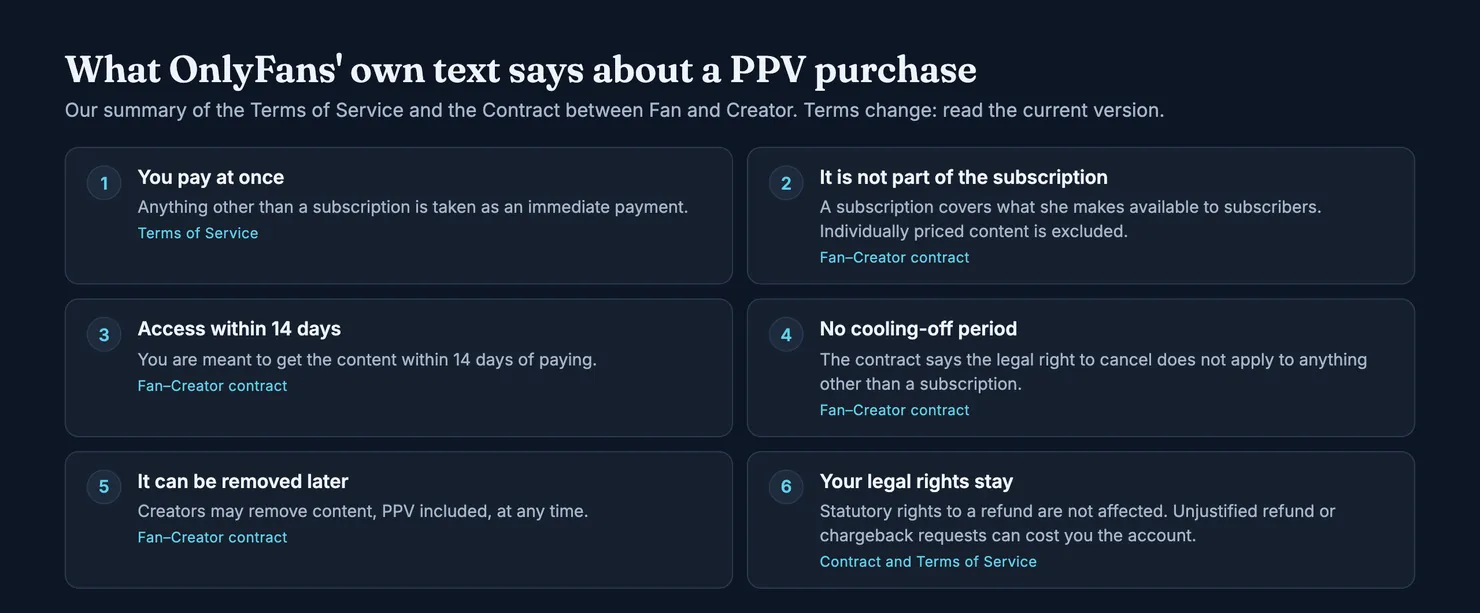
First, delivery. The fan-creator contract says the fan gets access to the content "within 14 days" of the purchase. With a locked message, access is normally immediate, so this mostly matters for content promised for later.
Second, the right to cancel. UK and EU consumer law gives buyers a cooling-off period for many purchases made at a distance. The contract states that, because you get access within 14 days, that statutory right to cancel "is therefore not applicable" to any Creator Interaction other than a subscription. In plain terms: OnlyFans' contract says you cannot simply change your mind about a PPV unlock and ask for your money back.
Third, the right to a refund. The same contract also says it does not affect "any statutory right to a refund" a fan may have under UK consumer law, the EU consumer rights directive or any other applicable law. That is a different thing from changing your mind. In the UK, the Consumer Rights Act, section 36 says digital content must match any description the trader gave of it, and section 42 gives the buyer repair or replacement, and a price reduction, when it does not. Who counts as the trader in a PPV sale, the creator or OnlyFans, is a legal question we cannot answer for you. The rights exist; how they apply to your case is for OnlyFans, your bank or a court.
Fourth, the warning. The Terms of Service say you agree not to make "unjustified" refund requests or "unjustified" chargeback requests to your card provider, and that OnlyFans may suspend or delete your account if it decides a request was made in bad faith. A justified complaint is fine. Asking for money back on content you received and simply did not like is the kind of request this clause has in mind.
What if the creator removes PPV content after you paid?
The contract says creators may remove content, pay-per-view content included, at any time, and that OnlyFans can remove content from an account too. We found no clause promising a refund when that happens. If something you paid for disappears soon after you paid, keep the date and the price and raise it with OnlyFans support. Our guide to OnlyFans refunds goes through the routes in order and what each one depends on.
What to check before you unlock a PPV message
None of this needs special tools. It needs a minute before you pay.
- Read the text, not the preview. A blurred thumbnail says very little. The text is what the seller committed to. Vague wording ("something special") gives you nothing to point to later if the content is not what you hoped.
- Look at the price against the subscription. If one message costs more than a month of the account, ask yourself whether the account is priced on its feed or on its messages.
- Check whether it went to everyone. A message that says it was made for you, sent within seconds of your subscription starting, probably was not.
- Ask before paying for anything specific. If you want something particular, ask in writing what is inside and what it costs. That is closer to a custom request than to PPV; our guide to custom content on OnlyFans explains how to agree it so there is less to dispute.
- Keep it on the platform. If a locked message, or the person behind it, suggests paying somewhere else for a "better deal", stop. The US Federal Trade Commission warns that people after your money soon want to talk off the platform, build trust by chatting often, and then ask you to pay. A payment outside OnlyFans is outside its terms and outside any refund route it offers.
- Look the account up first. On Legit you can search an account and see what other subscribers reported, including how likely it is that someone else writes the messages.
When a PPV message was not what it said
Say you unlocked a message described as a full video and found a few seconds of it, or a set of photos you had already seen on the feed. What you can do depends on the gap between the description and what arrived, and on how you go about it.
- Write to the creator once, on the platform. Say what the message promised, what it contained, and what you are asking for. Keep it short and factual. Screenshots of the message text and the price help.
- Contact OnlyFans support. Give the date, the amount and the conversation. The terms say OnlyFans facilitates creator interactions; the contract and the terms are the rules it will read your request against.
- Your card issuer, as a last resort and in good faith. In the US, the FTC explains that you can dispute a credit card charge for something you did not accept or that was not delivered as agreed. In the UK, the Financial Ombudsman Service describes how your bank may raise a chargeback when something you paid for by card was not supplied. Remember the clause on unjustified chargebacks: use this route when you have a real case and the other two failed, not to undo a purchase you regret.
We cannot promise any of these will get your money back. Each depends on what the message said, what you received, and who decides. What we can say is that a clear description, kept as a screenshot, puts you in a much better position than "it wasn't what I expected".
Recording a PPV-heavy inbox on Legit
Legit does not handle refunds and has no say over OnlyFans. What it does is collect what subscribers saw, so the next person can decide with more than a profile picture to go on. Two questions on the rating form matter for PPV.
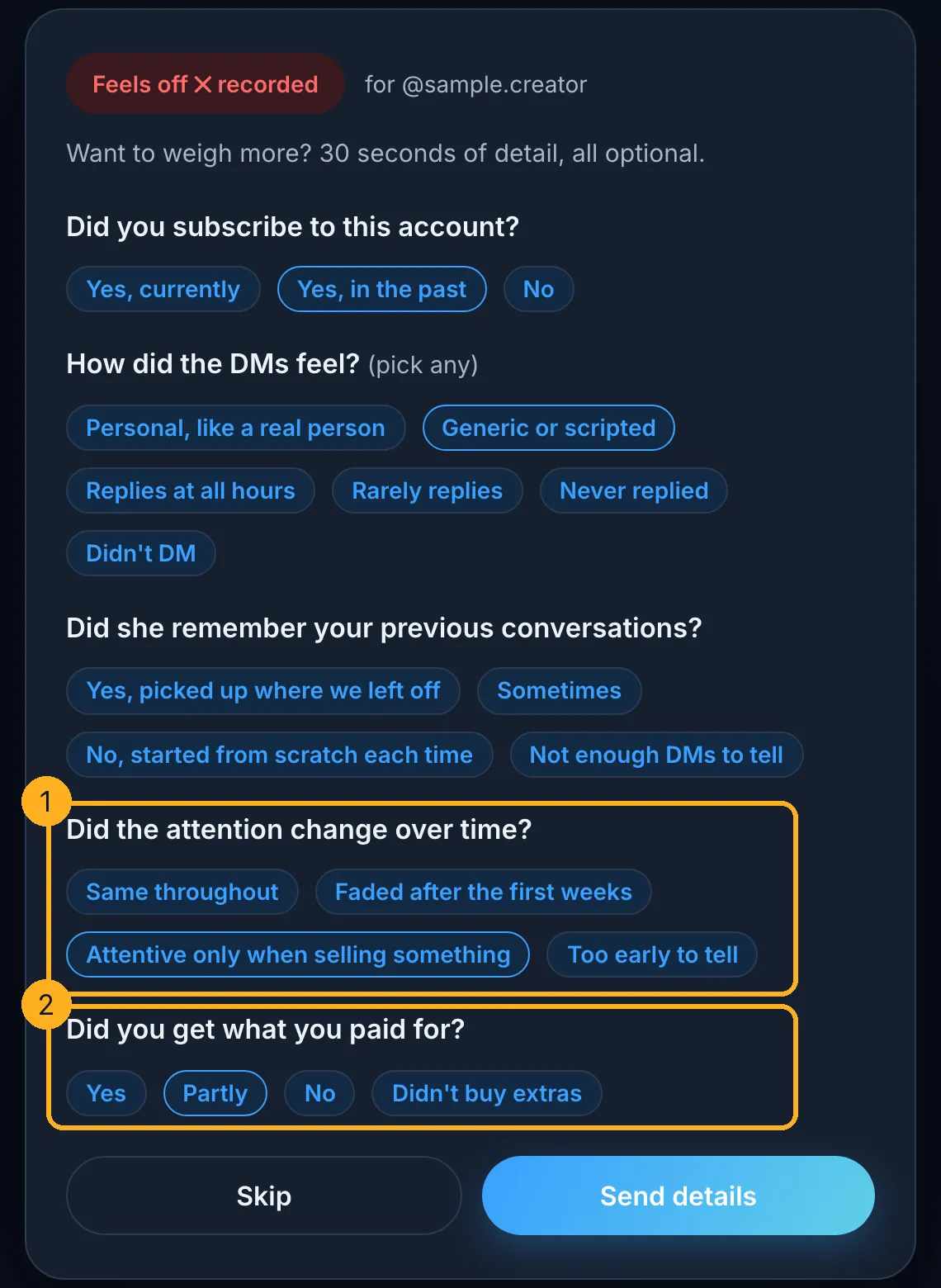
If you subscribed, the form asks whether the attention changed over time. "Attentive only when selling something" is one of the answers, and our published method counts it towards the chatter probability, because attention that follows the sales cycle rather than the conversation is typical of an inbox run for conversion. The form also asks "Did you get what you paid for?". A "No" moves the same estimate a little, since paid extras that did not arrive often go with a sales operator. Neither answer is an accusation. Each one is a weighted signal, and the method shows exactly how much it moves.
If you have paid for PPV on an account, add what you saw. If you are about to, check the account first. Both take less time than reading a locked message twice.
Questions people ask
What does PPV mean on OnlyFans?
PPV stands for pay-per-view. On OnlyFans it is a post on a creator's feed, or a message in your inbox, that stays locked until you pay a one-off price for it. The creator sets the price. Paying unlocks that single item and nothing else, and it is charged separately from your subscription, straight away, according to OnlyFans' terms.
Is PPV included in an OnlyFans subscription?
No. OnlyFans' Contract between Fan and Creator defines a subscription as access to the content a creator makes available to subscribers, and says it excludes individually priced content. So locked posts and locked messages are separate purchases, even on an account you already pay for every month. A low subscription price can hide an account that earns most of its money from messages.
What does no PPV mean on OnlyFans?
It is a claim a creator makes in her bio or posts: that everything is included in the subscription and that she will not send locked messages or locked posts. We found no 'no PPV' setting in OnlyFans' terms, so it is a promise rather than a rule the platform enforces. It can change later, and it does not always cover tips or paid custom requests.
Can you get a refund for a PPV message on OnlyFans?
Not simply because you changed your mind. OnlyFans' fan-creator contract says the statutory right to cancel does not apply to purchases other than subscriptions. It also says statutory refund rights are not affected, and UK law requires digital content to match its description. If a message was not what it described, raise it with the creator, then OnlyFans support, then your card issuer as a last resort.
What happens if a creator deletes PPV content I paid for?
OnlyFans' contract says creators may remove content, pay-per-view content included, at any time, and we found no clause promising a refund when that happens. An unlock buys access for as long as the content stays up, not a copy you own. If something disappears soon after you paid, note the date and amount and contact OnlyFans support.
Are OnlyFans PPV messages sent by the creator or by a chatter?
It depends on the account, and you usually cannot tell from one message. Some creators write everything themselves; others hand their inbox to staff. A BBC report described a chatter employed by a third party with sales targets for each shift. A locked message that feels personal may also have gone to every subscriber at once.