What a verified OnlyFans account really proves
On OnlyFans, verified means one thing: the account holder passed an identity check before being allowed to sell. It does not tell you who answers the messages, or that the account is the one you were looking for.
On OnlyFans, a verified account is an account whose holder passed an identity check before being allowed to sell. OnlyFans' terms make that check a condition of opening a creator account, so every account that charges you has been through it. It tells you an adult was identified. It does not tell you who answers the messages, whether the account is the one a creator links from her other profiles, or whether the word "verified" in someone's social bio means anything at all.
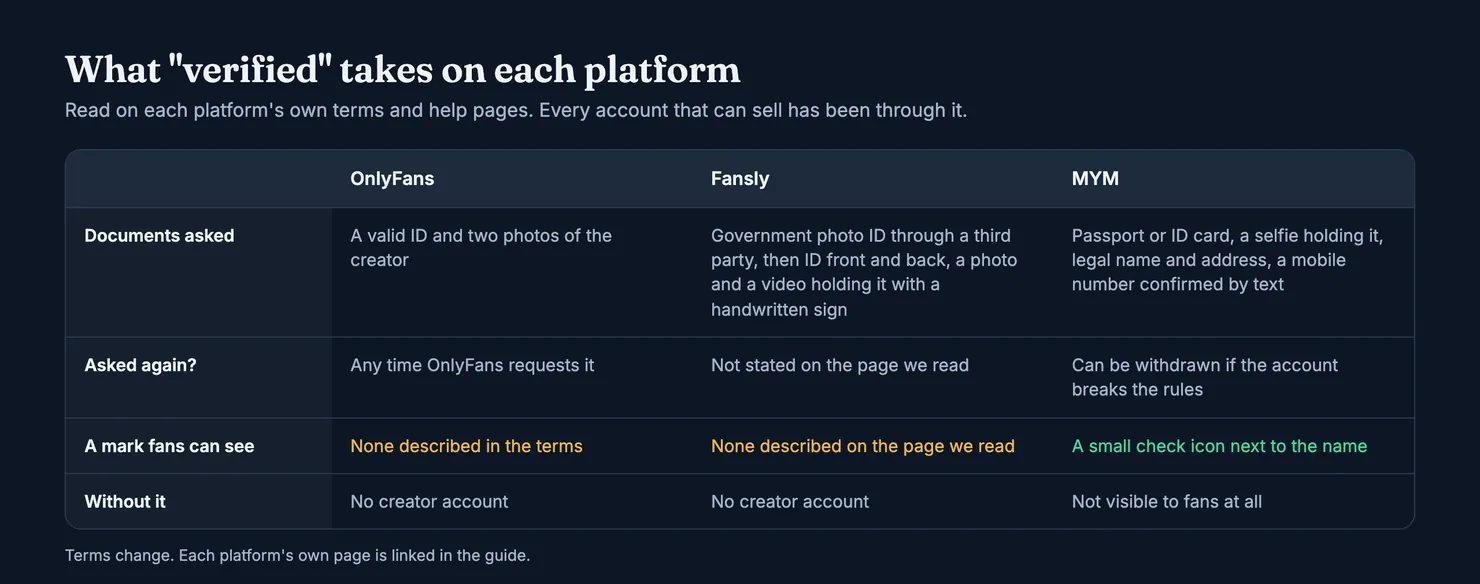
This guide is for subscribers, not creators. It sets out what verification involves on OnlyFans, Fansly and MYM, read on each platform's own pages; why you may be asked to verify yourself as a fan; what a platform check leaves unanswered; and how Legit treats a platform's mark. We read OnlyFans' terms in an archived copy, because onlyfans.com is blocked for our browsers.
What does verified mean on OnlyFans?
OnlyFans' Terms of Service list what a creator must do on top of what any user does. To open a creator account, you must upload a valid form of ID and two photos of yourself, add bank or payment details, choose how you get paid, and "submit additional age or identity verification information any time we ask for it" (OnlyFans Terms of Service). Anyone else who appears in a creator's content must be another creator tagged on the platform, or an adult whose proof of identity and written consent the creator holds.
So on OnlyFans, verified is not a level you reach. It is the door. An account that is not verified cannot sell, which means that "this account is verified" tells you nothing that "this account sells subscriptions" did not already tell you.
Is there a verified badge on OnlyFans?
The terms we read describe the identity check, not a badge for fans to look at. Some pages that rank for this query describe a badge you earn with enough followers or a regular posting schedule. We found nothing like that in OnlyFans' terms, and we cannot look at profiles ourselves, so we do not describe what a mark on a profile looks like. If you see a tick, treat it as the platform's account check at most, and read the rest of this guide before deciding what it is worth.
What is OnlyFans identity verification, and who runs it?
Identity verification is the step where a platform matches a document to a face: the ID says who you are and how old you are, the photos or the video show that the person holding it is the one opening the account. The platform does not have to do this itself. Ofcom's guidance notes that a site can run an age check or hand it to another company, and Fansly's help page says the first half of its own process is a third-party check. OnlyFans' terms do not name who carries out its checks, so we do not either. What you can rely on is what the terms commit to: no creator account without the documents, and more checks whenever OnlyFans asks.
For a fan, the practical consequence is that the platform, not you, holds the evidence. You cannot see the ID behind an account, and you should not want to. What you can see is how the account behaves, which is where the rest of this guide comes in.
Are all OnlyFans creators verified?
According to the terms, yes: the ID and the photos come before the account can sell, and OnlyFans can ask again later. That does not make every account trustworthy. It means each one is tied to an identified adult, and that the platform knows who receives the money.
Is OnlyFans verification reliable?
It is a real check, but it is run by the platform, set by the platform and only as good as its settings. The UK regulator gave a concrete example. OnlyFans' operator told Ofcom that its facial age estimation tool used a "challenge age" of 23: anyone the tool estimated to be older could continue, anyone else had to prove they were over 18 another way. Its technology provider later told the company the setting had in fact been 20 for more than two years. Ofcom fined the operator £1.05 million, not for the checks themselves but for giving the regulator inaccurate information, and noted that it took the company over 16 months to discover the error (Ofcom). The lesson for a fan is modest: a platform check exists and matters, and you cannot audit it from the outside.
How Fansly and MYM verify creators
The word is shared, the procedure is not. If you follow a creator across platforms, it helps to know that each one checks something slightly different.
How does Fansly verify creators?
Fansly's help centre describes a two-step application. First, a third-party check of your age and identity with a government photo ID. Then Fansly's own: a photo of the front and back of the ID, a photo of you holding it next to a handwritten sign with your name, the date and "For Fansly", and a video holding both with your face fully visible. Creators must also verify the age, identity and consent of anyone they make content with (Fansly Help Center). The page we read does not describe a mark for fans either.
What does the check icon mean on MYM?
MYM is the only one of the three that describes a visible mark. Its help pages call it certification: a passport or ID card (driving licences and residence permits are refused), a selfie holding it with the face uncovered, your name and address exactly as on the document, a mobile number confirmed by a text code, and at least three posts online. An account is not visible to fans until it is certified, and MYM says it can withdraw certification from an account that breaks its rules (MYM, Certification). Certified accounts get a small check icon next to their username; a separate star marks experience on the platform, not identity (MYM, creator badges).
Because every visible MYM account is certified, the icon does not separate good accounts from bad ones. It confirms that the account went through the process. Our MYM ranking lists accounts by their Legit scores, in which the mark is one public fact among others.
Why is OnlyFans asking me to verify?
If you are a fan and a screen asks you to prove your age, there are two usual reasons.
The first is the law where you live. In the UK, the Online Safety Act requires every site and app that allows pornography to run strong age checks for UK users. Ofcom's guidance for users lists the methods a site may use, either itself or through another company: facial age estimation from a photo or video, open banking, digital identity services, credit card checks, email-based age estimation, mobile network checks and photo-ID matching (Ofcom, age checks). OnlyFans' terms say some of its content is adult material, so UK fans should expect a check. Ofcom lists what is allowed, not which method a given site picked, and we do not guess.
The second is your card. Adding a payment method can trigger a small check, which we covered in our guide to what OnlyFans shows on a bank statement.
Do you have to verify to subscribe?
The terms require fans to be at least 18 and able to enter a contract. Whether you are asked to prove it depends on where you are and how you pay. What matters more is where the request comes from. A genuine check starts inside the app or the website you logged into. A message, an e-mail or a creator's DM sending you to a "verification" link is a classic way to collect card details and IDs; our guide on whether OnlyFans is safe covers those scams.
What verification does not prove
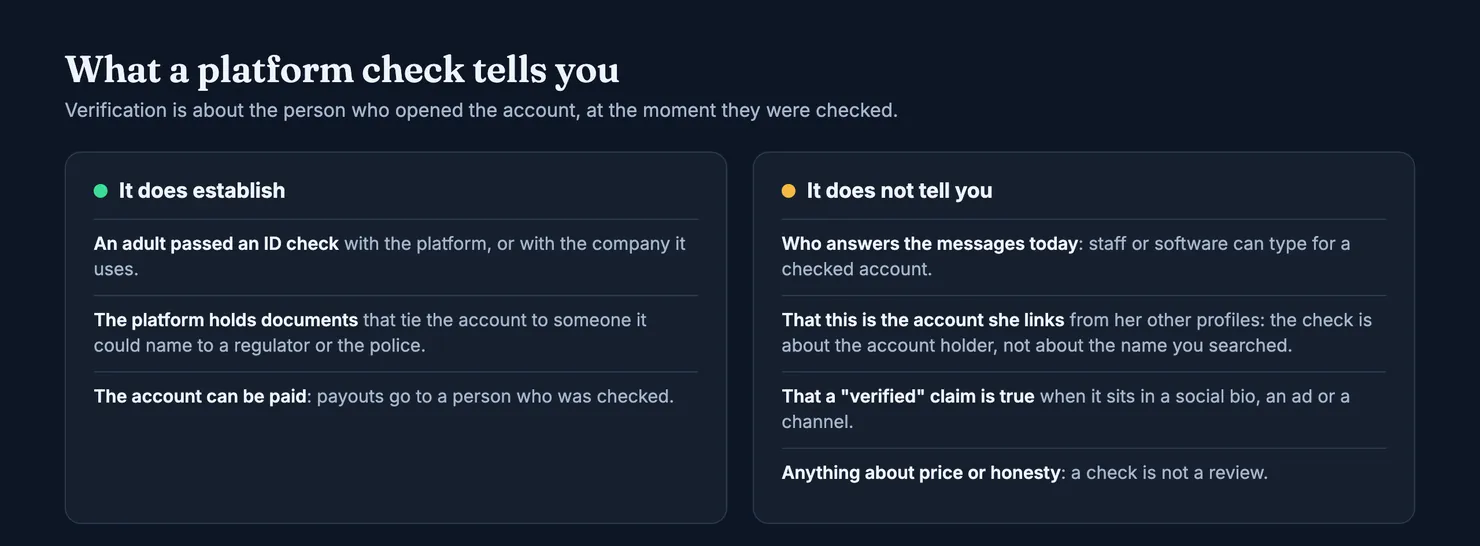
Fans tend to read "verified" as a promise about the experience: that the person in the photos is real, that she is the one writing back, that the account is hers. A platform check covers only the first part, and only about the account holder.
Does verified mean the creator answers her own messages?
No. The check is about who opened the account and who gets paid. It says nothing about who types the replies. Agencies, chat staff and software can write for accounts that passed every check. Our guide to OnlyFans chatters explains how that works and what the terms say about it.
How do you know if an OnlyFans account is real?
Start from the creator, not from the account. The address that counts is the one she links from profiles she controls, and the strongest sign is two of her accounts that link to each other. A copy can borrow her photos and her name, and even paste her real address into its own bio; it cannot make her real account link back. Our guide on how to spot a fake OnlyFans account goes through the checks one by one.
What about "verified" in a social bio or a channel?
That is just a word typed by whoever runs the page. A promoted post, a Telegram channel or a profile that calls itself verified has not been checked by anyone because it says so. Searches around this topic also turn up offers to buy accounts described as verified, which is one more reason the word proves less than it seems: the check describes the person who passed it, at the time they passed it.
How Legit treats verification
We keep platform checks and our own marker apart, and neither buys a better number.
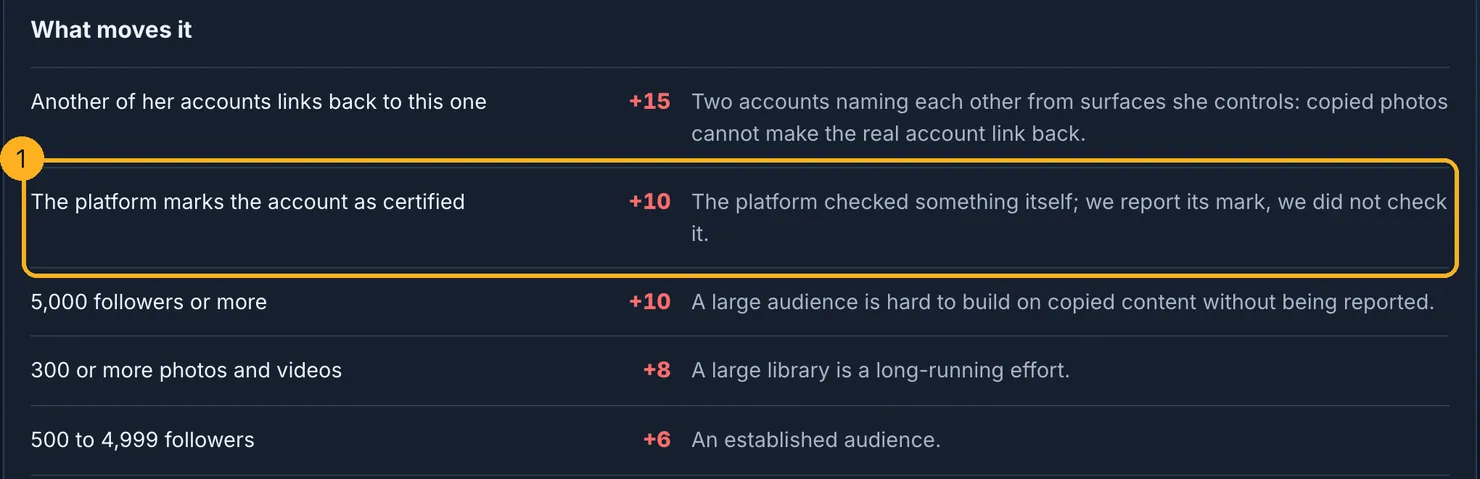
When a platform publishes its own mark, as MYM does, our authenticity score counts it as one fact among others: ten points, written in the rubric as "we report its mark, we did not check it". A confirmed link between two of a creator's accounts weighs more, and automatic evidence alone never takes confidence above medium. The full rubric, with every rule and its weight, is on our methodology page.
Our own "creator verified" marker works differently. A creator claims her profile by pasting a short code into her public bio; the code expires after an hour. That proves she controls the account, without an identity document, which we never ask for. It gives her a marker on the profile, a right of reply and priority for her reports. It never moves a score. Authenticity is computed from public facts, the chatter probability from fans' reports, and a creator cannot pay or claim her way into either.
Before you pay a verified account
Verification is a floor, not a recommendation. Before you subscribe or buy a message, search the account on Legit: you will see how likely it is that the account belongs to the person it shows, how likely it is that someone else answers, and how many contributions sit behind each figure. If you have subscribed before, you can add what you saw, and forward the platform's receipt e-mail so that we can check its signature ourselves.
Platforms change their checks and their terms. Read the current pages linked above before relying on any detail quoted here.
Questions people ask
Are all OnlyFans creators verified?
According to OnlyFans' terms, yes. To open a creator account you must upload a valid form of ID and two photos of yourself, and OnlyFans can ask for more age or identity information at any time. An account that sells subscriptions or messages has therefore been through a check. That says the holder is an adult who was identified, not that the account is honest or the one you meant.
Does a verified OnlyFans account mean the creator answers her own messages?
No. Verification is about who opened the account and who receives the money. It does not cover who types the replies. Staff, agencies or software can write messages for a verified account, and nothing on the profile tells you whether they do. That question is separate, which is why Legit publishes a distinct chatter probability score next to authenticity.
Why is OnlyFans asking me to verify my age as a fan?
In the UK, the Online Safety Act requires every site that allows pornography to run strong age checks for UK users. Ofcom lists the methods allowed, including facial age estimation, credit card checks and photo ID matching. Adding a payment card can also trigger a small check. Start any such check from inside the app or website, never from a link sent to you.
What does the check icon mean on MYM?
MYM's help pages say the icon marks a certified account. Certification needs a passport or ID card, a selfie holding it, a name and address matching the document, a mobile number confirmed by text and at least three posts. Until an account is certified it is not visible to fans, and MYM says it can withdraw certification from an account that breaks its rules.
Can someone claim to be verified when they are not?
Yes, outside the platform. The word verified in a social media bio, an advert or a messaging channel is just text that anyone can type. The only checks that count are the ones the platform runs itself, and even those only tell you about the account holder. Open the creator's own profile from a link she controls before paying anything.
Does Legit verify OnlyFans accounts?
Not by identity. Legit never asks creators for an ID. A creator can claim her profile by pasting a short code into her public bio, which shows she controls the account and adds a creator verified marker and a right of reply. It never changes a score. Authenticity is computed from public facts, such as accounts that link to each other.