OnlyFans tips: what you pay when you tip
A tip is the one payment on OnlyFans where you set the price. Here is how it is charged, who keeps what, and what OnlyFans' own terms say when you want it back.
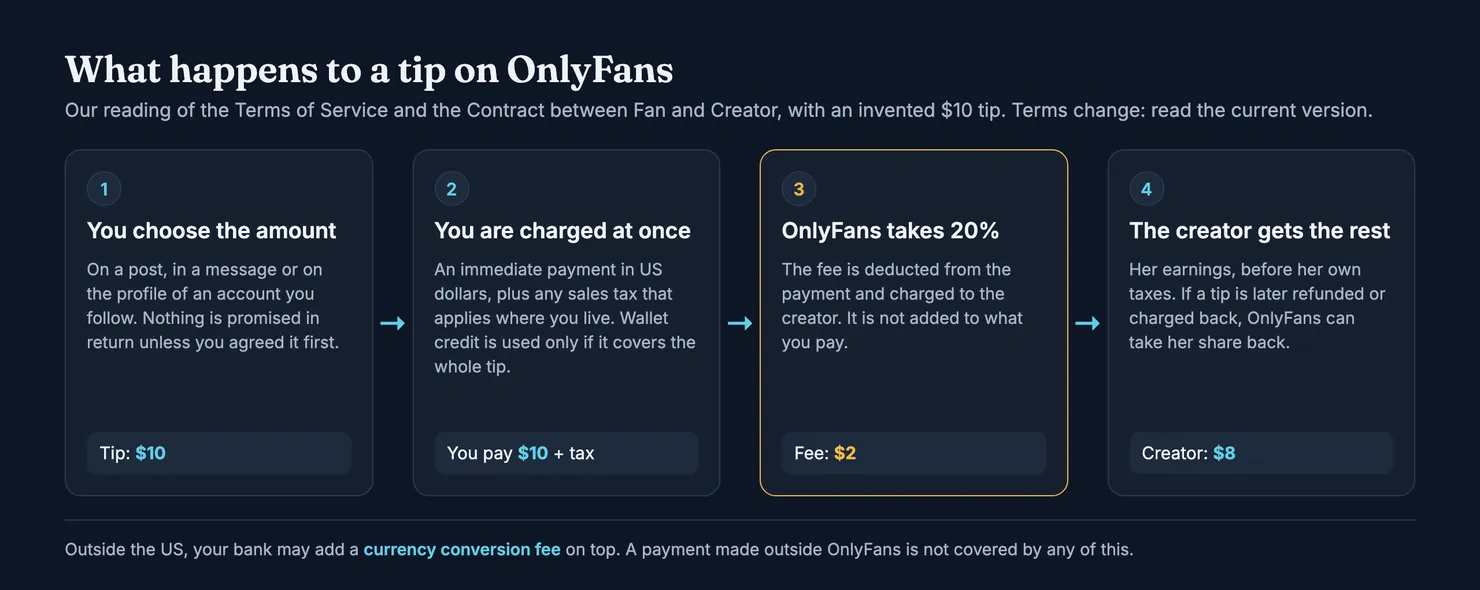
A tip on OnlyFans is a one-off payment you send to a creator for whatever amount you choose, on top of your subscription. You can send one from a post, a message or her profile. It is charged straight away, in US dollars, and OnlyFans keeps 20% of it, taken from the creator's share rather than added to yours. A tip buys nothing by itself: unless you and the creator agreed on something first, it is a gift, and OnlyFans' own terms make it hard to get back.
This guide covers tips from the subscriber's side: how to send one, what OnlyFans takes, what the tip menu on so many profiles really is, what the terms say about refunds, and when a request for a tip should make you stop. Search for "OnlyFans tips" and most of what comes up is advice for creators on earning more. This page is for the person paying. We read OnlyFans' Terms of Service and its Contract between Fan and Creator in archived copies on the Internet Archive, because onlyfans.com is blocked for our browsers. Terms change, so the links below go to OnlyFans' current pages. Read those before you rely on any detail here.
What is a tip on OnlyFans?
OnlyFans' terms do not have a special category for tips. They call every paid exchange with a creator a "Creator Interaction", and the definition in the Terms of Service is wide: a subscription, a payment for pay-per-view content, and "any other interaction or payment" between a user and a creator's account or content. A tip falls into that last part. Any payment linked to one of those interactions is a "Fan Payment", and the same rules on charging, fees and refunds apply to it.
What sets a tip apart is who decides. With a subscription the creator sets the price and you get her feed. With a locked post or message, she sets the price and decides what is inside. With a tip, you set the amount, and nothing comes back automatically. Our guide to PPV messages covers the locked content side, and the guide to what OnlyFans costs puts tips next to everything else you can pay for.
Can you tip on OnlyFans without being subscribed?
Not according to the terms. They say that before entering into a Creator Interaction, a user must add payment details to their account and then click "Subscribe" on the creator's account. A tip is one of those interactions, so you follow the account first. On a free account, subscribing costs nothing, which is why many profiles that make most of their money from tips and messages charge nothing to join.
How to tip on OnlyFans
We cannot open OnlyFans to photograph the steps, and the buttons move from one version of the app to the next. In outline, sending a tip works like this:
- Add a payment method to your account, or put money in your OnlyFans wallet. The terms require payment details before any payment to a creator.
- Follow the account, free or paid, as described above.
- Find the tip button on a post, in your conversation with the creator, or on her profile.
- Type the amount and, if you like, a short note. The amount you type is the tip; any sales tax is added on top.
- Confirm the payment. It goes through at once, not at your next renewal.
Check the amount twice before you confirm. A slip of the finger on a tip is not something the terms let you undo, as the section on refunds explains.
How do you send a tip in OnlyFans messages?
From your conversation with a creator, you send a tip the same way: amount, optional note, confirm. Tips sent in messages are where most disagreements start, because a conversation makes it easy to pay for something that was only hinted at. If you are tipping for a reason, write the reason in the note or in a message before you pay. A written exchange on OnlyFans is the only record you will have if it goes wrong.
Is there a maximum tip on OnlyFans?
Many websites quote a minimum tip, a maximum per tip and a daily cap. We have left those figures out on purpose: they do not appear in the terms we read, and OnlyFans' help pages are closed to our browsers, so we could not check them. What the terms do say is that wallet credit is capped, with the maximum "as indicated" on the site. If a tip is refused, read OnlyFans' own message or ask its support, rather than trusting a figure on a third-party page.
How much does OnlyFans take from tips?
OnlyFans takes 20%. The Terms of Service say its fee "is calculated as 20% of the total Fan Payment and will be deducted from each Fan Payment", and the Contract between Fan and Creator calls it the FIL Fee, 20% of all fan payments, charged to creators. On an invented $10 tip, OnlyFans keeps $2 and the creator's earnings are $8, before whatever tax she owes where she lives.
The same terms add one more detail. If a fan later wins a refund or a chargeback on a payment, OnlyFans can deduct the creator's share of it from her. A disputed tip comes back out of her earnings, which is one reason creators react badly to chargebacks.
Does OnlyFans charge you for tips?
Not as a separate fee on your side. The fee comes out of the payment, so a $10 tip costs you $10, plus two things that can sit on top:
- Sales tax. The fan-creator contract says the fan pays the fan payment "plus any Indirect Sales Tax", meaning VAT or sales tax where it applies. It shows on your total.
- Currency conversion. All fan payments are in US dollars. If your card is in pounds or euros, your bank converts the amount and may add its own fee, which the terms say OnlyFans does not control.
Paying from wallet credit changes how you pay, not how much. A purchase cannot be split, so if your wallet holds less than the tip, the terms say your card is charged the full amount. On your bank statement, a tip looks like any other OnlyFans payment; our guide to how OnlyFans appears on a bank statement explains what to expect.
What does a tip buy you?
Nothing, unless something was agreed. The fan-creator contract makes the creator promise to provide paid content once the fan has paid for it. A tip sent with no request attached has no content to provide. It is a gift, and the creator owes you nothing for it.
Tips get messy when they sit halfway between a gift and a purchase. "Tip $20 and I'll send you something special" is an offer. "Tip if you want more attention" is not: it promises nothing anyone could check. The more precise the agreement, written down in OnlyFans messages, the easier it is to show what you paid for. For anything made especially for you, our guide to custom content covers how to agree the details and the price before you pay.
What is an OnlyFans tip menu?
A tip menu is a price list a creator posts, often pinned at the top of her feed or written in her bio: so much for a particular photo set, so much for a voice note, so much for a reply. It is not an OnlyFans feature we found anywhere in the terms. It is a list the creator writes herself, and she can change it whenever she likes.
From your side, a tip menu is useful because it puts a promise in writing. If you tip the amount next to an item, you have a reasonable claim that you paid for that item. Take a screenshot of the menu before you pay, because it can be edited afterwards. And read it as a sales document: a long menu on a cheap account tells you where the money is meant to come from.
Can you get a refund on an OnlyFans tip?
It is hard, and OnlyFans' terms are written to keep it that way. Three clauses matter.
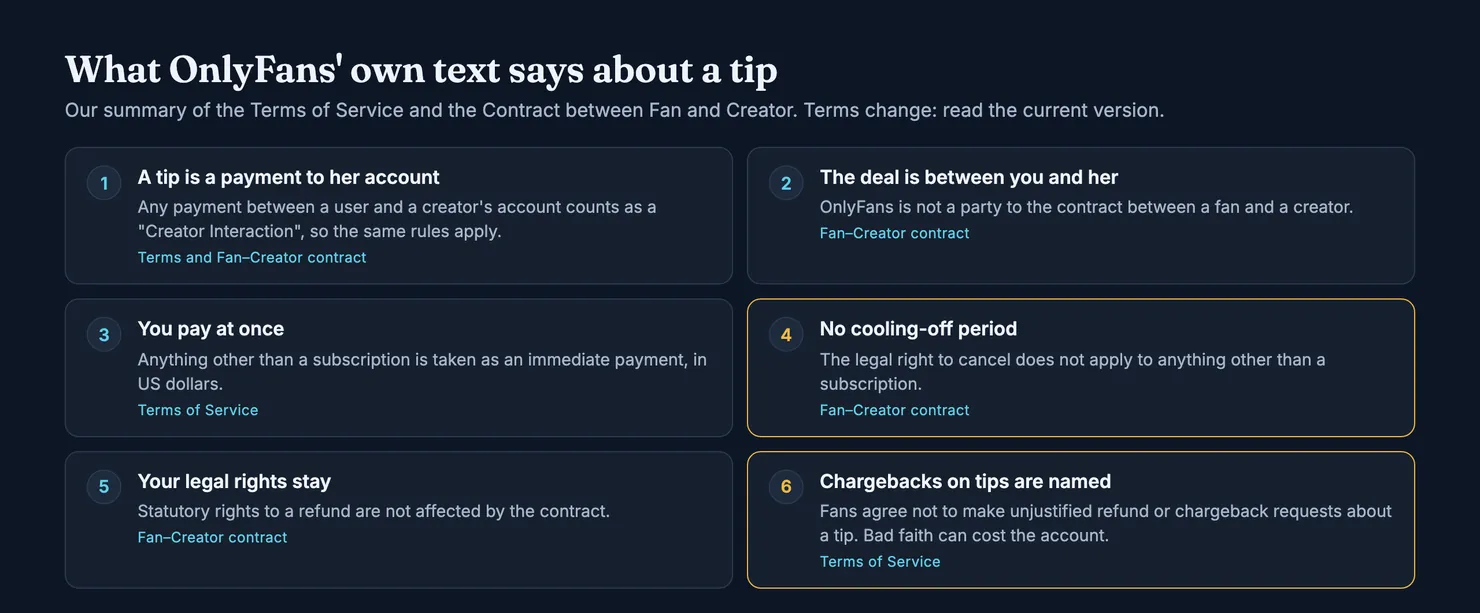
First, the fan-creator contract says that any statutory right to cancel, under the UK Consumer Rights Act, the Consumer Contracts Regulations, the EU consumer rights directive or similar law, "is therefore not applicable" to any interaction other than a subscription. There is no cooling-off period for a tip.
Second, the same contract says it does not affect any statutory right to a refund you may have. If you paid for something specific and it did not arrive, or was not what was described, you keep whatever rights the law gives you.
Third, the Terms of Service ask fans not to make unjustified refund requests or unjustified chargebacks "in relation to any Creator Interaction or tip to a Creator", and say a request made in bad faith can get your account suspended or deleted. Tips are named in so many words. A chargeback because you regret a generous tip is plainly the kind of request that clause is aimed at.
If you think you have a real case, the order is the same as for any OnlyFans payment:
- Ask the creator, in messages, saying what was agreed and what happened.
- Contact OnlyFans support with the date, the amount and screenshots. Our guide to contacting OnlyFans customer service lists the official routes.
- Go to your card issuer last. In the US, the FTC explains that you can dispute unauthorised charges and charges for things not delivered as agreed, in writing, within 60 days of the first bill showing the error. In the UK, the Financial Ombudsman Service says a chargeback can claw back a card payment only in certain circumstances, and that your bank will ask for evidence.
A tip sent as a gift rarely clears that bar. A tip sent for a written, specific promise that was not kept stands a better chance. Our OnlyFans refund guide goes through each step in more detail, and the same goes for a charge you do not recognise at all, which is a different problem from a tip you regret.
When a tip request should make you stop
Most tip requests are ordinary selling, and you can ignore them for free. Three situations deserve more care.
What if you are asked to tip somewhere other than OnlyFans?
Stop there. Everything above, the receipt, the 20% fee, the terms, support, a dispute through your card, exists because the payment went through OnlyFans. A payment made anywhere else is outside all of it. The FTC's advice on romance fraud describes the pattern: someone builds trust, moves the conversation off the platform, then asks for money by wire transfer, gift cards, a money transfer app or cryptocurrency, because those are hard to get back. Its page on gift cards is blunter: no real business asks to be paid with a gift card and its numbers. If you have already paid that way, the FTC says to contact the company or your bank straight away and report it.
What if the attention only comes with a tip?
A conversation that warms up every time you tip and goes cold when you stop is a sales pattern, whoever is typing. The fan-creator contract says fans acknowledge that third parties may help creators run their accounts and their interactions, so the person thanking you for a tip may not be the creator. That is allowed, but it means a warm thank-you is not proof of a friendship. Our guide to OnlyFans chatters explains the signs that someone else is answering, and why memory across conversations is the strongest one.
What if a tip was for something that did not arrive?
Write down what was promised, when, and how much you paid, with screenshots of the messages and of any tip menu. Ask once, clearly. If nothing comes, the refund steps above apply. Then tell other subscribers, which is the part that protects the next person.
Before you tip: check the account and share what you saw
A tip is easier to give well when you know who you are dealing with. Before you start tipping an account, look it up on Legit. Each profile has two scores: authenticity, whether the account appears to be the person it claims, and chatter probability, whether subscribers think someone else is replying. A score with no reports behind it shows as a dash, not as zero. Our methodology sets out what each one is built from.
If you have tipped an account and seen how it reacts, your report helps the next subscriber. Legit's rating form asks whether the attention changed over time, with "Attentive only when selling something" as one of the answers, and whether you got what you paid for.
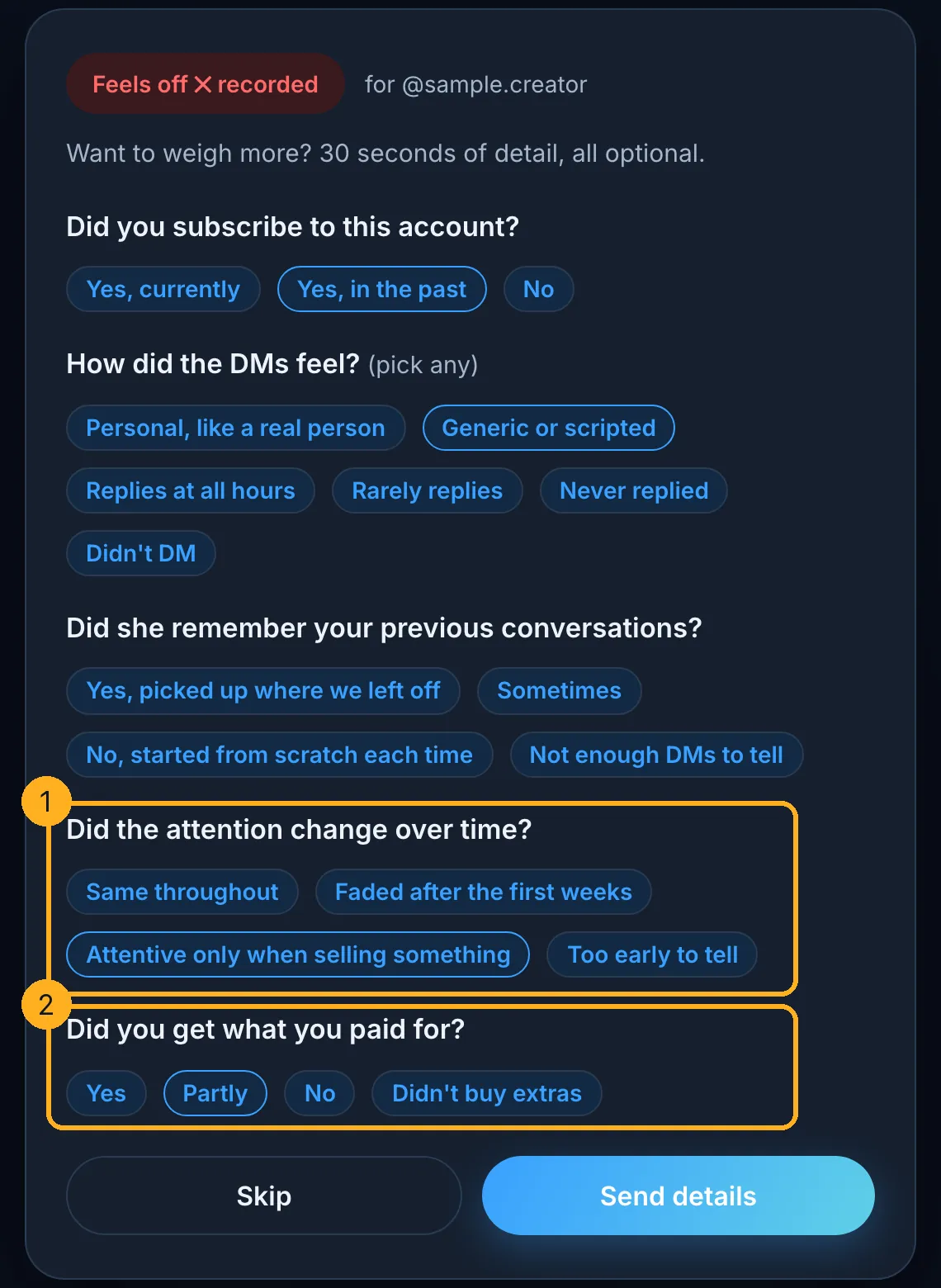
A rating is anonymous by default. If you sign in and forward the platform's own e-mail receipt, which we check against its cryptographic signature, your report weighs more. The form takes about thirty seconds.
Questions people ask
How do you tip on OnlyFans?
Add a payment method or wallet credit to your account, follow the creator's account, then use the tip button on one of her posts, in your conversation with her or on her profile. Type the amount, add a note if you want, and confirm. OnlyFans' terms say payments other than subscriptions are taken immediately, so the tip is charged at once, not at your next renewal.
How much does OnlyFans take from tips?
OnlyFans takes 20%. Its Terms of Service say the fee is 20% of the total fan payment, deducted from each payment, and the fan-creator contract says it is charged to creators. On a $10 tip, OnlyFans keeps $2 and the creator's earnings are $8, before her own taxes. The fee is not added to what you pay.
Can you tip on OnlyFans without subscribing?
Not according to OnlyFans' terms. They say a user must add payment details and click Subscribe on a creator's account before any paid interaction with it, and a tip is one of those interactions. On a free account, subscribing costs nothing, which is why many accounts that earn mostly from tips and messages are free to follow.
What is a tip menu on OnlyFans?
A tip menu is a price list a creator writes herself, usually pinned to her feed or put in her bio, setting a tip amount for each thing she offers. It is not a platform feature we found in OnlyFans' terms, and she can edit it at any time. Screenshot it before you pay, because it is your written record of what the tip was for.
Can you get a refund on an OnlyFans tip?
Rarely. OnlyFans' fan-creator contract says the legal right to cancel does not apply to anything but a subscription, and its terms ask fans not to make unjustified refund or chargeback requests about tips. Your statutory rights remain, so a tip paid for a specific promise that was not kept is different from a gift you regret. Ask the creator, then support, then your card issuer.
Is there a limit on how much you can tip on OnlyFans?
Many websites quote a minimum tip, a maximum per tip and a daily cap, but those figures do not appear in the OnlyFans terms we read, and its help pages were closed to us, so we do not repeat them. The terms do say wallet credit is capped. If a tip is refused, OnlyFans' own message or its support is the reliable place to find out why.