How much does OnlyFans cost? The real bill for fans
Joining OnlyFans is free; following a creator costs whatever she charges, plus everything sold after the subscription. Here is each line of the bill, read on OnlyFans' own terms, and how to work out what an account will cost you before you pay.
OnlyFans has no single price. Opening a fan account is free, and each creator decides what her own account costs: a monthly subscription at a price she sets, or nothing at all. On top of that come pay-per-view posts and messages, tips, sales tax or VAT, and sometimes a fee from your bank, because every price is in US dollars. So the honest answer to "how much does OnlyFans cost" is: whatever the accounts you follow charge, plus everything you click on once you are in. This guide shows how to add it up before you pay, using OnlyFans' own terms of service and its contract between fan and creator.
A note on those links. onlyfans.com does not let our browsers in, so we read those pages in copies kept by the Internet Archive; the links here go to the live pages. Terms change, so check the current version before relying on any detail. If you want the bigger picture first, our guide on how OnlyFans works explains the accounts and the payments; this one is only about the bill.
Does OnlyFans cost money?
Joining does not. Following a particular creator usually does, though not in every case, and often in more ways than the price on the profile suggests.
Do you have to pay for OnlyFans?
Not to sign up. OnlyFans' own page for creators says it is free to sign up, and that it is up to each creator whether her account is free or paid (OnlyFans, start page). A free account lets you follow her without a subscription.
The same page adds the detail that matters for your wallet: pay-per-view messages, posts and streams are available to free accounts too. A free profile can still cost money, and some are built that way, with the subscription waived and most of the content locked behind a price. Our guide to pay-per-view messages explains how those locked items work.
How much is OnlyFans a month?
There is no platform-wide monthly fee. The terms say creators alone set the pricing of what they call "Creator Interactions": subscriptions, pay-per-view payments and any other payment to a creator, including direct messages (Terms of Service). Your monthly cost is the sum of what the accounts you follow charge, which can be nothing, a few dollars, or a good deal more.
You will find average prices quoted elsewhere. We do not publish one. OnlyFans' terms and contract give no price range for fans, the platform's help pages are closed to our browsers, and the figures that circulate tend to come from people selling services to creators. A number we cannot check would only give you false confidence. The price that matters is the one shown on the profile you are about to pay for.
What you pay for on OnlyFans
Money leaves your account in four ways. Only the first one repeats on its own.
- Subscription. The contract defines it as access, for a specific period, to all the content a creator makes available to fans, in exchange for authorising automatic renewal payments (Contract between Fan and Creator).
- Pay-per-view. A post or message with its own price. The same definition says a subscription "excludes individually priced Content", so these are paid on top, one by one.
- Tips. Extra money you send to a creator, at an amount you choose. The terms mention tips alongside other creator payments when they deal with refunds and chargebacks.
- Wallet credits. Money you load in advance and spend later. The terms say the wallet has a maximum, earns no interest, and is not refundable. If a purchase costs more than what is left in it, your card is charged the full amount.
How much is an OnlyFans subscription?
Whatever the creator has set, shown on her profile before you subscribe. The price covers one period. The terms say a subscription renews "for additional periods of the same duration" unless you cancel, and the contract adds that it renews "at the current rate (plus Indirect Sales Tax)". A profile may also show an offer, such as a reduced first period; the terms we read do not describe those offers, so read what the profile says about the length and the price after the offer ends. Our guide on subscribing to OnlyFans walks through that screen.
Are pay-per-view messages included in the subscription?
No. Individually priced content is excluded from the subscription by definition, so a locked message stays locked until you pay for it, even while you are subscribed. This is the line that most often turns a cheap subscription into an expensive month. Before paying, look at how much of the profile is visible to subscribers and how much carries its own price.
What gets added on top of the price
The price on a profile is not quite the amount that leaves your bank. Two things can sit on top of it.
Is tax added to OnlyFans prices?
Yes. The terms say fan payments do not include indirect sales tax, which is added at the current rate that applies. The contract repeats it: you agree to pay the price "plus any Indirect Sales Tax". The rate depends on where you live. In the UK, for instance, HMRC's guidance says digital services supplied to consumers in the UK are liable to UK VAT, and that services supplied to consumers elsewhere may be taxed where the consumer is based (HMRC, VAT rules for digital services). Tax applies to every payment, not only the subscription.
Why is my OnlyFans charge in dollars?
Because the terms say all prices appear and are charged in US dollars, and that payment providers may charge currency conversion fees. If your card is in pounds, euros or any other currency, your bank converts the amount at its own rate and may add a fee for a payment in a foreign currency. Your card's terms say how much. Our guide to OnlyFans payment methods covers which cards and wallets work, and what shows on your bank statement explains how the charge appears.
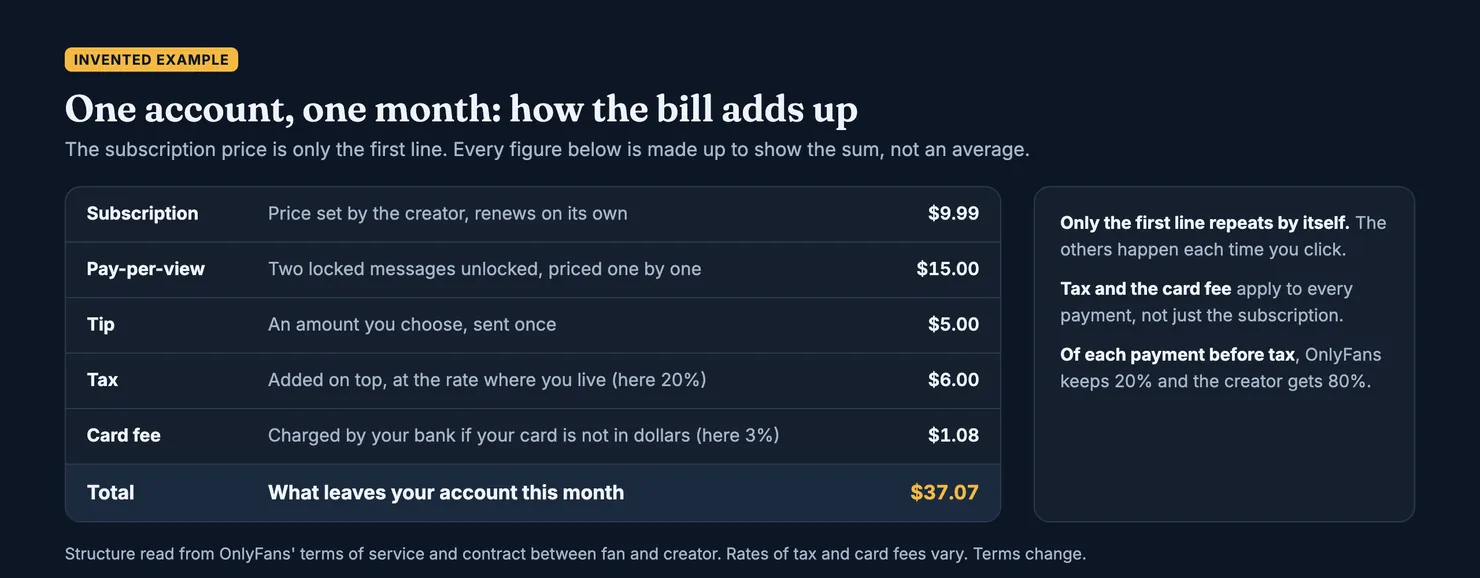
Put the four payments and the two additions together and you get the real bill. The example below is invented: it shows how the lines add up, not what anyone typically pays.
How much does OnlyFans charge, and who gets the money?
OnlyFans does not charge fans a fee of its own on top of the price. Its cut comes out of what you pay: the terms set the platform's fee at 20% of each fan payment, and the rest becomes the creator's earnings. OnlyFans' page for creators puts the same rule the other way round, saying creators keep 80% of their earnings (OnlyFans, start page).
So on a $10 subscription, the creator's share is $8 and OnlyFans keeps $2. Tax is collected on top of the $10 and is not part of either share. Any conversion fee goes to your bank.
The split does not change what you pay; it only decides who keeps what. The part of the bill you control is the rest: which messages you unlock, which tips you send, and whether the subscription renews.
How the price changes after you subscribe
The first payment is the one you see. The ones after it are where a budget slips.
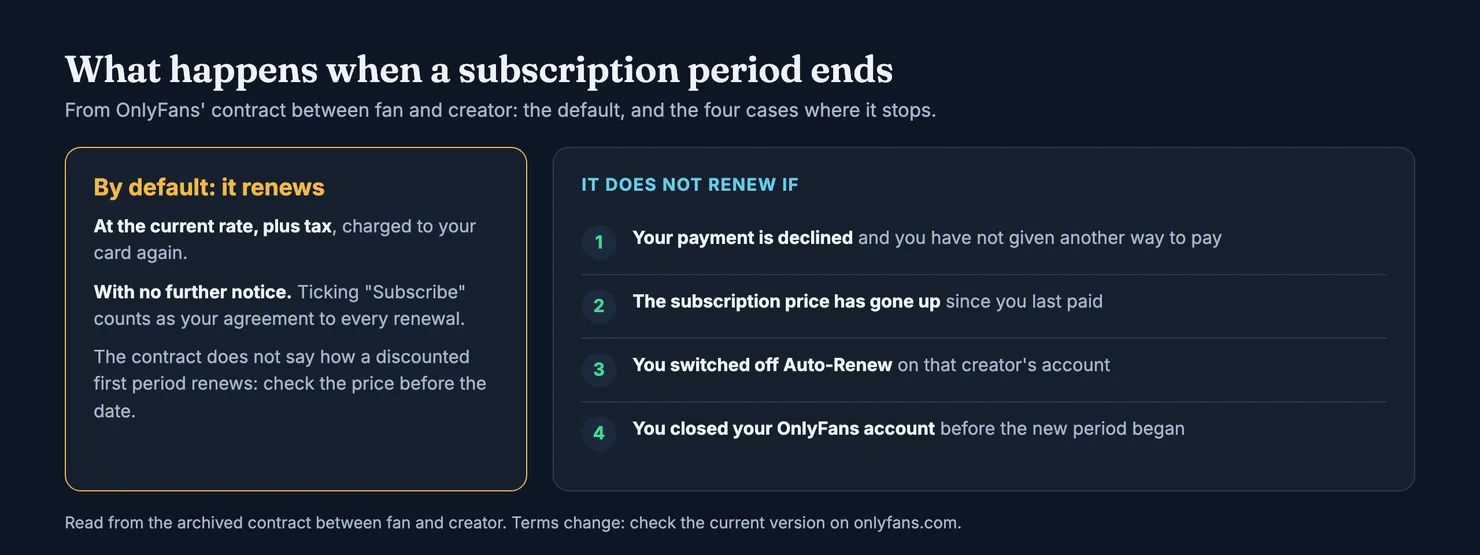
By default, the contract says a subscription renews automatically at the current rate, plus tax, and that by choosing "Subscribe" you agree to it and "will not receive further notice" of the renewal. It then lists four cases in which you are not charged again: your payment is declined and you have not provided another one, the subscription price has increased, you switched off Auto-Renew on the creator's account, or you closed your OnlyFans account before the new period began.
Can a creator raise the price of my subscription?
A creator can change her price at any time, since she sets it. What the contract says is that a price increase is one of the cases in which your subscription is not renewed automatically. Read literally, a higher price should not be charged to you without a fresh decision on your part. Check your subscriptions after any price change you notice, and if a renewal charges more than you agreed to, contact OnlyFans support first; our guide on refunds on OnlyFans explains what the terms allow and why a chargeback should be the last step.
Will a discounted first month renew at the full price?
The contract does not mention discounts. It says "the current rate", which leaves open whether that means the offer price or the creator's normal price. The US Federal Trade Commission warns, about subscriptions in general, that an automatic renewal "might charge more than you paid the last time", for example after a promotional rate (FTC, free trials and auto-renewals). Note the renewal date and look at the price before it arrives.
The simplest protection is to switch off Auto-Renew as soon as you subscribe. The terms say that if you cancel, you can still view the creator's content until the end of the period in which you cancelled, with no further subscription payments taken, and you can decide then whether to pay again. Our guide on cancelling an OnlyFans subscription shows where the switch is. In the UK, the Financial Conduct Authority explains that a recurring card payment lets a business charge your card without asking each time, and that you can cancel it with the business or with your card issuer (FCA, recurring card payments).
How to work out what an account will cost you
You can estimate the cost of one account in a few minutes, before entering a card.
- Read the subscription price and its period. Note whether it is an offer, how long the offer lasts, and the price after it.
- Look at what is locked. Scroll the profile. If many posts show a price of their own, the subscription is an entry ticket, not the whole cost.
- Expect messages to carry prices. Locked messages and requests for tips are part of how many accounts work. Decide your limit for the month before the first one arrives, not after.
- Add tax and the currency fee. Take the dollar total, add the sales tax or VAT where you live, then your card's foreign currency fee if it has one.
- Think twice about the wallet. Credits loaded in advance cannot be refunded, so load only what you mean to spend.
- Decide about renewal now. Switch off Auto-Renew if you are not sure you will want a second month.
How much do people usually spend on OnlyFans?
We do not know, and we do not think anyone outside OnlyFans can say reliably. OnlyFans' page for creators gives totals, such as the amount paid out to creators overall (OnlyFans, start page), not what a typical fan spends, and a total divided by a number of accounts would mostly measure how many accounts sit unused. What we can say from the terms is where spending grows: renewals nobody switched off, pay-per-view, tips and wallet top-ups. Those are the lines to watch on your own statement.
Is it worth paying for messages?
That depends partly on who is answering. OnlyFans' contract says the fan acknowledges that third parties may assist creators in operating their accounts and in creator interactions, which include direct messages. The person replying to a paid message may therefore not be the creator herself. You may or may not mind, but it is worth knowing before you pay per message. Our guide on OnlyFans chatters explains how this works and the signs people report.
Before you pay, check the account
Price is only half of value. The other half is whether the account is the person it claims to be, and who you will be talking to. Copy the handle from the creator's own link, not from a reply or a repost, and look it up on Legit's account search.
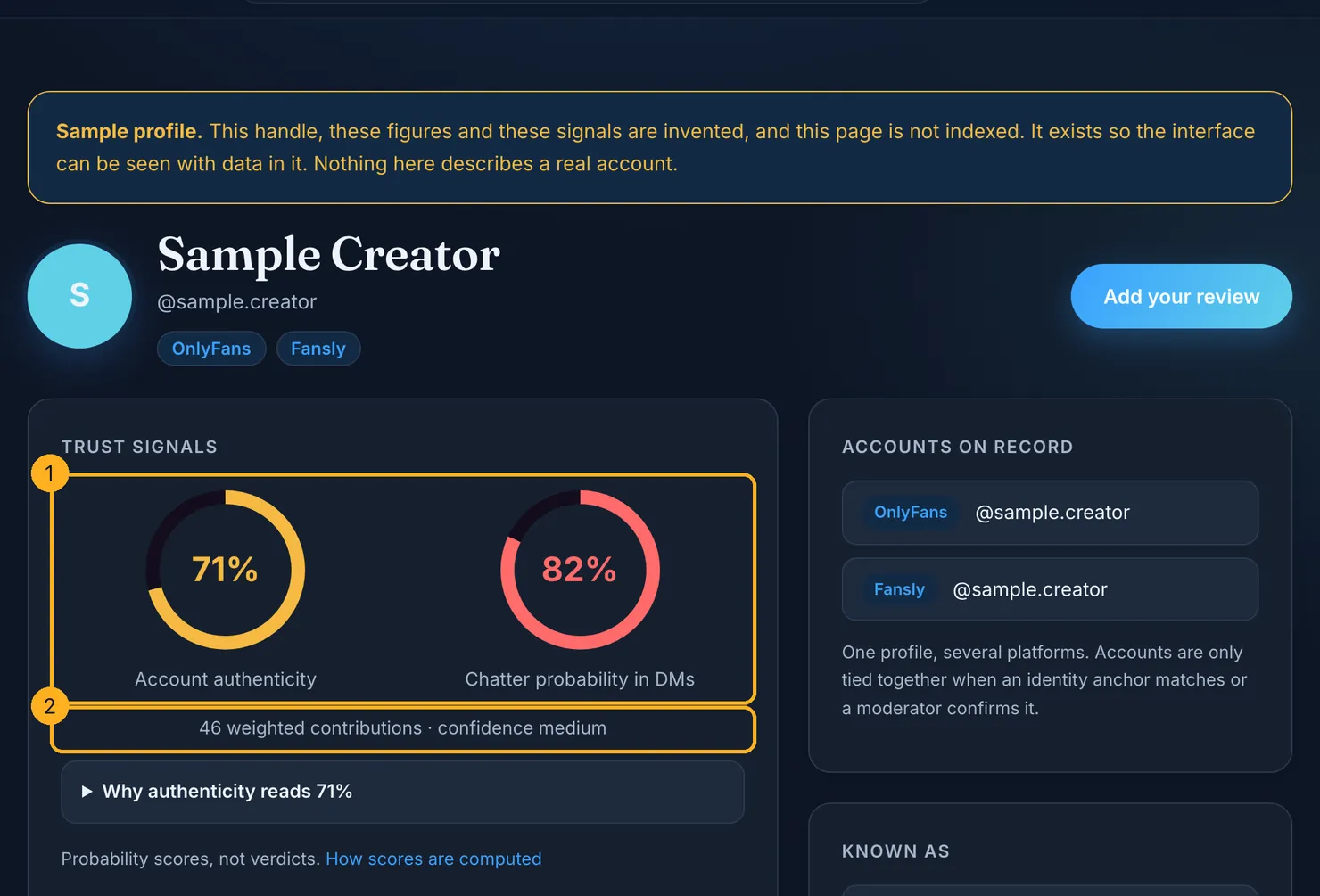
A Legit profile shows two separate scores, one for authenticity and one for the probability that someone else answers the messages, with the number of weighted contributions behind them and a confidence level. They are probabilities, not verdicts. Our methodology lists every input and how much it weighs, including why a review backed by the platform's own receipt counts for more than an anonymous one.
If you already pay for an account, adding what you saw takes two minutes: what the subscription included, how much was sold on top, how the messages felt. It is exactly what the next person needs to know before working out their own bill.
Questions people ask
Is OnlyFans free to join?
Yes. OnlyFans' own page says it is free to sign up. What costs money is access to creators: each one decides whether her account is free or paid. Even a free account can sell pay-per-view posts and messages, so following one is not necessarily free, and tips are paid separately.
How much is an OnlyFans subscription per month?
It depends entirely on the creator, because OnlyFans' terms say creators alone set their prices. The price is shown on the profile before you subscribe, in US dollars, with sales tax or VAT added at checkout. We do not quote an average: the terms give no price range for fans, and the averages that circulate cannot be checked.
Does an OnlyFans subscription include everything on the profile?
No. The contract between fan and creator defines a subscription as access to what a creator makes available to subscribers and excludes individually priced content. Posts and messages with their own price stay locked until you pay for each one, even while you are subscribed, so look at how much of a profile is priced separately before paying.
Does OnlyFans charge a fee on top of the price?
Not to fans. OnlyFans' fee is 20% of each fan payment and is taken out of the price the creator sets, so the creator receives the other 80%. What can be added on top is sales tax or VAT, which depends on where you live, and a foreign currency fee from your bank if your card is not in US dollars.
Why is my OnlyFans charge higher than the price shown?
Usually because of tax and currency. OnlyFans' terms say prices are charged in US dollars and that indirect sales tax is added at the rate that applies to you. If your card is in another currency, your bank converts the amount and may add its own fee. Pay-per-view purchases and tips also appear as separate charges.
Can an OnlyFans subscription renew at a higher price?
The contract says a subscription renews at the current rate without further notice, but lists a price increase as one of four cases in which it does not renew automatically. It does not say how a discounted first period renews. Note the renewal date, check the price before it, or switch off Auto-Renew when you subscribe.